
The IK Multimedia iRig Pro I/O is the best audio interface for iPad because its box includes Lightning, USB-C, and USB-A cables. This guide helps musicians, podcasters, and streamers who want to record on a tablet without buying extra adapters. Some interfaces ship with every cable an Apple device needs, while others require you to add your own.
- Best Overall: IK Multimedia iRig Pro I/O — includes every cable an iPad needs right in the box.
- Best Dual XLR: MAONO P2 Hybrid — two XLR inputs with 56dB of gain for stereo recording.
- Highest Preamp Gain: MAONO P1 — 70dB gain drives demanding dynamic microphones without extra hardware.
- Best for Stereo Streaming: IK Multimedia iRig Stream — RCA inputs connect directly to mixers and keyboards.
- Best Guitar Interface: IK Multimedia iRig HD 2 — dedicated Hi-Z input plus a switchable amplifier output.
- Best Traditional Studio: PreSonus AudioBox 96 — two Class-A preamps with MIDI I/O included.
- Best Portable Recording: Focusrite Scarlett Solo 4th Gen — 120dB dynamic range in a compact body.
- Most Versatile Inputs: Focusrite Scarlett 2i2 4th Gen — Auto Gain and Clip Safe protect every take.
- Best Direct Plug-In: JOYO MOMIX CAB — clips to a strap with no charging required.
- Best iOS Compatibility: PIYONE 2X2 USB-C — class-compliant design works without installing drivers.

- 24-bit/96 kHz audio quality for recording
- XLR and Hi-Z combo input with +48v phantom power
- Real-time headphone monitoring with no latency
- Includes Lightning, USB-C and USB-A cables

- Dual USB ports with MFi-certified connectivity
- 56dB gain, 24-bit/192kHz, -130dB EIN
- Independent mute and monitor controls included
- ProStudio 2 software routes app audio to channels
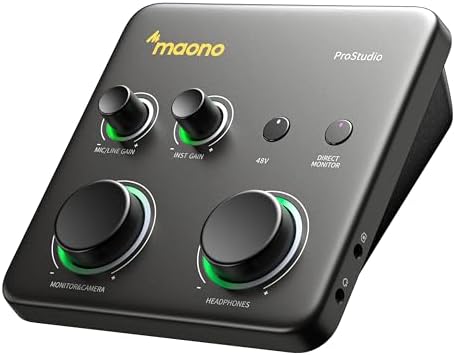
- Dual USB ports with MFi-certified connectivity
- Up to 70dB gain, 24-bit/192kHz, -130dB EIN
- Auto-Gain sets microphone level automatically
- ProStudio 2 software routes app audio to channels
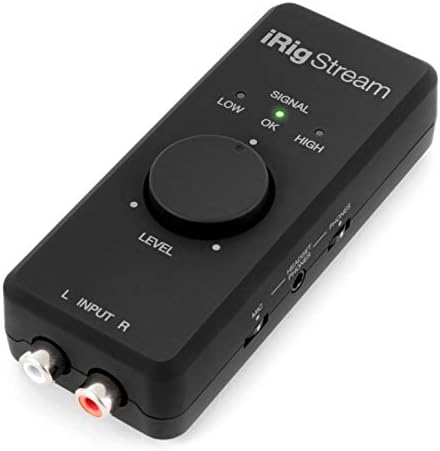
- 24-bit, 96 kHz audio interface with RCA inputs
- Connects mixers, keyboards and earbud mics
- Real-time headphone monitoring with no latency
- Global audio level LED indicator for gain control
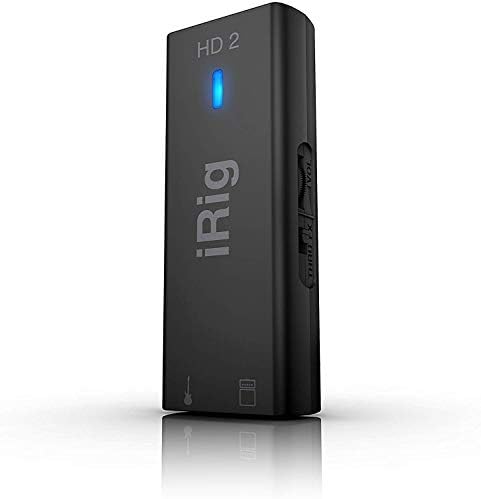
- Instrument-level 1/4" Hi-Z input jack
- 1/4" Amp Out jack with FX and Thru switch
- 96kHz sampling rate with headphone output
- Adjustable input gain for guitar recording
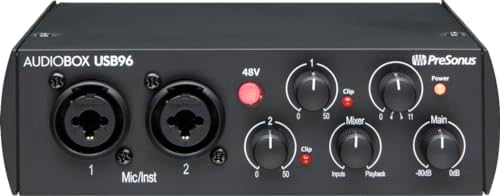
- 2-channel USB 2.0 interface for portable recording
- 2 Class-A mic preamps included
- 2 instrument inputs plus MIDI I/O
- Up to 24-bit/96 kHz recording and playback

- Scarlett Solo 4th Gen mic and guitar interface
- 120dB dynamic range converters
- Air mode adds presence to vocals and guitars
- Includes recording software and plugins
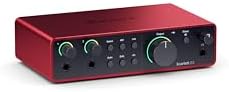
- Scarlett 4th Gen mic pres and guitar input
- 120dB dynamic range converters
- Auto Gain and Clip Safe prevent clipping
- Air mode adds presence to recordings
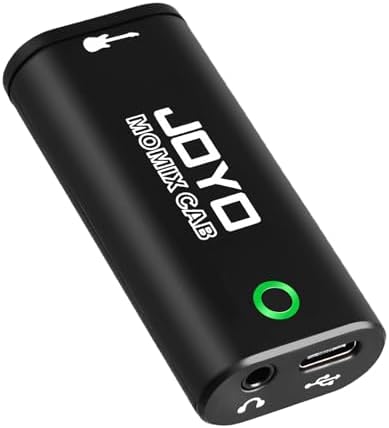
- Zero-latency direct monitoring to headphone output
- USB-C or Lightning plug and play connection
- Pocket-sized design with back clip
- Use only the included USB-C cable

- PIYONE Plug-and-Play USB C Audio Interface. Experience seamless connectivity with this class-compliant audio interface for Mac and PC. The modern…
- Studio-Grade 24-bit/192kHz Fidelity. Capture every nuance with professional resolution and a wide dynamic range. This 2 channel audio interface…
- Elegant Design with Illuminated Control. Enhance your interface for recording music with signature fixed LED light rings on each gain knob. This…
- Versatile 2 Channel XLR USB Interface. Connect any source with maximum flexibility via two combo jacks. This 2 input audio interface is perfect for…
1. IK Multimedia iRig Pro I/O audio interface
Best for: anyone needing instant iPad connectivity out of the box.
This interface ships with Lightning, USB-C, and USB-A cables, so there’s nothing else to buy before you start recording on an iPad. It handles 24-bit/96 kHz audio through a single combo jack that accepts both XLR microphones and Hi-Z instruments like guitars. You also get +48V phantom power for condenser mics, which covers most studio setups.
A headphone jack lets you monitor your sound directly with no latency, keeping your performance tight. The listing adds MIDI In and Out ports, so you can hook up a keyboard controller alongside your mic. It’s built for apps like Zoom and Instagram, making it useful for both music and calls.
Anyone who records multiple vocalists or instruments at once will need a different unit, since this one has only a single combo input. Against the MAONO P2 Hybrid, which lists dual XLR jacks, the iRig Pro I/O limits you to one source at a time.
Pros
- Includes Lightning, USB-C, and USB-A cables
- XLR and Hi-Z combo input with +48V phantom power
- MIDI In/Out ports for controllers
- 24-bit/96 kHz audio quality
- Direct monitoring headphone jack
Cons
- Single combo input limits you to one microphone or instrument at a time
2. MAONO P2 Hybrid USB Audio Interface Dual XLR
Best for: podcasters and musicians recording two XLR sources simultaneously.
Dual XLR inputs are the main draw here, giving you 56dB of gain to run two condenser or dynamic microphones together. It captures audio at the highest resolution available on this list. MFi-certified dual USB ports let you connect a computer and an iPad at the same time without swapping cables.
Stream Mode sends your voice equally to both channels, which keeps your listeners balanced during a live broadcast. Independent mute buttons prevent unwanted noise when you change guitars. The aluminum-alloy housing sits at a 15° tilt, putting the knobs right under your fingers on a desk.
You’ll still need to supply your own Lightning or USB-C cable for an iPad, as the box lists only a USB-C to USB-A/C connection cable. Compared to the IK Multimedia iRig Pro I/O, which includes all three mobile cables, this leaves you with a second purchase for Apple devices.
Pros
- Dual XLR inputs with 56dB gain
- 24-bit/192 kHz recording resolution
- MFi-certified dual USB ports for simultaneous connections
- Independent mute and monitor controls
- Aluminum-alloy housing with a 15° tilt
Cons
- Box lists only a USB-C to USB-A/C cable, so iPad users must provide their own adapter
- 56dB gain falls short of the 70dB listed on the MAONO P1
3. MAONO P1 USB Audio Interface with 70dB Gain
Best for: users pairing quiet dynamic microphones with a tablet.
Up to 70dB of gain means you can drive demanding dynamic microphones without plugging in an external booster. Like the P2, it uses MFi-certified dual USB ports to stay connected to a computer and an iPad at once. Auto-Gain sets your microphone level automatically, saving you from adjusting knobs mid-stream.
It records at studio-standard high resolution with a -130dB EIN rating for quiet backgrounds. The zinc-alloy metal housing matches the 15° tilt angle found on the P2, keeping the controls visible. Built-in loopback software routes backing tracks and desktop audio straight into your recording app.
The included package lists a USB-C to USB-A/C connection cable, leaving out the specific cord an older iPad requires. At 70dB gain against 56dB on the MAONO P2 Hybrid, this model gives you more headroom but shares the exact same cable limitation.
Pros
- Up to 70dB preamp gain
- Auto-Gain adjusts levels automatically
- 24-bit/192 kHz resolution with -130dB EIN
- Zinc-alloy metal housing
- Built-in loopback via ProStudio 2 software
Cons
- Box lists only a USB-C to USB-A/C cable, requiring a separate purchase for some iPads
- Shares the same dual-port layout as the MAONO P2 Hybrid without adding a second XLR input
4. IK Multimedia iRig Stream stereo audio interface
Best for: DJs and streamers routing stereo audio from mixers.
Stereo RCA inputs let you plug a mixer, keyboard, or audio player straight into your iPad. It processes that signal with high-fidelity digital conversion, sending a clean stereo feed to your streaming app. A global audio level LED indicator shows your gain at a glance, so you don’t have to guess if you’re clipping.
Loopback functionality lets you jam along with tracks playing on your tablet while broadcasting the mix. You can also plug an earbud mic in to talk over the music. Like the iRig Pro I/O, it ships with Lightning, USB-C, and USB-A cables, covering every recent Apple device instantly.
You won’t find an XLR jack here, ruling out anyone who wants to plug in a standard studio microphone. With RCA inputs instead of the XLR/Hi-Z combo on the IK Multimedia iRig Pro I/O, this is strictly for line-level gear.
Pros
- Stereo RCA inputs for mixers and keyboards
- Global audio level LED indicator
- Loopback function for jamming with device audio
- Includes Lightning, USB-C, and USB-A cables
- 24-bit/96 kHz recording
Cons
- RCA inputs only, so standard XLR microphones can’t be connected directly
- Maximum 96 kHz sample rate compared to 192 kHz on the MAONO P2 Hybrid
5. IK Multimedia iRig HD 2 guitar audio interface
Best for: guitarists practicing silently or recording direct.
A 1/4″ Hi-Z input jack takes your guitar signal straight into the high-resolution converter. The standout feature is the 1/4″ Amp Out jack with a switchable FX/Thru mode, letting you send processed or dry audio to a real amplifier. You can adjust your input gain right on the unit while monitoring through the headphone output.
It comes with Lightning, USB-C, and USB-A cables, meaning it connects to any iPad immediately. Microphone stand mounting clips are included, so you can attach it to a boom arm during a live set. The lightweight construction fits easily into a gig bag pocket.
Bass players or vocalists who need an XLR input will have to look elsewhere, since this only accepts a 1/4″ instrument cable. Against the IK Multimedia iRig Pro I/O, which lists an XLR/Hi-Z combo jack, the HD 2 restricts you entirely to guitars and synths.
Pros
- 1/4″ Hi-Z input for guitars and basses
- 1/4″ Amp Out with switchable FX/Thru
- Includes Lightning, USB-C, and USB-A cables
- Microphone stand mounting clips included
- Adjustable input gain and headphone preamp
Cons
- Only accepts 1/4″ instrument cables, so XLR microphones can’t be used
- 96 kHz sample rate, half the 192 kHz ceiling listed on the PIYONE 2X2 USB-C
6. PreSonus AudioBox 96 25th Anniversary USB Audio Interface
Best for: home studios needing traditional analog controls.
Two Class-A mic preamps give you independent control over two channels at once. Each channel handles high-headroom instrument inputs for guitars or line-level devices, backed by professional-grade digital converters. A mixer knob lets you blend your live input with playback from your iPad for zero-latency monitoring.
MIDI I/O ports are built in, so hardware synthesizers connect without a separate hub. It draws power entirely over USB 2.0, skipping the wall outlet. The box includes Studio One Artist and Ableton Live Lite, giving you a full software suite the moment you plug in.
You’ll need to buy a camera connection kit or adapter separately to hook this up to an iPad, as it relies on a standard USB 2.0 connection. Unlike the IK Multimedia iRig Pro I/O, which includes mobile cables in the box, this requires extra hardware for tablets.
Pros
- Two Class-A mic preamps
- High-headroom instrument inputs
- MIDI I/O included
- Mixer control for zero-latency monitoring
- USB bus-powered
Cons
- USB 2.0 connection requires an adapter for modern iPads
- 96 kHz maximum sample rate against 192 kHz on the MAONO P1
7. Focusrite Scarlett Solo 4th Gen USB-C Audio Interface
Best for: songwriters wanting flagship converters on the go.
A 120dB dynamic range uses the same converters as Focusrite’s flagship interfaces. The improved Air mode adds harmonic presence to vocals and acoustic guitars, pushing them forward in your mix. It connects over USB-C, which pairs natively with newer iPad models without an adapter.
The package includes Pro Tools Intro+, Ableton Live Lite, and Cubase LE, covering recording and production. It’s built for plugging in one mic and one guitar to capture ideas quickly. Bus power keeps the setup minimal when you’re working away from a desk.
Recording a duet or podcast with two microphones isn’t possible here, as it only offers a single input path. Next to the Focusrite Scarlett 2i2 4th Gen, which handles two inputs simultaneously, the Solo limits you to one source at a time.
Pros
- 120dB dynamic range
- Air mode for added harmonic presence
- USB-C connectivity
- Includes Pro Tools Intro+, Ableton Live Lite, and Cubase LE
- Compact bus-powered design
Cons
- Single input path prevents recording two microphones at once
- No MIDI I/O, unlike the PreSonus AudioBox 96 which includes it
8. Focusrite Scarlett 2i2 4th Gen USB-C Audio Interface
Best for: creators who want automatic level protection.
Auto Gain listens to your playing and sets the perfect level, while Clip Safe steps in if you suddenly get too loud. This means you won’t ruin a great take by accidentally peaking. Like the Solo, it delivers a 120dB dynamic range and Air mode for rich vocal tone over a USB-C connection.
Two inputs let you record a microphone and a guitar at the same time. The included software bundle matches the Solo exactly: Pro Tools Intro+, Ableton Live Lite, Cubase LE, and the Hitmaker Expansion. It acts as a complete hub for mixing and mastering directly from your tablet.
Older iPads with Lightning ports won’t connect directly, since this relies exclusively on a USB-C interface. Compared to the IK Multimedia iRig Pro I/O, which ships with a Lightning cable, you’ll need an adapter for anything before the USB-C era.
Pros
- Auto Gain and Clip Safe features
- Two simultaneous inputs
- 120dB dynamic range
- Air mode for vocal presence
- USB-C connection
Cons
- USB-C only, requiring an adapter for Lightning-equipped iPads
- No physical MIDI ports, where the PreSonus AudioBox 96 lists MIDI I/O
9. JOYO Guitar Audio Interface
Best for: guitarists capturing ideas completely untethered.
This unit plugs directly into your phone or tablet’s port, passing your guitar’s clean signal to the headphones with zero latency. It’s smaller than a key and features a back clip for your belt or guitar strap. A signal light glows green for a clean tone and turns red if your input is too hot.
There are no batteries to charge and no drivers to install. You just use the included USB-C cable and Lightning adapter to connect. It’s designed purely for recording dry guitar tracks or practicing with backing tracks from your device.
You can’t mute the dry signal, so running real-time amp simulators in an app will layer the unprocessed sound over the effect. At 6.35mm input only, it lacks the XLR jack found on the IK Multimedia iRig Pro I/O, ruling out microphones entirely.
Pros
- Pocket-sized with a back clip
- Zero-latency direct monitoring
- No batteries or charging needed
- Includes USB-C cable and Lightning adapter
- Signal indicator light
Cons
- Dry signal can’t be muted, limiting real-time effects processing
- 6.35mm input only, so microphones can’t be connected
10. PIYONE 2X2 USB-C
Best for: users wanting driver-free tablet recording.
Class-compliant design means you plug it into an iPad and start recording without downloading software. It handles multiple channels at top-tier recording resolution through XLR/TRS combo jacks, accepting both mics and guitars. Integrated 48V phantom power ensures condenser microphones get the voltage they need.
Fixed LED light rings around the gain knobs make it easy to see your settings in dark rooms. A 3.5mm headphone jack supports standard earbuds without forcing you to use a 1/4″ adapter. The alloy body keeps everything rigid during transport.
Connecting to an older iPad requires a separate Lightning-to-USB-C adapter, as the interface itself only features a USB-C port. Its 192 kHz resolution matches the MAONO P2 Hybrid, but it doesn’t include the mobile cables that the IK Multimedia iRig Pro I/O provides in the box.
Pros
- 24-bit/192 kHz resolution
- Two XLR/TRS combo inputs
- 48V phantom power included
- 3.5mm headphone jack
- Illuminated gain knobs
Cons
- USB-C port only, needing an adapter for Lightning iPads
- Box contents don’t list mobile-specific cables
Also Worth Considering
The IK Multimedia guitar audio interface is a lightweight adapter for iPhone and iPad with an instrument input and headphone/amplifier outs. The IK Multimedia iRig HD 2 beats it by including USB-C, Lightning, and USB-A cables directly in the box, plus a switchable Amp Out. Guitarists who just need a simple practice adapter might still prefer it.
The Synido USB C Audio Interface is listed for recording music, streaming, and podcasting over a USB-C connection in silver. The PIYONE 2X2 USB-C offers more detail with its stated 24-bit/192 kHz resolution and illuminated knobs. Anyone wanting a basic silver USB-C option could look here.
The KYXAIN Lightning Live Streaming iPad is a pocket sound card with Type-C and Lightning support for live streaming by iPad, iPhone, Android, and PC. The JOYO MOMIX CAB covers similar ground but adds a back clip and a signal indicator light. Streamers who specifically need a pocket internal sound card might consider it.
How We Chose
To earn a spot, a listing had to explicitly state compatibility with iOS, iPad, or Apple mobile devices. Interfaces limited to desktop operating systems were removed. What separates the final picks is how they handle the physical connection: the IK Multimedia iRig Pro I/O listing states it is an iPhone interface, iPad interface, and USB audio interface all in one, with Lightning, USB-C and USB-. Features like dual XLR inputs, auto-gain, and included software bundles were then weighed to ensure each pick serves a distinct type of creator. Listings lacking clear specifications about resolution or input counts were excluded to keep the comparisons honest.
How to Choose the Right Audio Interface for iPad
The cables included in the box
An iPad requires either a Lightning or USB-C connection depending on its generation. The IK Multimedia iRig Pro I/O and iRig Stream include Lightning, USB-C, and USB-A cables directly. If a listing only mentions a USB-C cable, like the PIYONE 2X2 USB-C, owners of older tablets must buy an adapter separately. Check your tablet’s port before deciding.
How many things you need to record
Solo guitarists only need one input, which the IK Multimedia iRig HD 2 provides via a 1/4″ jack. Podcasters interviewing guests require two XLR inputs, found on the MAONO P2 Hybrid and PIYONE 2X2 USB-C. Buying a single-input unit like the Focusrite Scarlett Solo 4th Gen when you need two forces a replacement later. Match the input count to your actual sessions.
Powering condenser microphones
Condenser mics need +48V phantom power to work. The IK Multimedia iRig Pro I/O and PIYONE 2X2 USB-C both list this feature in their specs. Dynamic microphones don’t require it, but if you plan to upgrade to a studio condenser later, picking an interface without phantom power limits your options. Verify this spec if you use sensitive mics.
Software bundled with the hardware
Some interfaces include recording applications to get you started immediately. The PreSonus AudioBox 96 ships with Studio One Artist and Ableton Live Lite. Focusrite models include Pro Tools Intro+ and Cubase LE. Mobile-focused units like the JOYO MOMIX CAB skip software entirely. If you lack a recording app, a bundled suite saves you from hunting one down separately.
Frequently Asked Questions
Can I use a USB-C interface with an older iPad?
Yes, but you’ll need an official adapter. Older iPads use a Lightning port, while units like the Focusrite Scarlett 2i2 4th Gen only output USB-C. Interfaces such as the IK Multimedia iRig Pro I/O solve this by packing a Lightning cable inside the box. Always check the included cables before buying for an older tablet.
Do I need phantom power for my microphone?
Only if you use a condenser microphone. Dynamic mics work without it. The MAONO P1 lists 70dB of gain, which is plenty for dynamic models, but it doesn’t specify phantom power. Units like the PIYONE 2X2 USB-C clearly state 48V phantom power for condensers. Match the interface to your specific microphone type.
Will these interfaces drain my iPad battery?
Bus-powered interfaces draw electricity directly from your tablet. The PreSonus AudioBox 96 states it’s USB bus-powered, meaning no wall outlet is needed. For extended recordings, ensure your tablet is fully charged or use a powered hub.
Is 192 kHz better than 96 kHz for recording?
Higher sample rates capture more audio data per second. The MAONO P2 Hybrid records at 24-bit/192 kHz, while the IK Multimedia iRig Stream tops out at 96 kHz. For most podcasts and songs, 96 kHz is more than enough. You’ll mainly benefit from 192 kHz if you plan to heavily process or pitch-shift audio later.
Can I plug my guitar amp into these interfaces?
Most interfaces send audio to headphones or studio monitors. The IK Multimedia iRig HD 2 is unique here because it lists a 1/4″ Amp Out jack with a switchable FX/Thru mode. This allows you to route your processed signal directly into a physical guitar amplifier. Other models lack this specific output.
Does loopback work for live streaming?
Loopback routes your device’s internal audio back into your streaming app alongside your microphone. The IK Multimedia iRig Stream explicitly lists loopback for jamming with smartphone audio, and the MAONO P1 includes built-in loopback via its software.
Why does my interface show a red light?
A red light usually means your input signal is too loud and clipping. The JOYO MOMIX CAB uses a signal indicator that turns red when the input is too hot, telling you to turn down your guitar volume. Not all interfaces have visual warnings, so watch your recording app’s meters if yours doesn’t.
Can I record two people talking at once?
You need an interface with at least two inputs to do this. The MAONO P2 Hybrid features dual XLR inputs, allowing two microphones to run simultaneously. Single-input models like the Focusrite Scarlett Solo 4th Gen only accept one microphone at a time, forcing you to share or upgrade.
Do I need to install drivers for my iPad?

Most mobile interfaces are class-compliant, meaning they work instantly. The PIYONE 2X2 USB-C explicitly states no drivers are required for plug-and-play use. Desktop computers sometimes need specific software, but iPads generally recognize these devices immediately upon connection.
Can I use these for video calls?
Yes, several listings mention communication apps. The IK Multimedia iRig Pro I/O states it works with Zoom and Clubhouse. By routing your microphone through the interface, you’ll deliver much higher audio quality to your callers than the tablet’s built-in mic provides.
Conclusion
Pick the box that fits your setup, plug it in, and start recording. You don’t need to overthink cables or adapters when the right gear comes ready out of the package. Open your favorite app today and lay down your first track—you’ll hear the difference immediately.
As an Amazon Associate, Cleanestor earns from qualifying purchases at no additional cost to you.