
The Focusrite Scarlett 2i2 4th Gen is the best audio interface for recording because it pairs a 120dB dynamic range with Auto Gain and Clip Safe to protect every take. This guide helps musicians, podcasters, and home producers find the right box to get sound into a computer. The one thing that separates these picks isn’t brand loyalty — it’s how many inputs you actually need and whether the unit handles level-setting on its own or leaves that job to you.
- Best Overall: Focusrite Scarlett 2i2 4th Gen — 120dB dynamic range with Auto Gain protects every vocal and guitar take.
- Best Professional DSP: Universal Audio Apollo Twin X — QUAD processing runs 200+ UAD plug-ins without taxing your computer.
- Best Converter Quality: MOTU M2 — 24-bit/192kHz resolution paired with hardware monitoring for precise tracking.
- Best Vintage Tone: Universal Audio Volt 2 — Built-in 610 preamp emulation adds analog warmth at the source.
- Most Inputs and Outputs: Focusrite Scarlett 4i4 4th Gen — Four line inputs, four outputs, and MIDI I/O handle full bands.
- Simplest to Use: Focusrite Scarlett Solo 4th Gen — One mic input and one instrument input keep setup instant.
- Best Midas Preamps: Behringer UMC202HD — Midas-designed preamps inside an impact-resistant metal chassis.
- Best Mobile Connectivity: MAONO P2 Hybrid — Dual USB ports connect a computer and phone simultaneously.
- Most Reliable Classic: PreSonus AudioBox 96 — 25th Anniversary edition with Class-A preamps and bus power.
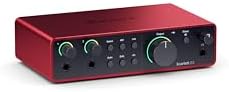
- Connect mic and guitar to Scarlett 4th Gen pres
- 120dB dynamic range using Focusrite flagship converters
- Auto Gain sets levels, Clip Safe prevents clipping
- Air mode adds presence and harmonic drive

- Widest dynamic range and lowest distortion Apollo
- Unison preamps emulate Neve, API, Avalon, Manley, Fender
- Access 200+ UAD DSP and Native plug-ins
- Apollo Monitor Correction powered by Sonarworks

- 6+GB of free content for macOS/Windows/iOS
- USB-C audio interface with 2 preamps
- Hardware monitoring included
- 24-bit/192kHz resolution

- Vintage mode uses UA classic 610 preamps
- Up to 24-bit / 192 kHz quality converters
- Includes LUNA digital audio workstation software
- Uses same UAD plug-ins trusted by pros

- Scarlett 4i4 4th Gen connects mics, guitars, synths
- Two 4th Gen pres, two Hi-Z, 4 line I/O, MIDI
- 120dB dynamic range using Focusrite flagship converters
- Air mode adds presence and harmonic drive

- Scarlett Solo 4th Gen connects mic and guitar
- 120dB dynamic range using Focusrite flagship converters
- Improved Air mode adds presence and harmonic drive
- Includes recording software and plugin collection

- Phantom power included
- Compatible with Pro Tools, Ableton Live, Cubase
- Phones output with level control, metal chassis

- Dual USB ports connect computer and phone simultaneously
- 56dB dual XLR, 24-bit/192kHz, -130dB EIN
- Independent mute and headphone controls included
- ProStudio 2 routes app audio to dedicated channels
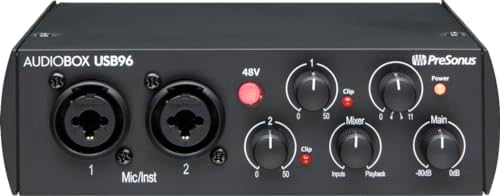
- 2-channel USB 2.0 interface for portable recording
- 2 Class-A mic preamps included
- 2 instrument inputs plus MIDI I/O
- 24-bit/96 kHz recording and playback
1. Focusrite Scarlett 2i2 4th Gen USB-C Audio Interface
Best for: singers and guitarists needing automatic level control
This interface leads the list because it solves the hardest problem for new recordists: setting levels. The listing highlights Auto Gain, which sets the perfect level for a mic or guitar automatically, while Clip Safe prevents clipping so you don’t lose a great take. That means you can focus on performing instead of staring at meters. It’s a feature you’ll appreciate the moment inspiration hits and you don’t have time to tweak knobs.
Sound quality here rests on a stated 120dB dynamic range. Focusrite notes this generation uses the same converters as their flagship interfaces found in professional studios. You also get Air mode, which lifts vocals and guitars to the front of the mix by adding harmonic drive. The software bundle is massive, including Pro Tools Intro+, Ableton Live Lite, Cubase LE, and the Hitmaker Expansion for effects and mastering tools. You won’t need to buy anything else to start producing.
Anyone who needs more than two line inputs will find this unit too limited, since the listing specifies only two mic pres and two instrument connections.
Pros
- 120dB dynamic range using flagship converters
- Auto Gain sets levels automatically
- Clip Safe prevents signal clipping
- Air mode adds presence and harmonic drive
- Includes Pro Tools Intro+, Ableton Live Lite, Cubase LE, and Hitmaker Expansion
Cons
- Two mic preamps limit simultaneous microphone recording.
2. Universal Audio Apollo Twin X QUAD Gen 2 with UAD
Best for: professionals running heavy plug-ins during tracking
The Apollo Twin X takes a different approach from everything else here by putting the processing inside the box. It’s a QUAD Gen 2 unit, meaning it carries dedicated digital signal processing to run plug-ins before the audio even reaches your computer. The listing states access to a full library of 200+ UAD DSP and Native plug-ins, including Capitol Chambers and the EL8 Distressor. That lets you track through studio-grade effects in real time using onboard processing.
Unison preamps let you record through authentic emulations of classic gear like Neve, API, Avalon, Manley, and Fender. You aren’t just applying a filter later; you’re shaping the tone as it enters the converter. Universal Audio claims this generation offers the widest dynamic range and lowest distortion of any Apollo. Auto-Gain is also present, setting levels across multiple inputs in seconds. Monitor Correction powered by Sonarworks ensures your room doesn’t lie to you when you mix.
Against the Focusrite Scarlett 2i2 4th Gen, which relies on included software bundles, the Apollo Twin X handles its processing internally via QUAD DSP. Thunderbolt 3 connectivity is required, so anyone working exclusively with older USB-A computers can’t use this interface.
Pros
- QUAD Gen 2 onboard DSP processing
- Unison preamps emulate Neve, API, Avalon, and Manley
- Access to 200+ UAD DSP and Native plug-ins
- Apollo Monitor Correction powered by Sonarworks
- Auto-Gain sets levels across multiple inputs
Cons
- Thunderbolt 3 is the stated connection requirement, ruling out computers that only offer USB-A or USB-C without Thunderbolt support.
3. MOTU M2 USB-C Audio Interface
Best for: engineers prioritizing high-resolution conversion and visual metering
MOTU built the M2 around pure conversion quality, giving you the highest resolution available on this page for capturing detail. It’s a straightforward 2-in/2-out design with two preamps, meaning you can record a stereo pair or a mic and a guitar simultaneously. There’s no mention of bundled digital effects or vintage emulations here; the focus stays entirely on getting clean audio into your software.
Hardware monitoring is listed as a core feature, allowing you to hear your input directly without routing it through your computer first. That keeps latency out of your headphones while you play. The MOTU M2 listing states it includes 6+GB of free content for macOS, Windows, and iOS; the Universal Audio Volt 2 listing states it supports MacOS, Windows, iPad, and iPhone (iOS 14+) for laptops, desktop, and mobile recording; and the Behringer UMC202HD listing states it is compatible with popular recording software including Avid Pro Tools, Ableton Live, and Steinberg Cubase*. It’s a lean setup that appeals to people who already know what software they want to use and just need a transparent path from microphone to hard drive.
Where the Universal Audio Apollo Twin X lists 200+ DSP plug-ins, the MOTU M2 focuses purely on 24-bit/192kHz conversion without internal processing.
4. Universal Audio Volt 2 USB Audio Interface
Best for: creators wanting analog character without buying outboard gear
Universal Audio designed the Volt 2 to bring their famous analog heritage to a simpler format. The headline feature is Vintage mode, which gives you the rich, full sound of UA’s classic 610 tube preamps. You press a button and instantly color your signal with the same tonal character used on countless hit records. Converters capture up to 24-bit / 192 kHz quality, ensuring that colored signal retains every nuance of your performance.
The software ecosystem leans heavily into Universal Audio’s world. You get the LUNA Digital Audio Workstation, which the listing says provides the workflow of a real analog studio, plus access to UAD plug-ins trusted by industry pros. It’s not just a recording tool; it’s an educational one, as the listing mentions tips and tutorials ranging from beginner to advanced levels. Support spans MacOS, Windows, iPad, and iPhone (iOS 14+).
Compared to the Focusrite Scarlett 2i2 4th Gen and its Air mode for harmonic presence, the Volt 2 specifically models the UA 610 tube circuit. Mobile users must note that the listing requires an external Volt power supply and an Apple Lightning to USB Camera Adapter for iPhones and older iPads.
Pros
- Vintage mode emulates UA’s classic 610 preamps
- 24-bit / 192 kHz converters
- Includes LUNA Digital Audio Workstation
- Access to UAD plug-ins and instruments
- Tutorials included for all skill levels
Cons
- Connecting to an iPhone or non-USB-C iPad requires an external power supply and an Apple Lightning to USB Camera Adapter, adding mandatory extra items to carry.
5. Focusrite Scarlett 4i4 4th Gen USB-C Audio Interface
Best for: multi-instrumentalists routing synths, drum machines, and outboard gear
If a simple stereo recording setup isn’t enough, the 4i4 expands the architecture significantly. The listing details two 4th Gen mic preamps, two Hi-Z instrument inputs, four line inputs, and four line outputs. That I/O count makes it a true studio hub rather than just a simple recording box. You can leave your synthesizers, drum machines, and outboard compressors plugged in permanently without repatching cables every time you start a session.
It shares the same core technology as the smaller Scarlett models. The 120dB dynamic range uses Focusrite’s flagship converters, and Auto Gain combined with Clip Safe ensures you never ruin a take by setting levels too hot. Air mode is present here too, lifting vocals and guitars forward in the mix. The software bundle mirrors the 2i2 exactly, handing you Pro Tools Intro+, Ableton Live Lite, Cubase LE, and the Hitmaker Expansion.
The 4i4 lists four line inputs and four line outputs against the more limited input count on the MOTU M2. Musicians who only ever record one microphone and one guitar at a time will find four line inputs and MIDI I/O completely unnecessary for their workflow.
Pros
- Two mic preamps and two Hi-Z instrument inputs
- Four line inputs and four line outputs
- MIDI I/O for connecting hardware synths
- 120dB dynamic range with flagship converters
- Auto Gain and Clip Safe prevent ruined takes
Cons
- Four line inputs and four line outputs demand more desk space and cable management than a singer-songwriter tracking solo will ever use.
6. Focusrite Scarlett Solo 4th Gen USB-C Audio Interface
Best for: songwriters who only need one mic and one guitar
The Solo strips the recording process down to its absolute essentials. The listing describes it as the songwriter’s interface, offering exactly what you need to plug in a mic and a guitar simultaneously. There’s no confusion about routing or unused inputs cluttering the top panel. Like its siblings, it boasts a 120dB dynamic range using Focusrite’s flagship converters, proving that a smaller footprint doesn’t mean compromised audio quality.
Air mode returns here, described as improved for the 4th generation, adding musical presence and harmonic drive to push vocals and guitars to the front of your mix. The software bundle remains identical to the larger units, providing Pro Tools Intro+, Ableton Live Lite, Cubase LE, and the Hitmaker Expansion. You get the exact same production tools as someone using the 4i4, just with fewer physical connections on the box itself.
7. Behringer UMC202HD Audiophile 2×2
Best for: gigging musicians needing rugged build and proven preamps
Behringer built the UMC202HD around durability and trusted components. The listing highlights an impact-resistant metal chassis described as “Built-like-a-tank,” making it a strong candidate for tossing into a backpack between rehearsals. Inside, it uses Midas-designed mic preamplifiers, a name long associated with live sound consoles. You get high-resolution audio capture, phantom power for condenser microphones, and compatibility with major software like Pro Tools, Ableton Live, and Cubase.
Monitoring is handled via a powerful phones output with its own level control and a Direct Monitor select switch. It’s a strictly 2×2 audiophile design, keeping the layout simple for tracking single instruments or vocal overdubs.
Unlike the Focusrite Scarlett 2i2 4th Gen, which lists Auto Gain and Clip Safe, the UMC202HD relies on manual level adjustment via its preamps.
Pros
- Midas-designed mic preamplifiers
- Impact-resistant metal chassis
- 24-Bit/192 kHz resolution
- Phantom power for condenser mics
- Direct Monitor select switch
Cons
- The listing specifies a 2×2 configuration, limiting you to two simultaneous inputs when tracking a full band.
8. MAONO P2 Hybrid USB Audio Interface Dual XLR
Best for: streamers and mobile creators routing audio to phones and PCs
The MAONO P2 Hybrid targets modern content creators who work across multiple devices at once. Its defining feature is hybrid connectivity: dual USB ports with MFi-certified connectivity let you hook up a computer and a phone or iPad simultaneously. You can record in Logic Pro on your Mac while streaming directly to TikTok from your phone without unplugging anything. Stream Mode sends your voice equally to both channels for a balanced listening experience on live broadcasts.
Audio specifications include 56dB of gain on dual XLR inputs, supporting most condenser and dynamic microphones, while the listing claims a class-leading -130dB EIN for dead-silent recording. Physical design matters here too, with an ergonomic 15° tilt angle and an aluminum-alloy housing. Independent mute buttons, headphone controls, and real-time signal indicators give you tactile command over your stream.
With 56dB of gain listed on the dual XLR inputs, it stands against the Behringer UMC202HD, which relies on Midas preamps without stating a specific gain figure. Anyone needing more than two XLR microphones for a roundtable podcast will find the dual XLR limit insufficient for their setup.
Pros
- Dual USB ports connect PC and mobile simultaneously
- MFi-certified for Apple devices
- 56dB gain on dual XLR inputs
- 24-bit/192kHz resolution with -130dB EIN
- Ergonomic 15° tilt angle and aluminum-alloy housing
Cons
- Dual XLR inputs represent the physical ceiling, so a three-person podcast requires an external mixer to combine signals first.
9. PreSonus AudioBox 96 25th Anniversary USB Audio Interface
Best for: traditionalists wanting simple bus-powered recording anywhere
The PreSonus AudioBox 96 celebrates a long history as a 25th Anniversary edition. It operates over USB 2.0 and draws its power directly from the bus, meaning you don’t need to hunt for a wall outlet when recording on a laptop. The listing specifies two high-quality Class-A mic preamps and two high-headroom instrument inputs for guitars and line-level devices. Converters allow for up to 24-bit/96 kHz recording and playback.
A standout feature is the Mixer control, letting you create a custom blend between your live inputs and computer playback for zero-latency monitoring. You also get MIDI I/O for connecting keyboards, a high-powered headphone output, and balanced ¼” TRS outputs for studio monitors. The software bundle is substantial, including Studio One Artist, Ableton Live Lite, and the Studio Magic Plug-In suite.
The 24-bit/96 kHz maximum resolution here sits below the 24-bit/192 kHz capability listed for the MOTU M2. Audiophiles chasing the highest possible sample rate for archiving classical music will find 96 kHz limiting compared to newer designs.
Pros
- Bus-powered via USB 2.0
- Two Class-A mic preamps
- Mixer control for zero-latency monitoring
- MIDI I/O included
- Includes Studio One Artist and Ableton Live Lite
Cons
- The listing caps recording at 24-bit/96 kHz, falling short of the 192 kHz resolution offered by other current interfaces.
Also Worth Considering
The M-AUDIO Solo USB Audio Interface is a basic recording tool according to its title. The Focusrite Scarlett Solo 4th Gen beats it easily, offering a stated 120dB dynamic range and a complete software bundle including Pro Tools Intro+ that the M-Audio title never promises. Someone needing the absolute simplest entry point might still look here, but the feature gap is wide.
The Behringer UMC22 Audiophile 2×2 lists 48 kHz resolution in its title. The Behringer UMC202HD dominates it by stating 24-Bit/192 kHz operation alongside Midas preamps and a metal chassis. Buyers restricted to older computers that struggle with higher sample rates might find 48 kHz perfectly adequate for basic voice memos.
The Tiimge USB Audio Interface names 48V Phantom Power and 24Bit/192kHz sound in its title. The MAONO P2 Hybrid surpasses it by detailing dual USB ports, MFi-certification, and a -130dB EIN figure that the Tiimge title omits entirely. Creators who only need standard PC connectivity without mobile streaming might still consider the Tiimge for its stated specs.
How We Chose
To earn a spot, a listing had to state its resolution clearly and specify exactly how many microphones or instruments could connect at once. Interfaces lacking clear I/O counts or relying solely on vague marketing terms were excluded. The final nine were separated by distinct physical capabilities: dedicated DSP processing, dual-device mobile routing, expanded line-level connections, and automated gain control. Every chosen product represents a specific workflow need backed by numbers printed directly on the seller’s page.
How to Choose the Right Audio Interface
Input count and what you plan to record
Decide how many sources you need to capture simultaneously before looking at anything else. A solo singer needs two inputs, which the Focusrite Scarlett Solo 4th Gen provides. Tracking a synthesizer alongside a drum machine requires the four line inputs listed on the Focusrite Scarlett 4i4 4th Gen. Buying more inputs than you use just adds cables to your desk.
Resolution and sample rate limits
Higher numbers capture more detail, but your software must support them. The MOTU M2 and MAONO P2 Hybrid both list 24-bit/192kHz operation for maximum fidelity. The PreSonus AudioBox 96 stops at 24-bit/96 kHz. If you only record spoken word podcasts, 96 kHz is plenty, but acoustic instruments benefit from the higher ceiling.
Included software and plug-in bundles
Check what comes in the box so you don’t buy redundant tools. Focusrite models include Pro Tools Intro+, Ableton Live Lite, and Cubase LE. Universal Audio provides the LUNA workstation. The PreSonus AudioBox 96 ships with Studio One Artist. Knowing your preferred software beforehand ensures the bundled workstation matches the digital tools you plan to use.
Connection type and device compatibility
Your computer dictates the cable you must use. The Universal Audio Apollo Twin X requires Thunderbolt 3, while the PreSonus AudioBox 96 uses USB 2.0. For mobile recording, the MAONO P2 Hybrid offers dual USB ports with MFi certification. Always match the interface’s stated connection to the ports physically available on your machine.
Related guides
- How to Put an Audio Recording into Apple Music
- How Do You Record Music on iPhone
- How to Connect TC Helicon to Audio Interface
Frequently Asked Questions
Do I need phantom power for my microphone?
Yes, if you use a condenser microphone. The Behringer UMC202HD lists Phantom Power directly in its features, and the Tiimge title mentions 48V Phantom Power. Dynamic microphones don’t require it. Check your microphone’s manual before turning this feature on, as sending voltage to a ribbon mic can damage it.
Can I use these interfaces with an iPad or phone?
Some are built specifically for it. The MAONO P2 Hybrid lists dual USB ports with MFi-certified connectivity for simultaneous phone and computer use. The Universal Audio Volt 2 supports iOS 14+, though the listing notes you need an external power supply and an Apple Lightning adapter for older devices.
What does DSP processing actually do?
It runs audio effects inside the hardware instead of on your computer’s CPU. The Universal Audio Apollo Twin X features QUAD Gen 2 processing, letting you track through 200+ UAD plug-ins in real time. Without DSP, heavy effects cause latency or crash your session.
Is 192kHz better than 96kHz for home recording?
It captures higher frequencies, but human hearing has a natural upper limit. The MOTU M2 and MAONO P2 Hybrid list 24-bit/192kHz, while the PreSonus AudioBox 96 lists 24-bit/96 kHz. For most home studios, 96 kHz provides more than enough headroom, and 192 kHz simply creates larger files that fill your hard drive faster.
Will Auto Gain replace my need to learn leveling?

It helps immensely, but understanding levels remains important. The Focusrite Scarlett 2i2 4th Gen lists Auto Gain and Clip Safe to prevent ruined takes. These features catch sudden volume spikes. However, knowing where to place your microphone relative to the source still dictates the fundamental tone you capture.
Do I need a separate mixer if I buy a 2-input interface?
Only if you have more than two sources to record at once. The Focusrite Scarlett 4i4 4th Gen avoids this by listing four line inputs and MIDI I/O. If you buy a 2-in/2-out model like the Behringer UMC202HD, combining three microphones requires an external mixer before the signal reaches the interface.
Conclusion
For most people, the Focusrite Scarlett 2i2 4th Gen is the right choice because its 120dB dynamic range and Auto Gain remove the friction from daily recording. If you only ever track one voice and one guitar, the Focusrite Scarlett Solo 4th Gen simplifies the desk further. Pick the one that matches your input needs and start tracking today.
As an Amazon Associate, Cleanestor earns from qualifying purchases at no additional cost to you.