
The Focusrite Scarlett Solo 3rd Gen is the best portable audio interface for most creators because it balances professional-grade pre-amps with a robust software suite that works right out of the box. Finding the right tool for your setup depends on whether you need a simple connection for a guitar or a complex mixer for live streaming. This guide helps you navigate those choices by focusing on input types, power requirements, and device compatibility, ensuring you pick hardware that fits your specific workflow.
- Best Overall: Focusrite Scarlett Solo 3rd Gen — Features high-performing pre-amps and a generous software bundle for immediate recording.
- Most Compact: Fender Link I/O — Offers a professional, pocket-sized solution that handles both instruments and headphones.
- Best XLR Adapter: Shure MVX2U Gen 2 — Simplifies professional microphone connections with advanced onboard digital audio processing.
- Best with Mixer: JOYO MOMIX PRO — Provides a portable, battery-powered mixing solution for multi-channel streaming setups.
- Best Recorder Hybrid: TASCAM DR-05XP — Serves as both a standalone field recorder and a functional USB-C interface.
- Best for Streaming: Zoom AMS-22 — Includes dedicated modes that make switching between recording and streaming seamless.
- Best Dual Input: PreSonus AudioBox 96 — Delivers dual pre-amps and MIDI connectivity for more complex home studio projects.
- Best for Phone: JOYO MOMIX CAB — Clips directly to your gear, making it the most portable option for mobile recording.
- Simplest to Use: IK Multimedia iRig 2 — Utilizes a straightforward analog path that works instantly with most mobile devices.
- Best for Advanced Users: Focusrite Scarlett 2i2 4th Gen — Adds auto-gain features and a wider dynamic range for demanding sessions.

- Switchable Air mode adds clarity to acoustic instruments
- Two high-headroom instrument inputs with Gain Halos
- Records and mixes at up to 24-bit/192kHz
- 2 low-noise balanced outputs for clean playback

- Ultra-compact USB-C audio interface
- Includes Fender Studio DAW recording app
- Bus-powered via connected USB-C device
- High impedance TS instrument input

- XLR-to-USB-C interface for desktop, tablet, or smartphone
- Onboard DSP with Auto Level Mode and Denoiser
- Auto gain adjustment with Dark, Natural, or Bright tones
- Provides up to +60 dB gain and 48V phantom power

- 2-channel interface with combo XLR/6.35mm jacks and 48V
- Two OTG ports connect two smartphones simultaneously
- Dedicated stereo instrument input plus 3-level reverb
- Built-in battery delivers up to 4-5 hours of use

- Portable handheld recorder for music and dictation
- Supports 32-bit float/24-bit/16-bit, 96kHz/48kHz/44.1kHz and MP3
- Omnidirectional condenser microphones handle up to 125dB SPL
- 2-in/2-out USB-C audio interface
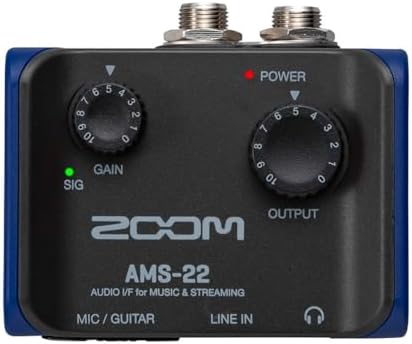
- One XLR/TRS combo input with Hi-Z, one stereo 3.5mm input
- Direct Monitor and Loopback switches without extra software
- Toggle between Music mode and Streaming mode
- Works across major platforms and recording software
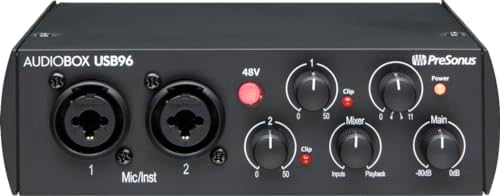
- 2-channel USB 2.0 interface
- 2 Class-A mic preamps
- 2 high-headroom instrument inputs plus MIDI I/O
- Converters allow up to 24-bit/96 kHz recording
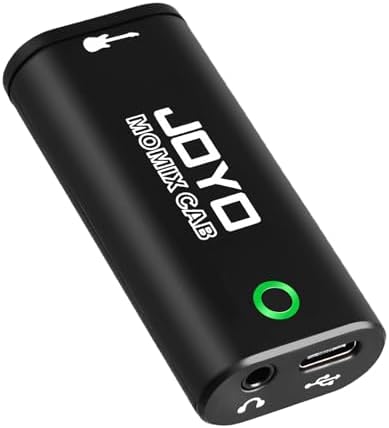
- Zero latency direct monitoring to headphone output
- Connects via USB-C or Lightning port, no drivers needed
- Pocket-sized design with back clip
- Use only the included USB-C cable

- Adjustable gain dial with built-in 1/8" TRRS output
- 1/4” output jack connects directly to an amplifier
- Requires Apple-brand USB-C to 3.5mm adapter for newer iOS
- Paired with AmpliTube CS (free) for iOS
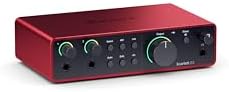
- Scarlett's 4th Gen mic pres with included software
- 120dB dynamic range using flagship converters
- Auto Gain sets level and Clip Safe prevents clipping
- Air mode adds presence and harmonic drive
1. Focusrite Scarlett Solo 3rd Gen USB-C Audio Interface
Best for: Musicians and podcasters needing a reliable, all-in-one studio starter kit.
This unit stands out for its high-performing pre-amps, which bring a noticeable clarity to acoustic instruments when you engage the Air mode. The gain halos are a practical addition, helping you visualize levels to prevent unwanted distortion without needing to stare at a computer screen. It records at 24-bit/192kHz, providing a standard of quality that holds up well for professional-sounding music and podcasts.
While it’s excellent for solo projects, it has two instrument inputs for guitar or bass. If you need to record two microphones at once, the PreSonus AudioBox 96 is a better choice, as it offers two high-quality Class-A mic preamps against the single mic input on this model. The included software bundle is comprehensive, providing everything you need to begin recording immediately.
Pros
- Switchable Air mode for added clarity
- Visual gain halos prevent clipping
- High-performance 24-bit/192kHz converters
- Three-year manufacturer warranty
Cons
- Single microphone input limits multi-mic setups
2. Fender Link I/O Portable USB-C Audio Interface
Best for: Guitarists who need professional-grade recording tools that fit in their pockets.
The Fender Link I/O is designed for maximum portability, turning your mobile device or computer into a recording rig without the bulk of a traditional interface. Its amp-like instrument input circuit is a highlight, as it captures the natural feel of your guitar or bass, making it a great companion for practice or quick demos. It’s entirely bus-powered, meaning you never have to worry about finding an outlet while on the move.
Because it focuses on a compact, single-input design, it lacks the multi-channel flexibility found in the JOYO MOMIX PRO. The JOYO model offers two combo jacks and a dedicated stereo instrument input, while this unit is strictly for one instrument and one headphone pair. It’s a straightforward, no-fuss device for someone who wants to capture high-quality audio without carrying extra gear.
Pros
- Ultra-compact, pocket-sized form factor
- Bus-powered through USB-C
- Studio-grade 24-bit/96 kHz conversion
- Includes Fender Studio DAW recording app
Cons
- Only one instrument input available
- Requires a compatible USB-C device for power
3. Shure MVX2U Gen 2 XLR-to-USB-C Audio Interface
Best for: Podcasters and streamers using high-quality XLR microphones.
This interface is essentially a bridge that turns any standard XLR microphone into a high-performance digital tool. It’s particularly impressive for its onboard digital processing, which includes a denoiser and a “popper stopper” to keep your audio clean from the start. The +60 dB of clean gain ensures that even power-hungry microphones will sound loud and clear without needing a separate preamp.
Compared to the Focusrite Scarlett Solo 3rd Gen, which is a full interface with headphone outputs and instrument jacks, this device is highly specialized for microphone-first workflows. If your goal is simply to get a professional mic signal into your computer or phone, this is the most streamlined path.
Pros
- Advanced onboard DSP for real-time processing
- Provides up to +60 dB of clean gain
- Compatible with MOTIV apps for deep customization
- Plug-and-play XLR-to-USB-C conversion
Cons
- Designed exclusively for XLR microphones
4. JOYO Portable Audio Mixer Rechargeable USB Audio Interface with 48V
Best for: Live streamers and content creators who need a portable, multi-channel mixer.
The MOMIX PRO is a powerhouse for mobile creators, featuring two combo XLR/6.35mm jacks that handle both microphones and instruments. Its unique dual OTG ports allow you to stream from two smartphones at once, which is a massive advantage for creators who broadcast to different platforms or need a dedicated phone for backing tracks. The built-in battery provides up to 5 hours of use, making it truly independent of wall power.
This unit weighs 0.2kg and fits in a gig bag. While it’s more versatile than the Fender, its size is the trade-off for having three simultaneous channels and built-in reverb. It’s the ideal choice for those who need to manage a mix on the fly rather than just recording a single source.
Pros
- Two combo XLR/6.35mm inputs
- Built-in rechargeable battery for mobile use
- Dual OTG ports for simultaneous streaming
- Integrated 3-level reverb for vocals and guitar
Cons
- Heavier and larger than pocket-sized interfaces
- Battery requires periodic recharging to stay functional
5. TASCAM DR-05XP 32-Bit Float Portable Handheld Field Recorder and USB-C
Best for: Field recorders who occasionally need a desktop interface.
The TASCAM DR-05XP is a versatile hybrid that excels as both a handheld recorder and a USB-C audio interface. Its omnidirectional microphones can handle high sound pressure levels, making it a reliable choice for recording everything from loud live performances to quiet dictation. It offers flexible recording modes, including the high-fidelity 32-bit float format, which gives you more headroom to fix audio levels after the recording is finished.
This device isn’t as intuitive for pure studio recording as the Focusrite Scarlett 2i2 4th Gen, which is built specifically for desktop DAW work. The TASCAM requires AA batteries for mobile use, whereas the Scarlett is always bus-powered when connected to a computer. It’s best suited for someone who spends as much time recording in the field as they do at their desk.
Pros
- Functions as both a recorder and an interface
- Supports 32-bit float recording
- Handles up to 125dB SPL
- Long battery life up to 17.5 hours
Cons
- SD card and batteries aren’t included
6. Zoom AMS-22 USB Audio Interface
Best for: Streamers who need to toggle between recording and broadcasting modes.
The AMS-22 is built with a focus on simplicity, featuring a single switch to toggle between Music and Streaming modes. In Streaming mode, it combines all inputs into a single signal, which is perfect for streamers who want to avoid complicated software routing. The loopback switch is another thoughtful inclusion, allowing you to easily mix computer audio with your live input for professional-sounding broadcasts.
This interface is more focused on streaming than the PreSonus AudioBox 96, which leans heavily into traditional studio recording. While the PreSonus offers a pair of dedicated microphone channels, the Zoom is limited to one combo input and one stereo 3.5mm input. If you’re a solo streamer who only needs to capture a single voice at a time, the Zoom’s mode-switching capability provides a faster, easier workflow.
Pros
- Dedicated switches for Streaming and Music modes
- Built-in loopback for easy broadcast mixing
- Lightweight and bus-powered
- Works with all major streaming platforms
Cons
- Limited to one combo input and one stereo input
- Lacks the advanced pre-amp gain controls of larger units
7. PreSonus AudioBox 96 25th Anniversary USB Audio Interface
Best for: Home studio producers who need to record a stereo source or a pair of microphones alongside MIDI connectivity.
The AudioBox 96 is a workhorse for anyone building a small home studio, offering a matched pair of high-quality Class-A mic preamps in a durable chassis. It’s one of the few portable options that includes MIDI I/O, which is essential if you use external hardware synthesizers or controllers. Its bus-powered design makes it easy to move between locations without needing a power brick, provided you have a USB 2.0 connection.
This interface is bulkier than the compact Fender Link I/O, which fits in a pocket. The AudioBox is better suited for a desk setup where you need to keep a stereo pair or multiple sources plugged in at once. It’s a solid, reliable choice for those who prefer physical controls and a more traditional studio configuration over ultra-portable designs.
Pros
- Two high-quality Class-A mic preamps
- Includes MIDI I/O for external gear
- High-powered headphone output
- Studio-grade 24-bit/96 kHz recording
Cons
- Uses USB 2.0, which is slower than USB-C models
- Less portable than pocket-sized interfaces
8. JOYO Guitar Audio Interface
Best for: Guitarists wanting to record dry tracks directly to their phones.
The MOMIX CAB is a niche tool for guitarists who need to capture a clean signal while monitoring their playing in real-time. By clipping directly to your belt or guitar strap, it offers the ultimate “grab and go” experience for recording practice sessions or quick song ideas. It’s a direct-monitoring device, meaning you’ll always hear your dry, unprocessed guitar signal in your headphones, which helps in maintaining timing while recording.
This interface is very specific, as the listing notes it isn’t designed for real-time software amp simulations. In contrast, the IK Multimedia iRig 2 allows you to switch between processed and clean signals, giving you more flexibility if you use mobile effects apps. If you only want a simple, clean recording and don’t plan to use software effects, this is a highly efficient, no-battery solution.
Pros
- Zero-latency direct monitoring
- Pocket-sized with a belt clip
- No charging or drivers required
- Includes Lightning and USB-C cables
Cons
- Not designed for real-time software amp sims
- Dry signal can’t be muted during monitoring
9. IK Multimedia iRig 2 portable guitar audio interface
Best for: Mobile guitarists who want a simple, analog-style connection.
The iRig 2 is the definition of “plug and play,” offering a straightforward way to connect a guitar or bass to a smartphone or tablet. Its adjustable gain dial makes it easy to set the right input level, while the 1/4″ amplifier output allows you to connect to a real guitar amp without needing any extra adapters. It’s a reliable choice for those who already use mobile apps for effects and just need a solid, analog interface.
This unit is less flexible than the JOYO MOMIX PRO, which provides multiple channels and built-in battery power for complex setups. The iRig 2 is limited to a single instrument input and relies on your mobile device’s power, making it a simpler, less capable tool. It’s perfect for the user who wants to keep their setup minimal and focus entirely on their guitar tone.
Pros
- True plug-and-play simplicity
- 1/4″ output for direct amp connection
- Adjustable gain dial for level control
- Compatible with a wide range of mobile apps
Cons
- Requires a separate adapter for newer Apple devices
- Lacks the multi-channel mixing features of larger units
10. Focusrite Scarlett 2i2 4th Gen USB-C Audio Interface
Best for: Advanced users who want professional features like auto-gain.
The 4th Gen 2i2 brings flagship-level converters to a portable interface, offering a massive 120dB dynamic range. Its standout feature is the Auto Gain and Clip Safe, which take the guesswork out of setting levels by automatically adjusting them for you. This is a significant upgrade for those who frequently record varying volume sources and want to ensure they never lose a great take to digital clipping.
This model adds Auto Gain and Clip Safe compared to the Focusrite Scarlett Solo 3rd Gen. If you don’t need the extra input or the automated gain features, the Solo is a more straightforward choice. However, for those who want the most advanced, worry-free recording experience available in a portable package, the 4th Gen 2i2 is the top-tier option.
Pros
- 120dB dynamic range for professional sound
- Auto Gain sets levels automatically
- Clip Safe prevents digital distortion
- Comprehensive software and plugin suite included
Cons
- More complex setup than the Scarlett Solo
- Requires more power than simpler, single-input interfaces
Also Worth Considering
The M-AUDIO Solo USB Audio Interface is a basic, single-input interface that offers a clean signal path for simple recording needs. It’s bested by the Focusrite Scarlett Solo 3rd Gen, which provides a more robust software bundle and superior pre-amp clarity, but this unit remains a decent option for those who want a no-frills entry point.
The M-AUDIO Duo USB Audio Interface features a pair of inputs, making it a direct competitor to the PreSonus AudioBox 96. While the AudioBox 96 includes MIDI connectivity and a wider range of software, the Duo is a functional choice for someone who simply needs to capture a stereo signal or multiple sources simultaneously.
The BOMGE Channel USB Audio Interface is a mini, two-channel device that supports XLR microphones with phantom power. It’s a more compact alternative to the PreSonus AudioBox 96, though it lacks the extensive software suite and established warranty reputation of the larger brand. It may appeal to someone looking for a very small footprint for basic podcasting or vocal recording.
How We Chose
Thirty-seven Amazon listings were compared on input types, power requirements, and device compatibility, and near-duplicates were left out. Each product had to provide clear specifications regarding its connectivity and primary intended use to be included. Products were evaluated based on their ability to serve specific creator needs, such as portability for mobile recording, multi-channel mixing for streaming, or high-fidelity conversion for studio work. Only interfaces with clear, manufacturer-stated features were selected, ensuring that each recommendation is based on the technical capabilities printed by the original maker.
How to Choose the Right Portable Audio Interface
Input types and your gear
First, decide how many sources you need to record at once. If you’re a solo singer-songwriter, a single combo input like the one on the Focusrite Scarlett Solo 3rd Gen is sufficient. For those recording a guitar and a microphone simultaneously, a dual-input model like the PreSonus AudioBox 96 is necessary.
Power and portability
Consider where you’ll be recording. Bus-powered units like the Fender Link I/O are ideal for mobile setups because they draw power directly from your phone or laptop. If you’re streaming outdoors or away from power outlets, a battery-powered interface like the JOYO MOMIX PRO ensures you can keep working without needing a wall outlet.
Software and compatibility
Check which devices you plan to connect. Many interfaces are plug-and-play, but some require specific OS versions or drivers. The Shure MVX2U Gen 2 is optimized for mobile app compatibility, making it a strong choice for phone-based creators. Always verify that your recording software works with the interface’s stated technical requirements to ensure a smooth setup.
Frequently Asked Questions
Is an expensive interface worth it for beginners?
Higher-end interfaces often include features like auto-gain and better digital converters, which can save time and improve audio quality. The Focusrite Scarlett 2i2 4th Gen, for example, uses the same converters found in flagship studio models. For a beginner, these features reduce the learning curve and help prevent common mistakes like digital clipping.
Do I need a separate power supply for my interface?
Most modern portable interfaces are bus-powered, meaning they get their electricity from the computer or phone they’re plugged into. Products like the Zoom AMS-22 and Fender Link I/O are designed this way. However, larger mixers like the JOYO MOMIX PRO include internal batteries to support their extra features without draining your connected device.
Can I use these interfaces with a smartphone?
Yes, many of the interfaces listed, such as the JOYO MOMIX CAB and IK Multimedia iRig 2, are specifically designed for use with smartphones and tablets. You may need an OTG adapter or a specific cable, which is often included in the box. Always check your phone’s settings to ensure OTG is enabled for the best performance.
What is 48V phantom power?

Phantom power is a standard method of sending electricity through an XLR cable to power condenser microphones. The JOYO MOMIX PRO and Shure MVX2U Gen 2 both provide 48V phantom power, which is necessary if you’re using a studio-grade condenser mic that requires external power to operate.
How do I monitor my audio without latency?
Direct monitoring allows you to hear your input signal immediately through your headphones before it reaches your computer. Many interfaces on this list, such as the PreSonus AudioBox 96 and the JOYO MOMIX CAB, feature a direct monitoring switch or dial to ensure you hear yourself in real-time, which is essential for accurate performance.
Conclusion
When you’re ready to start recording, the Focusrite Scarlett Solo 3rd Gen is the most reliable choice for most users because of its balanced feature set and excellent pre-amps. If you prefer something even simpler for mobile use, the IK Multimedia iRig 2 is a great alternative. You can now use these details to find the right gear on Amazon.
As an Amazon Associate, Cleanestor earns from qualifying purchases at no additional cost to you.