
The best small studio monitors for most creators are the PreSonus Eris 3.5. These speakers provide a balanced sound profile and a compact footprint that fits easily on crowded desks, making them the most versatile choice for everyday production and multimedia work. Choosing the right set of monitors depends on your available desk space and whether you need wireless features or higher output for larger rooms.
Quick Picks
- Best Overall: PreSonus Eris 3.5 — Reliable, balanced sound for most home studio setups.
- Most Compact: IK Multimedia iLoud Micro — Tiny profile with surprising bass for very small desks.
- Best Reference Accuracy: Yamaha HS4 — Clean, professional response for critical listening tasks.
- Simplest Controls: Mackie CR3.5 — Easy-to-reach tone adjustment without navigating digital menus.
- Best Wireless Connectivity: Edifier MR3 — Multi-point Bluetooth support for seamless device switching.
- Best Midrange Detail: PreSonus Eris E4.5 — Enhanced clarity for vocal-heavy mixing and production.
- Best Desktop Bass: Mackie CR4.5 — Larger woofers provide a fuller low-end without needing subwoofers.
- Best High-Performance Output: Yamaha HS8 — Massive power and frequency range for serious, larger studios.

- Smallest [active studio reference monitoring](https://instrumentinsight.com/can-studio-monitors-be-used-as-speakers/) system
- Internal DSP for linear frequency response
- Class D amplifiers deliver 50W RMS total
- Low-end response down to 55Hz (-3dB)
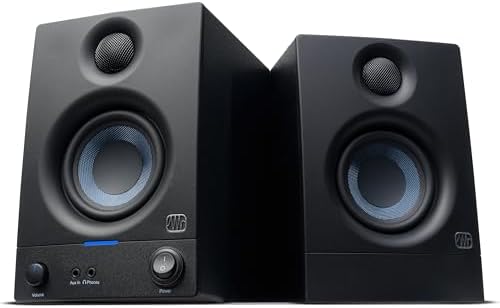
- Sold as a complete stereo pair
- 50 watts of built-in amplification
- 3.5” woven-composite woofers and 1” silk-dome tweeters
- Frequency range from 80 Hz–20 kHz
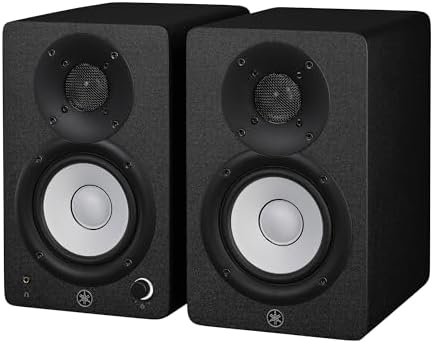
- Packaging: Pair
- 2-way bass-refiex powered speaker with 4.5" cone woofer and 1" dome tweeter
- 60 Hz – 22 kHz frequency response (-10 dB)
- 26 W and above 26 W output power

- Sold as a pair, sized for desks and small studios
- Hear your mix or stream the way it actually sounds, not flattered
- Tone Knob: dial voicing from your desk without menus
- Location Switch: corrects bass whether they sit against a wall or free
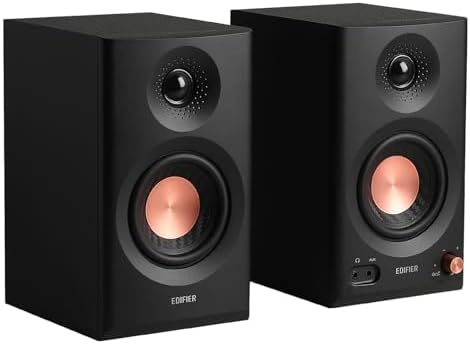
- Hi-Res Audio Certified – Experience superior sound with Hi-Res Audio certification, delivering a flat response across 52Hz to 40kHz for precise and…
- Rich Connectivity – Balanced TRS, RCA, and AUX inputs, headphone output, with Bluetooth supporting multi-point connection. RCA and AUX inputs enable…
- Powerful Sound Output – Enjoy 18W*2 RMS output with a peak SPL of 92.5dB, enhanced by 3.5" mid-low drivers and 1" tweeters for rich, full-range sound.
- Customizable Sound Experience – Easily switch between Music, Monitor, and Custom modes to suit your needs. Fine-tune your sound precisely through the…

- HONEST. Eris 4.5 near field studio monitors deliver studio-quality, accurate sound perfect for music production, hi-fi audio listening, or multimedia…
- EXPRESSIVE. Clear, accurate audio with a big low end — Eris 4.5’s woven-composite woofers’ weave and nature result in tight bass that you can feel,…
- POWERFUL. Compact speakers that pack a punch — 50 Watts of Class AB dual amplification (25W per side) provide all the volume and loudness you want…
- ULTRA-WIDE LISTENING SWEET SPOT. The natural high-frequency response of the 1-inch low-mass, silk-dome transducers (tweeters) provide superior stereo…

- Sold as a pair, the step-up size for desks with more room
- Fuller low end than 3.5-inch monitors without needing a sub
- Tone Knob: front-panel voicing control
- Location Switch: wall or free-standing bass correction

- 38Hz – 30kHz frequency response
- 75W LF plus 45W HF bi-amp system for high-performance 120W power amplification
- 8-inch cone woofer, 1-inch dome tweeter
- Large magnets in an Advanced Magnetic Circuit design
1. IK Multimedia iLoud Micro Monitor 50 watt Portable Wireless Bluetooth
Best for: Creators working in extremely tight spaces or while traveling.
These monitors are designed for portability and fit where larger speakers cannot. The internal DSP helps you manage the sound based on your desk position, which is useful when you have limited room for acoustic treatment. They deliver a sound profile that punches above their physical size, making them a top contender for mobile producers who need a consistent reference point.
Anyone who needs to fill a large room with sound should look elsewhere, as the 55Hz (-3dB) limit is optimized for near-field, desk-based listening rather than room-filling volume. Comparing their size to the Yamaha HS8, these are significantly smaller, making them the better choice for a temporary setup against the 8-inch design of the Yamaha.
Pros
- Smallest footprint in this category
- Integrated DSP for room correction
- Bluetooth-ready for wireless playback
- 50W RMS power output
Cons
- Limited low-end reach compared to 8-inch models
- Requires specific placement for best DSP results
2. PreSonus Eris 3.5 Powered Studio Monitors
Best for: Home producers needing a reliable, all-around set of monitors.
These speakers are built for clarity and ease of use in a variety of settings. The 3.5-inch woven-composite woofers provide a tight, controlled sound that helps you hear details in your mix without taking up your entire workspace. With both balanced and unbalanced inputs, they integrate easily into almost any existing audio interface or computer setup.
Anyone who requires high-volume, professional-grade monitoring for large studios might find these too modest. At 50 watts total, they provide less power than the 120W output found on the Yamaha HS8, though they’re perfectly capable for personal desk use.
Pros
- Clear, distortion-free sound reproduction
- Front-panel aux input and headphone jack
- High- and low-frequency acoustic tuning
- Compact size fits most desks
Cons
- Lower total power output than larger professional models
3. Yamaha HS4 Powered Studio Monitor in Black
Best for: Professionals who prioritize accuracy over all else.
The HS4 monitors are designed to provide a flat, honest representation of your audio. The 4.5-inch woofer and 1-inch tweeter work together to cover a wide frequency range, ensuring you hear your mix as it is, rather than as you might want it to sound. They include essential controls for room adjustment, allowing you to tune the high and low frequencies to your environment.
Those who need deep, booming bass for electronic music might find the 60 Hz limit restrictive without an additional subwoofer. Comparing their frequency response to the Edifier MR3, the Edifier reaches down to 52 Hz, which provides a slightly broader range in the low end.
Pros
- Professional-grade frequency response
- Included anti-slip pads and cables
- Versatile input options including combo jacks
- Room control and high trim switches
Cons
- Less low-end extension than some wireless-focused models
4. Mackie CR3.5 Studio Monitors (Pair)
Best for: Users who want quick, manual control over their sound.
These monitors simplify the mixing process by putting tone control right on the front panel. You can adjust the voicing of your speakers without needing to open software or dive into complex settings. The included isolation pads are a helpful addition for keeping your desk surface from vibrating during playback.
Anyone who needs a wide array of professional input types should note that this model is more focused on simplicity. While it offers essential features, it lacks the variety of connectivity found on the Edifier MR3, which provides more input options for complex setups.
5. Edifier MR3 Powered Studio Monitor
Best for: Creators who rely on multiple devices and wireless audio.
The MR3 stands out with its Hi-Res Audio certification and multi-point Bluetooth support. You can connect your phone, computer, and other devices simultaneously, which is a major advantage for creators who jump between tasks. The ability to fine-tune the sound through a dedicated app makes them highly adaptable to different listening environments.
Anyone who prefers a traditional, wired-only professional studio workflow might find the app-based controls unnecessary. Comparing their connectivity to the PreSonus Eris 3.5, the Edifier offers more modern wireless flexibility against the traditional wired-only focus of the PreSonus.
Pros
- Multi-point Bluetooth connectivity
- App-based EQ and customization
- Hi-Res Audio certification
- Broad frequency range coverage
Cons
- App setup required for full customization
6. PreSonus Eris E4.5-2-Way 4.5″ Near Field Studio Monitor (Pair)
Best for: Producers who need extra detail in the midrange frequencies.
The Eris E4.5 is a step up in terms of midrange clarity, thanks to its 4.5-inch woven-composite woofers. They’re designed to provide a “tight bass” feel and a wider listening sweet spot, which helps when you’re moving around your studio. The front-panel headphone output is a great touch for quick switches between speakers and monitors.
Anyone with a very limited desk surface might find the 4.5-inch size a bit too large compared to the 3.5-inch PreSonus Eris 3.5. The extra inch of woofer diameter requires more space, making them less ideal for cramped setups.
Pros
- Superior stereo imaging
- Front-panel headphone output
- Customizable acoustic tuning
- Tight, responsive bass performance
Cons
- Larger footprint than 3.5-inch alternatives
7. Mackie CR4.5 Studio Monitors (Pair)
Best for: Users who want a fuller bass response without a subwoofer.
The CR4.5 provides a larger 4.5-inch woofer that fills the room with more low-end presence than the smaller 3.5-inch versions. It keeps the same user-friendly features like the tone knob and location switch, making it an easy transition for those who want more power. It’s a solid middle ground for those who have a bit of extra desk space.
Anyone who strictly monitors for clinical accuracy might find the “fuller” sound profile less neutral than the Yamaha HS4. Compared with the smaller Mackie CR3.5, this model’s wider driver delivers noticeably deeper bass.
Pros
- Fuller bass without needing a sub
- Front-panel voicing control
- Includes all necessary cables
- Location switch for wall placement
Cons
- Requires more desk room than smaller monitors
8. Yamaha HS8 8-Inch Powered Studio Monitor Pair
Best for: Large studios or serious production work requiring high volume.
These are the powerhouses of the group, featuring an 8-inch woofer and a bi-amp system that pushes 120W of total power. They’re designed for environments where you need to hear every detail at high volumes without the speakers distorting. They’re significantly larger and heavier than the other monitors on this list, reflecting their professional performance capabilities.
Anyone working in a small bedroom studio will likely find these too powerful and too large. Comparing their 120W output to the 50W found on the PreSonus Eris 3.5, these offer significantly more headroom for large rooms but take up much more space on your desk.
Pros
- High-performance 120W bi-amp system
- Wide 38Hz – 30kHz frequency response
- Large magnets for accurate transient response
- Industry-standard professional sound
Cons
- Extremely large for standard home desks
Also Worth Considering
The M-AUDIO 3.5″ Wired Studio Monitors offer a compact, wired-only experience for those who don’t need extra features. They’re outclassed in frequency range by the Edifier MR3, but they remain a simple alternative for basic setups. The Ortizan C7 Powered Studio Monitors provide Bluetooth connectivity for those who want wireless convenience, though they lack the professional tuning controls found on the PreSonus Eris E4.5. Finally, the YAMAHA Hs5 Powered Studio Monitor sits between the HS4 and HS8 in size, offering a 5-inch woofer for those who want more power than the HS4 but can’t accommodate the large footprint of the HS8.
How We Chose
Thirty-one Amazon listings were compared on frequency response, input variety, and power output, and near-duplicates were left out. To earn a place in this monitor roundup, a speaker had to provide clear, defined audio specs rather than vague marketing language. Priority was given to speakers that included cables or isolation pads in the box, as these items are essential for setting up a studio desk correctly. Monitors that lacked clear woofer dimensions or power ratings were excluded to ensure consistent comparisons across the entire set.
How to Choose the Right Studio Monitors
Size and where it has to fit
Before you buy, measure the available space on your desk. Larger woofers, like the 8-inch drivers on the Yamaha HS8, offer more bass but take up significantly more room. If your desk is limited, compact monitors like the PreSonus Eris 3.5 or Mackie CR4.5 are more practical choices.
What comes in the box
Check the listing to see if cables and isolation pads are included. The Mackie CR4.5 and Yamaha HS4 both include essential accessories, which saves you from having to purchase extra components. Having these items ready allows you to start your work immediately without needing additional trips to the store.
Connectivity and wireless needs
Decide if you need to connect multiple devices at once. If you use a computer, a phone, and a tablet, the Edifier MR3 with multi-point Bluetooth is the most flexible. If you stick to a single audio interface, the balanced TRS and RCA inputs on the PreSonus Eris 3.5 are sufficient for professional production.
Frequently Asked Questions
Are these speakers safe to use near my computer?
Most modern studio monitors are designed for desktop use and include shielding to prevent interference with your screen. You can find more information on electromagnetic compatibility standards through the International Electrotechnical Commission guidelines on equipment safety. Always keep them on a stable surface to ensure they don’t vibrate or fall.
Do I need a separate amplifier?
No, all the monitors listed here are “powered” or “active,” meaning they have built-in amplification. You can plug them directly into your audio interface or computer using the provided cables. There’s no need for an external amplifier unless you’re using passive speakers, which aren’t included in this desktop monitor comparison.
Can I mix electronic music without a subwoofer?
You can mix most genres with these monitors, but for sub-bass heavy music, you might eventually want a subwoofer. Models like the Mackie CR4.5 provide more low-end than their smaller siblings, but a dedicated subwoofer is the only way to hear those very low frequencies accurately if your work requires it.
How do I set up the acoustic tuning controls?
Most monitors, like the PreSonus Eris E4.5, have switches on the back to adjust for room placement. If your speakers are against a wall, use the “room” or “boundary” setting to reduce bass buildup. These controls help you get a flatter, more accurate sound in small or untreated home studio rooms.
Is it worth paying more for wireless features?
Wireless features are worth it if you frequently switch between audio sources like phones or tablets. If you primarily work from a single computer connected to an audio interface, wired-only models like the Yamaha HS4 provide a more stable connection for critical studio work.
How do I connect these to a balanced audio interface?
You should use the TRS (Tip-Ring-Sleeve) inputs on the back of your monitors. Most professional interfaces have balanced outputs, and using TRS cables helps reduce electrical noise and hum. The Yamaha HS4 and PreSonus Eris E4.5 both support these balanced connections, which are preferred for minimizing interference in a studio environment.
Will these monitors work for home theater or gaming?
Yes, these monitors are excellent for gaming and movies because they provide a flat, detailed sound that reveals details often hidden by “colored” consumer speakers. You can connect them to your TV or console using the RCA or aux inputs. The PreSonus Eris 3.5 is particularly popular for this because of its compact size and clear audio.
What is the difference between a woofer and a tweeter?
The woofer is the larger driver responsible for bass and midrange frequencies, while the smaller tweeter handles the high-frequency details. A 2-way system, like the ones found in the Yamaha HS8 or Mackie CR3.5, uses these two parts to cover the full range of human hearing. Larger woofers generally move more air, resulting in a deeper low-end response.
Do I need to buy special stands for these?
Stands aren’t mandatory, but they help by decoupling the speakers from your desk surface. This prevents the desk from vibrating and coloring the sound. If you can’t use stands, the isolation pads included with the Mackie CR3.5 and CR4.5 are a great way to improve your monitoring accuracy without needing extra equipment.
Can I leave my monitors on all the time?
It’s generally better to turn them off when you aren’t working to save energy and extend the life of the internal electronics. Most of these models have a power switch on the back or front. If you have a busy workflow, a simple power strip with a master switch can make it easier to power everything down at once.
What should I do if the sound feels “muddy”?
Muddy sound often comes from the speakers being too close to a wall, which causes bass buildup. Use the “room control” or “location” switches found on the Yamaha HS4 or Mackie CR4.5 to compensate for this. Adjusting these settings can tighten the low end and make the overall mix sound much clearer and more professional.
Why do some monitors have a “front-firing” port?
A front-firing port, like the one on the IK Multimedia iLoud Micro, allows for better bass performance when the speaker is placed close to a wall. Rear-ported speakers, which are common in many studio monitors, require more space behind them to avoid bass reflections. Check your desk layout to decide which port design fits your specific room constraints.
How often should I calibrate my monitor settings?
You should calibrate your acoustic tuning switches whenever you move your speakers to a new location. If you rearrange your desk or move to a different room, the interaction between your speakers and the walls will change. Re-adjusting the high and low-frequency settings on models like the PreSonus Eris E4.5 will ensure your reference remains consistent.
Can I mix and match different brands of monitors?
It’s strongly recommended to use a matching pair from the same brand and model line. Mixing different speakers will result in inconsistent frequency responses and poor stereo imaging, which defeats the purpose of accurate studio monitoring. Always use the pair as they’re sold, such as the Yamaha HS8 pair or the Edifier MR3 set.
What is the advantage of a bi-amp system?
A bi-amp system, like the one used in the Yamaha HS8, uses separate amplifiers for the woofer and the tweeter. This design allows each driver to be optimized for its specific frequency range, resulting in lower distortion and better overall clarity. It’s a hallmark of professional-grade monitors and provides a more accurate representation of your audio.
Does the cabinet material affect the sound quality?
Yes, the cabinet material plays a role in reducing unwanted resonances. The Edifier MR3 uses an MDF cabinet, which is denser than plastic and helps reduce distortion during playback. A solid, non-resonant cabinet is essential for keeping the sound clean, especially when you’re monitoring at higher volumes during long mixing sessions.
Are Bluetooth monitors as accurate as wired ones?
Bluetooth connectivity is convenient for casual listening and quick reference, but wired connections are still the gold standard for critical mixing. The Edifier MR3 offers both, allowing you to use Bluetooth for convenience and balanced TRS cables for your actual production work. This gives you the best of both worlds for your studio tasks.
What happens if I set the high-trim control too high?
Setting the high-trim or “high frequency” control too high can make your audio sound harsh and fatiguing, which may lead you to mix your tracks with too little treble. Start with the controls at their flat or neutral position. Only adjust them if you notice your room is absorbing too much high-end or if the speakers sound dull in your specific environment.
Can I use these monitors for live sound?

These are “near-field” monitors designed for close-range listening in a studio, not for live sound reinforcement. They lack the dispersion and power required to fill a performance venue. Using them for live sound could lead to distortion or damage to the drivers. For live performances, you should look for dedicated PA speakers instead.
How do I know if my monitors are at the right height?
The tweeters should be at the same level as your ears when you’re sitting in your primary mixing position. If your monitors are sitting on your desk, you may need to use angled stands or foam pads to tilt them upward. Proper positioning ensures you hear the full frequency range of the speakers without losing high-end detail.
Conclusion
Once your speakers arrive, place them at ear level and angle them slightly toward you. Don’t worry if the sound feels strange at first—you’ll get used to it quickly. Spend a few days listening to songs you love, and you’ll start mixing with real confidence.
As an Amazon Associate, Cleanestor earns from qualifying purchases at no additional cost to you.