
The PreSonus Eris 3.5 is the top pick among cheap studio monitors because it delivers 50 watts of built-in amplification and a full set of acoustic tuning controls in a complete stereo pair. These speakers suit anyone setting up a small desk or bedroom studio who needs accurate sound without complicated gear. What actually separates them isn’t just driver size—it’s how each one connects to your equipment, handles room reflections, and gives you control over the final tone right from your chair.
- Best Overall: PreSonus Eris 3.5 — 50 watts and high/low tuning controls for any room.
- Best Tone Control: Mackie CR3.5 — Single front knob and location switch shape the voicing instantly.
- Best Wired Latency-Free: M-Audio BX3 — Bi-amplified wired design engineered for zero-latency monitoring.
- Best Bluetooth Connectivity: Ortizan C7 — BT 5.3 pairing and a built-in 24-bit DAC for wireless playback.
- Best Hi-Res Audio: Edifier MR3 — Certified flat response from 52Hz to 40kHz with app-based EQ.
- Best Larger Drivers: PreSonus Eris E4.5 — 4.5-inch woven-composite woofers deliver deeper bass than 3.5-inch models.
- Best Mid-Size Desktop: Mackie CR4.5 — 4.5-inch drivers provide fuller low end without needing a subwoofer.
- Best Compact Yamaha: Yamaha HS3 — 26W per side output and room control switches in a white finish.
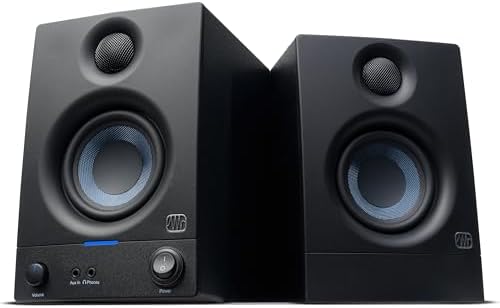
- Sold as a complete stereo pair
- 50 watts of built-in amplification
- 3.5” woven-composite woofers and 1” silk-dome tweeters
- 80 Hz–20 kHz frequency range

- Sold as a pair for desks and small studios
- Tone knob for voicing adjustment from desk
- Location switch corrects bass near walls

- Wired connection engineered for zero-latency audio
- Bi-amplified power for studio monitor quality
- 3.5-inch Kevlar woofers for bass response
- Natural silk dome tweeters for precise stereo imaging
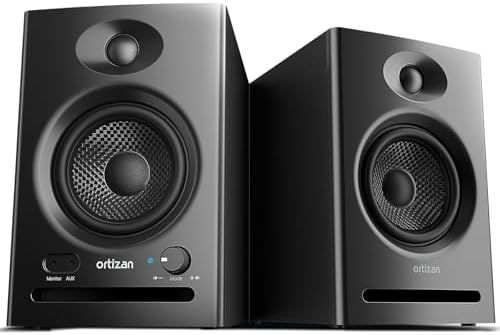
- RCA input and BT 5.3 wireless pairing
- Built-in 24-bit DAC captures audio via USB
- 3.5 inch carbon fiber speaker and 0.75inch silk dome tweeter
- Speaker units tuned for a flat response curve
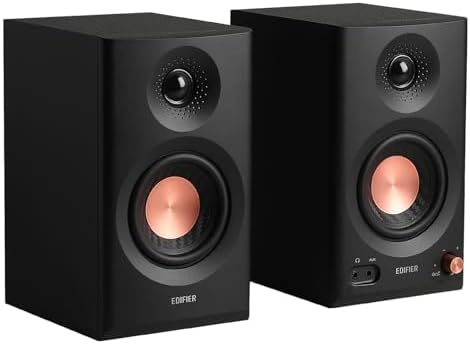
- Hi-Res Audio certified, 52Hz to 40kHz response
- Balanced TRS, RCA, AUX inputs and headphone output
- 18W*2 RMS output with peak SPL of 92.5dB
- 3.5" mid-low drivers and 1" tweeters

- Eris 4.5 near field studio monitors
- Woven-composite woofers deliver tight bass
- 50 Watts of Class AB dual amplification (25W per side)
- 1-inch low-mass silk-dome transducers

- Sold as a pair for desks with more room
- Fuller low end than 3.5-inch monitors without sub
- Front-panel tone knob for voicing control
- Location switch for wall or free-standing correction
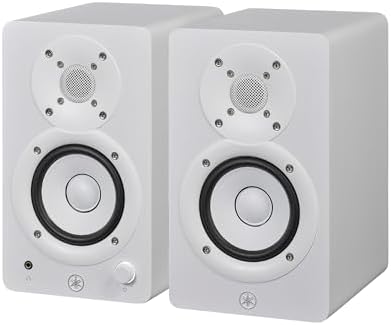
- Packaging: Pair
- 2-way bass-refiex powered speaker
- 3.5" cone woofer and 0.75" dome tweeter
- 70 Hz – 22 kHz frequency response (-10 dB)
1. PreSonus Eris 3.5 Powered Studio Monitors
Best for: producers needing versatile inputs and room-tuning controls
Fifty watts of built-in amplification drives this complete stereo pair, giving you enough power to fill a small room while keeping the signal clean. The 3.5-inch woven-composite woofers handle frequencies down to 80 Hz, while 1-inch silk-dome tweeters smooth out harshness at the top end. That frequency range means you’ll hear the core of your mix accurately without artificial boosting.
What makes this pair the most practical choice here is the combination of rear-panel TRS and RCA inputs alongside a front-panel aux jack. You can plug an audio interface into the back and leave your phone connected up front. Built-in high- and low-frequency acoustic tuning controls let you adjust the output to match your desk placement, so you don’t need extra room treatment to get balanced sound. A front headphone jack mutes the speakers automatically for late-night sessions.
Compared to the Mackie CR3.5, which relies on a single tone knob, the PreSonus Eris 3.5 gives you separate high and low dials for finer adjustments. That level of control matters when your desk sits tight against a wall and bass builds up unevenly. You’re getting a setup that adapts to the space rather than forcing you to adapt to the speakers.
Pros
- 50 watts of built-in amplification across the stereo pair
- High- and low-frequency acoustic tuning controls included
- Balanced TRS, RCA, and front-panel aux inputs provided
- Front headphone jack available for private listening
- 3.5-inch woven-composite woofers paired with 1-inch silk-dome tweeters
Cons
- Frequency response covers 80 Hz to 20 kHz
2. Mackie CR3.5 Studio Monitors (Pair)
Best for: beginners wanting simple tone shaping right out of the box
This pair is sized specifically for desks and small studios, aiming to reproduce your mix exactly as it sounds rather than flattering it. The standout feature here is the front-panel Tone Knob, which lets you dial in the voicing directly from your seat without digging through software menus. It’s a straightforward approach that keeps your workflow moving.
A Location Switch on the back corrects the bass response depending on whether the speakers sit flush against a wall or stand free in the room. That single toggle does the work that manual EQ sliders handle on other models. The listing also notes that isolation pads and all necessary cables come in the box, meaning you won’t have to hunt for extras before plugging them into your laptop or interface.
Where the smaller PreSonus Eris model offers separate high and low tuning knobs, the compact Mackie alternative simplifies everything into one Tone Knob and a two-position switch. That makes it faster to set up if you’re new to audio gear, though you sacrifice some granular control. For a quick desktop upgrade, the simplicity is a real advantage.
Producers who need independent high and low frequency adjustments will find the single Tone Knob too broad for precise room correction.
3. M-AUDIO BX3 3.5″ Wired Studio Monitors Pair
Best for: live performers needing zero-latency wired monitoring
Engineered for zero-latency audio monitoring, these wired desktop speakers deliver a pure, uninterrupted signal. That makes them ideal for live streaming, gaming, podcasting, and studio tracking where even a slight delay ruins the take. There’s no wireless processing standing between your source and the drivers.
The bi-amplified design powers 3.5-inch Black Kevlar low-frequency drivers separately from the natural silk dome tweeters. This separation provides punchy bass response and precise stereo imaging without muddying the vocal range. An acoustically-inert MDF cabinet stops unwanted vibration, and an enhanced bass reflex design pushes the low end further than standard plastic multimedia speakers typically manage.
You get 1/4-inch, 1/8-inch, and RCA inputs on the rear panel, covering DJ gear, instruments, and consumer electronics alike. A front-panel 1/8-inch AUX input handles headphones for silent late-night mixing. Against the Ortizan C7, which adds Bluetooth 5.3 and a USB DAC, the M-Audio BX3 skips wireless entirely to guarantee that latency-free wired connection. If reliability matters more than convenience, this is the path to take.
Streamers who want wireless playback from a tablet will have to run a physical cable every time, since the listing specifies a purely wired connection.
Pros
- Engineered for zero-latency wired audio monitoring
- Bi-amplified power driving the woofer and tweeter independently
- 3.5-inch Black Kevlar low-frequency drivers for punchy bass
- Acoustically-inert MDF cabinet reduces unwanted vibration
- Rear 1/4-inch, 1/8-inch, and RCA inputs plus front headphone AUX
Cons
- Uses smaller woofers, which limits maximum bass depth compared to the larger drivers on the PreSonus Eris E4.5
4. Ortizan C7 Powered Studio Monitors Pair with Bluetooth 5.3
Best for: creators switching between wired interfaces and wireless phones
Stable BT 5.3 technology lets you pair a smartphone or tablet in about 2 seconds, enabling wireless music playback without dealing with messy wires. Alongside Bluetooth, you get RCA, 3.5mm AUX, and a 6.35mm TRS balanced input. That TRS port connects directly to professional mixing consoles, electric guitars, and pianos, bridging the gap between casual listening and music production.
A built-in 24-bit DAC captures digital audio directly via USB, minimizing signal loss during conversion. The hardware pairs a compact carbon fiber mid-bass driver with a 0.75-inch silk dome tweeter using an electronic 2-way crossover. The listing states these units are finely tuned to achieve a flat response curve, ensuring balanced reproduction across high, mid, and low frequencies without artificial enhancement.
Two unbalanced AUX inputs and a front-panel headphone output make switching sources fast. Compared to the Edifier MR3, which holds a Hi-Res Audio certification and extends up to 40kHz, the Ortizan C7 focuses its engineering on connectivity variety and rapid wireless pairing. It’s the one here that tries to do both studio work and living room streaming equally well.
Pros
- BT 5.3 technology enables wireless pairing in roughly 2 seconds
- Built-in 24-bit DAC processes digital audio directly via USB
- 6.35mm TRS balanced input connects to professional mixing consoles
- Compact carbon fiber speaker paired with a 0.75-inch silk dome tweeter
- Electronic 2-way crossover and fine-tuned flat response curve
Cons
- Tweeter measures 0.75 inches, smaller than the 1-inch silk-dome tweeters found on the PreSonus Eris 3.5
5. Edifier MR3 Powered Studio Monitor
Best for: audiophiles demanding certified high-resolution frequency extension
Hi-Res Audio certification guarantees a flat response across a massive 52Hz to 40kHz range. That upper limit captures harmonic details most standard monitors roll off long before reaching. With 18W per channel RMS output and a peak SPL of 92.5dB, the compact mid-low drivers and 1-inch tweeters produce rich, full-range sound that fills a workspace comfortably.
Connectivity covers balanced TRS, RCA, and AUX inputs, plus a headphone output. Bluetooth supports multi-point connection, letting you keep a laptop and phone linked simultaneously. The RCA and AUX inputs allow multiple wired devices to stay plugged in at once. An MDF cabinet reduces distortion, keeping the signal tight whether you’re editing video, playing guitar, or producing tracks.
What sets this apart is the EDIFIER ConneX app, which lets you switch between Music, Monitor, and Custom modes while offering personalized EQ control. Looking at the Yamaha HS3, which relies on physical room control and high trim switches, the Edifier MR3 moves that adjustment process to your screen. If you prefer tweaking settings digitally rather than reaching behind the speaker, this fits that workflow perfectly.
Users who prefer adjusting settings via physical knobs on the speaker itself must rely on an app instead.
Pros
- Hi-Res Audio certified with a flat response from 52Hz to 40kHz
- 18W per channel RMS output reaching a peak SPL of 92.5dB
- Multi-point Bluetooth connection links multiple devices simultaneously
- EDIFIER ConneX app provides Music, Monitor, and Custom modes with EQ
- MDF cabinet construction reduces distortion
Cons
- Fine-tuning the sound precisely requires using the EDIFIER ConneX app, adding a software step to the setup
- Delivers 18W per channel RMS, less total power than the 50 watts built into the PreSonus Eris 3.5 pair
6. PreSonus Eris E4.5-2-Way 4.5″ Near Field Studio Monitor (Pair)
Best for: producers needing deeper bass from larger composite woofers
Stepping up to 4.5-inch woven-composite woofers gives these near-field monitors a big low end you can actually feel. The weave and nature of the material result in tight bass and cleaner overall sound compared to smaller cones. Paired with 1-inch low-mass silk-dome transducers, they provide superior stereo imaging from nearly any listening angle, creating an ultra-wide sweet spot.
Fifty watts of Class AB dual amplification—split as 25W per side—drives the system without sacrificing tonal balance or clarity. On the back panel, you’ll find ¼-inch TRS balanced inputs for professional audio devices and unbalanced RCA inputs for consumer electronics. A front-panel ⅛-inch TRS stereo aux input handles quick phone connections, while a built-in headphone amplifier drives the front output for private reference.
High- and low-frequency tuning controls let you customize the output for your specific room size and speaker orientation. They also support integration with the companion Eris Sub 8BT, an 8-inch subwoofer that adds Bluetooth and creates a 2.1 system. Against the comparable Mackie CR4.5, which shares the same driver class, the PreSonus Eris E4.5 lists its exact 50W Class AB amplification and specific TRS/RCA layout, giving you clearer specs to plan around.
Pros
- Larger woven-composite woofers deliver tight, felt bass
- 50 Watts of Class AB dual amplification (25W per side)
- 1-inch low-mass silk-dome tweeters create an ultra-wide sweet spot
- High- and low-frequency tuning controls customize room output
- Compatible with the Eris Sub 8BT for a 2.1 speaker system
Cons
- Companion Eris Sub 8BT subwoofer is required to build the mentioned 2.1 system, making it a second purchase
7. Mackie CR4.5 Studio Monitors (Pair)
Best for: desks with room for larger drivers and fuller bass
Positioned as the step-up size for desks with more room, this pair uses 4.5-inch woofers to deliver a fuller low end than 3.5-inch monitors without needing a subwoofer. If your mixes rely on kick drums or bass guitars, that extra cone area moves more air naturally. You get low-frequency presence without adding another box to your floor space.
Like its smaller sibling, it features a front-panel Tone Knob for immediate voicing control and a Location Switch that corrects bass buildup whether the speakers sit against a wall or stand free. The box includes both monitors, isolation pads, and all cables needed to start. Having the pads included means you can decouple the cabinets from your desk surface immediately, reducing resonance right out of the packaging.
Comparing it to the Yamaha HS3, which lists 26W + 26W output power and specific room control switches, the Mackie CR4.5 focuses on physical inclusion and ease of use. The Yamaha specifies its exact wattage and frequency response, while the Mackie emphasizes what comes in the box and how fast you can set it up. For someone who hates hunting for accessories, having the isolation pads included solves a common headache.
Anyone working on a cramped dorm desk will struggle to fit these wider woofers comfortably alongside a keyboard and screen.
Pros
- Larger woofers provide fuller low end without a subwoofer
- Front-panel Tone Knob allows instant voicing adjustments
- Location Switch corrects bass for wall or free-standing setups
- Isolation pads included in the box to reduce desk resonance
- All cables required to start are provided
Cons
- Marketed as the step-up size for desks with more room, ruling out tight workspaces
- Box lists both monitors, isolation pads, and cables, but no specialized balanced TRS inputs for professional interfaces
8. Yamaha HS3 Powered Studio Monitor in White
Best for: minimalists wanting precise room control in a white finish
This 2-way bass-reflex powered speaker pairs a 3.5-inch cone woofer with a 0.75-inch dome tweeter. It delivers 26W + 26W of output power, providing enough headroom for close-range mixing and everyday listening. The frequency response spans 70 Hz to 22 kHz (-10 dB), covering the essential vocal and instrumental ranges accurately while rolling off extreme sub-bass.
Room control and high trim response controls let you tailor the output to your specific environment. The room control switch manages low-frequency buildup when placed near boundaries, while the high trim adjusts the top end to taste. Coming in a white finish, it offers a distinct aesthetic choice for bright studio spaces or modern desk setups where traditional black boxes feel too heavy visually.
Against the M-Audio BX3, which highlights its acoustically-inert MDF cabinet and Kevlar drivers, the Yamaha HS3 leans on its specific -10 dB frequency measurements and dedicated trim switches. The M-Audio emphasizes materials designed to stop vibration, whereas the Yamaha gives you exact numbers to calculate your room’s acoustic needs. Both approaches work, but Yamaha’s specification style appeals to those who plan their layouts mathematically.
Beatmakers relying on deep 808 sub-bass will hit the 70 Hz floor quickly and miss the lowest fundamental notes.
Pros
- 26W + 26W output power drives the 2-way bass-reflex design
- Room control switch manages boundary bass buildup
- High trim response control adjusts top-end frequencies
- 3.5-inch cone woofer paired with a 0.75-inch dome tweeter
- Available in a white finish for brighter room aesthetics
Cons
- Frequency response starts at 70 Hz (-10 dB), so deep sub-bass falls outside its reach
Also Worth Considering
YAMAHA HS4 Powered Studio Monitor: This is a black pair featuring 4-inch drivers, stepping up from the 3.5-inch cones on the Yamaha HS3. The HS3 remains on the main list because its specific 26W + 26W power rating and white finish offer a distinct aesthetic and documented spec sheet. Buyers who prefer a darker color scheme and slightly larger drivers for their desk might still want the HS4.
Mackie CR4.5BT Powered Studio Monitors: This model takes the larger Creative Reference platform and adds wireless capability. The standard Mackie CR4.5 beats it for our main list by focusing purely on the included isolation pads, cables, and physical tone controls without the added complexity of wireless pairing. Creators who absolutely need Bluetooth streaming from a phone will find the CR4.5BT suits that specific workflow better.
YAMAHA HS5 Powered Studio Monitor: Featuring a 5-inch cone, this is a significantly larger step up from the 3.5-inch Yamaha HS3. The HS3 earns its spot here by fitting tighter desks while still providing dedicated room control and high trim switches. Anyone moving into a treated room with enough desk depth for a 5-inch woofer should look closely at the HS5.
How We Chose
To earn a place, a listing had to clearly state its amplification type, input connections, and frequency range or tuning features. Products missing basic specifications like wattage or input types were removed from consideration. What separates the final picks is how they solve different desk constraints: some include isolation pads and cables in the box, others offer built-in Bluetooth or dedicated apps, and a few step up to larger drivers for deeper bass. Every selected monitor provides a distinct combination of physical controls, connection methods, and acoustic adjustments that serves a specific buyer’s workflow.
How to Choose the Right Studio Monitors
Driver size and desk space
Decide how much physical room your desk actually has before looking at anything else. Listings here range from 3.5-inch woofers on the PreSonus Eris 3.5 to 4.5-inch cones on the Mackie CR4.5. Larger drivers push more air for deeper bass, but they demand wider and deeper surfaces. Measure your space first, then match the driver size to what fits comfortably.
Inputs and how you connect
Look at the gear you already own and check its outputs. The M-Audio BX3 lists 1/4-inch, 1/8-inch, and RCA inputs, covering almost any wired device. If you stream from a phone, the Ortizan C7 adds BT 5.3 and a USB DAC. Match the speaker’s rear and front panel connections to your interface, laptop, or turntable so you aren’t buying adapters later.
Tuning controls for your room
Every room changes how speakers sound, especially small bedrooms. The Yamaha HS3 provides room control and high trim switches, while the PreSonus Eris 3.5 offers separate high and low acoustic tuning dials. If your desk pushes against a wall, these controls prevent muddy bass. Pick the model whose adjustment method matches how you prefer to tweak audio.
What arrives in the box
Check the listing’s “in the box” section carefully before ordering. The Mackie CR3.5 explicitly includes isolation pads and all cables to start, saving you a second trip to the store. Other models list only the monitors themselves. You can avoid frustrating delays when you are ready to set up by knowing exactly what ships with the speakers.
Related guides
- How to Extend FL Studio to Second Monitor
- Could Not Enable Core Audio Device FL Studio
- What is the Best Gauge for Speaker Wire Studio Monitor
Frequently Asked Questions
Do I need an audio interface to run these?
No, you don’t always need one. The PreSonus Eris 3.5 lists RCA and front-panel aux inputs that plug straight into a computer, phone, or turntable. However, if you record vocals or guitars, an interface with balanced TRS outputs connects cleanly to the TRS inputs found on the M-Audio BX3 and Ortizan C7 for a lower-noise signal.
Can I add a subwoofer later?
It depends on the model you choose. The PreSonus Eris E4.5 listing specifically mentions compatibility with the Eris Sub 8BT to create a 2.1 system. Other models, like the Mackie CR4.5, state they provide a fuller low end without needing a sub, but they don’t list a dedicated subwoofer output for easy expansion.
Are isolation pads really necessary?
They stop the speaker cabinet from vibrating your desk, which muddies the bass. The Mackie CR3.5 and Mackie CR4.5 both include isolation pads directly in the box. If you choose a model that doesn’t list them, placing books underneath works temporarily, but dedicated pads keep the sound tighter.
Does Bluetooth add noticeable delay?
Wireless connections introduce processing time. The Ortizan C7 uses BT 5.3 for fast pairing, but the M-Audio BX3 is engineered specifically for zero-latency wired monitoring. If you track live instruments or edit video frame-by-frame, stick to the wired inputs listed on any of these models to avoid sync issues.
What does Hi-Res Audio certification mean here?

It refers to the frequency range the hardware reproduces. The Edifier MR3 holds Hi-Res Audio certification, delivering a flat response from 52Hz to 40kHz. Standard human hearing tops out around 20kHz, so that extended range ensures the audible frequencies remain completely uncompressed and detailed. JAS defines the Hi-Res Audio standard for digital audio devices, establishing the baseline requirements a product must meet to carry the designation.
Will 50 watts be loud enough for my room?
For a bedroom or small home studio, yes. The PreSonus Eris 3.5 and PreSonus Eris E4.5 both list 50 watts of amplification, which the seller states is powerful enough to fill the room cleanly. The Yamaha HS3 lists 26W + 26W, which also handles near-field desk listening easily without distorting at normal working volumes.
Conclusion
The PreSonus Eris 3.5 remains a solid starting point for most people, thanks to its 50 watts of amplification, flexible inputs, and dedicated tuning dials. If you want fewer decisions and faster setup, the Mackie CR3.5 hands you isolation pads, cables, and a simple tone knob right inside the box. Pick the one that matches your desk space, connect your gear, and start listening.
As an Amazon Associate, Cleanestor earns from qualifying purchases at no additional cost to you.