
The M-Audio M-Track Duo is an inexpensive audio interface that suits most people because it gives you two combo inputs and 48kHz resolution in one portable box. To record a guitar and a microphone at the same time without extra gear, the right fit depends on input count, sample rate, and what software arrives in the box.
We compared nine models that cover everything from single-channel podcasting to multi-track music production. Each one connects over USB, but they don’t all handle phantom power, monitoring modes, or headphone outputs the same way. Read on to see which facts matter for your setup.
- Best Overall: M-Audio M-Track Duo — two combo inputs with phantom power and included MPC Beats software.
- Most Compact: M-Audio M-Track Solo — one combo input plus a dedicated line/instrument jack for tight desks.
- Best Preamps: Behringer UMC22 — Midas-designed mic preamp for cleaner vocal recordings.
- Most Reliable: Focusrite Scarlett Solo 3rd Gen — 192kHz converters backed by a three-year warranty.
- Smallest Footprint: BOMGE Mini 2 Channel — ultra-portable design needing no driver downloads for Mac or PC.
- Highest Sample Rate: Jolgoo 2×2 USB — 24-bit/192kHz conversion inside a rugged metal housing.
- Best Multi-Track: Cubilux CB5 USB — five-in-one hub assigning independent device names to each port.
- Easiest Monitoring: Synido USB C Interface — three switchable monitoring modes with color-coded LED levels.
- Simplest Setup: XTUGA USB Interface — plug-and-play PC connection with zero external power adapters required.

- USB sound card for Mac or PC, 48kHz resolution
- Two combo XLR / Line / Instrument inputs with phantom power
- 1/4" headphone and stereo 1/4" outputs, USB/Direct switch
- M-Track Duo Crystal Preamps work with condenser mics
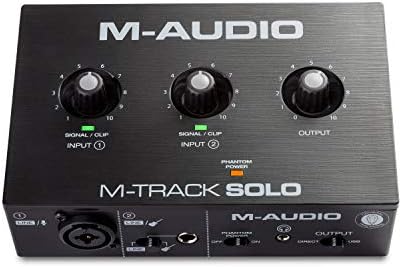
- USB sound card for Mac or PC, 48kHz resolution
- One combo XLR / Line input, one Line / Instrument input
- 1/8" headphone and stereo RCA outputs, USB/Direct switch
- M-Track Solo Crystal Preamp works with condenser mics

- UMC22 interface for Mac or Windows computers
- Compatible with Avid Pro Tools, Ableton Live, Steinberg Cubase
- Midas-designed mic preamp built in
- Direct monitor select, phones output, signal clip LEDs, USB power

- Scarlett 3rd Gen mic pre-amps with switchable Air mode
- Two high-headroom instrument inputs with Gain Halos
- High-performance converters record at up to 24-bit/192kHz
- 2 low-noise balanced outputs and headphone connection

- USB sound card for Mac or PC, 48 kHz resolution
- 2 combo XLR/MIC/LINE inputs, 2 independent RCA stereo jacks
- +48V phantom power with ultra-low noise design
- 1/4” headphone and stereo 1/4” outputs, USB/Direct switch

- 24-Bit/192kHz audio conversion rate
- Direct Monitor switch for real-time monitoring, USB-powered
- Dual XLR/Line combo inputs, independent gain, LED Peak indicators, 48V phantom
- Works with Windows, macOS, iOS/Android; compatible with Audacity, Ableton, Pro Tools

- Cubilux CB5 has 2 stereo mic jacks, 1 line-in, 1 line-out, 1 headphone jack
- Independent device names enable multi-track recording
- Built-in chip captures audio up to 96 KHz/24-bit
- Hi-Res DAC drives monitors up to 250 Ohm, 192 KHz/32-bit playback

- Synido 2×2 interface supports 24-bit depth and 48kHz sampling rate
- Three monitoring modes including Stereo and Mix
- XLR interface supports 6.35mm and XLR microphones, LED volume lights
- 48V phantom power switch with noise reduction

- Q-12 interface provides 16-Bit/48kHz resolution, XLR and 3.5mm inputs
- Switchable 48V phantom power, fast transmission rates
- USB powered from computer, no external adapter needed
- Solid build designed for students and beginners
1. M-AUDIO M-Track Duo USB Audio Interface
Best for: musicians recording vocals and instruments simultaneously.
This interface gives you versatile inputs that accept XLR, line, and instrument signals, so you can plug in a condenser mic and an electric guitar at the same time. Phantom power is built in for sensitive studio microphones.
Monitoring is handled through a 1/4″ headphone output and stereo 1/4″ main outputs. A physical USB/Direct switch lets you toggle between hearing your computer’s playback and the raw input signal with zero latency. The included MPC Beats software from Akai Professional gives you a starting point for beat-making right out of the box.
The M-Track Duo delivers 48kHz audio resolution, matching the Behringer UMC22. The Crystal Preamps are designed to stay transparent, keeping your recordings free from unwanted coloration.
Pros
- Dual XLR/Line/Instrument inputs with phantom power
- 1/4″ headphone and stereo 1/4″ monitor outputs
- USB/Direct switch for zero-latency monitoring
- Includes MPC Beats software from Akai Professional
- Delivers 48kHz audio resolution
Cons
- Audio resolution has a fixed ceiling, so projects demanding higher fidelity require a different unit.
- The box includes MPC Beats software but not a DAW license, meaning recording software is still a separate step.
2. M-AUDIO M-Track Solo USB Audio Interface
Best for: solo podcasters working on very small desks.
When space is tight, having fewer jacks actually makes life easier. The M-Track Solo strips things down to one combo XLR/Line input with phantom power and a second Line/Instrument input. You still get those Crystal Preamps to keep your voice or acoustic guitar sounding clear.
This model uses a 1/8″ headphone output alongside stereo RCA monitor outputs. You can plug standard earbuds directly in without an adapter. The USB/Direct switch remains, giving you that crucial zero-latency monitoring path.
Pros
- One combo XLR/Line input with phantom power
- Dedicated Line/Instrument input
- 1/8″ headphone output and stereo RCA outputs
- USB/Direct switch for zero-latency monitoring
- Includes MPC Beats software
Cons
- Only one combo XLR input is provided, so recording two microphones simultaneously requires a different interface.
- Monitor outputs use RCA jacks rather than 1/4″, which means standard studio monitors may need adapter cables.
3. Behringer UMC22 Audiophile 2×2
Best for: singers wanting Midas-designed preamp clarity.
Behringer built the UMC22 around a specific advantage: a Midas-designed mic preamplifier. You’ll find one combination jack on the front panel accepting balanced XLR, 1/4″ TRS, and unbalanced 1/4″ TS connections, plus a dedicated 1/4″ TRS instrument input.
Monitoring is handled through a Direct Monitor select switch, letting you hear yourself without routing the signal through your computer first. Status and Signal Clip LEDs sit right on the faceplate, so you can see instantly if your input is too hot. The rear panel holds a +48V phantom power switch, a USB port for power and data, and two 1/4″ TRS outputs for connecting studio monitors directly.
Pros
- Midas-designed mic preamp for high-quality audio reproduction
- Front-panel combination jack accepts XLR, 1/4″ TRS, and 1/4″ TS
- Dedicated 1/4″ TRS instrument input
- Direct Monitor select switch with Signal Clip LEDs
- Rear-panel +48V phantom power switch and dual 1/4″ TRS outputs
Cons
- The maximum sample rate is fixed, so high-resolution recording sessions will hit a hard limit.
- The front panel offers only one combination jack, meaning a second microphone requires a separate preamp.
4. Focusrite Scarlett Solo 3rd Gen USB-C Audio Interface
Best for: producers needing high-resolution converters and warranty coverage.
The third-generation Scarlett Solo captures audio at up to 24-bit/192kHz. That places it alongside the Jolgoo 2×2 USB for sheer resolution. A switchable Air mode adds extra clarity to acoustic instruments, mimicking the response of classic transformer-based preamps.
Two high-headroom instrument inputs let you plug in guitars or basses without worrying about clipping. Gain Halos light up around the knobs, shifting colors to show you exactly when your signal is healthy or distorting. On the output side, two low-noise balanced outputs provide clean playback for your studio monitors, while a dedicated headphone jack handles private listening. It connects via USB-C, ensuring modern compatibility with current laptops.
Pros
- Records and mixes at up to 24-bit/192kHz
- Switchable Air mode for added acoustic clarity
- Visual Gain Halos prevent unwanted distortion
- Includes Pro Tools Intro+, Ableton Live Lite, and Cubase LE
- Backed by a three-year global warranty
Cons
- Designed as a USB-C interface, so older computers without that port will need an adapter to connect.
- The box lists software licenses but no physical cables beyond the USB connection, so monitor cables remain a separate task.
5. BOMGE mini 2 Channel USB Audio Interface
Best for: beginners needing instant driver-free setup.
BOMGE designed this mini interface to work without downloading drivers on Mac OS or Windows. You simply plug it in and start recording, which removes the most frustrating hurdle for new users. Dedicated XLR/MIC/LINE inputs with +48V phantom power let you run professional condenser microphones right away.
For monitoring, you get a 1/4″ headphone output and stereo 1/4″ outputs, paired with a USB/Direct switch for zero-latency tracking. The rear connectivity stands out here: two independent RCA stereo jacks let you hook up PA speakers, powered monitors, or amplifiers. You can choose RCA TRS for balanced connections or TS for unbalanced ones, adapting to whatever gear you already own.
Pros
- Dual XLR/MIC/LINE inputs with +48V phantom power
- Driver-free plug-and-play on Mac OS and Windows XP or later
- Independent RCA stereo jacks for various speaker connections
- 1/4″ headphone output with USB/Direct switch
- Ultra-portable size for mobile recording
Cons
- Audio resolution is capped at 48 kHz, which rules out high-definition recording workflows.
- The listing notes Windows XP compatibility, but newer operating systems aren’t explicitly named beyond “Mac OS and Windows XP or later.”
6. Jolgoo 2×2 USB Audio Interface
Best for: engineers wanting 192kHz resolution in a metal shell.
Jolgoo packs 24-bit/192kHz conversion into a sturdy metal housing designed to shield against electrical interference. Dual versatile inputs accept both XLR and line signals, featuring independent gain controls so you can balance a loud amp against a quiet singer easily. LED Peak indicators flash when your signal approaches clipping, helping you dial in the perfect level before hitting record.
Built-in +48V phantom power supports professional studio condenser microphones without external supplies. A Direct Monitor switch provides zero-latency playback, letting you hear yourself in real time through the dedicated headphone output. The interface draws power entirely over USB, eliminating the need for a wall outlet. It ships with both USB-C and USB-A cables, ensuring you can connect to modern tablets or traditional desktop towers immediately.
Compatibility spans Windows, macOS, iOS, and Android devices, working seamlessly with DAWs like Audacity, Ableton, and Pro Tools. Comparing its sample rate to the Cubilux CB5 USB, the Jolgoo reaches 192kHz against the Cubilux’s 96kHz recording ceiling. That headroom matters if you plan to pitch-shift audio or master tracks for high-resolution distribution.
Pros
- 24-bit/192kHz high-fidelity audio conversion
- Rugged metal housing shields against interference
- Dual inputs with independent gain control and LED Peak indicators
- Built-in +48V phantom power for condenser mics
- Includes both USB-C and USB-A cables
Cons
- Requires a wired USB connection, so completely wireless recording setups can’t use this interface.
7. Cubilux CB5 USB Audio Interface
Best for: podcasters recording multiple guests on separate tracks.
Cubilux built the CB5 as a 5-in-1 audio hub, converting a single laptop USB port into two stereo microphone jacks, one line-in, one line-out, and one headphone jack. This layout solves a specific problem: getting multiple voices onto isolated tracks. By assigning independent device names to each interface within your software, you can record multi-track audio without routing everything through a complex mixer. It captures sound up to 96 KHz/24-bit using a built-in advanced chip.
Playback quality gets a boost from an integrated Hi-Res DAC capable of driving studio monitors up to 250 Ohm. That DAC delivers pristine sound up to 192 KHz/32-bit for your listening chain, even though recording maxes out lower. The entire unit requires no external power source, drawing everything it needs from your computer.
One limitation noted in the listing is that the line-out jack and the audio output jack can’t be used simultaneously. You’ll have to choose between feeding your monitors or your headphones at any given moment. Comparing its input style to the Behringer UMC22, the Cubilux uses 3.5mm stereo microphone jacks against the Behringer’s professional XLR/TRS combo jack. That makes the Cubilux ideal for headset mics and lavaliers rather than large-diaphragm studio condensers.
Pros
- Converts one USB port into five distinct audio connections
- Assigns independent device names for easy multi-track recording
- Integrated Hi-Res DAC drives monitors up to 250 Ohm
- Captures audio up to 96 KHz/24-bit
- No external power source required
Cons
- The line-out jack and audio output jack can’t be used simultaneously, forcing a choice between monitors and headphones.
- Microphone inputs are 3.5mm stereo jacks, so standard XLR studio microphones won’t plug in directly.
8. Synido USB C Interface
Best for: streamers switching between recording and broadcast modes.
Synido designed this 2×2 interface around three distinct monitoring modes to handle different creative tasks. Stereo mode presents independent left and right channels for accurate recording, while Mix mode blends your input audio with computer playback in real time—perfect for live broadcasts. USB mode isolates the computer’s audio alone, which suits post-production editing.
The faceplate features three independent control areas and color-coded LED lights in green, orange, and red to display volume levels visually. Dual inputs support 6.35mm and XLR microphones, with a simple switch toggling between Line In and instrument modes. A professional 48V phantom power switch drives condenser mics with excellent noise reduction performance.
It weighs only 300g and measures 14 x 11.5 x 4.5 cm, making it highly portable. The box includes a 3.5mm to 6.35mm adapter and a USB-C to USB-A data cable for immediate connection to phones or computers. The listing recommends downloading a third-party universal ASIO driver for optimal DAW compatibility. Comparing its monitoring options to the M-Audio M-Track Duo, the Synido offers three switchable modes against the Duo’s single USB/Direct toggle.
Pros
- Three switchable monitoring modes (Stereo, Mix, USB)
- Color-coded green, orange, and red LED volume indicators
- Supports 6.35mm and XLR microphones with 48V phantom power
- Weighs only 300g with included adapters and cables
- 24-bit depth and 48kHz sampling rate
Cons
- The listing recommends downloading a third-party universal ASIO driver, adding a setup step before recording.
- Sampling rate is limited to 48kHz, which falls short of interfaces offering 192kHz on this list.
9. XTUGA USB Audio Interface
Best for: students building their first basic home studio.
XTUGA targets beginners with the Q-12, a straightforward interface providing 16-Bit/48kHz resolution. It features both an XLR input and a 3.5mm microphone jack, accommodating standard dynamic mics alongside headset microphones. An upgraded chip aims to eliminate the popping noises that plague entry-level gear, ensuring crystal-clear daily music production. Switchable 48V phantom power lets you step up to condenser microphones when you’re ready to improve your vocal quality.
Setup is entirely plug-and-play via USB, drawing power directly from your computer without any external adapters. Fast transmission rates deliver zero latency, letting you track vocals without distracting delays. The solid build is designed to withstand the rigors of home karaoke and network streaming better than fragile alternatives. Low power consumption keeps your laptop battery draining slower during mobile sessions.
Pros
- Provides both XLR and 3.5mm microphone inputs
- Switchable 48V phantom power for condenser mics
- Plug-and-play USB connection requires no external power
- Solid build designed for durable daily use
- Upgraded chip reduces popping noise
Cons
- Audio resolution is limited to 16-Bit/48kHz, restricting dynamic range compared to 24-bit interfaces.
- The inclusion of a 3.5mm mic jack instead of a second XLR input limits professional dual-microphone setups.
Also Worth Considering
JOLGOO USB Audio Interface is a red 24-Bit/192kHz plug-and-play recording sound card. The Jolgoo 2×2 USB on our main list beats it by specifying a rugged metal housing and including both USB-C and USB-A cables, whereas this listing only mentions the color and resolution.
Piyone Audio Interface is a 2X2 24-bit/192kHz interface in an alloy red finish featuring a monitor mix and loopback function. The Synido USB C Interface covers similar ground with its three dedicated monitoring modes and explicit LED level indicators, making the Synido the clearer choice for streamers needing visual feedback.
Tiimge USB Audio Interface is a 2×2 recording interface offering 48V phantom power and 24Bit/192kHz studio sound with XLR/TRS inputs. The Behringer UMC22 edges ahead for pure preamp pedigree thanks to its Midas-designed circuitry, though the Tiimge offers a much higher 192kHz sample rate compared to the Behringer’s 48kHz limit. Users wanting high-resolution conversion alongside standard XLR/TRS combo jacks could consider the Tiimge.
How We Chose
Thirty Amazon listings were compared on input configurations, sample rate specifications, and included software bundles, and near-duplicates — another colour, another size of one already here — were left out. To earn a place, a listing had to state its exact audio resolution, specify the types of inputs provided, and confirm how the unit receives power. Interfaces lacking clear descriptions of their monitoring capabilities or phantom power switches were excluded from the final selection. What separates these picks is how they handle specific workflows: some prioritize multi-track routing, others focus on high-resolution conversion, and a few strip everything down for absolute simplicity. Every chosen product explicitly details its connection type and compatible operating systems within the seller’s description, ensuring buyers can verify compatibility before purchasing.
How to Choose the Right Audio Interface
Input count and connector types
Decide how many sources you need to record at once. A solo podcaster only needs one microphone input, which the M-Audio M-Track Solo provides via a single combo jack. Musicians tracking guitar and vocals together require two inputs, like those on the M-Audio M-Track Duo or BOMGE Mini 2 Channel. Check whether your microphones use XLR or 3.5mm connectors to match the interface.
Sample rate and bit depth
Higher numbers capture more audio detail. The Focusrite Scarlett Solo 3rd Gen and Jolgoo 2×2 USB both list 24-bit/192kHz conversion, ideal for professional music production. Spoken word and basic streaming sound perfectly fine at 48kHz, which the Behringer UMC22 and Synido USB C Interface deliver. Match the resolution to your actual project needs rather than buying specs you won’t use.
Monitoring modes and latency
Hearing yourself without delay is critical when recording. Look for a direct monitoring switch, found on the M-Audio M-Track Duo and BOMGE Mini 2 Channel, which bypasses computer processing. Streamers benefit from multiple modes; the Synido USB C Interface offers Stereo, Mix, and USB settings. These physical switches prevent the distracting echo that ruins vocal takes.
Software and bundled extras
An interface often includes the programs you need to start creating. The Focusrite Scarlett Solo 3rd Gen ships with Ableton Live Lite, Pro Tools Intro+, and Cubase LE. M-Audio models include MPC Beats from Akai Professional. If you already own recording software, these bundles matter less, but beginners save significant effort by using the included digital audio workstations.
Frequently Asked Questions
Do I need phantom power for my microphone?
Only if you use a condenser microphone. Dynamic microphones don’t require it, but condenser mics need +48V to operate properly. The Behringer UMC22, BOMGE Mini 2 Channel, and Synido USB C Interface all feature dedicated phantom power switches. Always check your microphone’s specifications before engaging the switch, as sending phantom power to certain ribbon microphones can cause damage.
Can I connect these interfaces to my phone or tablet?
Some models support mobile devices, while others are strictly for computers. The Jolgoo 2×2 USB explicitly lists compatibility with iOS and Android devices and includes USB-C cables for direct connection. The Synido USB C Interface also connects to mobile phones via its included USB-C to USB-A cable. Other units, like the XTUGA USB Interface, specify PC connections only.
Why does bit depth matter for recording?
Bit depth determines the dynamic range your interface can capture. A 24-bit depth, found on the Focusrite Scarlett Solo 3rd Gen and Jolgoo 2×2 USB, records quieter sounds without introducing digital noise. The XTUGA USB Interface uses 16-Bit resolution, which is standard for CD audio but offers less headroom for mixing. Higher bit depth gives you more room to adjust volume during editing.
Is a direct monitor switch really necessary?
Yes, if you plan to sing or play along with backing tracks. Without it, your audio travels into the computer, gets processed, and returns with a slight delay called latency. The M-Audio M-Track Solo and Cubilux CB5 USB both feature switches to route the input directly to your headphones. This zero-latency path keeps your performance tight and natural.
What is an ASIO driver and do I need one?

ASIO is a protocol that allows audio software to communicate directly with your interface, reducing latency on Windows machines. The Synido USB C Interface recommends downloading a third-party universal ASIO driver for optimal performance with digital audio workstations. Mac users generally rely on Core Audio instead, which functions similarly without extra downloads. Installing the recommended driver ensures smoother multi-track recording sessions.
Can I use RCA outputs with studio monitors?
You can, provided your monitors accept RCA inputs or you use adapter cables. The M-Audio M-Track Solo outputs audio via stereo RCA jacks. Many entry-level powered speakers include RCA connections, making the Solo a convenient match, though professional monitors usually expect balanced 1/4″ or XLR connections.
Conclusion
Once your gear arrives, plug in a mic and test the levels before you start recording. You don’t need a fancy studio to capture something real. Just hit record, listen back with headphones, and trust what you hear. That’s how every great track begins.
As an Amazon Associate, Cleanestor earns from qualifying purchases at no additional cost to you.