
The best audio interface for PC is the Focusrite Scarlett 2i2, because its listed 120dB dynamic range and Auto Gain make recording straightforward. This guide helps anyone setting up a home studio, streaming desk, or podcasting space on a computer. What separates these picks isn’t just input counts; it’s whether you need onboard effects, mobile device support, or software that handles everything right out of the box.
- Best Overall: Focusrite Scarlett 2i2 — 120dB dynamic range with Auto Gain keeps recordings clean.
- Best for Songwriters: Focusrite Scarlett Solo — single mic preamp plus Air mode shapes vocals instantly.
- Best for High-Gain Mics: Elgato Wave XLR — 80dB gain drives quiet microphones without extra hardware.
- Best for Dual Device Streaming: MAONO P2 Hybrid — dual USB ports connect a computer and phone at once.
- Best for Portable Recording: PreSonus AudioBox 96 — bus-powered over USB 2.0 needs no wall outlet.
- Best Dual-Input Compact: M-AUDIO M-Track Duo — two combo inputs fit inside a small footprint.
- Best for Guitarists: Fender AudioBox GO — dedicated TS instrument input and amp models included.
- Best for Podcasting: FIFINE PC Audio Mixer — separate monitor knob gives real-time vocal control.
- Best for Mobile Streaming: IK Multimedia iRig Stream — stereo RCA inputs accept mixers and keyboards directly.
- Best Plug-and-Play: YONDRIX USB Interface — no driver required for Windows or Mac systems.
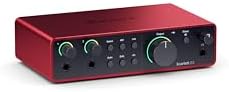
- 4th Gen mic pres for mic and guitar
- 120dB dynamic range using Focusrite flagship converters
- Auto Gain sets levels, Clip Safe prevents clipping
- Air mode adds presence and harmonic drive

- Solo 4th Gen interface for mic and guitar
- 120dB dynamic range using Focusrite flagship converters
- Improved Air mode adds presence and harmonic drive
- Includes recording software and plugins

- 80dB gain for any XLR microphone
- 24bit, 48kHz audio resolution monitoring
- Built-in voice enhancer, compressor, EQ, Wave FX Processor
- Touch control with customizable LED feedback

- Dual USB ports with MFi-certified connectivity
- 56dB dual XLR inputs, 24-bit/192kHz, -130dB EIN
- Independent mute and monitor controls, stream mode
- ProStudio 2 software routes audio to dedicated channels
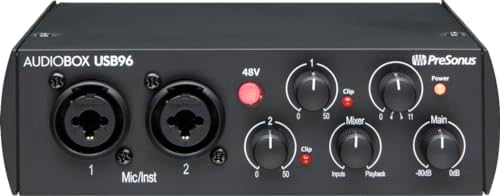
- 2-channel USB 2.0 interface
- 2 Class-A mic preamps
- 2 instrument inputs plus MIDI I/O
- 24-bit/96 kHz recording and playback

- USB sound card delivering 48kHz audio resolution
- Two combo XLR / Line / Instrument inputs with phantom power
- 1/4" headphone and stereo 1/4" outputs, zero latency
- M-Track Duo Crystal Preamps for all microphones
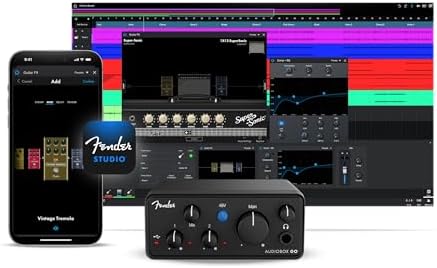
- 2×2 USB-C interface with 24-bit/96 kHz converters
- Fender Studio app provides amp models and effects
- XLR mic/line combo input with +48V phantom power
- Dedicated TS instrument input for guitar and bass

- One XLR microphone and one instrument interface
- 48V phantom power and mic gain knob
- Dedicated instrument input with separate volume knob
- Direct monitor with dedicated monitoring knob
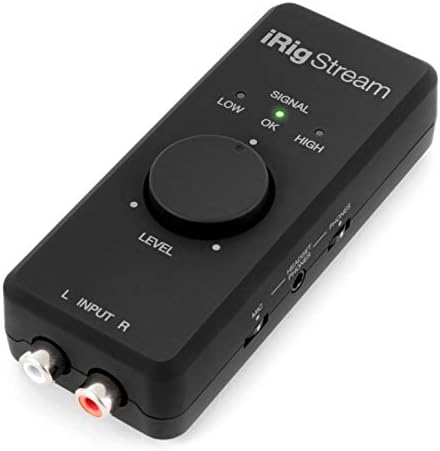
- 24-bit, 96 kHz interface with stereo RCA inputs
- Connects mixers, keyboards, earbud mic, supports loopback
- Headphone output for real-time direct monitoring
- Global audio level LED indicator for gain

- No driver required, works with Windows and Mac
- Dual XLR/Line inputs, 60dB preamp gain, HI-Z switching
- 48V phantom power with indicator light
- Low-latency audio for vocals and instruments
1. Focusrite Scarlett 2i2 4th Gen USB-C Audio Interface
Best for: home studio builders needing reliable two-track recording
The fourth generation of this interface brings a 120dB dynamic range to a desktop setup. That figure means the gap between the quietest noise floor and the loudest signal is wide enough to capture subtle details without distortion. You’ll plug in a microphone and a guitar at the same time using both available connections.
Auto Gain sets the level automatically, while Clip Safe stops the signal from distorting if you play too hard. These features matter when you’re focused on performing instead of watching meters. The included software bundle has Pro Tools Intro+, Ableton Live Lite, Cubase LE, and the Hitmaker Expansion, so you don’t have to hunt for recording tools after unboxing.
Air mode adds harmonic drive to vocals and acoustic instruments. It’s a simple switch that changes the character of the preamp, pushing your voice forward in a mix. Anyone who records several sources simultaneously will find the available connections limiting here. Compared to the Focusrite Scarlett Solo, the 2i2 lists double the connections of the smaller model.
- 120dB dynamic range
- Auto Gain and Clip Safe features
- Air mode for added presence
-
Includes Pro Tools Intro+, Ableton Live Lite, Cubase LE, and Hitmaker Expansion
-
The limited number of connections restricts multi-mic sessions, so recording a full drum kit requires a different unit.
2. Focusrite Scarlett Solo 4th Gen USB-C Audio Interface
Best for: solo artists recording one vocal and one instrument
This interface targets songwriters who only need to record a single microphone and one instrument at a time. It shares the 120dB dynamic range found on the larger model, meaning the converters handle quiet whispers and loud strums with the same clarity. You’ll get the exact same software suite: Pro Tools Intro+, Ableton Live Lite, Cubase LE, and the Hitmaker Expansion.
The improved Air mode lifts vocals and guitars to the front of the mix. When you’re singing and playing, that presence helps your voice sit above the chords without extra mixing work. It’s a streamlined setup where you plug in, set your levels, and start tracking immediately.
Having only a single microphone preamp means you can’t record two singers facing each other at once. If your workflow ever expands to interviews or duets, you’ll need a second interface or a mixer feeding into this one. The Focusrite Scarlett 2i2 offers double the connections against the single mic input listed here.
- 120dB dynamic range
- Improved Air mode for vocals and guitars
- Includes Pro Tools Intro+, Ableton Live Lite, Cubase LE, and Hitmaker Expansion
-
Single mic preamp simplifies solo setups
-
A single mic input rules out recording two vocalists together, so duets require a different approach.
3. Elgato Wave XLR MK.2 USB Audio Interface and DSP Mixer
Best for: streamers using low-output dynamic microphones
Eighty decibels of gain is the headline feature here. That amount of amplification drives any XLR microphone with loud, clear output. You’ll plug your XLR mic directly into the interface and get a loud, clear signal ready for streaming or voiceover work.
Onboard DSP includes a voice enhancer, compressor, and EQ managed through the Wave Link app. The Wave FX Processor unifies DSP effects and VST plugins in one signal chain. Touch controls on the top panel let you mute yourself or adjust levels instantly, with customizable LED lighting showing your current status.
The MAONO P2 Hybrid captures audio at 24-bit/192kHz against the 24-bit, 48kHz resolution listed here.
- 80dB gain for demanding microphones
- Onboard voice enhancer, compressor, and EQ
- Touch mute with customizable LED feedback
- Wave Link app integration for routing
4. MAONO P2 Hybrid USB Audio Interface Dual XLR
Best for: creators streaming from a PC and phone simultaneously
Dual USB ports with MFi-certified connectivity let you hook up a computer and a smartphone or iPad at the same time. You can record a track in Logic Pro on your laptop while streaming the session live from your phone. It removes the need to constantly swap cables when switching between devices.
The interface supports 24-bit/192kHz quality with a -130dB EIN rating. Fifty-six decibels of gain is available across the dual XLR inputs, and ASIO support keeps latency down during monitoring.
ProStudio 2 software handles routing, letting you send Spotify or browser audio to specific channels. Built-in loopback captures your instrument, voice, and backing tracks together. The Elgato Wave XLR provides 80dB gain against the 56dB listed on this hybrid model.
- Dual USB ports for simultaneous PC and mobile connection
- 24-bit/192kHz resolution with -130dB EIN
- Independent mute and monitor controls
- ProStudio 2 software with built-in loopback
-
Aluminum-alloy housing with a 15° tilt angle
-
56dB of gain limits use with very low-output microphones, so hungry dynamic mics might sound too quiet.
5. PreSonus AudioBox 96 25th Anniversary USB Audio Interface
Best for: musicians taking their recording setup on the road
Bus power over USB means this interface runs entirely from your laptop without a wall adapter. You can throw it in a backpack, plug it in anywhere, and start recording both channels immediately. Dual Class-A mic preamps and dual high-headroom instrument inputs give you enough connections for a vocal and a guitar.
A physical mixer control knob blends your input signal with playback audio for zero-latency monitoring. Instead of digging through software menus to hear yourself, you just turn the dial until the balance sounds right. The unit also includes MIDI I/O, allowing you to connect older synthesizers or drum machines that rely on five-pin cables.
- USB 2.0 bus-powered operation
- Two Class-A mic preamps
- MIDI I/O for external gear
- Mixer control for zero-latency blending
-
Includes Studio One Artist and Ableton Live Lite
-
24-bit/96 kHz is the maximum resolution, so audiophile projects requiring 192kHz sampling need another interface.
6. M-AUDIO M-Track Duo USB Audio Interface
Best for: beginners needing two inputs in a tiny footprint
Two combo XLR/Line/Instrument inputs with phantom power fit into a chassis designed for tight desks. You can plug in a condenser mic on one side and a bass guitar on the other without needing adapters. Crystal Preamps aim to deliver transparent sound, keeping your source audio uncolored during tracking.
A physical USB/Direct switch handles monitoring. Flip it to Direct, and you hear your instrument with zero latency; flip it back to USB to hear your software playback. The 1/4″ headphone output and stereo 1/4″ main outputs give you standard connections for studio monitors and cans alike.
For spoken word, podcasting, or casual streaming, that’s completely sufficient, but it leaves less room for heavy pitch-shifting or high-end production. The included MPC Beats software focuses on beat-making rather than traditional multi-track recording. The PreSonus AudioBox 96 supports 96 kHz against the 48kHz resolution stated here.
- Two combo XLR/Line/Instrument inputs
- Switchable 48V phantom power
- USB/Direct switch for zero-latency monitoring
- Stereo 1/4″ outputs and 1/4″ headphone jack
- Includes MPC Beats software
7. Fender AudioBox GO USB Audio Interface
Best for: guitarists wanting authentic amp tones on a PC
A dedicated TS instrument input optimized for guitar and bass sets this apart from interfaces that only offer generic line-level jacks. You’ll plug your electric guitar straight in and access the Fender Amp & FX Pack through the Fender Studio app. It puts classic amplifier models right inside your recording software.
The hardware itself is an ultra-compact 2×2 USB-C interface with 24-bit/96 kHz converters. An XLR mic/line combo input with switchable +48V phantom power handles vocals when you want to sing over your riffs. Bus-powered design keeps the whole rig portable, running off your laptop battery during practice or travel.
Zero-latency headphone monitoring with mix control lets you blend your dry guitar signal with the processed sound from your computer. Registering the hardware includes a Fender Studio Pro 6 Month Trial. The FIFINE PC Audio Mixer uses standard knobs for control against the app-dependent amp modeling found here.
- Dedicated TS instrument input for guitar and bass
- Fender Amp & FX Pack via Fender Studio app
- 24-bit/96 kHz converters
- USB-C bus-powered design
- Zero-latency headphone monitoring with mix control
8. FIFINE PC Audio Mixer
Best for: podcasters adjusting levels by hand during shows
Physical knobs dominate the layout here, giving you immediate tactile control over your sound. A dedicated mic gain knob lets you ride the volume of a guest who suddenly laughs too loud, while a separate monitoring knob adjusts what you hear in your headphones. It’s a hands-on approach that keeps your eyes off the screen.
A single XLR microphone interface with 48V phantom power handles condenser mics, and a separate instrument input takes a guitar or keyboard. The direct monitor functionality routes your input straight to your headphones without passing through the computer first, eliminating the distracting delay that ruins vocal takes.
With only a single XLR input, hosting a roundtable with three people in the same room requires an external mixer feeding into this unit. It’s built for solo broadcasters or one-on-one remote interviews rather than multi-guest studio panels. The MAONO P2 Hybrid lists double the XLR inputs against the single XLR interface provided here.
- Dedicated mic gain knob
- Separate monitoring volume knob
- 48V phantom power for condenser microphones
- Direct monitor functionality for zero-latency listening
-
Instrument input for guitars or keyboards
-
One XLR input restricts multi-guest setups, so two people in one room need a separate mixer.
9. IK Multimedia iRig Stream stereo audio interface
Best for: DJs connecting mixers to phones and laptops
Stereo RCA inputs are the defining feature of this interface. Instead of XLR jacks meant for microphones, you’ll plug in DJ mixers, synthesizers, or audio players directly. It bridges professional line-level gear with consumer devices like iPhones, iPads, and PCs for live-streaming or recording sets.
Loopback functionality lets you jam along with music playing on your smartphone or tablet. You can route backing tracks from an app, play your keyboard over them, and send the combined stereo signal to a streaming platform. A global audio level LED indicator helps you dial in the right gain quickly before going live.
Direct monitoring works through the headphone output, letting you connect earbuds to hear the stream with no latency. Because it relies on RCA inputs, plugging in a standard XLR vocal microphone requires an adapter cable not mentioned in the listing. The FIFINE PC Audio Mixer accepts XLR mics natively against the RCA-only inputs listed here.
- Stereo RCA inputs for mixers and keyboards
- Loopback function for jamming with device audio
- Global audio level LED indicator
- Direct monitoring via headphone output
-
Connects to iPhone, iPad, Mac, and PC
-
Stereo RCA inputs exclude direct XLR microphone connections, so singers need an adapter or a different interface.
10. YONDRIX USB Interface
Best for: users avoiding driver installations entirely
No driver is required for Windows or Mac systems. You simply connect the included USB cable and start recording in software like Pro Tools, Ableton Live, or Cubase. It strips away the troubleshooting step that often frustrates beginners setting up their first studio.
Dual XLR/Line combo inputs feature 60dB preamp gain and HI-Z switching for high-impedance instruments. Balanced TRS outputs connect to studio monitors, while a dedicated headphone output with separate level control handles private listening. The 48V phantom power switch includes an indicator light so you always know when your condenser mic is receiving power.
Recording happens at 24-bit/192kHz, matching the highest resolution on this list. The package includes both a USB-A to C cable and a USB-B 2.0 to USB-A cable, covering modern and older computers. However, it lacks the specialized software bundles or amp modeling suites that accompany brand-name competitors. The Focusrite Scarlett 2i2 includes multiple DAWs against the basic manual provided in this box.
- No driver required for plug-and-play setup
- 24-bit/192kHz recording resolution
- 60dB preamp gain with HI-Z switching
- 48V phantom power with indicator light
- Includes USB-A to C and USB-B to USB-A cables
Also Worth Considering
The Piyone Audio Interface is a 2X2 24-bit/192kHz unit featuring XLR/TRS combo inputs, loopback, and an alloy red finish. The MAONO P2 Hybrid beats it for mobile creators by listing dual USB ports for simultaneous phone and PC connections, whereas the Piyone mentions a one-cable setup. It still suits desktop-only users wanting loopback.
The Tiimge USB Audio Interface is a 2×2 recording device offering 48V phantom power, 24-bit/192kHz resolution, and XLR/TRS inputs for guitar and podcasting. The Focusrite Scarlett 2i2 surpasses it with a stated 120dB dynamic range and Auto Gain features that simplify tracking. Buyers who just need standard phantom power might prefer this simpler layout.
The NUOSIYA USB Audio Interface is a 24-bit/192kHz unit aimed at PC and Mac recording, featuring 48V phantom power and a red guitar-friendly design. The Fender AudioBox GO outpaces it for guitarists by including a dedicated TS instrument input and an entire amp and FX pack. It remains an option for basic vocal tracking.
How to Choose the Right Audio Interface for PC
Inputs and what you plan to record
Decide what you’re plugging in before looking at anything else. A solo singer needs one XLR input, like the Focusrite Scarlett Solo. A podcaster interviewing guests in person requires two, as seen on the MAONO P2 Hybrid. Connecting a DJ mixer demands RCA inputs, which only the IK Multimedia iRig Stream lists here.
Sample rate and bit depth
Higher numbers mean more audio data captured per second. The YONDRIX USB Interface and MAONO P2 Hybrid both state 24-bit/192kHz resolution, capturing fine detail for music production. The M-AUDIO M-Track Duo lists 48kHz, which is plenty for spoken-word podcasts but leaves less flexibility for heavy audio editing.
Included software and effects
Hardware gets you sound into the computer, but software shapes it. The Focusrite Scarlett 2i2 bundles Pro Tools Intro+, Ableton Live Lite, and Cubase LE. The Fender AudioBox GO skips traditional DAWs but includes amp models via its app. Check what’s in the box so you aren’t downloading tools later.
Power and portability
Interfaces drawing power from your laptop’s USB port skip the wall outlet entirely. The PreSonus AudioBox 96 specifies USB 2.0 bus power, making it ideal for travel. Units requiring external power supplies tie you to a desk. Always verify how the device receives electricity before packing it for mobile sessions.
Frequently Asked Questions
Do I need to install drivers for these interfaces?
It depends on the model. The YONDRIX USB Interface explicitly states no driver is required for Windows or Mac systems, letting you plug in and record immediately. Other brands may rely on native operating system drivers or require specific downloads for advanced features like ASIO support, which the MAONO P2 Hybrid lists for lower latency.
Can I use a condenser microphone with any of these?
Yes, provided the interface supplies 48V phantom power. The FIFINE PC Audio Mixer, M-AUDIO M-Track Duo, and YONDRIX USB Interface all list 48V phantom power specifically for condenser microphones. Without this voltage, condenser capsules won’t produce a signal, so always check the spec sheet before pairing your mic.
Which interface works best for live streaming?
Streaming requires routing computer audio alongside your microphone. The MAONO P2 Hybrid includes built-in loopback and ProStudio 2 software designed to send app audio to dedicated channels. The IK Multimedia iRig Stream also lists loopback functionality, letting you jam along with smartphone audio and broadcast the combined signal directly.
Will these work with my phone or tablet?
Not all of them support mobile devices. The MAONO P2 Hybrid features dual USB ports with MFi-certified connectivity for iPhones and iPads. The IK Multimedia iRig Stream explicitly lists compatibility with iPhone, iPad, and Android devices. Standard USB interfaces meant strictly for PC or Mac might not communicate with mobile operating systems.
What does dynamic range actually affect?

Dynamic range dictates the difference between the quietest possible noise and the loudest signal before distortion. The Focusrite Scarlett 2i2 and Focusrite Scarlett Solo both advertise a 120dB dynamic range. Focusrite explains converter specifications on their support pages. A wider range preserves subtle details in your recordings.
Can I plug my electric guitar directly in?
You need an input designed for high-impedance instruments. The Fender AudioBox GO lists a dedicated TS instrument input optimized specifically for guitar and bass. Plugging a guitar into a standard line input often results in a dull tone.
Conclusion
Picking the right box is just your first move. Once it’s on your desk, plug in a mic and record something short to test your levels. You’ll quickly hear what works and what doesn’t, so don’t overthink it—just start making sound.
As an Amazon Associate, Cleanestor earns from qualifying purchases at no additional cost to you.