
The Solid State Logic 2 MKII is the best professional audio interface here because it’s the only one listing 32-bit converters and four line outputs. This guide helps producers, podcasters, and musicians who need clean recordings without guessing which box fits their desk. What actually separates these picks isn’t just sound quality — it’s how many inputs you get, whether they run on bus power, and what software comes in the box.
- Best Overall: Solid State Logic 2 MKII — 32-bit converters and four line outputs for full studio routing.
- Most Versatile: Focusrite Scarlett 2i2 4th Gen — Auto Gain and Clip Safe handle unpredictable levels easily.
- Best Vintage Tone: Universal Audio Volt 2 — Built-in 610 preamp mode adds classic analog warmth.
- Best Metering Display: MOTU M2 — Full-color screen shows exact signal levels at a glance.
- Most Inputs: Focusrite Scarlett 4i4 4th Gen — Two mic preamps, two Hi-Z instrument inputs, and four line inputs cover bands and drum machines.
- Best Single Input: Focusrite Scarlett Solo 4th Gen — One mic preamp keeps songwriter setups simple.
- Best Classic Design: PreSonus AudioBox 96 — Traditional USB 2.0 layout with dedicated mixer control.
- Best Inline Adapter: Shure MVX2U Gen 2 — Plugs directly into any XLR microphone without cables.
- Best Mobile Hybrid: MAONO P2 Hybrid — Dual USB ports connect a computer and phone simultaneously.
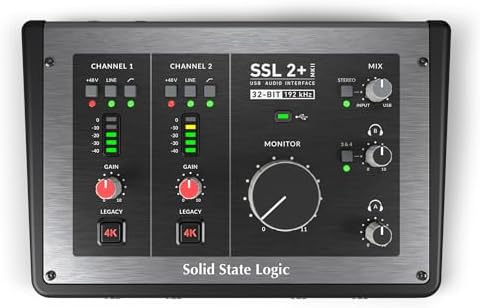
- Bus powered for Mac and Windows
- 2 XLR mic preamps, 2 1/4" line inputs
- 32-Bit / 192 kHz AD/DA converters
- 48V phantom power with zero-latency monitoring
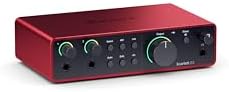
- Scarlett 4th Gen mic preamps included
- 120dB dynamic range with flagship converters
- Auto Gain sets levels, Clip Safe prevents clipping
- Air mode adds presence to vocals and guitars

- Vintage mode emulates UA classic 610 preamps
- Up to 24-bit / 192 kHz recording quality
- Includes LUNA Digital Audio Workstation
- UAD plug-ins and instruments included

- 6+GB of free content included
- USB-C audio interface with 2 preamps
- Hardware monitoring supported
- 24-bit/192kHz resolution

- Scarlett 4i4 4th Gen studio hub
- Two Scarlett 4th Gen mic preamps, MIDI I/O
- 120dB dynamic range with flagship converters
- Air mode adds presence to recordings

- Scarlett Solo 4th Gen interface
- 120dB dynamic range with flagship converters
- Improved Air mode adds presence to recordings
- Includes recording software and plugins
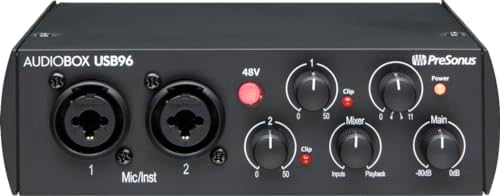
- 2-channel USB 2.0 interface
- 2 Class-A mic preamps
- 2 instrument inputs plus MIDI I/O
- 24-bit/96 kHz recording and playback

- XLR-to-USB-C interface for multiple devices
- Onboard DSP with Auto Level Mode
- Dark, Natural, or Bright tone options
- +60 dB gain and 48V phantom power

- Dual USB ports with MFi-certified connectivity
- 56dB dual XLR, 24-bit/192kHz quality
- Independent mute and headphone controls
- ProStudio 2 software routes app audio
1. Solid State Logic 2 MKII Plus USB-C Audio Interface 2×4
Best for: Producers needing maximum routing and converter resolution.
This unit brings 32-bit / 192 kHz AD/DA converters to the table, a spec that stands alone in this lineup. You’ll also find Legacy 4K Analog Enhancement, a feature that adds harmonic drive straight from the hardware.
Routing is where it really pulls ahead. Four 1/4″ line outputs let you send separate mixes to studio monitors and an external effects chain at once. Two discrete headphone outputs mean a producer and a vocalist can each set their own monitoring level without fighting over a single knob. Add stereo loopback for streaming, high-pass filters to cut rumble early, and MIDI I/O on standard 5-pin DIN jacks, and you’ve got a central hub that doesn’t force you into a corner.
Anyone tracking a full live band at once will hit a wall here, since the box lists only two XLR mic preamps and two 1/4″ line/Hi-Z inputs.
Pros
- 32-bit / 192 kHz AD/DA converters
- Four 1/4″ line outputs and two discrete headphone outs
- Legacy 4K Analog Enhancement circuit
- Stereo loopback and high-pass filters built in
- MIDI I/O on 5-pin DIN jacks
Cons
- Only two XLR mic preamps are listed, limiting multi-mic recording sessions.
2. Focusrite Scarlett 2i2 4th Gen USB-C Audio Interface
Best for: Musicians who want automatic gain protection during recording.
Auto Gain is the headline here. It sets the perfect level for your mic or guitar automatically, while Clip Safe prevents clipping if you suddenly play louder than expected.
The converters match those found in Focusrite’s flagship interfaces, delivering a stated 120dB dynamic range. Air mode lifts vocals and guitars forward in the mix, adding harmonic drive that mimics classic console behavior.
Pros
- Auto Gain sets input levels automatically
- Clip Safe prevents digital distortion during loud takes
- 120dB dynamic range using flagship converters
- Air mode adds presence and harmonic drive
- Includes Pro Tools Intro+, Ableton Live Lite, and Cubase LE
Cons
- Limited to a 2-in configuration, ruling out multi-mic setups like drum kits.
3. Universal Audio Volt 2 USB Audio Interface
Best for: Creators chasing classic analog warmth through hardware modeling.
Vintage mode is the reason this box exists. It recreates the rich, full sound of UA’s classic 610 preamps directly inside the hardware. You just press a button. It captures up to 24-bit / 192 kHz quality.
It pairs natively with the LUNA Digital Audio Workstation, giving you a workflow designed to feel like a real analog studio. You also get access to UAD plug-ins and instruments trusted by industry pros. Compatibility stretches across MacOS, Windows, iPad, and iPhone (iOS 14+), making it highly flexible for mobile recording. However, iOS users need to know that it requires an external Volt power supply and an Apple Lightning to USB Camera Adapter, except for iPads equipped with USB-C.
Pros
- Vintage mode recreates the sound of UA’s classic 610 preamps
- 24-bit / 192 kHz conversion quality
- Native integration with LUNA recording software
- Supports MacOS, Windows, iPad, and iPhone
- Includes UAD plug-ins and educational tutorials
Cons
- Requires an external power supply and Apple adapter for most iOS devices.
4. MOTU M2 USB-C Audio Interface
Best for: Engineers who rely on visual feedback for precise gain staging.
The listing highlights hardware monitoring and 2-in/2-out routing via USB-C, making it a straightforward tool for desktop producers. It operates at full studio-grade resolution. Having professional-grade clarity in a compact 2-in/2-out format makes it ideal for desktop producers who don’t need dozens of cables snaking across their workspace.
It features two preamps and connects via USB-C, keeping the setup modern and fast. Compatibility spans macOS, Windows, and iOS, meaning you can move from a desktop studio to a laptop session without changing drivers or buying new hardware. The inclusion of 6+GB of free content gives you immediate sounds and loops to build tracks around. Hardware monitoring ensures you hear your input without the delay that sometimes plagues software-based routing.
Songwriters needing to plug in a guitar and a mic simultaneously alongside a drum machine will run out of room fast.
Pros
- 24-bit/192kHz audio resolution
- Dedicated hardware monitoring for zero-latency playback
- USB-C connectivity across macOS, Windows, and iOS
- Two high-quality preamps included
- Ships with 6+GB of free content
Cons
- Restricted to 2-in/2-out routing, leaving no room for additional synthesizers or drum machines.
5. Focusrite Scarlett 4i4 4th Gen USB-C Audio Interface
Best for: Small bands and synth players needing multiple simultaneous inputs.
Channel count is the entire story here. You get two Scarlett 4th Gen mic preamps, two Hi-Z instrument inputs, four line inputs, and four line outputs. That totals enough connections to record a vocalist, a guitarist, and a stereo synthesizer all at once. MIDI I/O is also listed, keeping your hardware controllers synced without needing a separate USB hub.
Audio performance carries the same 120dB dynamic range found elsewhere in the 4th Gen family. Air mode is present too, lifting vocals and guitars with added harmonic drive. Auto Gain and Clip Safe work together to protect your recordings from sudden volume spikes, letting you focus on playing rather than staring at meters. The software bundle mirrors the smaller models, including Pro Tools Intro+, Ableton Live Lite, Cubase LE, and the Hitmaker Expansion.
Podcasters working alone with a single microphone will find the extra inputs sitting unused on their desk every day.
Pros
- Four line inputs and four line outputs
- Two Hi-Z instrument inputs for direct guitar or bass
- MIDI I/O included for hardware synchronization
- Auto Gain and Clip Safe prevent distorted takes
- 120dB dynamic range with Air mode enhancement
Cons
- Four line inputs exceed what a solo podcaster or single-vocalist setup actually requires.
6. Focusrite Scarlett Solo 4th Gen USB-C Audio Interface
Best for: Singer-songwriters recording one vocal track at a time.
This is the simplest path into the 4th Gen ecosystem. It offers exactly what a solo artist needs: one place to plug in a mic and another for a guitar. The improved Air mode pushes vocals and guitars to the front of the mix, giving your demos the presence they need before you even touch an EQ plugin.
Like its bigger siblings, it delivers a 120dB dynamic range. The software package is identical to the larger models, bundling Pro Tools Intro+, Ableton Live Lite, Cubase LE, and the Hitmaker Expansion.
Producers wanting to record two singers harmonizing together can’t do it here, as the listing supports only a single microphone connection.
Pros
- Improved Air mode for vocal and guitar presence
- 120dB dynamic range using flagship converters
- Simple layout for quick songwriter setups
- Includes Pro Tools Intro+, Ableton Live Lite, and Cubase LE
- Hitmaker Expansion provides essential effects and instruments
Cons
- Supports only one microphone connection, blocking duet or harmony recording.
7. PreSonus AudioBox 96 25th Anniversary USB Audio Interface
Best for: Traditionalists preferring physical mixer controls over software menus.
This 25th Anniversary edition sticks to a proven formula. It uses USB 2.0 and draws power directly from the connection, meaning no wall outlet is required to make it mobile friendly. The standout feature is the dedicated mixer control knob. It lets you create a custom blend between your live inputs and computer playback, so you can monitor with zero latency without opening a software window.
Inside, you’ll find two Class-A mic preamps and two high-headroom instrument inputs ready for guitars, basses, or line-level devices. MIDI I/O is built in, and the output section features a high-powered headphone jack alongside balanced ¼” TRS outputs. The software bundle is massive, shipping with Studio One Artist, Ableton Live Lite, and the Studio Magic Plug-In suite to cover every stage of production.
Pros
- Mixer control knob blends inputs and playback physically
- USB bus-powered via USB 2.0 with no external supply needed
- Two Class-A mic preamps and high-headroom instrument inputs
- Balanced ¼” TRS outputs and high-powered headphone jack
- Includes Studio One Artist and Studio Magic Plug-In suite
Cons
- Maximum recording resolution tops out at a standard professional depth, capping high-sample-rate workflows.
8. Shure MVX2U Gen 2 XLR-to-USB-C Audio Interface
Best for: Podcasters converting existing XLR mics into instant USB streams.
Form factor defines how this adapter fits into your workflow. This adapter plugs directly into the bottom of any dynamic or condenser XLR microphone. It instantly converts that mic for professional podcasting or livestreaming on a desktop, tablet, or smartphone. You get up to +60 dB of clean gain and 48V phantom power, which is enough to drive notoriously hungry broadcast microphones without needing an inline booster.
Onboard Shure Digital Audio Processing does the heavy lifting. Auto Level Mode adjusts gain in real time, keeping your voice consistent even if you lean back from the mic. You can choose a Dark, Natural, or Bright tone profile to tailor your sound immediately. The Real-Time Denoiser and Digital Popper Stopper ensure zero-latency audio stays clean without post-production fixes. Everything is managed through the MOTIV Mix, MOTIV Audio, and MOTIV Video apps, giving you access to EQ, compression, and limiter settings right from your phone.
Guitarists needing to plug in an instrument cable directly have no way to do so, since the device terminates exclusively in an XLR connection. The Shure MVX2U Gen 2 delivers +60 dB of gain, standing apart from the MAONO P2 Hybrid which lists 56dB across its dual XLR inputs.
Pros
- Plugs directly into any XLR microphone
- Provides up to +60 dB clean gain and 48V phantom power
- Auto Level Mode adjusts gain in real time
- Real-Time Denoiser and Digital Popper Stopper built in
- Managed via MOTIV apps for EQ, compression, and limiting
Cons
- Terminates exclusively in an XLR connection, offering no 1/4″ input for guitars or synths.
9. MAONO P2 Hybrid USB Audio Interface Dual XLR
Best for: Creators streaming to phones while recording to computers simultaneously.
Dual USB ports with MFi-certified connectivity define this unit. You can connect your computer and your phone or iPad at the exact same time. Record a vocal take in GarageBand on your Mac, then stream a guitar cover directly to TikTok from your phone without unplugging anything. It instantly works across Mac, PC, iPhone, Android, and cameras.
Audio specs hold up under scrutiny. It features 56dB Dual XLR inputs compatible with most condenser and dynamic microphones, capturing sound at 24-bit/192kHz quality. The listing notes a class-leading -130dB EIN for dead-silent recording, meaning the preamps themselves won’t add hiss to quiet passages. ASIO support delivers lower-latency monitoring, while Stream Mode sends your voice equally to both channels for balanced listening. Independent mute buttons prevent unwanted noise during instrument swaps, and built-in loopback captures backing tracks alongside your voice seamlessly.
The ergonomic 15° tilt angle and durable aluminum-alloy housing keep it desk-friendly. ProStudio 2 software routes FL Studio, Spotify, or browser audio directly to dedicated channels. The box includes the interface, a USB-C to USB-A/C connection cable, and a user manual.
Users needing more than two microphones for a roundtable discussion will run out of XLR inputs immediately. Its 56dB of gain trails the +60 dB listed on the Shure MVX2U Gen 2, though the MAONO offers two XLR inputs where the Shure provides only one.
Pros
- Dual USB ports connect a computer and mobile device simultaneously
- 24-bit/192kHz resolution with -130dB EIN
- Independent mute controls for headphones and monitors
- Built-in loopback and Stream Mode for balanced broadcasting
- Aluminum-alloy housing with an ergonomic 15° tilt angle
Cons
- Limited to two XLR inputs, preventing three-person podcast recordings without an external mixer.
Also Worth Considering
The Universal Audio Volt 1 is a single-input variant of the Volt series. The Universal Audio Volt 2 beats it by offering two inputs for recording a mic and guitar together, though solo vocalists might prefer the simpler layout. The YONDRIX USB Audio Interface presents itself as a high-resolution plug-and-play device for recording. The MOTU M2 matches that audio quality while adding dedicated hardware monitoring and 6+GB of free content, making the YONDRIX better suited only for buyers wanting absolute minimalism. The Piyone Audio Interface is a 2X2 high-resolution unit featuring an alloy red chassis, loopback, and one-cable setup. The MAONO P2 Hybrid covers similar ground with dual USB mobile connectivity and independent mute controls, leaving the Piyone for those who specifically want that distinct metal finish.
How We Chose
A listing had to clearly state its conversion rate, physical connections, and power requirements. Units missing basic routing details were removed. What separates the final picks is how they handle signal flow: some offer automatic gain staging, others provide physical mixer knobs, and a few specialize in mobile connectivity. Every selected product serves a distinct workflow based on the published specifications.
How to Choose the Right Professional Audio Interface
Input count and what you plan to record
Decide what you’re plugging in before looking at anything else. A solo singer needs one XLR input, which the Focusrite Scarlett Solo 4th Gen provides. A musician layering vocals and guitar needs two, like the Solid State Logic 2 MKII. Bands tracking drums or multiple synths require the four line inputs found on the Focusrite Scarlett 4i4 4th Gen. Matching the physical connections to your actual gear prevents buying a box that leaves inputs empty or forces you to record one track at a time.
Resolution and dynamic range specifications
Higher numbers generally mean cleaner audio capture. Look for 24-bit/192 kHz conversion on units like the MOTU M2 or MAONO P2 Hybrid if you want maximum detail. The Solid State Logic 2 MKII steps further to 32-bit converters. Dynamic range matters too; Focusrite’s 4th Gen models list 120dB, ensuring quiet parts stay noise-free. Choose the specification that matches your software’s capabilities so you aren’t paying for resolution your DAW can’t process.
Power requirements and portability
Where you record dictates how your interface gets power. Bus-powered units like the PreSonus AudioBox 96 draw energy directly from your laptop via USB, making them ideal for travel. Others, such as the Universal Audio Volt 2, require an external power supply when used with certain mobile devices. If you plan to record on an iPad or phone, check the listing’s specific compatibility notes to ensure you won’t be stranded without the necessary adapters or wall outlets.
Included software and monitoring features
Hardware is only half the setup. Bundles like the Hitmaker Expansion on Focusrite models provide immediate DAWs and plugins. Monitoring features change your workflow significantly. The PreSonus AudioBox 96 offers a physical mixer knob for zero-latency blending, while the Shure MVX2U Gen 2 relies on app-based DSP for auto-leveling. Decide whether you prefer turning physical dials or adjusting settings on a screen, then pick the software bundle that fills the gaps in your current production toolkit. Understanding digital audio fundamentals helps clarify why these monitoring choices matter.
Related guides
- How To Clean A Bass Guitar? (Simple 5 Step Process with 5 Pro Tips)
- Can Windows Audio Settings Affect FL Studio
Frequently Asked Questions
Can I connect these interfaces to my iPad or smartphone?
Some work perfectly with mobile devices, while others do not. The Shure MVX2U Gen 2 plugs directly into smartphones for instant streaming. The Universal Audio Volt 2 supports iOS 14+, but requires an external power supply and a specific camera adapter unless your iPad has USB-C. Always check the listing’s stated mobile requirements before assuming compatibility.
Do I need an external power supply for any of these?
Most options here run directly on bus power from your computer. The PreSonus AudioBox 96 explicitly states it draws power via USB 2.0 with no additional supply needed. The exception is the Universal Audio Volt 2, which demands an external power supply when connected to iPhones or older iPads. If you record away from wall outlets frequently, stick to the bus-powered models.
What does loopback actually do for streaming?
Loopback routes your computer’s internal audio back into your streaming software alongside your microphone input. The Solid State Logic 2 MKII lists stereo loopback, allowing you to broadcast system sounds and live vocals together. The MAONO P2 Hybrid features built-in loopback that captures instruments, voice, and desktop audio in one workflow. Without it, sharing backing tracks or game audio during a live stream requires complex third-party software routing.
Is 32-bit conversion noticeably better than 24-bit?
The Solid State Logic 2 MKII is the only unit here listing 32-bit converters, while others like the MOTU M2 state 24-bit. Higher bit depth provides more headroom before digital distortion occurs, which benefits extremely dynamic recordings. However, most DAWs process internally at 32-bit float anyway. The practical difference depends heavily on your recording environment and whether your source material pushes the limits of a 24-bit noise floor.
Why would I choose an inline adapter over a desktop box?

An inline adapter removes cables and desk clutter entirely. The Shure MVX2U Gen 2 screws directly into your XLR microphone, turning it into a USB-C device instantly. Desktop boxes like the Focusrite Scarlett 2i2 4th Gen sit on your desk and require separate cables for the mic and the computer. If you only use one microphone and stream from different locations, the inline form factor travels much easier.
Does MIDI I/O matter if I only use virtual instruments?
MIDI I/O is essential only if you own hardware synthesizers or drum machines with 5-pin DIN connections. The Solid State Logic 2 MKII and PreSonus AudioBox 96 both include traditional MIDI ports. If you play virtual instruments using a USB keyboard controller, that controller plugs directly into your computer, bypassing the audio interface entirely. Skip the MIDI ports unless your specific gear requires them.
Conclusion
For most people building a studio, the Solid State Logic 2 MKII is the best professional audio interface because its 32-bit converters and four outputs handle any routing task. If you need something simpler for a single microphone, the Focusrite Scarlett Solo 4th Gen does exactly that without extra complexity. Pick the one that matches your current gear, plug it in, and start recording today.
As an Amazon Associate, Cleanestor earns from qualifying purchases at no additional cost to you.