
The Focusrite Scarlett 2i2 4th Gen is the best audio interface for shure SM7B because its listed 120dB dynamic range and Auto Gain feature handle a low-output dynamic mic without manual fuss. This guide helps podcasters, streamers, and musicians figure out which box actually drives that specific microphone well. The one thing separating these picks is how much clean gain each listing states it can deliver to a hungry mic.
- Best Overall: Focusrite Scarlett 2i2 4th Gen — 120dB dynamic range with Auto Gain keeps levels safe automatically.
- Best for SM7B: Shure MVX2U Gen 2 — +60 dB of clean gain built specifically for XLR microphones.
- Best Converters: MOTU M2 — 24-bit/192kHz resolution across two preamps for detailed capture.
- Simplest Setup: Focusrite Scarlett Solo — Gain Halos show clipping instantly on a single-input layout.
- Best Streaming Mixer: MAONO G1 Neo — Built-in voice changer, sound pads, and RGB lighting for live broadcasts.
- Most Compact: M-Audio M-Track Solo — Small footprint with RCA outputs and a USB/Direct switch.
- Highest Dynamic Range: Focusrite Scarlett Solo 4th Gen — 120dB dynamic range in a single-channel body.
- Best Dual XLR Hybrid: MAONO P2 Hybrid — Two XLR inputs with dual USB ports for computer and phone at once.
- Best for Podcasting: MAONO PS22 Lite — 56 dB of preamp gain and ProStudio routing software included.
- 4th Gen mic pres for mic and guitar
- 120dB dynamic range with flagship converters
- Auto gain sets level, clip safe prevents clipping
- Air mode adds presence and harmonic drive

- XLR-to-USB-C interface for desktop, tablet, smartphone
- Onboard DSP with auto level, denoiser, popper stopper
- Auto level mode adjusts gain in real time
- Provides up to +60 dB clean gain and 48V phantom power

- 6+GB of free content for macOS/Windows/iOS
- USB-C audio interface with 2 preamps
- Hardware monitoring included
- Records at 24-bit/192kHz

- High performing mic pre-amps with switchable Air mode
- Two high-headroom instrument inputs with Gain Halos
- Record and mix at up to 24-bit/192kHz
- 2 low-noise balanced outputs for clean audio playback

- Built-in pro-preamp and 48V phantom power
- Voice change feature with custom sound pads
- Bluetooth accompaniment input for live streams
- One-click mute and Loopback functionality
- USB sound card delivers 48kHz audio resolution
- Combo XLR / Line input with phantom power
- 1/8" headphone output and stereo RCA outputs
- Crystal Preamp works with all microphones including condensers

- Scarlett Solo 4th Gen for mic and guitar
- 120dB dynamic range with flagship converters
- Improved Air mode adds presence and harmonic drive
- Includes recording software and record-making plugins

- Dual USB ports connect computer and phone simultaneously
- 56dB dual XLR interface records at 24-bit/192kHz
- Independent mute and monitor controls for streaming
- ProStudio 2 software routes audio to dedicated channels
- Records at 24-bit/192kHz with 106dB dynamic range
- Handles condenser and dynamic mics with 56 dB preamp
- Dedicated instrument input with adjustable impedance
- ProStudio routing software with virtual channels and loopbacks
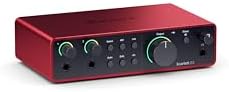
1. Focusrite Scarlett 2i2 4th Gen USB-C Audio Interface
Best for: Creators who need automatic gain control.
The 4th Gen Scarlett 2i2 uses the same converters as Focusrite’s flagship studio units, bringing a 120dB dynamic range into a desktop format. That headroom matters when you’re pushing a quiet dynamic mic hard. You won’t hear the noise floor creeping up while you try to get enough volume from your recordings.
Auto Gain sets the level for your microphone automatically, while Clip Safe stops the signal before it distorts. You don’t have to ride a knob while talking or singing. Air mode adds harmonic drive to the top end, giving vocals more presence right out of the gate. It’s a two-input design, so you can track a guitar alongside your voice without swapping cables.
The box includes Pro Tools Intro+, Ableton Live Lite, Cubase LE, and the Hitmaker Expansion plugin suite. You’ve got the software to record, mix, and master immediately after plugging in via USB-C. Comparing specs, it offers a 120dB dynamic range against 106dB on the MAONO PS22 Lite, meaning it captures a wider span between the quietest and loudest sounds.
Anyone needing just one microphone input will find the second channel sitting unused on their desk.
Pros
- 120dB dynamic range using flagship converters
- Auto Gain sets levels automatically
- Clip Safe prevents distortion during takes
- Air mode adds harmonic presence to vocals
- Includes Pro Tools Intro+, Ableton Live Lite, and Cubase LE
Cons
- Designed with more inputs than a single voice requires, so a solo podcaster pays for a channel they might never plug anything into
2. Shure MVX2U Gen 2 XLR-to-USB-C Audio Interface
Best for: SM7B owners wanting maximum clean gain.
Shure built this adapter specifically to turn any XLR mic into a USB-C device, and it delivers up to +60 dB of clean gain. You plug the mic directly into the barrel, and the other end goes straight to your computer, tablet, or phone.
Onboard Digital Audio Processing handles the heavy lifting. Auto Level Mode adjusts gain in real time, while the Real-Time Denoiser cleans up background hum before it hits your software. You can also pick between Dark, Natural, or Bright tone profiles directly on the unit. It even provides 48V phantom power if you decide to swap in a condenser mic later.
The MOTIV app ecosystem lets you manage EQ, compression, and limiting from your desktop or smartphone. Everything stays zero-latency, so monitoring through headphones feels immediate. Against the Focusrite Scarlett Solo 4th Gen’s 120dB dynamic range, the MVX2U focuses its engineering entirely on that +60 dB gain figure rather than quoting a converter spec.
Streamers running multi-guest setups need something with more than one XLR port.
Pros
- Provides up to +60 dB clean gain
- Onboard Auto Level Mode adjusts gain in real time
- Real-Time Denoiser processes audio with zero latency
- Tone selection between Dark, Natural, or Bright
- 48V phantom power included for condenser mics
Cons
- Limited to a single XLR input, ruling out anyone who needs to record an interview or duet simultaneously
3. MOTU M2 USB-C Audio Interface
Best for: Musicians prioritizing high-resolution conversion.
The MOTU M2 operates at 24-bit/192kHz resolution, capturing audio with extreme detail. It’s a 2-in/2-out USB-C interface featuring two preamps and dedicated hardware monitoring. That means you can listen to your input directly from the box without routing it through your computer first, keeping latency out of your headphones.
It comes with over 6GB of free content for macOS, Windows, and iOS users. You aren’t just buying a piece of hardware; you’re getting a library of sounds to start producing immediately. The dual preamps let you record a vocal and an instrument simultaneously. Hardware monitoring controls sit right on the front panel for quick adjustments mid-session.
This interface doesn’t list onboard DSP effects or auto-leveling features. It relies on pristine conversion and straightforward analog signal paths instead. When looking at inputs, it matches the Focusrite Scarlett 2i2 4th Gen in channel count, though the Focusrite lists Auto Gain where the MOTU lists hardware monitoring.
Podcasters who want built-in noise reduction will need to handle that inside their recording software.
Pros
- 24-bit/192kHz recording resolution
- Dual-channel capture for recording multiple sources at once
- Hardware monitoring for zero-latency playback
- 2-in/2-out configuration via USB-C
- Includes 6+GB of free content for major platforms
Cons
- No onboard DSP or auto-leveling is listed, so beginners must set their own gain manually
4. Focusrite Scarlett Solo 3rd Gen USB-C Audio Interface
Best for: Beginners needing visual clipping indicators.
This 3rd Gen interface keeps things simple with one mic preamp and switchable Air mode for extra clarity on acoustic sources. Gain Halos light up around the knobs to show you exactly when your signal is too hot. You don’t need to stare at a screen to know if you’re clipping; the hardware tells you instantly.
It captures audio at extremely high resolution using high-performance converters. Two low-noise balanced outputs provide clean playback for speakers, while a dedicated headphone output lets you monitor privately. A USB/Direct switch isn’t listed here, but the I/O setup covers basic tracking needs perfectly. The package includes Pro Tools Intro+, Ableton Live Lite, Cubase LE, and the Hitmaker Expansion.
Focusrite backs this generation with a three-year warranty covering manufacturing faults. It’s a solid safety net for hardware that lives on a busy desk. Compared to the MAONO P2 Hybrid’s -130dB EIN specification, this model uses Gain Halos for visual clipping indication.
Musicians tracking drums or multiple instruments simultaneously will run out of inputs immediately.
Pros
- Switchable Air mode adds clarity to recordings
- Gain Halos provide visual clipping indicators
- Records at exceptionally high fidelity and sample rate
- Two low-noise balanced outputs for clean playback
- Three-year warranty covers manufacturing faults
Cons
- Features only one mic preamp, meaning anyone wanting to record a multi-mic setup simultaneously has to buy a larger interface
5. MAONO G1 Neo Gaming Audio Mixer Audio Interface with XLR
Best for: Gamers needing live sound effects.
The G1 Neo is built as a gaming mixer first and an audio interface second. It packs a pro-preamp and 48V phantom power to drive XLR microphones, alongside one-click noise reduction to keep your voice clear over game chat. Custom sound pads let you trigger voice tags or effects instantly while streaming to Twitch, Discord, or YouTube.
Voice changing features let you sound like a robot, baby, or different gender on the fly. You can add reverb or use sidechain compression to sing over backing tracks. Bluetooth accompaniment input lets you play music from your phone directly into the stream. Twelve RGB color variations sync with the body light strips to match your desk setup.
Compatibility spans phones, computers, tablets, PS4, and PS5. However, the listing explicitly notes it isn’t for Xbox or USB microphones. The gain range sits between -45dB and -55dB, which is a specific operational window you’ll need to work within. Against the Shure MVX2U Gen 2’s +60 dB of clean gain, the G1 Neo’s stated -45dB to -55dB range serves a completely different mixing purpose.
Pros
- Built-in pro-preamp with 48V phantom power
- One-click noise reduction for live streams
- Voice changer and custom sound pads included
- Bluetooth input for mobile accompaniment
- 12 customizable RGB lighting variations
Cons
- The listed gain range is -45dB to -55dB, so anyone needing positive gain boost for a quiet dynamic mic must look elsewhere
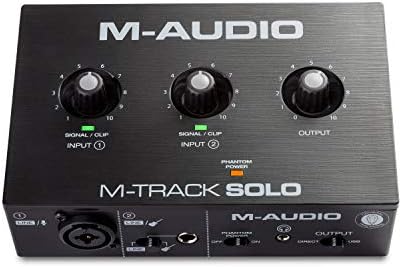
6. M-AUDIO M-Track Solo USB Audio Interface
Best for: Travelers needing a tiny recording footprint.
The M-Track Solo is a highly portable USB sound card delivering 48kHz audio resolution. It features one combo XLR/Line input with phantom power and a separate Line/Instrument input. You can plug in a mic and a guitar at the same time without needing adapters. A Crystal Preamp aims to keep the signal transparent for both condensers and dynamics.
Monitoring options include a 1/8″ headphone output and stereo RCA outputs. A physical USB/Direct switch lets you toggle between hearing your computer’s playback and the raw input signal for zero-latency tracking. It’s designed for fuss-free operation on Mac or PC. The box includes MPC Beats Software with production tools from Akai Professional.
Its 48kHz resolution limit is the defining spec here. It captures standard audio perfectly but doesn’t push into high-res territory. Looking at sample rates, it tops out at 48kHz against the far higher resolution capability listed on the MOTU M2.
Audiophiles chasing ultra-high-resolution archival recordings will find the ceiling too low.
Pros
- Combo XLR/Line input plus a dedicated Instrument input
- Stereo RCA outputs alongside a 1/8″ headphone jack
- USB/Direct switch enables zero-latency monitoring
- Transparent Crystal Preamp for clean signal capture
- Includes MPC Beats Software with Akai Professional tools
Cons
- Listed at 48kHz audio resolution, so anyone needing 192kHz high-definition capture has to choose a different interface
7. Focusrite Scarlett Solo 4th Gen USB-C Audio Interface
Best for: Soloists wanting flagship converter quality.
This 4th Gen Solo brings a massive 120dB dynamic range to a single-channel interface. It uses the exact same converters found in Focusrite’s flagship studio gear. You get that wide, quiet canvas for recording without paying for inputs you don’t need. An improved Air mode lifts vocals forward, adding rich harmonic drive to your takes.
The software bundle matches the larger 2i2 model perfectly. Pro Tools Intro+, Ableton Live Lite, Cubase LE, and the Hitmaker Expansion are all in the box. You have everything required to record, mix, and master a track from scratch. It connects via USB-C, fitting neatly into modern laptop setups.
Being a songwriter’s interface, it limits you to one microphone and one instrument at a time. It’s meant for overdubbing rather than live band tracking. It shares the 120dB dynamic range spec with the Focusrite Scarlett 2i2 4th Gen, but drops the second mic preamp and the Auto Gain feature entirely.
Duo podcasters sitting across from each other can’t plug two XLR mics into this unit.
Pros
- 120dB dynamic range using flagship converters
- Improved Air mode adds musical presence
- Includes Pro Tools Intro+, Ableton Live Lite, and Cubase LE
- Hitmaker Expansion provides essential mastering plugins
- USB-C connection for modern setups
Cons
- Lacks the Auto Gain and Clip Safe features listed on the 2i2 4th Gen, requiring manual level setting during loud performances
8. MAONO P2 Hybrid USB Audio Interface Dual XLR
Best for: Creators recording on phones and computers.
The P2 Hybrid stands out with dual USB ports and MFi-certified connectivity. You can plug it into your computer and your iPhone or iPad at the exact same time. Record a vocal take in Logic Pro, then switch to streaming on TikTok from your phone without unplugging anything. It’s a true dual-XLR interface supporting studio-grade high-resolution audio.
A class-leading -130dB EIN ensures dead-silent recordings in untreated rooms. The 56dB of gain handles most condenser and dynamic microphones comfortably. Independent mute buttons prevent accidental noise during instrument swaps. Stream Mode routes your voice equally to both channels, creating a balanced listening experience for your audience instantly.
ProStudio 2 software lets you route Spotify, browser audio, or FL Studio directly to dedicated channels. Built-in loopback captures everything in one workflow. The housing is made of durable aluminum-alloy with a 15° ergonomic tilt. Compared to the Focusrite Scarlett Solo’s three-year warranty, the P2 emphasizes its physical build and dual-device routing instead.
Users who only ever record on a single desktop machine won’t utilize the second USB port.
Pros
- Dual USB ports with MFi-certified connectivity
- 56dB gain and -130dB EIN for silent recordings
- High-resolution capture across two XLR inputs
- Independent mute and Stream Mode controls
- Durable aluminum-alloy housing with 15° tilt
Cons
- The box lists the interface, cable, and manual, but no recording software licenses are included like those bundled with the Focusrite models
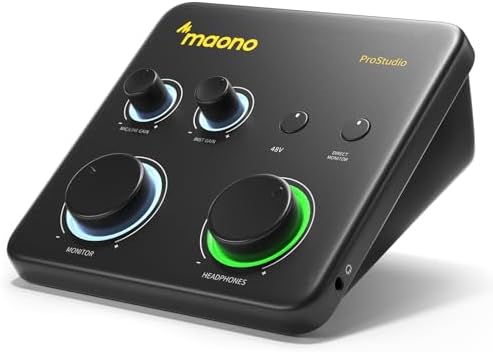
9. MAONO PS22 Lite USB Audio Interface
Best for: Podcasters needing built-in routing software.
The PS22 Lite targets recording enthusiasts with exceptional audio clarity and a 106dB dynamic range. It supplies 56 dB of preamp gain and 48V phantom power, making it ready for both dynamic and condenser microphones. A dedicated instrument input lets guitarists adjust impedance for realistic tone. It’s small enough to fit in the palm of your hand.
ProStudio Routing Software is the main draw here. It opens virtual channels and loopbacks for live streaming, compatible with ASIO drivers for low-latency output. Intuitive modes let you switch between recording, broadcasting, and instrument setups quickly. A dynamic light ring shows your input status at a glance, while the side-mounted headphone jack reduces desk clutter.
It plays nicely with Mac, Windows, iPads, and major DAWs like Pro Tools, Ableton Live, and Cubase. You just need to select the MAONO ASIO driver in your settings. Against the MAONO P2 Hybrid’s -130dB EIN, the PS22 Lite specifies a 106dB dynamic range instead, focusing on overall playback clarity rather than input noise floor.
Guitarists needing multiple simultaneous amp-modeling inputs will outgrow the single instrument jack fast.
Pros
- Studio-quality resolution with 106dB dynamic range
- 56 dB preamp gain and 48V phantom power
- Dedicated instrument input with adjustable impedance
- ProStudio Routing Software with virtual channels
- Dynamic light ring indicates input status
Cons
- Listed with a narrower dynamic range than the huge 120dB range on the Focusrite Scarlett Solo 4th Gen
Also Worth Considering
The M-AUDIO Duo USB Audio Interface is a two-input variant of the Solo listed above. The M-Track Solo beats it for pure portability by offering RCA outputs alongside its 1/8″ jack, but the Duo suits anyone who strictly needs two XLR/TRS combo inputs without upgrading to a larger mixer.
The BOMGE U202 USB Audio Interface advertises 32-Bit/192kHz resolution and a mic preamplifier. While 32-bit depth exceeds the standard resolution seen on the MOTU M2, buyers needing proven ASIO driver stability for professional DAWs might prefer the established software ecosystems bundled with the Focusrite picks.
The PUPGSIS Gaming Audio Mixer is a 4-channel sound board with Bluetooth, voice changing, and DJ effects. It competes directly with the MAONO G1 Neo for streamers, but the G1 Neo’s specific compatibility list for PS4 and PS5 gives console gamers a clearer path to setup.
How We Chose
Thirty-six Amazon listings were compared on stated gain figures, dynamic range specifications, and included software bundles, and near-duplicates — another colour, another size of one already here — were left out. A listing had to state its preamp capabilities or resolution clearly to earn a spot. Interfaces lacking specific performance metrics were removed early. What separates the final picks is how they solve the gain problem for low-output microphones. Some rely on sheer decibel boosts, while others use digital processing or wide dynamic ranges to keep the signal clean. Only products with distinct features or form factors made the final list. Every spec quoted comes directly from the seller’s published bullet points.
How to Choose the Right Audio Interface for Your Mic
Gain requirements for dynamic microphones
Decide how much boost your mic actually needs first. Low-output dynamics require significant amplification to reach usable recording levels without excessive noise. The Shure MVX2U Gen 2 lists up to +60 dB of clean gain, while the MAONO PS22 Lite offers 56 dB. Match that figure to your microphone’s sensitivity rating.
Resolution and dynamic range
Higher numbers mean more detail and quieter backgrounds. Look at the bit depth and sample rate printed in the specs. The MOTU M2 and MAONO P2 Hybrid both list 24-bit/192kHz resolution. For dynamic range, the Focusrite Scarlett 2i2 4th Gen states 120dB, providing immense headroom for sudden loud sounds.
Inputs and physical connections
Count the microphones and instruments you plan to record at once. A solo podcaster needs only one XLR port, making the Focusrite Scarlett Solo ideal. Interview setups demand two inputs, like those found on the MAONO P2 Hybrid. Check whether the unit uses USB-C or older connections to match your computer.
Included software and routing tools
Hardware gets your sound into the computer, but software shapes it. Bundles vary wildly. Focusrite models include Ableton Live Lite and Pro Tools Intro+. If you stream, look for loopback features. The MAONO PS22 Lite includes ProStudio Routing Software specifically designed to manage virtual channels for live broadcasts.
Related guides
- Why Does My Audio Interface Keep Disconnecting
- How to Connect Akai MPK Mini to Audio Interface
- How to Use Audio Interface With Discord
Frequently Asked Questions
Do I need phantom power for an SM7B?
No, you don’t. The SM7B is a dynamic microphone, meaning it generates its own signal without external voltage. In fact, applying 48V phantom power to certain dynamic mics can cause issues. Interfaces like the MAONO G1 Neo remind users to keep 48V off for XLR dynamics, reserving it strictly for condenser microphones.
Can I connect these interfaces to a smartphone?
Some of them support mobile devices directly. The Shure MVX2U Gen 2 connects via USB-C to smartphones and tablets for instant recording. The MAONO P2 Hybrid goes further, listing MFi-certified connectivity for iPhones and iPads alongside Android support. Always check the product’s compatibility list before assuming your phone will recognize the hardware.
Why does dynamic range matter for recording vocals?
Dynamic range measures the distance between the noise floor and the point of distortion. A wider range means quieter background hiss and more room for loud peaks. The Focusrite Scarlett Solo 4th Gen lists a 120dB dynamic range, ensuring that whispered words and loud shouts both stay clean. Shure explains dynamic microphone characteristics on their official support pages for deeper context.
Is loopback necessary for streaming?

Loopback is essential if you want your audience to hear your computer’s audio—like game sounds or music—mixed with your voice. Without it, you’d need complex virtual cable software. The MAONO PS22 Lite includes ProStudio software with built-in loopback, while the MAONO P2 Hybrid lists a dedicated loopback workflow for seamless broadcasting.
Will a higher sample rate improve my podcast?
Recording at 24-bit/192kHz, as supported by the MOTU M2, captures incredible detail. However, spoken word podcasts rarely need that much resolution. Standard 48kHz, like the M-Audio M-Track Solo provides, is perfectly adequate for voice. Higher rates mainly benefit musicians preserving subtle harmonics during mixing and mastering.
Conclusion
For most people driving a demanding dynamic mic, the Focusrite Scarlett 2i2 4th Gen remains the strongest choice thanks to its 120dB dynamic range and Auto Gain. If you only need one input and prefer simpler operation, the Shure MVX2U Gen 2 delivers targeted power. Pick the one that fits your channel count and start recording.
As an Amazon Associate, Cleanestor earns from qualifying purchases at no additional cost to you.