
The LICAEVEY PCIE Sound Card earns our top spot because its listing prints up to 127dB dynamic range and dual ES9018K2M DAC hardware. If you want to replace noisy motherboard audio or bring multichannel analog jacks to your desktop PC, choosing the best PCI audio interface comes down to slot fit, driver support, and channel counts.
Internal sound cards plug right into your motherboard’s expansion slots to deliver clean playback, direct surround outputs, and dedicated headphone feeds. The main thing that separates these four picks is motherboard slot type: three cards require modern PCI Express slots, while one demands legacy 32-bit PCI slots.
Quick Picks
- Best Overall: LICAEVEY PCIE Sound Card — 127dB dynamic range and dual DACs lead all listed specs.
- Best for Surround Sound: VBESTLIFE 5.1 Sound Card — Six-channel analog surround playback via PCI Express x1 slot connectivity.
- Best for Legacy Systems: ASHATA 5.1 Sound Card — Low-profile bracket included alongside Windows XP through 7 system support.
- Best for Vintage PCI Slots: Mrisata PCI Sound Card — Traditional PCI bus interface with 4-channel surround and dual SPDIF.
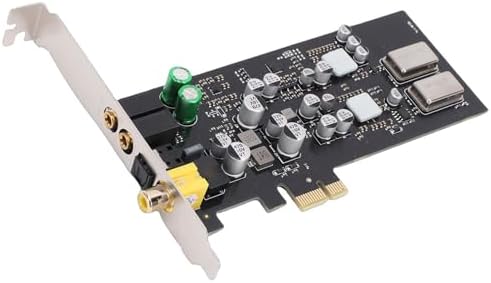
- Equipped with dual DACs
- Optical, coaxial, and analog outputs
- CM108AH controller with 100dB SNR
- Supports 44.1kHz, 48kHz, 96kHz sampling rates
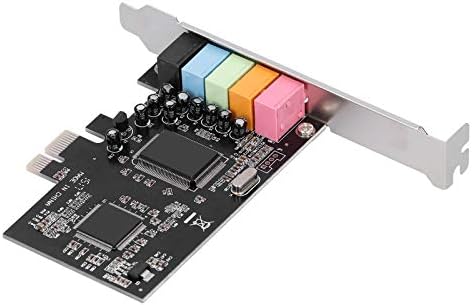
- Full duplex 5.1 channel CMI8738 chip
- PCI Express x1 revision 1.1 compliant
- 24-bit 48KHz playback and recording
- Includes noise balance cancellation

- CMI8738 5.1 [multichannel audio chip
- 6 channel](https://instrumentinsight.com/what-is-spdif-audio-interface/) surround with S/PDIF Out
- Eliminates noise during power cycles
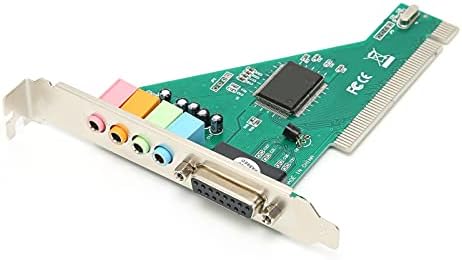
- HT8738 chip with 120dB SNR
- Supports 4-channel surround sound
- Includes 24-bit SPDIF and optical I/O
1. LICAEVEY PCIE to 5.1 Sound Card
Best for: Desktop builders wanting modern multi-channel HiFi analog outputs.
The LICAEVEY PCIE Sound Card centers on a CM108AH master controller paired with dual ES9018K2M digital-to-analog converters. That hardware combination delivers up to 127dB dynamic range and a listed -120dB THD+N figure. It fits modern motherboards using a standard PCI Express Rev 2.0 interface. It also includes dedicated headphone drivers alongside a full array of analog jacks for front stereo, rear surround, center/subwoofer, and side surround setups.
If you connect your PC to an external AV receiver, this card provides both optical fiber and coaxial digital outputs. The listing states native support for 16-bit and 24-bit audio formats across 44.1kHz, 48kHz, and 96kHz sampling rates. That makes it simple to match standard media formats without forced sample rate conversion. The seller notes driver-free plug-and-play operation across modern Windows, OS X, and Android environments.
Anyone running older operating systems like Windows XP or Vista will need another card because this listing specifies modern Wins, OS X, and Android support instead. Compared to the VBESTLIFE 5.1 Sound Card, which maxes out at 48KHz, the LICAEVEY card supports higher 96kHz audio playback.
Pros
- Dual ES9018K2M DACs with time domain jitter elimination.
- Listed up to 127dB dynamic range and 100dB signal-to-noise ratio.
- Optical fiber and coaxial digital outputs on the backplate.
- Supports 44.1kHz, 48kHz, and 96kHz sampling rates at 24-bit depth.
- Side surround analog output alongside standard multi-speaker surround jacks.
Cons
- Listed as working with Wins, OS X, and Android systems, leaving other setups unsupported.
2. PCI E 5.1 Stereo Audio Card
Best for: Adding basic multi-speaker analog surround jacks to Windows 7 PCs.
The VBESTLIFE PCIe Sound Card provides an internal route to restore multichannel sound on desktops with damaged integrated audio. Built around the CMI8738 multichannel processor, this card supports 6-channel surround sound output across front left/right, surround left/right, and center/subwoofer jacks. It complies with PCI Express x1 revision 1.1 standards, so it seats easily into any open x1, x4, x8, or x16 PCIe slot.
This model features a built-in noise balance cancellation function that activates when your PC powers on or off. That feature silences the annoying pops and thumps that basic computer speakers often make during power transitions. For gaming and retro media, the listing specifies support for legacy audio extensions including A3D 1.0, DS3D, DirectSound 3D, and standard sound libraries.
At 48KHz playback and recording, this card isn’t suitable for users seeking 96kHz high-resolution audio production. The VBESTLIFE card provides 6-channel surround sound, whereas the Mrisata PCI Sound Card stops at 4-channel surround output.
Pros
- Uses standard PCI Express x1 revision 1.1 bus connection.
- CMI8738 sound chip handles full duplex multichannel surround audio.
- Supports A3D 1.0, DS3D, and DirectSound 3D gaming audio standards.
- Hardware noise balance cancellation eliminates computer power-on pops.
- 24-bit sound sampling rate support across recording and playback.
Cons
- The listing limits OS compatibility to Windows 7 and Vista (32/64-bit).
3. ASHATA 5.1 Sound Card
Best for: Small-form-factor desktop towers running classic Windows operating systems.
The ASHATA PCIe Sound Card targets legacy desktop audio recovery by pairing the CMI8738 processor with broad backward OS support. It includes a low-profile bracket right in the package, making it the only card here ready for half-height computer cases. The board features a PCIe connector, allowing older operating systems to run on motherboards that dropped original PCI slots years ago.
You get 6-channel analog surround sound output to drive separate front, surround, and center/subwoofer channels. The card also features an integrated S/PDIF Out interface for sending digital stereo or compressed surround bitstreams to compatible audio equipment. Like similar cards running the CMI8738 silicon, it carries hardware noise balance cancellation to prevent speaker thump when booting your system.
Buyers running modern 64-bit Windows 10 or 11 rigs should pass on this pick, as its listing only claims support for Windows 7, Vista, and XP. The ASHATA listing includes a low bracket directly in the box, unlike the LICAEVEY card which includes only its standard bracket.
Pros
- Includes a low bracket for half-height, small-form-factor desktop cases.
- Explicit driver support for Windows XP, Vista, and Windows 7 (32/64-bit).
- 6-channel surround outputs plus a dedicated S/PDIF Out interface.
- Compatible with DirectSound 3D and EAX audio sound effects.
- Full-duplex PCI Express slot compatibility for older operating systems.
Cons
- Compatible only with systems running Windows XP, Vista, or Windows 7.
4. PCI Sound Card 120db PCI Sound Card Computer Built
Best for: Vintage computer builds that feature traditional legacy PCI slots.
The Mrisata PCI Sound Card is engineered for vintage PC motherboards requiring a legacy 32-bit PCI interface rather than modern PCI Express. Driven by the HT8738 chip, it functions across variable bus voltages between 0.5V and 5V. That makes it compatible with older PC platforms. The card delivers 24-bit stereo 44KHz sound recording and playback with a listed 120dB signal-to-noise ratio.
This card is equipped to handle legacy MIDI and sound libraries, offering full compatibility with DLS sound library technology, A3D 1.0, DS3D, and EAX effects. For digital routing, it supports high-resolution digital SPDIF input and output simultaneously, alongside optical fiber connectivity via an included daughter card. It also maintains support for legacy music synthesizers, making it a functional tool for older audio workstations.
Anyone with a modern motherboard featuring only PCIe slots can’t use this card because it requires a traditional, long PCI slot. The Mrisata sound card handles 4-channel surround sound output, whereas the ASHATA PCIe Sound Card supports full 6-channel surround output.
Pros
- Fits legacy 32-bit PCI slots with 0.5V to 5V bus operating voltage.
- Optical fiber input and output provided through an included daughter card.
- 120dB signal-to-noise ratio with full-duplex recording and playback.
- Listed support for vintage operating systems including Windows 98 and NT.
- Supports dual SPDIF In and Out functions with high-resolution digital fidelity.
Cons
- Listed at 4-channel surround output, which rules out dedicated center-and-subwoofer surround speaker setups.
How to Choose the Right PCI Audio Interface
Expansion Slot Compatibility
You must check your motherboard’s open expansion slots before choosing a sound card. Modern motherboards only feature PCI Express slots, which use short x1 connectors or long x16 graphics card slots. The LICAEVEY, VBESTLIFE, and ASHATA cards use PCIe slots. In contrast, the Mrisata card requires an older, 32-bit PCI slot with a completely different pin arrangement.
Operating System Support
Sound cards depend heavily on chip-level driver support to function properly. The LICAEVEY listing specifies compatibility with modern Windows, OS X, and Android environments without extra driver hassles. Older options like the VBESTLIFE and ASHATA cards focus on Windows 7, Vista, and XP platforms. The Mrisata card explicitly extends support back to Windows 98 and Windows NT systems.
Speaker and Channel Counts
Map your sound card choice directly to your speaker configuration. For 5.1 surround sound setups, the LICAEVEY, VBESTLIFE, and ASHATA cards provide front, rear, and center/subwoofer analog jacks. The LICAEVEY card adds side surround jacks for extra expansion. If you only run basic desktop monitors or a 4-channel quadraphonic setup, the 4-channel Mrisata card fits the bill.
Digital Audio Connections
Digital jacks bypass low-quality computer electronics to send clean audio streams directly to standalone DACs or AV receivers. The LICAEVEY card carries both optical fiber and coaxial digital outputs right on its main bracket. The Mrisata card delivers optical fiber input and output via an expansion daughter card, while the ASHATA card lists a dedicated S/PDIF Out connector.
Frequently Asked Questions
What is the difference between PCI and PCIe audio interfaces?
PCI and PCIe interfaces use physically incompatible slot designs and transfer data differently across the motherboard. Traditional PCI uses a 32-bit parallel bus, as seen on the Mrisata PCI Sound Card. PCI Express (PCIe) uses high-speed serial lanes, which the LICAEVEY, VBESTLIFE, and ASHATA cards use. Modern motherboards built over the past decade exclusively feature PCI Express slots.
Can a PCIe x1 audio card fit into a PCIe x16 slot?
Yes, a PCIe x1 sound card fits into any larger PCI Express slot on your motherboard. PCI Express slots provide compatibility across different lane sizes, meaning an x1 card functions correctly in x4, x8, or x16 slots. Cards like the VBESTLIFE 5.1 Sound Card seat safely into long graphics card slots if your short slots are blocked.
Does an internal sound card eliminate PC power-on speaker pops?
Some sound cards include dedicated hardware to block power-on electrical surges. Both the VBESTLIFE 5.1 Sound Card and the ASHATA 5.1 Sound Card feature hardware noise balance cancellation circuits. These circuits suppress the electrical burst sent down the analog line when your computer turns on or off, keeping your connected speakers quiet.
Do these internal sound cards support modern high-resolution audio?
High-resolution format support varies by the main controller chip used on each sound card. The LICAEVEY PCIE Sound Card supports high-resolution audio formats up to 24-bit depth and 96kHz sampling rates. Cards using CMI8738 chips, like the VBESTLIFE model, support studio-grade bit depth but cap playback and recording sample rates at 48KHz.
Which card works best inside a small-form-factor desktop case?
The ASHATA 5.1 Sound Card is the ideal choice for slim desktop cases because it includes a low-profile bracket. Standard full-height brackets cannot fit into half-height chassis, so having this smaller metal bracket supplied in the package ensures you can securely mount the audio card into compact computers without issue.
How do you stop crackling or popping noises in an internal sound card?
Electrical interference inside your desktop case causes audio crackling, hiss, and buzzing sounds. Moving your sound card to an open PCIe slot further away from your graphics card and power supply resolves this. However, cards like the VBESTLIFE 5.1 Sound Card and ASHATA 5.1 Sound Card include built-in noise cancellation to eliminate power-surge pops.
Why does Windows show “No Audio Device Installed” after inserting the card?
This error occurs when a sound card is improperly seated or the operating system lacks base drivers. Power down the system, clear any dust from the slot, and firmly reseat the card until the bracket aligns. Modern setups with the LICAEVEY PCIE Sound Card use the CM108AH controller for seamless driverless plug-and-play detection.
What should you do if there’s no sound from rear or subwoofer channels?
Multichannel analog audio outputs require specific software configuration in Windows to distribute sound beyond standard stereo. Access the Windows Sound Control Panel, select your sound card, and change your output setting to 5.1 Surround. For the VBESTLIFE 5.1 Sound Card or ASHATA 5.1 Sound Card, verify cables match the color-coded surround jacks.
How do you get optical digital audio output working on a sound card?
Digital audio output requires selecting the digital stream as your default playback device in Windows. Open your Sound Settings from the taskbar and select SPDIF Out or Optical Out as the primary output. For the LICAEVEY PCIE Sound Card, connect a standard Toslink cable directly to the optical port on the backplate.
What causes a sound card’s microphone input to produce low volume or heavy static?
Low microphone volume typically points to missing microphone boost settings, while static stems from ungrounded front-panel PC wiring. Plug your microphone directly into the rear pink analog jack on the sound card rather than using front case jacks. Open your recording settings, select the CMI8738 or CM108AH input device, and adjust the input level to 100%. If static continues, confirm your desktop power cord connects to a properly grounded three-prong wall outlet.
Can an internal PCIe audio card work inside an external Thunderbolt dock?
Yes, a PCIe audio card functions inside an external Thunderbolt PCIe enclosure connected to a laptop. Hardware with plug-and-play controller chips like the LICAEVEY PCIE Sound Card functions properly across modern operating systems. However, cards like the ASHATA 5.1 Sound Card or VBESTLIFE 5.1 Sound Card require legacy drivers unsupported by modern laptops.
Does an internal sound card reduce CPU usage during PC gaming?
Basic motherboards rely on software audio emulation, which consumes processing power from your CPU during games. Sound cards equipped with dedicated hardware processors offload positional audio calculations like DirectSound 3D entirely from the system CPU. The VBESTLIFE 5.1 Sound Card and ASHATA 5.1 Sound Card handle these 3D effects directly on their audio chips.
How do you fix audio latency and delay when recording on a sound card?
Audio latency occurs when software recording buffer sizes are configured too high, creating audible delays. Lowering your application buffer size between 64 and 128 samples minimizes this lag during playback. The LICAEVEY PCIE Sound Card supports full-duplex operation up to 96kHz, enabling simultaneous recording and monitoring without excessive buffering delays.
Why is an internal sound card better than integrated motherboard audio?
Integrated motherboard audio chips sit directly next to high-voltage processor regulators, graphics card power stages, and memory traces, causing electromagnetic buzzing in your headphones. An internal expansion card moves sensitive digital-to-analog converter chips away from these noisy motherboard circuits. The LICAEVEY PCIE Sound Card features dedicated ES9018K2M DAC chips with a 127dB dynamic range and a -120dB THD+N rating, providing a cleaner noise floor than typical onboard computer audio chips.
Can you use an internal sound card alongside your motherboard’s audio?
Yes, Windows lets you keep both motherboard audio and an internal sound card active simultaneously. You can route primary game audio through the dedicated PCIe card while assigning communication software to the motherboard output. If using the LICAEVEY PCIE Sound Card, assign it as the Windows Default Device and use onboard audio for chat.
What is the difference between S/PDIF optical and coaxial digital outputs?
Optical connections send digital audio pulses through fiber-optic plastic or glass lines, while coaxial connections transmit electrical digital signals through shielded copper wire. Optical lines prevent ground loops because they don’t carry electrical current. The LICAEVEY PCIE Sound Card includes both optical fiber and coaxial digital outputs on its metal bracket. The Mrisata PCI Sound Card provides optical fiber inputs and outputs through its included auxiliary daughter card.
Can a 5.1 sound card produce surround sound through regular stereo headphones?
A 5.1 sound card can simulate surround audio through normal stereo headphones using spatial processing algorithms. Cards built around the CMI8738 chip, like the VBESTLIFE 5.1 Sound Card and the ASHATA 5.1 Sound Card, support DirectSound 3D and EAX sound positioning to mix multi-channel sound into two headphone channels. The LICAEVEY PCIE Sound Card includes dedicated headphone driver amplifiers to power standard stereo headphones with full dynamic range.
Why do some sound cards come with an extra daughter card?
Extra daughter cards provide more physical ports without crowding the components on the primary expansion card. The Mrisata PCI Sound Card uses a secondary bracket to host optical fiber input and output connectors without taking up room on the main board.
What audio sample rate should you pick in Windows: 44.1kHz, 48kHz, or 96kHz?
Select 44.1kHz if you listen mostly to standard music tracks, or select 48kHz if you watch movies and play modern games. Setting your card above 48kHz is only useful when working with high-resolution music files or professional audio tracks. The LICAEVEY PCIE Sound Card supports 44.1kHz, 48kHz, and 96kHz at standard as well as high-resolution studio bit depths.
Will an internal PCIe sound card block airflow to your graphics card?
An internal PCIe sound card installed directly next to a graphics card fan can restrict cooling intake air. To ensure proper airflow, mount your sound card in the lowest open PCIe slot at the bottom of your desktop motherboard. Cards like the ASHATA 5.1 Sound Card feature short circuit boards that leave plenty of breathing room inside your case, and the included low-profile bracket supports placement inside crowded, compact PC enclosures.
How do you install an internal audio card on a motherboard with no open x1 slots?
You can safely mount an internal PCIe x1 sound card into any larger PCIe x4, x8, or x16 expansion slot. The PCI Express standard requires larger slots to accept smaller cards automatically. If your motherboard’s short slots are covered by a thick graphics card, insert the LICAEVEY PCIE Sound Card or VBESTLIFE 5.1 Sound Card into an open full-length graphics slot at the bottom of your motherboard.
What does full-duplex audio mean on an internal sound card?
Full-duplex audio means the sound card can record incoming audio and play back outgoing sound at the exact same moment without stuttering. Half-duplex cards must stop recording to output sound, which makes two-way voice chat impossible. The VBESTLIFE 5.1 Sound Card, ASHATA 5.1 Sound Card, and Mrisata PCI Sound Card all support full-duplex operation, making them suitable for real-time multiplayer gaming chat, live voice recording, and simultaneous software monitoring.
Why won’t an old PCI sound card fit into a modern motherboard?
Traditional 32-bit PCI slots and modern PCI Express slots share no physical or electrical commonality. Legacy PCI slots use a longer connector operating across standard parallel power rails. PCI Express slots use serial links with a shorter footprint and separate power lines. The Mrisata PCI Sound Card requires a classic PCI slot, so it can’t be installed on modern consumer motherboards built exclusively with PCIe slots.
Can you connect front-panel PC case audio ports to these sound cards?
Internal sound cards often use dedicated 9-pin headers to connect case front-panel audio ports directly. If your sound card lacks an internal connector, plug your headphones straight into the backplate’s analog output jacks instead. The LICAEVEY PCIE Sound Card delivers its cleanest amplified analog audio directly through these rear output connections.
What is EAX audio support, and do modern PC games still use it?

Environmental Audio Extensions (EAX) was a sound technology created for older 3D computer games to simulate room reverbs, acoustic reflections, and underwater audio effects. Modern games use software-based spatial audio instead, but classic games from the Windows XP era require hardware EAX to output 3D sound. The ASHATA 5.1 Sound Card and Mrisata PCI Sound Card retain direct hardware compatibility with EAX and DirectSound 3D game engines for retro gaming rigs.
How does signal-to-noise ratio affect sound card output quality?
Signal-to-noise ratio (SNR) measures the strength of your audio signal compared to background electrical noise and hiss generated by the card’s electronic components. Higher SNR figures mean clearer playback with less hiss during quiet music passages. The LICAEVEY PCIE Sound Card lists a 100dB SNR with a 127dB dynamic range, while the Mrisata PCI Sound Card lists a 120dB chip-level SNR for clear audio playback and recording.
Do these sound cards require extra power cables from the power supply?
The sound cards reviewed here draw all their operating power directly through your motherboard’s expansion slot pins. Standard PCI Express x1 slots and legacy 32-bit PCI slots supply plenty of direct bus power.
As an Amazon Associate, Cleanestor earns from qualifying purchases at no additional cost to you.