
The Focusrite Scarlett 2i2 is the best audio interface for streaming because it lists a 120dB dynamic range and Auto Gain to keep your levels steady. This guide helps anyone who wants clean voice audio without fighting software settings all day. What separates these picks isn’t just sound quality. It’s how they handle routing, gain, and the physical space on your desk.
- Best Overall: Focusrite Scarlett 2i2 — 120dB dynamic range with automatic gain control for zero clipping.
- Best for High-Gain Mics: Elgato Wave XLR — 80dB of gain drives any microphone loud enough.
- Best for Mobile Streaming: Zoom AMS-22 — Hardware loopback switch needs no extra software.
- Best for Mobile Devices: IK Multimedia iRig Stream — Stereo RCA inputs connect directly to phones.
- Best Hybrid Connectivity: MAONO P2 Hybrid — Dual USB ports link a computer and phone at once.
- Best for Gaming Control: FIFINE Ampligame SC3 — Individual faders let you adjust game and mic volume separately.
- Best Multi-Output Setup: BlueAVS 2-In/4-Out — Four outputs route audio to multiple destinations simultaneously.
- Best Compact Versatility: M-AUDIO M-Track Duo — Two combo inputs fit into a small footprint.
- Best High-Fidelity Entry: Jolgoo 2×2 Interface — 24-bit/192kHz conversion captures every detail.
- Best Integrated Mixer: MAONO AME2 — Eleven sound pads trigger effects during live broadcasts.
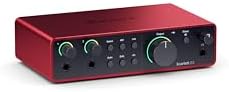
- 4th Gen mic pres for mic and guitar
- 120dB dynamic range with flagship converters
- Auto gain sets level, clip safe prevents clipping
- Air mode adds presence to vocals and guitars

- 80dB gain drives any XLR microphone
- Ultra-low-latency monitoring at 24bit, 48kHz
- Built-in voice enhancer, compressor, EQ and DSP
- Touch control with customizable LED feedback
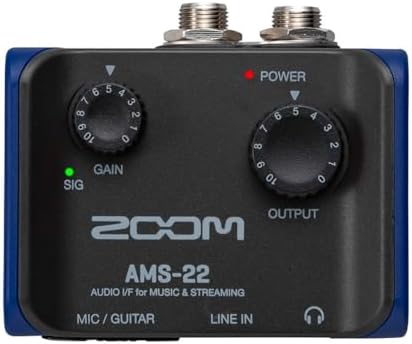
- One XLR/TRS combo input with Hi-Z
- Direct monitor and loopback without extra software
- Toggle between music mode and streaming mode
- Works with Pro Tools, Cubase, GarageBand, YouTube
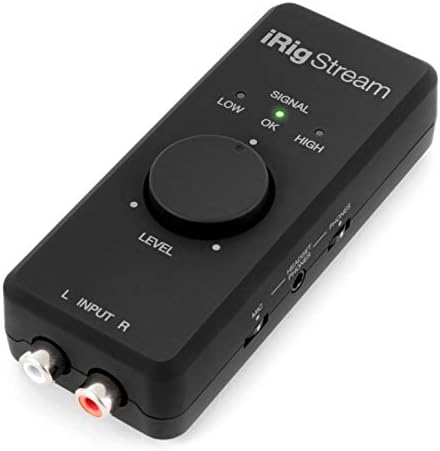
- 24-bit, 96 kHz audio interface with stereo RCA
- Connect mixers, keyboards, players and earbud mic
- Headphone output for real-time direct monitoring
- Global audio level LED indicator for gain control

- Dual USB ports with MFi-certified connectivity
- 56dB dual XLR in 24-bit/192kHz quality
- Independent mute and stream mode controls
- Route app audio to channels with VST effects

- One XLR mic input with built-in 48V phantom power
- Four independent channels with volume slider fader
- Front mute and monitor buttons for real-time use
- Four sound pads, 6 voice modes, 12 auto tune

- BlueAVS AR013 with 103dB dynamic range
- Records at up to 24-bit/192kHz sample rate
- Zero-latency monitoring with 4 monitoring modes
- Independent +48V phantom power and PAD switches

- USB sound card delivers 48kHz audio resolution
- Two combo XLR / Line / Instrument inputs
- 1/4" headphone and stereo 1/4" outputs
- Crystal preamps support condenser mics

- 24-Bit/192kHz audio conversion
- Direct monitor switch for zero-latency monitoring
- Dual inputs with 48V phantom and LED peak indicators
- Driver-free plug and play on Windows, macOS, iOS

- AME2 preamps with 60dB gain and 48V phantom
- 10-channel mixer with 11 customizable sound pads
- 6.35mm instrument input for guitar or bass
- Plug-and-play digital audio workstation controllers
1. Focusrite Scarlett 2i2 4th Gen USB-C Audio Interface
Best for: streamers wanting studio-grade converters and automatic level control.
The fourth generation of this unit brings a 120dB dynamic range, matching the converters found in Focusrite’s flagship interfaces. For a streamer, that means the noise floor stays out of your broadcast even when you boost quiet speech. You won’t hear hiss creeping in during pauses.
Auto Gain sets the level for your mic or guitar automatically, while Clip Safe prevents clipping if you suddenly shout. That takes the guesswork out of dialing in knobs before going live. Air mode adds harmonic presence to vocals, pushing your voice forward in the mix without needing third-party plugins. The box includes Pro Tools Intro+, Ableton Live Lite, Cubase LE, and the Hitmaker Expansion suite.
Comparing its specs to the rest of the list, the 120dB dynamic range here stands against the 103dB dynamic range on the BlueAVS 2-In/4-Out.
Pros
- 120dB dynamic range using flagship converters
- Auto Gain and Clip Safe prevent distorted audio
- Air mode lifts vocal presence
- Includes Pro Tools Intro+, Ableton Live Lite, Cubase LE, and Hitmaker Expansion
Cons
- The listing specifies two inputs, so recording a guest alongside an instrument requires planning around that ceiling.
2. Elgato Wave XLR MK.2 USB Audio Interface and DSP Mixer
Best for: creators using demanding dynamic microphones requiring massive amplification.
This unit lists 80dB of gain built right in. That’s enough to make almost any XLR microphone loud and clear without adding noise. Your audience hears you, not the hiss of pushed preamps.
Onboard DSP handles voice enhancement, compression, and EQ through the Wave FX Processor. You can unify these effects and VST plugins in one signal chain, keeping your broadcasting software uncluttered. The touch-sensitive top panel mutes you instantly, and customizable LED lighting gives visual feedback on your levels. It runs at 24-bit, 48kHz resolution with ultra-low-latency monitoring.
The Wave Link software integrates natively for precise audio routing. Its 80dB gain leads the entire set, standing well above the 60dB gain listed on the MAONO AME2. A setup needing more than one microphone at a time will hit a wall, since only a single XLR input is provided here.
Pros
- 80dB gain drives any XLR microphone
- Built-in voice enhancer, compressor, and EQ
- Touch mute with LED level feedback
- Native Wave Link software integration
- 24-bit, 48kHz audio resolution
Cons
- Only one XLR input is listed, meaning a two-person podcast requires a second interface entirely.
3. Zoom AMS-22 USB Audio Interface
Best for: solo broadcasters needing hardware loopback without software routing.
Loopback is essential for streaming, letting you combine your mic with computer playback for your audience. Most units force you to configure this in software, but the AMS-22 puts a physical Loopback switch right on the chassis. You flip it and start broadcasting immediately.
A second switch toggles between Music mode for DAW recording and Streaming mode, which merges all active sources so your broadcasting software receives a single unified feed. That saves you from digging into operating system settings every time you change tasks. You get one XLR/TRS combo input with Hi-Z support and a stereo 3.5mm input. Direct monitoring lets you hear yourself in real time.
It powers directly from your computer via USB-C with no external supply needed. Streamers running complex multi-mic setups are ruled out by the single XLR/TRS combo input listed here.
Pros
- Physical Loopback switch needs no extra software
- Dedicated Streaming mode combines inputs into one signal
- Bus-powered via USB-C
- Works across major platforms including Twitch and YouTube
Cons
- The box lists the interface alone and not an XLR cable, so connecting your microphone is a second purchase.
4. IK Multimedia iRig Stream stereo audio interface
Best for: mobile creators connecting mixers directly to smartphones and tablets.
This unit targets people who stream from phones rather than desktop computers. It features stereo RCA inputs to connect mixers, keyboards, or audio players directly to an iPhone, iPad, Mac, or PC. You can even plug your earbud’s mic in to talk over a music stream.
Audio resolution reaches professional depth at 96 kHz. A global audio level LED indicator helps you dial in the right gain quickly without staring at a screen. Direct monitoring through the headphone output ensures zero latency or echo while you perform. Loopback functionality lets you jam along with music playing on your device.
It ships with USB-C, Lightning, and USB cables for broad compatibility. However, it relies entirely on RCA connections, unlike the BlueAVS 2-In/4-Out which provides dual XLR/TRS combo inputs for professional microphones. Anyone needing to plug in a standard XLR broadcast microphone directly will find the RCA-only inputs incompatible with their gear.
Pros
- Stereo RCA inputs for mixers and keyboards
- 24-bit, 96 kHz audio resolution
- Global audio level LED indicator
- Includes USB-C, Lightning, and USB cables
- Direct monitoring with zero latency
Cons
- The inputs are strictly RCA, so plugging in an XLR microphone directly requires an adapter bought separately.
5. MAONO P2 Hybrid USB Audio Interface Dual XLR
Best for: multi-device creators streaming to a phone while recording to a computer.
Dual USB ports with MFi-certified connectivity let you hook up a computer and a phone or iPad at the exact same time. You can record a track in GarageBand on your laptop while streaming the performance directly from your mobile device.
The preamps deliver 56dB of gain, compatible with most condenser and dynamic microphones. Audio conversion captures every detail at 192kHz quality with a -130dB EIN for silent recordings. Independent mute buttons prevent unwanted noise during instrument changes, and Stream Mode sends your voice equally to both channels. ProStudio 2 software routes apps like Spotify or TikTok to dedicated channels and supports VST effects.
An ergonomic 15° tilt angle keeps controls within easy reach on your desk. Against the Jolgoo 2×2 Interface, which lists 192kHz conversion as well, the P2 matches that fidelity while adding dual-device routing. Creators needing 80dB of gain for a notoriously quiet microphone will hit a ceiling with the 56dB listed here.
Pros
- Dual USB ports connect computer and phone simultaneously
- 24-bit/192kHz audio with -130dB EIN
- Independent mute and Stream Mode controls
- ProStudio 2 software for app routing and VSTs
- Ergonomic 15° tilt aluminum-alloy housing
Cons
- Preamp gain is listed at 56dB, compatible with most condenser and dynamic microphones.
6. FIFINE Ampligame SC3 Gaming Audio Mixer with Indi-Fader and Volume
Best for: gamers wanting physical faders and RGB lighting on stream.
Gaming streams often require quick audio adjustments mid-match, and this mixer puts smooth volume slider faders right under your fingers. Four independent channels give you individual control over the microphone, line in, headphone, and line out volumes. You don’t have to tab out of your game to tweak levels in software.
Built-in 48V phantom power supports condenser microphones directly. Front-facing mute and monitor buttons let you kill background noise instantly. Beyond basic mixing, four customizable sound effect buttons can be recorded and triggered live. Six voice changing modes and 12 auto-tune settings add variety to your broadcast. Controllable RGB lighting matches your streaming theme without being harsh on camera.
It connects via USB-C and includes a 3.5mm port for line input. The tips section explicitly states that an XLR cable isn’t included in the box, whereas the BlueAVS 2-In/4-Out lists a USB-A to USB-C cable among its contents.
Pros
- Four independent channels with physical slider faders
- Built-in 48V phantom power
- Customizable sound effect buttons and voice changers
- Controllable RGB lighting
- Plug-and-play for Mac OS and Windows
Cons
- The listing notes the XLR cable isn’t included, so connecting a microphone requires buying one separately.
7. BlueAVS USB Audio Interface
Best for: podcasters routing audio to multiple speakers and headphones simultaneously.
Most streaming interfaces offer two outputs, but this unit lists four. That 2-In/4-Out architecture means you can send separate mixes to studio monitors, a streaming PC, and headphones all at once. It opens up routing possibilities that smaller boxes simply can’t handle.
Dual XLR/TRS combo inputs accept microphones, guitars, or line-level devices. Conversion runs at 192kHz with an upgraded 103dB dynamic range and ultra-low THD+N below 0.003%. Independent +48V phantom power supports condenser mics, while dedicated PAD switches protect against clipping from loud sources. You get four monitoring modes: OFF, MONO, Crossfeed, and STEREO.
A USB-A to USB-C cable comes in the package, backed by 1-year limited quality coverage. Its 103dB dynamic range falls short of the 120dB dynamic range printed on the Focusrite Scarlett 2i2. Solo streamers who only need to plug in a single microphone will find the dual-input layout taking up more desk space than necessary.
Pros
- 2-In/4-Out architecture for complex routing
- 24-bit/192kHz conversion with 103dB dynamic range
- Four monitoring modes including Crossfeed
- Dedicated PAD switches prevent clipping
- Includes USB-A to USB-C cable
Cons
- The 103dB dynamic range sits below the 120dB dynamic range on the Focusrite Scarlett 2i2, leaving less headroom for very quiet sounds.
8. M-AUDIO M-Track Duo USB Audio Interface
Best for: beginners needing simple plug-and-play recording with included software.
Sometimes you just want to plug in and go. The M-Track Duo offers two combo XLR/Line/Instrument inputs with phantom power, covering everything from condenser mics to electric guitars. It delivers 48kHz audio resolution, which is the standard sample rate for video and streaming platforms.
Transparent Crystal Preamps aim to capture optimal sound without coloring your voice. Monitoring is handled through a 1/4″ headphone output and stereo 1/4″ outputs. A physical USB/Direct switch lets you toggle zero-latency monitoring instantly, bypassing any delay from your computer. It acts as a straightforward USB sound card for Mac or PC.
The package includes MPC Beats Software with production tools from Akai Professional. When placed next to the Jolgoo 2×2 Interface, which lists 192kHz conversion, the 48kHz resolution here represents a much lower ceiling for high-fidelity music recording.
9. Jolgoo 2×2 USB Audio Interface
Best for: musicians demanding high-resolution conversion in a rugged metal chassis.
High-fidelity conversion is the main draw here, with a 24-bit/192kHz sample rate ensuring every nuance of a vocal or acoustic guitar is captured. That resolution exceeds what many entry-level streaming boxes provide. You get professional results without stepping into a full studio rack.
Dual XLR/Line combo inputs feature independent gain control and LED Peak indicators to help you prevent clipping. Built-in +48V phantom power supports professional studio microphones. A “Direct Monitor” switch allows zero-latency listening while you record. The driver-free design works out of the box with Windows, macOS, iOS, and Android devices, fully compatible with DAWs like Audacity and Ableton.
A sturdy metal housing shields against interference, and both USB-C and USB-A cables are included. Its 192kHz sample rate matches the MAONO P2 Hybrid, though the P2 adds dual-device routing this unit omits. Streamers who rely on hardware loopback to blend game audio with their voice will find no such switch listed here.
Pros
- 24-bit/192kHz high-fidelity conversion
- Independent gain control with LED Peak indicators
- +48V phantom power for condenser mics
- Driver-free plug-and-play compatibility
- Sturdy metal housing with shielding
Cons
- The box lists the interface and cables but not recording software, so producing content requires downloading a DAW separately.
10. MAONO AME2 Audio Interface Mixer
Best for: podcast hosts triggering sound effects and managing multiple guests live.
This unit functions more like a full broadcast console than a simple interface. It features 11 customizable sound pads, with three supporting up to 60 seconds of audio and one-key looping. You can upload clips via smartphone, PC, or Bluetooth to trigger intros, ads, or jokes mid-stream.
Quality preamps support 48V phantom power and offer 3-level mic gain adjustment up to 60dB. A 32-bit chipset and built-in DENOISE function keep the audio clean. You get six reverb modes, 12-step auto-tune, pitch changer knobs, and adjustable treble, mid-range, and bass. Pro features like sidechain, music-only, and loopback switches are built directly into the board.
Connectivity covers USB-C for computers, LIVE-OUTPUT1/2 for smartphones, and an INST jack for guitars. Compared to the Elgato Wave XLR, which lists 80dB of gain, the 60dB maximum here may struggle with the hungriest dynamic microphones. Creators looking for a minimal, invisible audio box will find the extensive knob layout too large for a crowded desk.
Pros
- 11 customizable sound pads with up to 60s recording
- 60dB gain with 3-level adjustment and DENOISE
- Sidechain, music-only, and loopback switches
- Six reverb modes and 12-step auto-tune
- Connects to PC, smartphone, and instruments simultaneously
Cons
- Mic gain maxes out at 60dB, falling short of the 80dB gain on the Elgato Wave XLR for very quiet microphones.
Also Worth Considering
The Focusrite Gen USB-C Audio Interface is a single-input variant from the same fourth-generation line as our top pick. It shares the brand’s converter technology but limits you to one microphone input, where the Focusrite Scarlett 2i2 provides two. Solo podcasters who never plan to record a guest might prefer its smaller footprint.
The MAONO 70dB USB Audio Interface offers 70dB of gain for PC, phone, and iPad use. While that extra headroom beats the 56dB on the MAONO P2 Hybrid, it lacks the dual USB ports that let the P2 connect a computer and mobile device simultaneously. Streamers needing maximum gain for a single dynamic mic could look here.
The Synido USB C Audio Interface is a silver unit designed for recording music, streaming, and podcasting. Its title gives no specifications regarding sample rate, gain, or included software. Because the Jolgoo 2×2 Interface lists 24-bit/192kHz conversion and includes both USB-C and USB-A cables, it remains the safer choice for high-fidelity needs.
How We Chose
Thirty Amazon listings were compared on input count, stated gain or dynamic range, and included software or cables, and near-duplicates — another colour, another size of one already here — were left out. To earn a place, a listing had to state its connection type, resolution or gain figures, and specific routing features like loopback or phantom power. Units missing these core specifications were removed from consideration. Separation came down to what each box actually solves for a broadcaster. Some prioritize raw amplification for difficult microphones, while others focus on physical mixing controls or simultaneous mobile connections. Every selected product states facts that map directly to a distinct streaming workflow, ensuring the final list covers different needs without repeating the same feature set twice.
How to Choose the Right Audio Interface for Streaming
Microphone gain requirements
Decide what microphone you’re plugging in first. Low-output dynamic mics need massive amplification to sound clear. The Elgato Wave XLR lists 80dB of gain, while the MAONO AME2 tops out at 60dB. Condenser mics require less gain but demand 48V phantom power, which most picks here include. Match the listed figure to your mic’s sensitivity.
Routing and loopback needs
Streaming requires sending your voice and computer audio to your audience together. Look for how a unit handles this. The Zoom AMS-22 uses a physical Loopback switch, avoiding software configuration. The MAONO P2 Hybrid routes apps to dedicated channels via software. Pick the method that fits your comfort level with digital audio workstations.
Inputs and outputs available
Count exactly what you need to plug in today and next year. One XLR input on the Elgato Wave XLR suits solo voices. Two inputs on the Focusrite Scarlett 2i2 handle a mic and guitar. If you broadcast to multiple platforms, the 2-In/4-Out architecture of the BlueAVS unit splits signals physically.
Included software and cables
Check what arrives in the box so you aren’t stuck waiting for deliveries, because knowing what’s supplied prevents unexpected gaps when you sit down to go live. The Focusrite Scarlett 2i2 bundles Ableton Live Lite and Pro Tools Intro+. The Jolgoo 2×2 Interface includes both USB-C and USB-A cables. Proper USB audio standards ensure these devices communicate reliably with your computer.
Frequently Asked Questions
Can I use a USB microphone with these interfaces?
No, these units are designed for analog microphones. The FIFINE Ampligame SC3 listing explicitly states it isn’t available for USB mics. Similarly, the MAONO AME2 notes that USB microphones aren’t supported. You’ll need an XLR or 3.5mm analog microphone to connect to any of the interfaces covered here.
Do I need to install drivers to stream?
Most modern interfaces operate plug-and-play, but it depends on the specific model. The Jolgoo 2×2 Interface highlights a driver-free design for Windows, macOS, and mobile devices. Others, like the MAONO P2 Hybrid, mention ASIO support for lower-latency monitoring, which typically requires installing a manufacturer-provided driver on Windows machines.
What does phantom power actually do?
Phantom power sends 48 volts of electricity through the XLR cable to run condenser microphones. Without it, those mics produce no sound. The BlueAVS 2-In/4-Out and the FIFINE Ampligame SC3 both list independent +48V phantom power switches. Dynamic microphones don’t need this voltage, so leave the switch off when using them.
Is 192kHz resolution necessary for live streaming?

Streaming platforms like Twitch and YouTube compress audio to 48kHz anyway, so ultra-high rates don’t reach your viewers directly. However, recording at 24-bit/192kHz, as listed on the Jolgoo 2×2 Interface and BlueAVS 2-In/4-Out, captures more detail if you plan to edit podcasts or release music later. For pure live talking, 48kHz is sufficient.
Will my phone work with these interfaces?
Mobile compatibility varies heavily by model. The IK Multimedia iRig Stream specifically lists Lightning and USB-C cables for direct iPhone and iPad connection. The MAONO P2 Hybrid mentions MFi-certified connectivity for Apple devices alongside Android support. Always check the listing’s stated cable types before assuming your smartphone will connect directly.
Conclusion
For most streamers, the Focusrite Scarlett 2i2 remains a starting point thanks to its 120dB dynamic range and automatic gain control. If you only need to amplify a single stubborn microphone, the Elgato Wave XLR delivers unmatched power. Pick the one that matches your current gear, plug it in, and go live.
As an Amazon Associate, Cleanestor earns from qualifying purchases at no additional cost to you.