
The best audio interface for podcast is the Focusrite Scarlett 2i2 4th Gen, because its listed 120dB dynamic range matches the converters in Focusrite’s flagship studio gear. This guide helps anyone starting a show or upgrading a home desk figure out which box actually fits their microphones and workflow. What separates these ten picks isn’t just sound quality — it’s how many people can plug in at once, whether the unit runs on batteries, and what software comes ready to use out of the box.
- Best Overall: Focusrite Scarlett 2i2 4th Gen — 120dB dynamic range and automatic gain control for effortless recording.
- Best Dedicated Podcast Recorder: Zoom PodTrak P4 — Four XLR inputs, four headphone outputs, and battery power for remote shows.
- Best Dual Device Connectivity: MAONO P2 Hybrid — Dual USB ports connect a computer and phone at the same time.
- Best Simple Two-Channel: M-Audio M-Track Duo — Two combo inputs and a USB/Direct switch for zero latency monitoring.
- Best High-Resolution Audio: MOTU M2 — 24-bit/192kHz resolution with hardware monitoring built in.
- Best AI Noise Reduction: Zoom PodTrak P4next — AI tools handle noise reduction and tone enhancement automatically.
- Best High Gain Preamp: MAONO P1 — 70dB gain drives demanding dynamic microphones without an external booster.
- Best Multi-Output Routing: BlueAVS 2-In/4-Out — Four monitoring modes including crossfeed and stereo options.
- Best Built-In Sound Pads: MAONO AME2 Mixer — Eleven customizable sound pads and six reverb modes for live effects.
- Most Compact Design: BOMGE Mini 2-Channel — Ultra-portable size with RCA outputs for powered monitors.
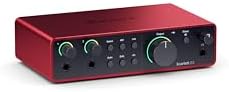
- 4th Gen mic pres for mic and guitar
- 120dB dynamic range with flagship converters
- Auto Gain sets levels, Clip Safe prevents clipping
- Air mode adds presence to vocals and guitars
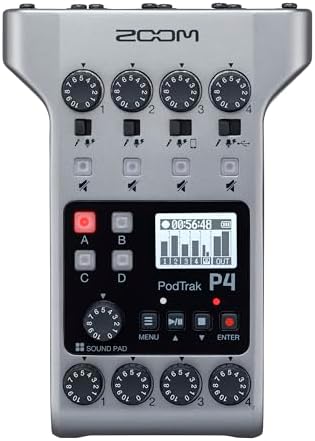
- 4 microphone inputs with phantom power
- 4 headphone outputs with individual volume control
- 4 programmable Sound Pads plus multi-track recording
- Automatic Mix-Minus via TRRS jack and USB

- Dual USB ports connect computer and phone simultaneously
- 56dB gain, 24-bit/192kHz quality, -130dB EIN
- Independent mute and headphone controls included
- ProStudio 2 software routes audio to dedicated channels

- USB sound card delivers 48kHz audio resolution
- Two combo XLR / Line / Instrument Inputs with phantom power
- 1/4" headphone output and stereo 1/4" outputs
- Crystal Preamps support all microphones including condensers

- 6+GB of Free Content for macOS/Windows/iOS
- USB-C Audio Interface with 2 Preamps
- Hardware Monitoring included
- 24-bit/192kHz resolution

- FOUR MICS, ONE ROOM, ONE RECORDER – Four XLR inputs with multitrack recording support up to four people plus a call-in guest, giving you flexibility…
- AI TOOLS THAT DO THE MIXING FOR YOU – AI noise reduction, Tone Enhancement, and COMP help you achieve clear, balanced audio with minimal effort.
- HANDLES EVEN THE MOST DEMANDING MICS – The P4next's four XLR inputs provide up to +70dB of gain, allowing you to use even the most demanding podcast…
- EVERYONE HEARS THEMSELVES CLEARLY – Four headphone outputs with separate volume controls ensure each person can listen comfortably during recording.
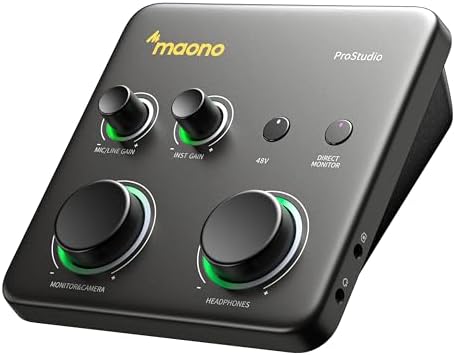
- HYBRID CONNECTIVITY: Dual USB ports with MFi-certified connectivity connect your computer and phone or iPad simultaneously. Record in GarageBand or…
- STUDIO-GRADE AUDIO: Up to 70dB gain drives hungry-gain dynamic microphones flawlessly—no external booster. Capture every vocal and guitar nuance in…
- STREAM AND RECORD WITHOUT THE GUESSWORK: Built for podcasters, streamers, and musician creators. Auto-Gain sets the ideal microphone level for clear…
- SIMPLIFY COMPLEX AUDIO ROUTING SOFTWARE PROSTUDIO2: Record guitar tutorials, cover songs, and vocal streams with ease. Route FL Studio, Spotify,…

- Professional 2-In/4-Out USB Audio Interface for Recording, Streaming & Podcasting – Capture studio-quality sound with dual XLR/¼" combo inputs for…
- 24-Bit/192kHz Professional Recording with Extended Sample Rate Support – Record crystal-clear vocals and instruments at up to 24-bit/192kHz. Supports…
- Zero-Latency Monitoring with 4 Monitoring Modes – Hear yourself in real time without distracting delay. Choose OFF, MONO, Crossfeed or STEREO…
- Built for Condenser Microphones and Loud Instruments – Independent +48V phantom power supports professional condenser microphones, while dedicated…

- [Excellent Performance with Superior Preamp]: AME2 built-in quality preamps support phantom power for optimal performance of XLR microphones. The…
- [Up to 11 Customized Sound Pads to Enhance Your Podcast Atmosphere]: AME2 10-channel podcast mixer allows for 11 customizable sound pads. 3 sound…
- [Perfect for Guitar, Bass, and Other Musical Instruments with a 6.35mm Jack]: AME2 is a great option if you are looking for an audio interface to…
- [Upgraded Podcast Equipment Bundle]: Elevate your podcasting game with our new digital audio workstation controllers. They are plug-and-play ready,…

- USB Audio Interface: Podcast, Record, Live Stream, This Portable Audio Interface Covers it All – USB sound card for Mac or PC delivers 48 kHz audio…
- 2 in/2 out and connect more devices: The portable audio interface has 2 jacks: 2 combo XLR/MIC/LINE inputs with phantom power for recording guitar,…
- 48V Phantom Power: For reliable power, the stage audio mixer is equipped with +48V phantom power. With ultra-low noise design. Suitable for beginners…
- Sound mixer Interface for Fuss-Free Monitoring: 1/4” headphone output and stereo 1/4” outputs for total monitoring flexibility; USB/Direct switch for…
1. Focusrite Scarlett 2i2 4th Gen USB-C Audio Interface
Best for: Solo hosts wanting professional sound without manual level adjustments.
This interface leads the list with a stated 120dB dynamic range, using the same converters found in Focusrite’s flagship studio units. For a podcaster, that means capturing quiet breaths and loud laughs in the same take without distortion. The Auto Gain feature sets the microphone level automatically, while Clip Safe prevents clipping if someone suddenly speaks too loudly. You don’t have to watch your meters constantly during an interview.
Air mode adds harmonic drive to vocals, pushing them to the front of the mix without extra plugins. The included software bundle covers every step from recording to mastering, featuring Pro Tools Intro+, Ableton Live Lite, Cubase LE, and the Hitmaker Expansion. That collection gives a new creator everything needed to start producing episodes immediately.
Anyone who needs more than two microphones plugged in at once will find the two inputs limiting for roundtable discussions. Compared to the Zoom PodTrak P4, which lists four XLR inputs, this Focusrite model handles fewer guests in the same room.
Pros
- 120dB dynamic range matching flagship studio converters
- Auto Gain and Clip Safe prevent ruined takes
- Air mode lifts vocal presence
- Includes Pro Tools Intro+, Ableton Live Lite, Cubase LE, and Hitmaker Expansion
Cons
- A pair of inputs limits you to a host and one guest, so a larger panel requires a different setup.
2. Zoom PodTrak P4 Podcast Recorder with 4 XLR Mic Inputs
Best for: Multi-guest podcasts recorded away from a studio desk.
Four XLR inputs with phantom power mean everyone gets their own microphone, and four headphone outputs let each person set their own volume. That separation stops arguments over who’s too loud in the headphones. The built-in Mix-Minus feature handles call-in interviews through a TRRS jack or USB, removing echo automatically when a guest phones in.
It runs on two AA batteries for up to 3.5 hours, so you aren’t tied to a wall outlet. Four programmable sound pads let you trigger intro music or effects directly from the unit during multitrack recording. It operates as a 2-in/2-out USB audio interface when connected to a computer.
At 3.5 hours on two AA batteries, a longer recording session means stopping to swap cells mid-show. The Focusrite Scarlett 2i2 4th Gen draws power straight from USB-C, avoiding battery limits entirely.
Pros
- 4 XLR mic inputs with phantom power
- Dedicated headphone outputs give every participant individual volume control
- Automatic Mix-Minus for phone and remote interviews
- Programmable sound pads let you trigger effects during multitrack recording
- Battery powered for up to 3.5 hours on 2 AA batteries
Cons
- Up to 3.5 hours on 2 AA batteries, so a longer job means stopping to swap cells.
3. MAONO P2 Hybrid USB Audio Interface Dual XLR
Best for: Creators recording simultaneously on a computer and mobile device.
Dual USB ports with MFi-certified connectivity let you plug into a laptop and an iPad or phone at the exact same time. You can record a full episode in Logic Pro while streaming a clip to TikTok from your phone without unplugging anything. Stream Mode sends your voice equally to both channels, keeping the listening experience balanced across platforms.
The preamps deliver 56dB of gain and support 24-bit/192kHz audio resolution. A stated -130dB EIN keeps the noise floor dead silent, which matters when you’re boosting quiet dynamic mics. Independent mute buttons stop unwanted noise when switching guitars or adjusting stands, and the ergonomic 15° tilt angle keeps controls easy to reach on a crowded desk.
With 56dB of gain listed, highly demanding dynamic microphones might still need an external booster to hit proper levels. The MAONO P1 offers 70dB of gain, making it the better match for those specific mics.
Pros
- Dual USB ports connect computer and phone/iPad simultaneously
- 56dB gain with 24-bit/192kHz resolution
- -130dB EIN for dead-silent recording
- Independent mute and Stream Mode for balanced output
- Ergonomic 15° tilt angle with aluminum-alloy housing
Cons
- 56dB of gain, which is what anyone using a very low-output dynamic mic has to plan around by adding an external booster.
4. M-AUDIO M-Track Duo USB Audio Interface
Best for: Beginners needing a straightforward stereo recording setup.
Combo inputs with phantom power accept microphones, line-level gear, or instruments directly handle microphones, keyboards, or guitars without adapter cables. The Crystal Preamps aim for transparent sound, letting condenser mics capture vocals cleanly. A physical USB/Direct switch toggles between computer playback and direct input monitoring instantly, giving you zero latency while tracking.
It delivers 48kHz audio resolution for Mac or PC setups. The package includes MPC Beats Software with essential production tools from Akai Professional, providing a starting point for editing and mixing. Stereo 1/4″ outputs and a 1/4″ headphone jack give you standard monitoring connections.
A fixed 48kHz audio resolution means it doesn’t offer the higher sample rates some modern DAWs prefer for heavy processing. The MOTU M2 lists 24-bit/192kHz support, offering significantly more resolution headroom.
Pros
- Two combo XLR/Line/Instrument inputs with phantom power
- USB/Direct switch for zero latency monitoring
- Crystal Preamps for transparent microphone sound
- Includes MPC Beats Software with Akai Professional tools
Cons
- 48kHz audio resolution against 192kHz on the MOTU M2, meaning less headroom for heavy digital processing.
5. MOTU M2 USB-C Audio Interface
Best for: Producers wanting high-resolution audio and visual metering.
This unit supports 24-bit/192kHz audio resolution across its stereo input and output configuration. Two preamps handle microphones or instruments, while hardware monitoring lets you hear your input directly without routing it through software first. That direct path eliminates the delay that distracts performers during tracking.
It connects via USB-C and works with macOS, Windows, and iOS devices. The listing notes 6+GB of free content included with the interface, giving buyers immediate access to sounds and tools. The high sample rate ensures detailed captures, preserving the nuance of spoken word and acoustic instruments alike.
Anyone running older computers without USB-C ports will need to source an adapter before plugging in. The M-Audio M-Track Duo uses standard USB connections, avoiding that extra step entirely.
Pros
- 24-bit/192kHz audio resolution
- Hardware monitoring for zero-latency tracking
- USB-C connection compatible with macOS, Windows, and iOS
- 6+GB of free content included
Cons
- USB-C connection required, so older computers lacking that port need a separate adapter to function.
6. Zoom PodTrak P4next Podcast Recorder with 4 Inputs + AI
Best for: Hosts recording in noisy rooms who want automatic cleanup.
Four XLR inputs provide up to +70dB of gain, allowing you to use demanding dynamic microphones without buying an inline booster. Multitrack recording supports four people plus a call-in guest simultaneously. The AI noise reduction, Tone Enhancement, and COMP tools process the audio internally, balancing levels and cutting background hum before the signal hits your computer.
Separate headphone outputs with individual volume controls ensure every guest hears themselves clearly. You can also connect the recorder directly to a smartphone to capture high-quality audio straight into video files, eliminating the need to sync tracks in editing software later.
Relying on internal AI processing means you surrender some manual control over exactly how the noise reduction shapes the final sound. The Focusrite Scarlett 2i2 4th Gen uses Clip Safe and Auto Gain instead, leaving tonal shaping to your software.
Pros
- Four XLR inputs with up to +70dB of gain
- AI noise reduction, Tone Enhancement, and COMP tools
- Four headphone outputs with separate volume controls
- Direct phone connection for video audio capture
- Multitrack recording for up to four people plus a guest
Cons
- AI tools do the mixing for you, which rules out creators who want total manual control over noise reduction parameters.
7. MAONO P1 USB Audio Interface with 70dB Gain
Best for: Users of low-output dynamic microphones needing massive gain.
Up to 70dB of gain drives hungry dynamic microphones flawlessly, removing the need for an external inline booster. That extra power means popular broadcast mics reach optimal volume purely through the interface itself. The Auto-Gain feature sets ideal levels automatically in software like OBS Studio, saving you from riding the dial during live streams.
Dual USB ports with MFi certification connect a computer and mobile device simultaneously. The ProStudio2 software routes audio from Spotify, browsers, or FL Studio directly to dedicated channels. A zinc-alloy metal housing protects the internals, and the 15° tilt angle keeps knobs accessible on your desk.
A zinc-alloy metal housing makes this unit sturdier but heavier than plastic alternatives, which matters if you’re traveling daily. The BOMGE Mini emphasizes an ultra-portable size designed specifically for taking anywhere.
Pros
- 70dB gain drives demanding dynamic microphones without a booster
- Auto-Gain sets levels automatically in OBS Studio
- Dual USB ports with MFi-certified connectivity
- ProStudio2 software for advanced audio routing and loopback
- Zinc-alloy metal housing with 15° tilt angle
Cons
- Zinc-alloy metal housing adds weight compared to plastic units, which is what anyone carrying it in a backpack daily has to plan around.
8. BlueAVS USB Audio Interface
Best for: Streamers needing flexible headphone and speaker monitoring options.
A 2-in/4-out configuration provides dual XLR/¼” combo inputs alongside multiple output paths. Four monitoring modes—OFF, MONO, Crossfeed, and STEREO—let you tailor exactly how the audio reaches your headphones during a livestream. An upgraded 103dB dynamic range and THD+N below 0.003% ensure clean, detailed recordings without audible distortion.
Independent +48V phantom power supports condenser microphones, while dedicated PAD switches protect against clipping from loud instruments or sudden shouting. It records at 24-bit/192kHz and supports intermediate sample rates like 88.2kHz and 176.4kHz for seamless DAW compatibility. The package includes a USB-A to USB-C cable.
The box lists the interface, a USB-A to C cable, and a manual, but not the XLR cables required to actually connect your microphones. That remains a second purchase before you can record anything.
Pros
- 2-In/4-Out routing with four monitoring modes
- 103dB dynamic range and THD+N <0.003%
- Independent +48V phantom power and PAD switches
- 24-bit/192kHz recording with extended sample rate support
- Includes USB-A to USB-C cable
Cons
- The box lists the interface, cable, and manual, and not the XLR cables the job still needs, so that’s a second purchase.
9. MAONO AME2 Audio Interface Mixer
Best for: Live podcasters wanting built-in sound effects and voice processing.
Eleven customizable sound pads let you trigger jingles, ads, or reactions directly from the console. Three pads hold up to 60 seconds of audio each with one-key looping, while eight others store 20-second clips. You can upload these sounds via smartphone, PC, or Bluetooth. Six reverb modes, a 12-step auto-tune, and pitch changer knobs shape your voice in real time.
The built-in preamps support 48V phantom power and deliver up to 60dB of gain with a 3-level adjustment system. A DENOISE function cleans up background noise at the hardware level. Dedicated switches for sidechain, music-only, and loopback make routing audio for live streams much simpler than configuring software alone.
Listed as supporting analog XLR, 6.35mm, and 3.5mm microphones, and outside that range—specifically with USB microphones—this is the wrong buy. Anyone already owning a USB mic can’t plug it into this mixer.
Pros
- 11 customizable sound pads (three at 60s, eight at 20s)
- Six reverb modes, 12-step auto-tune, and pitch changer
- Up to 60dB gain with 48V phantom power
- Sidechain, music-only, and loopback switches included
- Compatible with PC, smartphones, and cameras
Cons
- Listed as working with analog XLR, 6.35mm, and 3.5mm microphones, and outside it—specifically for USB microphones—this is the wrong buy.
10. BOMGE mini 2 Channel USB Audio Interface
Best for: Traveling podcasters needing the smallest possible recording footprint.
An ultra-portable size makes this the easiest unit here to toss into a bag for recording on location. Combo XLR/MIC/LINE inputs include +48V phantom power for condenser microphones. Beyond the standard 1/4″ outputs, it features two independent RCA stereo jacks to connect PA speakers, powered monitors, or amplifiers directly.
It delivers 48kHz audio resolution and works plug-and-play on Mac OS and Windows XP or later without downloading drivers. A physical USB/Direct switch enables zero latency monitoring. The small footprint doesn’t sacrifice connectivity, offering both balanced TRS and unbalanced TS connection options for different devices.
Fixed at 48kHz audio resolution, it falls short of interfaces offering 192kHz for detailed post-production work. The BlueAVS 2-In/4-Out lists 24-bit/192kHz support, providing significantly higher fidelity for editing.
Pros
- Ultra-portable size for mobile recording
- Combo XLR inputs provide +48V phantom power
- Independent RCA stereo jacks for PA speakers or monitors
- Plug and play with no drivers required on Mac or Windows
- USB/Direct switch for zero latency monitoring
Cons
- 48kHz audio resolution against 192kHz on the BlueAVS 2-In/4-Out, leaving less detail for heavy post-production editing.
Also Worth Considering
The Focusrite Gen USB-C Audio Interface is listed as a 3rd generation Solo model with a single input configuration. The Focusrite Scarlett 2i2 4th Gen beats it with newer 4th generation converters and two inputs instead of one. Someone strictly recording solo voice memos might still prefer the smaller footprint of the Solo.
The Piyone Audio Interface is a 2×2 unit supporting 24-bit/192kHz recording with an alloy red chassis and loopback function. The BlueAVS 2-In/4-Out matches that resolution while adding four distinct monitoring modes and PAD switches. Buyers drawn to the specific alloy finish or simpler layout might still consider the Piyone.
The CIXUN 2×2 USB-C Audio Interface is a basic 2×2 recorder for PC and Mac. The MOTU M2 surpasses it by explicitly listing 6+GB of included content and hardware monitoring capabilities. Those who just need a bare-bones USB-C connection without extras might find the CIXUN sufficient.
How We Chose
To earn a place, a listing had to state clear connectivity specs, such as XLR inputs, phantom power, or USB configurations, alongside specific resolution figures or unique routing tools. Interfaces lacking detailed bullet points explaining their actual functions were removed from consideration. What separates the final ten picks is how they solve different recording problems: some offer battery power for travel, others provide artificial intelligence mixing, and several include extensive software bundles. Every chosen product prints measurable specifications that allow direct comparison, ensuring buyers can match a unit to their exact microphone count and workspace constraints.
How to Choose the Right Audio Interface for Podcasting
Number of Microphones Needed
Count the people sitting in the room during a typical episode. A solo host only needs one input, but a panel requires more. The Zoom PodTrak P4 and Zoom PodTrak P4next both list four XLR inputs for larger groups. The Focusrite Scarlett 2i2 4th Gen provides two inputs, fitting a standard host-and-guest format perfectly.
Where You Record Your Episodes
A bedroom desk setup relies on USB power, while field recording demands batteries. The Zoom PodTrak P4 runs on two AA batteries for up to 3.5 hours, making it viable for locations without outlets. Desktop units like the MAONO P2 Hybrid draw power directly through USB connections to your computer or tablet.
Microphone Type and Gain Requirements
Dynamic broadcast microphones often require significant gain to reach usable volumes. The MAONO P1 lists 70dB of gain, driving demanding mics without an external booster. Condenser microphones need phantom power instead; the BlueAVS 2-In/4-Out provides independent +48V phantom power specifically for those sensitive studio microphones.
Included Software and Effects
Some interfaces ship with complete production suites, while others rely entirely on third-party apps. The Focusrite Scarlett 2i2 4th Gen includes Pro Tools Intro+, Ableton Live Lite, and Cubase LE. The MAONO AME2 Mixer skips traditional DAWs but builds eleven sound pads and six reverb modes directly into the hardware for live broadcasting.
Frequently Asked Questions
Can I use these interfaces with my smartphone?
Yes, but only specific models list mobile compatibility. The MAONO P2 Hybrid and MAONO P1 feature dual USB ports with MFi-certified connectivity for iPhones and iPads. The MOTU M2 states iOS compatibility alongside macOS and Windows. Other units, like the M-Audio M-Track Duo, list only Mac or PC support.
Do I need to install drivers for Windows or Mac?
Most modern interfaces operate plug-and-play, but listings vary. The BOMGE Mini 2-Channel explicitly states no driver downloads are needed for Mac OS and Windows XP or later. Others, like the MAONO P2 Hybrid, mention ASIO support for lower-latency monitoring, which typically requires installing manufacturer software on Windows machines.
Will these work with my existing USB microphone?
Generally, no. Audio interfaces are designed for analog microphones using XLR or 1/4″ cables. The MAONO AME2 Mixer listing specifically notes that USB microphones aren’t supported. If you own a USB mic, it plugs directly into your computer, bypassing an interface entirely.
What does phantom power actually do?
Phantom power sends +48V of electricity through an XLR cable to operate condenser microphones. Without it, those mics produce no sound. The BlueAVS 2-In/4-Out and BOMGE Mini 2-Channel both list independent +48V phantom power switches, allowing you to activate it only when a condenser mic is connected.
Is loopback necessary for podcasting?

Loopback routes your computer’s audio back into the interface so you can record it alongside your voice. It’s essential if you play sound effects from a browser or interview a guest over a calling app. The MAONO P1 and MAONO P2 Hybrid list built-in loopback via their ProStudio software.
How does AI noise reduction change my workflow?
Instead of fixing background noise in editing software after recording, AI tools process the audio inside the hardware. The Zoom PodTrak P4next lists AI noise reduction, Tone Enhancement, and COMP features that balance audio automatically. This saves editing time but limits manual control over the final sound profile.
Conclusion
For most people building a show, the Focusrite Scarlett 2i2 4th Gen is a reliable choice because its 120dB dynamic range and Auto Gain remove technical friction. If you just need two simple inputs without complex routing, the M-Audio M-Track Duo handles the basics cleanly. Pick the one that fits your microphone count and start recording.
As an Amazon Associate, Cleanestor earns from qualifying purchases at no additional cost to you.