
The PreSonus Eris 3.5 is the best budget studio monitors choice for most creators because it provides a reliable, balanced sound profile that helps your mixes translate across different playback systems. If you’re setting up a home workspace for music production, video editing, or casual listening, these monitors offer the clarity and input flexibility you need to get started without complexity.
Choosing the right speakers depends on your available desk space and the specific connections your equipment requires. While some models prioritize wireless convenience, others focus on wired performance to ensure zero latency during high-stakes recording sessions. Comparing the features of these units will help you find the pair that fits your creative workflow.
- Best Overall: PreSonus Eris 3.5 — Balanced sound with versatile inputs for any studio setup.
- Best Mid-Range Accuracy: PreSonus Eris E4.5 — Superior stereo imaging with a wider listening sweet spot.
- Simplest Controls: Mackie CR3.5 — Intuitive tone and location switches for quick sound adjustments.
- Best Wireless Connectivity: Edifier MR3 — Multi-point Bluetooth support for seamless device switching.
- Best Wired Latency: M-Audio BX3 — Engineered for uninterrupted, zero-latency audio monitoring.
- Best Built-In DAC: Ortizan C7 — Includes a 24-bit DAC for direct digital USB audio.
- Best Larger Driver: PreSonus Eris E5 — Larger woofer size for enhanced low-end performance.
- Best Hi-Res Audio: Edifier R1700BT — High-frequency response range suitable for detailed listening.
- Most Powerful Output: Rockville APM6W V2 — High-output architecture delivering significant peak power.
- Best Compact Reference: Yamaha HS4 — Precise, neutral reference sound in a small footprint.
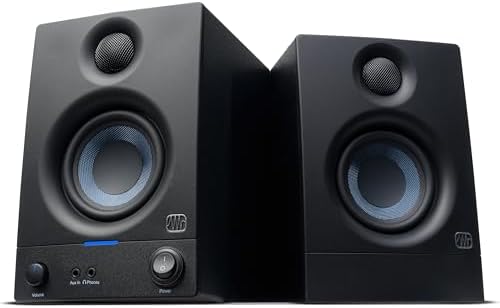
- Sold as a complete stereo pair
- 50 watts of built-in amplification
- 3.5” woven-composite woofers and 1” silk-dome tweeters
- Frequency range from 80 Hz to 20 kHz

- Eris 4.5 near field studio monitors
- Woven-composite woofers for tight bass
- 50 Watts of Class AB dual amplification (25W per side)
- 1-inch low-mass silk-dome transducers

- Sold as a pair, sized for desks
- Tone Knob dials voicing from your desk
- Location Switch corrects bass near walls
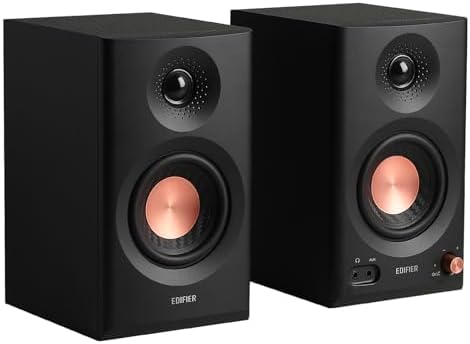
- Hi-Res Audio certified, 52Hz to 40kHz response
- Balanced TRS, RCA, AUX inputs and Bluetooth
- 18W*2 RMS output with 92.5dB peak SPL
- 3.5" mid-low drivers and 1" tweeters

- Zero-latency wired audio monitoring connection
- Bi-amplified power for desktop use
- 3.5-inch Kevlar low-frequency drivers
- Natural silk dome tweeters for stereo imaging
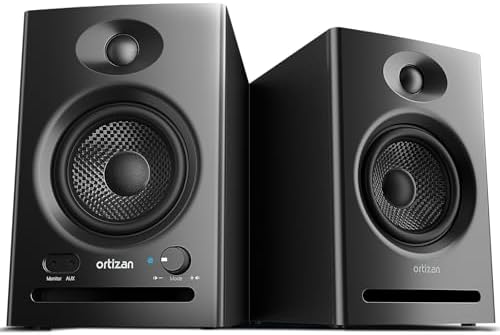
- RCA inputs and BT 5.3 wireless pairing
- Built-in 24-bit DAC captures audio via USB
- 3.5 inch carbon fiber speaker and 0.75inch silk dome tweeter
- Flat response curve across high, mid, low frequencies
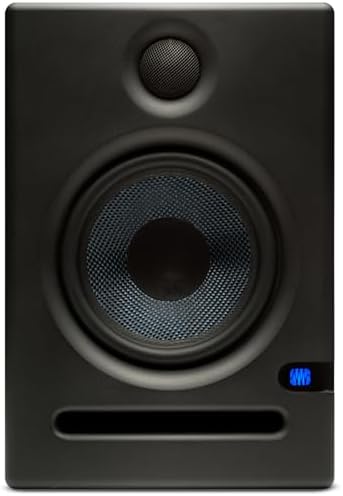
- Includes Studio One Prime and Studio Magic plug-in suite
- Over $1000 USD worth of music production software
- 5.25-inch woven composite woofer
- 1-inch ultra-low-mass silk-dome tweeter

- Built-in amplifier (33 watts x 2 speakers)
- Frequency response: 55 Hz to 20 kHz
- Bluetooth pairing capability for streaming
- 10° tilt angle directs sound toward ears

- 400W Peak / 100W RMS total power
- 105dB Max SPL and 96dB Signal-to-Noise Ratio
- Frequency response of 43Hz – 22kHz (-3dB)
- 6.5 inch polypropylene woofer and 1 inch soft dome tweeter
- Packaging: Pair
- 4.5" cone woofer and 1" dome tweeter
- 60 Hz – 22 kHz frequency response (-10 dB)
- 26 W and above 26 W output power
1. PreSonus Eris 3.5 Powered Studio Monitors
Best for: Beginners needing a reliable, all-purpose studio monitor pair.
These monitors are designed to be the foundation of a home studio. With 50 watts of amplification and 3.5-inch woven-composite woofers, they deliver a balanced frequency range that’s ideal for those who need to hear their mix clearly. The inclusion of high- and low-frequency tuning controls allows you to adjust the output to match the acoustics of your specific room.
Connecting your gear is straightforward, as the rear panel features balanced TRS and unbalanced RCA inputs, alongside a front-panel auxiliary input for quick access. Compared to the Mackie CR3.5, which includes isolation pads, the Eris 3.5 focuses on providing a wider range of integrated tuning options to help you dial in your sound.
Anyone who requires deep, sub-bass monitoring will find the 80 Hz lower limit restrictive, as it misses the very bottom of the frequency spectrum.
Pros
- Includes high- and low-frequency acoustic tuning controls.
- Features balanced TRS and unbalanced RCA connectivity.
- Front-panel aux input and headphone jack.
- Compact design suitable for smaller desks.
Cons
- Frequency range starts at 80 Hz, limiting sub-bass monitoring.
2. PreSonus Eris E4.5-2-Way 4.5″ Near Field Studio Monitor (Pair)
Best for: Users who need a larger sweet spot for mixing.
The Eris E4.5 monitors provide an upgrade in size and performance, utilizing 4.5-inch woofers to create a more expressive low end. The silk-dome tweeters are designed to maintain stereo imaging even when you aren’t sitting perfectly centered, which is helpful during long sessions. The 50 watts of Class AB amplification ensures there’s plenty of volume available for near-field work.
These speakers offer a similar connection layout to the smaller Eris 3.5 but provide a more robust sound stage. If you need even more bass, you can pair these with a dedicated subwoofer to create a 2.1 system, a feature not explicitly detailed for the smaller Eris 3.5.
At 4.5 inches, these require more desk space than the 3.5-inch models, which might rule them out for those with cramped workstations.
Pros
- 4.5-inch woofers provide tighter, more felt bass.
- Supports expansion with an external subwoofer.
- Front-panel headphone output for quick switching.
- Wide listening sweet spot for better imaging.
Cons
- Larger footprint compared to the most compact desktop monitors.
3. Mackie CR3.5 Studio Monitors (Pair)
Best for: Creators who want to adjust sound without using menus.
Mackie focuses on simplicity with the CR3.5. The standout feature is the dedicated tone knob on the front, which lets you change the voicing of the speakers instantly. A rear-mounted location switch is also provided, allowing you to compensate for bass buildup if the speakers are placed close to a wall.
The box includes everything you need to get running, including isolation pads and all necessary cables.
Users who need advanced software-based EQ will find the physical-only controls limiting, as there’s no app integration for fine-tuning.
Pros
- Includes isolation pads and all necessary cables.
- Physical tone knob for quick voicing adjustments.
- Location switch to manage bass placement.
- Simple setup process for immediate use.
Cons
- Lacks software or app-based customization options.
4. Edifier MR3 Powered Studio Monitor
Best for: Those who need both wired and wireless inputs.
The Edifier MR3 stands out by offering Hi-Res Audio certification, covering a broad frequency range from 52 Hz to 40 kHz. It’s highly versatile, featuring Bluetooth with multi-point connectivity alongside standard TRS and RCA inputs. The ability to switch between Music, Monitor, and Custom modes allows you to adapt the speakers for different tasks.
You can use the Edifier ConneX app to perform in-depth EQ adjustments, giving you more control than the physical knobs on the Mackie CR3.5. This makes the MR3 a powerful tool for those who switch between production and casual media consumption.
Anyone who prefers a strictly analog signal path may find the reliance on app-based controls for deep customization to be an unnecessary step.
Pros
- Hi-Res Audio certification for detailed monitoring.
- Bluetooth support with multi-point device switching.
- Customizable sound modes via dedicated mobile app.
- Wide frequency range up to 40 kHz.
Cons
- Requires mobile app for advanced EQ adjustments.
5. M-AUDIO BX3 3.5″ Wired Studio Monitors Pair
Best for: Streamers and podcasters needing zero-latency monitoring.
The M-Audio BX3 is built specifically for tasks where delay isn’t an option. By prioritizing a wired connection, it ensures the signal remains uninterrupted for live streaming or recording. The use of Kevlar woofers is a distinct material choice meant to provide a punchy response, while the MDF cabinet helps reduce unwanted vibrations.
These monitors include rear-panel inputs for professional gear alongside a front-panel aux input. Compared to the Edifier MR3, which focuses on wireless flexibility, the BX3 remains focused on providing a stable, latency-free experience for studio professionals.
This model isn’t intended for users who require Bluetooth or wireless streaming, as it’s strictly a wired system.
Pros
- Kevlar woofers for punchy low-frequency response.
- MDF cabinet construction minimizes acoustic vibrations.
- Zero-latency wired signal path.
- Rear-panel inputs for professional equipment.
Cons
- No integrated wireless or Bluetooth connectivity.
6. Ortizan C7 Powered Studio Monitors Pair with Bluetooth 5.3
Best for: Users who want a built-in DAC for digital audio.
The Ortizan C7 is equipped with a 24-bit DAC, allowing you to connect directly via USB to capture high-fidelity digital audio. This minimizes signal loss, making it a strong choice for content creators who work primarily on computers. The combination of a small-format carbon fiber woofer and a silk dome tweeter aims for a flat, accurate response.
It also includes professional-grade 6.35mm TRS balanced inputs, which is an advantage over the Mackie CR3.5. This allows for a more direct connection to mixers and audio interfaces.
Anyone without a USB-capable source or a need for balanced inputs will be paying for features they might not utilize in a basic setup.
Pros
- Built-in 24-bit DAC for USB digital audio.
- TRS balanced inputs for professional gear.
- Carbon fiber woofer for precise low-end detail.
- Bluetooth 5.3 for wireless playback.
Cons
- Complex feature set may exceed the needs of casual users.
7. PreSonus Eris E5 2-Way 5.25″ Near Field Studio Monitor
Best for: Professionals who need more power and low-end definition.
The Eris E5 increases the woofer size to 5.25 inches, providing a more robust low-frequency output than the entry-level PreSonus Eris 3.5. It includes 80 watts of bi-amplification, offering significant headroom for near-field monitoring. The inclusion of a front-firing acoustic port also aids in the reproduction of bass frequencies.
This model comes with a suite of music production software, adding value beyond the hardware itself. While the Eris 3.5 is excellent for smaller desks, the E5 is better suited for larger workspaces where you can take advantage of the increased volume.
Users with limited desk space will find the 5.25-inch size difficult to accommodate compared to the more compact Eris 3.5.
Pros
- 5.25-inch woofer for solid low-end performance.
- 80 watts of bi-amplified power.
- Includes professional music production software.
- Balanced XLR and TRS inputs.
Cons
- Large physical size requires significant desk space.
8. Edifier R1700BT Bluetooth Bookshelf Speaker
Best for: Listeners who want a tilted soundstage.
The Edifier R1700BT features a unique 10-degree tilt, which directs the sound directly toward your ears for a more immersive experience. With 66 watts of RMS power and dual RCA inputs, it’s designed for convenience. It also includes Bluetooth, allowing you to stream audio from mobile devices without needing a wired connection.
Compared to the M-Audio BX3, which is designed for studio monitoring, the R1700BT is more of a hybrid bookshelf speaker. It’s better for those who want a blend of studio-quality sound and everyday utility.
Anyone who needs balanced TRS inputs for professional audio interfaces will find this model lacking, as it relies primarily on RCA connections.
Pros
- 10-degree tilt directs audio toward the listener.
- 66W RMS total power output.
- Bluetooth pairing for wireless streaming.
- Dual RCA inputs prevent cable swapping.
Cons
- Lacks balanced TRS or XLR inputs for pro gear.
9. Rockville APM6W V2 6.5″ White Powered Studio Monitor Speakers Pair
Best for: Users needing maximum output power.
The Rockville APM6W V2 is a powerhouse, offering 400W peak power and a 105dB maximum SPL. It features a 6.5-inch polypropylene woofer, providing significant bass response. It also includes a built-in USB soundcard and Bluetooth 5.3, making it a highly modern and capable monitor.
Its versatility is bolstered by a wide range of inputs, including balanced XLR/TRS combos. Compared to the PreSonus Eris E5, which offers 80 watts, the Rockville model provides substantially more peak power for high-volume environments.
At 6.5 inches, these monitors may be too large for anyone with a standard or small-sized studio desk.
Pros
- High-output architecture with 400W peak power.
- 6.5-inch woofer delivers deep, punchy lows.
- Includes built-in USB soundcard.
- Balanced XLR/TRS combo inputs.
Cons
- Physical size is too large for compact desk setups.
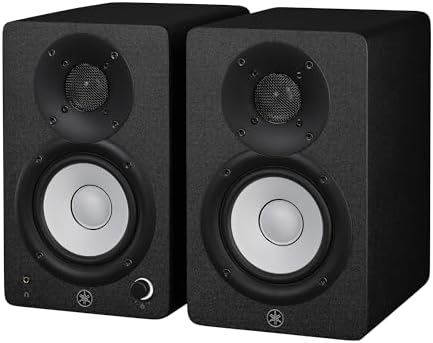
10. Yamaha HS4 Powered Studio Monitor in Black
Best for: Those who want a standard, neutral reference sound.
The Yamaha HS4 is built for accuracy, featuring a 4.5-inch woofer and a 1-inch tweeter in a bass-reflex cabinet. It provides room control and high trim response switches to help you flatten the sound in your specific environment. The inputs cover all bases, including combo XLR/TRS and RCA.
While it lacks the wireless features of the Edifier MR3, it makes up for it by providing a professional, neutral reference sound that’s a hallmark of the Yamaha HS brand. It’s an ideal choice for those who want a no-nonsense monitoring tool.
Users looking for built-in Bluetooth or advanced app-based EQ will find the HS4 too traditional, as it focuses entirely on the wired monitoring experience.
Pros
- Neutral, accurate reference sound quality.
- Room control and high trim switches.
- Combo XLR/TRS inputs for professional connectivity.
- Includes all necessary cables and pads.
Cons
- No wireless connectivity or mobile app support.
Also Worth Considering
The Sanyun SW208 Bluetooth Bookshelf Speakers offer a compact 3-inch design with a built-in 24-bit DAC, making them a space-saving alternative. They’re less powerful than the Ortizan C7, which also features a DAC but provides more robust woofer dimensions for better range. They suit users who need the absolute smallest footprint.
The Rockville APM5B Studio Monitor Speakers feature a 5.25-inch woofer, similar to the PreSonus Eris E5. While they share a similar driver size, the Rockville model focuses on a different aesthetic design. You might choose these if you prefer the Rockville brand’s specific enclosure style over the PreSonus option.
The PreSonus Powered Desktop Studio Monitors (Eris 4.5 Bluetooth) provide the same core audio quality as the Eris E4.5 but add wireless convenience. They’re beaten by the Edifier MR3 in terms of total frequency range, but those already integrated into the PreSonus ecosystem will find them a familiar and logical upgrade.
How to Choose the Right Studio Monitor
Size and where it has to fit
The size of the woofer determines the physical footprint and the bass depth. A compact monitor like the PreSonus Eris 3.5 is ideal for tight desks, while a 6.5-inch model like the Rockville APM6W V2 requires more space. Measure your desk area before choosing to ensure the speakers don’t obstruct your workspace.
Connections for your gear
Check which inputs your audio interface or computer supports. If you use a professional mixer, look for balanced TRS or XLR inputs like those on the Yamaha HS4. If you plan to connect phones or tablets, models with Bluetooth or 3.5mm aux inputs, such as the Edifier MR3, offer better convenience.
Tuning to your room
Every room has different acoustic properties that can color the sound. Monitors with high- and low-frequency tuning controls, such as the PreSonus Eris E5, allow you to adjust the output to compensate for walls or corners. Proper placement is essential for accurate monitoring, as noted by the Occupational Safety and Health Administration regarding workplace noise exposure and sound management.
Frequently Asked Questions
Are studio monitors better than regular computer speakers?
Yes, studio monitors are designed to provide a flat, accurate frequency response, meaning they reproduce audio without adding artificial color or enhancement. In contrast, standard computer speakers often boost bass and treble to make music sound more exciting, which can hide flaws in a mix during production.
Can I use these monitors for gaming and movies?
You certainly can. While they’re engineered for accurate audio production, their clear sound and wide frequency range make them excellent for media consumption. Many models, such as the PreSonus Eris 3.5, explicitly list gaming and movies as intended use cases, providing a more detailed experience than generic multimedia speakers.
Do I need an external amplifier for these?
No, all the monitors listed here are “powered” or “active,” meaning they have built-in amplification. You can plug them directly into your computer, audio interface, or mixer without needing a separate power amp. This simplifies your setup and ensures the internal amps are perfectly matched to the drivers.
How do I connect these to my computer?

Most modern studio monitors connect via the headphone jack of your computer using a 3.5mm-to-dual-RCA or 3.5mm-to-dual-TRS cable. For the best quality, use an external audio interface to connect via balanced TRS cables, which helps reduce electrical noise and interference over longer cable runs.
What is a balanced input?
A balanced input uses a specific circuit design to cancel out electrical interference that can be picked up by cables. If you’re running long cables or have a lot of electronic gear near your speakers, using balanced TRS or XLR inputs will help keep your audio signal clean and free of hum.
Conclusion
The PreSonus Eris 3.5 remains the top choice for most home studio setups due to its balanced sound and flexible input options. If you need a simpler solution with physical controls, the Mackie CR3.5 is a great alternative. Check your desk dimensions and connection needs before making your final selection.
As an Amazon Associate, Instrument Insight earns from qualifying purchases at no additional cost to you.