
The JBL 305P MkII is our top pick because its patented Image Control Waveguide provides a wide sweet spot that helps producers make consistent mixing decisions. For those looking for the best studio monitors under 500, this list compares the most reliable options to help you find a pair that fits your desk and your workflow. The main difference between these models is how they handle frequency response and room placement, which dictates how much space you’ll need on your workspace.
Quick Picks
- Best Overall: JBL 305P MkII — Features an advanced waveguide for a wide, precise sweet spot.
- Most Powerful: Rockville APM8D — Delivers the highest peak power output for large studio setups.
- Best Compact: Mackie CR4-X — Ideal for tight spaces while providing reliable, clean stereo sound.
- Best Reference Accuracy: Yamaha HS5 Pair — Emphasizes sonic purity without coloring the original audio signal.
- Best Mid-Range Compact: Yamaha HS4 Pair — Offers essential room control features in a smaller footprint.
- Best Wireless Connectivity: Edifier MR3 — Includes multi-point Bluetooth for flexible, modern studio input options.
- Best Entry-Level Active: PreSonus Eris 3.5 — Provides balanced, clear audio with easy-to-use acoustic tuning controls.
- Best Ultra-Compact Wired: M-Audio BX3 — Designed for zero-latency monitoring in a very small desk area.
- Best Tone Control: Mackie CR3.5 — Includes a dedicated knob for quick, manual voicing adjustments.

- Includes two 305P MkII studio monitors
- Image Control Waveguide for precise imaging
- Dual 41-Watt Class-D amplifiers
- Boundary EQ and HF Trim adjustments

- 500W peak power with bi-amped Class-D
- MDF wood cabinet construction
- XLR, 1/4” TRS, RCA, and USB inputs
- ADAU1701 DSP and TPA3116 amplifier circuitry

- Professional studio-quality sound
- Front-facing headphone jack
- 1/4”, 1/8”, and RCA inputs
- 50 watts of stereo sound

- Includes two Yamaha HS5 monitors
- 5-inch woofer and 1-inch dome tweeter
- 54 hertz to 30 kilohertz response
- 45W LF and 25W HF bi-amp
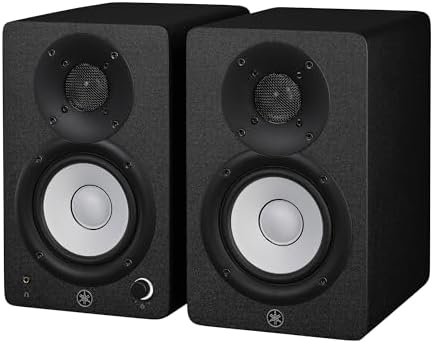
- Sold as a pair
- 4.5-inch woofer and 1-inch tweeter
- 60 Hz to 22 kHz frequency response
- 26 W output power
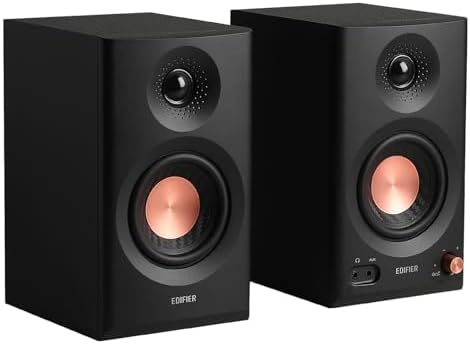
- 52Hz to 40kHz frequency response
- TRS, RCA, AUX, and Bluetooth inputs
- 18W*2 RMS output with 92.5dB SPL
- Music, Monitor, and Custom modes
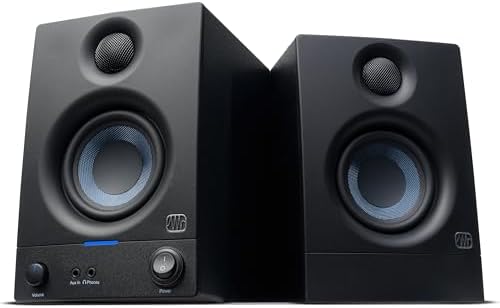
- Sold as a stereo pair
- 50 watts of built-in amplification
- 3.5-inch woofers and 1-inch tweeters
- High- and low-frequency acoustic tuning

- Latency-free wired connection
- Bi-amplified desktop power
- 3.5-inch Kevlar woofers
- Natural silk dome tweeters

- Sold as a pair
- Neutral sound reproduction
- Tone knob for voicing adjustments
- Location switch for bass correction
1. (2) JBL 305P MkII 5″ 2-Way Active Powered Studio Reference
Best for: Producers and podcasters needing a wide, consistent stereo image.
The JBL 305P MkII stands out for its Image Control Waveguide, which is designed to keep your sound consistent even if you move slightly while mixing. Its dual 41-watt amplifiers drive a 5-inch woofer and the Slip Stream port, which works together to provide a controlled low-end response. You can use the Boundary EQ and HF Trim switches on the back to tweak how the speakers interact with your room, making them a versatile choice for home studios where you can’t perfectly treat every wall.
Compared to the Mackie CR4-X, the JBL 305P MkII offers a larger 5-inch woofer against the 4.5-inch driver on the Mackie, which provides a more substantial low-frequency foundation for professional work. The enclosure is built from MDF and has been through a 100-hour reliability test, ensuring it stays sturdy on your desk for years. Anyone who needs a massive soundstage will find these speakers to be a reliable partner for their daily audio tasks.
Anyone who has a very small desk might find the 5-inch woofer size a bit large, as these monitors require more clearance than the 3.5-inch options on this list.
Pros
- Patented Image Control Waveguide for wide sweet spot
- Dual 41-watt Class-D amplifiers
- Boundary EQ and HF Trim for room adjustment
- XLR and TRS balanced inputs
- 100-hour reliability testing
Cons
- 5-inch woofer size is a footprint constraint for smaller desks
2. Rockville APM8D 8″ 500W Active Powered Studio Monitor Speakers (Pair)
Best for: Users who need maximum power and multiple input options in one package.
The Rockville APM8D is built for those who want serious volume and power. With 500 watts of peak power and an 8-inch injection-molded polypropylene woofer, these monitors are designed to move a lot of air. The inclusion of a USB audio interface means you can plug them directly into your computer, which simplifies your setup if you don’t already have an external interface. Its dark wood finish and thick MDF cabinet construction are intended to minimize vibrations that can otherwise muddy your mix.
These speakers are significantly larger than the PreSonus Eris 3.5, as the 8-inch woofer here occupies much more space than the 3.5-inch driver on the PreSonus. The Rockville APM8D provides a frequency response from 30Hz to 20kHz, which is helpful if you’re working on bass-heavy music genres. You also get dedicated bass and treble controls on the back, allowing you to fine-tune the sound profile to match your personal preference or room acoustics.
This model isn’t meant for people with limited surface area, as the 8-inch woofers and thick MDF cabinet demand a larger studio desk than the more compact alternatives here.
Pros
- 500-watt peak power output
- Built-in USB audio interface
- Large-format polypropylene woofer
- Dedicated bass and treble controls
- MDF construction for reduced resonance
Cons
- Large physical size requires significant desk space
3. Mackie CR-X Series
Best for: Beginners or creators working in tight, limited studio spaces.
The Mackie CR4-X is a straightforward choice for those who need reliable sound without taking up too much room. These 4.5-inch multimedia monitors are small enough to fit on most desks while still delivering 50 watts of power. A very helpful feature is the front-facing headphone jack, which automatically mutes the speakers when you plug in your headphones, making it easy to switch between listening modes during late-night editing sessions.
Compared to the Yamaha HS5 Pair, the CR4-X is much more compact, taking up less desk real estate than the Yamaha’s 5-inch woofer design. You get a variety of inputs, including 1/4-inch, 1/8-inch, and RCA, which makes it simple to connect your computer, phone, or other media players without needing extra adapters. They come with the necessary cables in the box, so you can get them set up immediately without additional purchases.
Anyone who requires professional-grade reference accuracy for high-end mastering might find the CR4-X less precise than the Yamaha HS5, as these are tuned more for general multimedia and creative work.
Pros
- Front-facing headphone jack with auto-mute
- Flexible 1/4-inch, 1/8-inch, and RCA inputs
- Compact 4.5-inch footprint
- Included hookup cables
- 50 watts of total power
Cons
- Lacks the advanced frequency tuning of higher-end reference monitors
4. YAMAHA Hs5 Powered Studio Monitor
Best for: Engineers and mixers who prioritize a flat, uncolored sound.
The Yamaha HS5 Pair is widely recognized for its commitment to sonic purity. These monitors are designed to present the audio exactly as it is, without adding extra “flatter” to the sound, which is exactly what you want when you’re making critical mixing decisions. The 5-inch cone woofer and 1-inch dome tweeter are bi-amplified, providing a total of 70 watts of power to ensure your audio remains clear even at higher volumes.
When you look at the frequency response, the HS5 spans from 54Hz to 30kHz, which is a wider range than the 80Hz low-end limit listed for the PreSonus Eris 3.5. This allows you to hear more detail in the high frequencies and a more extended low-end, which is vital for professional music production. Because they’re designed to be “near-field” monitors, they’re most effective when placed within a few feet of your listening position, providing a focused, accurate soundstage.
Anyone who wants a “fun” or “enhanced” bass sound might find these too clinical, as they’re specifically tuned to avoid coloring the original audio signal.
Pros
- Bi-amplified 70-watt system
- Flat, uncolored frequency response
- 5-inch cone woofer and 1-inch tweeter
- Balanced XLR and TRS inputs
- Designed for near-field precision
Cons
- Tuning is intentionally flat, which may feel thin to casual listeners
5. Yamaha HS4 Powered Studio Monitor in Black
Best for: Users who want the Yamaha sound in a smaller, more desk-friendly size.
The Yamaha HS4 Pair offers a compact solution for those who like the company’s signature reference sound but lack the desk space for the larger HS5 models. With a 4.5-inch cone woofer, these speakers are easier to fit into small bedroom studios or home offices. They include room control and high trim response switches on the back, which are very useful for adjusting the output to fit your specific desk or wall proximity.
Compared to the M-Audio BX3, the HS4 provides a slightly more comprehensive set of connectivity options, including a combo XLR/TRS input alongside the standard RCA and stereo mini inputs. These monitors also come with a full set of accessories, including an anti-slip pad and all the necessary cables, which is a nice touch for a quick and stable setup. They’re built to provide a balanced, accurate sound profile that helps you identify issues in your mix quickly.
This model isn’t built for large studio rooms, as its 4.5-inch woofer and power output are optimized for close-range, near-field listening on a desktop.
Pros
- Compact 4.5-inch woofer design
- Built-in room control and high trim switches
- Versatile combo XLR/TRS, RCA, and mini inputs
- Includes anti-slip pads and cables
- Balanced 26-watt per-speaker output
Cons
- Maximum output power is lower than the larger HS5 model
6. Edifier MR3 Powered Studio Monitor
Best for: Creators who need a modern, wireless, and highly adjustable monitoring solution.
The Edifier MR3 brings modern technology to the studio monitor category with features like multi-point Bluetooth and Hi-Res Audio certification. You can connect multiple devices at once using the various inputs, which include balanced TRS, RCA, and AUX. The ability to switch between different sound modes—Music, Monitor, and Custom—gives you a lot of flexibility, and you can even use the Edifier ConneX app to fine-tune your EQ settings exactly how you want them.
When compared to the Mackie CR3.5, the Edifier MR3 offers significantly more connectivity, including Bluetooth support which the Mackie lacks entirely. The 3.5-inch mid-low drivers and 1-inch tweeters are housed in an MDF cabinet to help reduce unwanted distortion. This makes them a great pick if you want a pair of speakers that can handle both professional creative work and daily listening tasks without needing to swap cables constantly.
Anyone who is strictly looking for a traditional, wired-only analog signal path might find the extra digital features unnecessary for their specific workflow.
Pros
- Hi-Res Audio certification
- Multi-point Bluetooth connectivity
- EDIFIER ConneX app for custom EQ
- Balanced TRS, RCA, and AUX inputs
- MDF cabinet construction
Cons
- Digital features and app connectivity add complexity to the setup
7. PreSonus Eris 3.5 Powered Studio Monitors
Best for: Students and hobbyists looking for an easy, all-in-one desktop upgrade.
The PreSonus Eris 3.5 is a popular choice for those who want to move away from standard computer speakers without a steep learning curve. These monitors provide 50 watts of power and are designed to be very simple to integrate into your existing desk setup. With both balanced TRS and RCA inputs, you can connect your audio interface, turntable, or game console with minimal fuss. The front-panel aux input and headphone jack are convenient for quick access, which is a major time-saver for anyone who switches between speakers and headphones often.
The Eris 3.5 offers a frequency range of 80Hz to 20kHz, which is slightly less extended on the low end than the 52Hz limit found on the Edifier MR3. However, the built-in acoustic tuning controls allow you to boost or cut the high and low frequencies to compensate for your room’s acoustics. This makes them very forgiving for people who don’t have a professional acoustic setup in their home office or dorm room.
This one isn’t meant for deep-bass mixing, as the compact woofer size and 80Hz low-frequency floor mean you’ll likely need a subwoofer if you’re producing heavy electronic music.
Pros
- 50 watts of built-in power
- Convenient front-panel aux and headphone jack
- Built-in high and low frequency tuning
- Balanced TRS and RCA inputs
- Compact woven-composite woofer
Cons
- Frequency response starts at 80Hz, limiting deep bass output
8. M-AUDIO BX3 3.5″ Wired Studio Monitors Pair
Best for: Gamers and streamers who need a zero-latency wired connection.
The M-Audio BX3 is designed for people who need an immediate, reliable audio signal without any delay. These monitors use a durable Kevlar woofer, which is a material choice that helps provide a punchy response for beat-making and gaming. The cabinet is made from MDF wood to keep the sound tight and accurate, avoiding the hollow resonance you often get from plastic computer speakers.
Compared to the Rockville APM8D, the BX3 is a much smaller, more portable option that fits easily on a crowded desk where the larger Rockville would simply be too large. The rear inputs offer 1/4-inch, 1/8-inch, and RCA connectivity, ensuring you can plug in your instruments or DJ gear without searching for adapters. The front panel also features an 1/8-inch AUX input, which is perfect for plugging in a phone or headphones for quick, private monitoring.
Anyone who needs to fill a large room with sound will find the BX3 underpowered compared to the larger monitors on this list, as these are built specifically for close-range desktop use.
Pros
- Zero-latency wired connection
- Durable Kevlar woofers
- Acoustically-inert MDF cabinet
- Front-panel AUX input for headphones
- Balanced and unbalanced input options
Cons
- Limited low-end reach due to smaller woofer size
9. Mackie CR3.5 Studio Monitors (Pair)
Best for: Those who want quick, manual control over their speaker’s voicing.
The Mackie CR3.5 is a compact speaker set that gives you physical control over how your music sounds. The standout feature is the dedicated tone knob, which lets you dial in the voicing directly from your desk without having to open any menus or apps on your computer. It also includes a location switch, which helps you correct the bass response based on whether the speakers are pushed against a wall or sitting out in the open.
When you look at the feature set, the CR3.5 is more focused on physical adjustments than the Edifier MR3, which relies more on app-based EQ. The box includes isolation pads, which are a very helpful addition for a desk-based monitor, as they help decouple the speaker from your furniture to stop unwanted vibrations. These speakers are aimed at people who want to hear their mix as it actually sounds, rather than having it flattered by standard consumer audio tuning.
At 3.5 inches, this model isn’t built for professional-level sub-bass monitoring, so users mixing genres with very low-frequency content might find them lacking in that specific range.
Pros
- Physical tone knob for quick adjustments
- Location switch for bass correction
- Includes isolation pads
- Compact woofer design
- Straightforward, honest sound profile
Cons
- The woofer isn’t designed for deep sub-bass reproduction
Also Worth Considering
The Rockville APM8C Wood Studio Monitor is a larger option that comes bundled with isolation pads. It serves as a more accessories-focused alternative to the Rockville APM8D, which is the more powerful, feature-heavy pick in that size class. It’s ideal for someone who wants a larger footprint but needs the included pads to protect their desk surface.
The Ortizan C7 Powered Studio Monitors are a white-finish pair that includes Bluetooth 5.3 connectivity. They compete with the Edifier MR3 for those who prioritize wireless features, but they offer a different aesthetic. They’re a good choice for someone who wants a clean, modern look for their workspace while maintaining the convenience of modern wireless pairing.
How We Chose
Nineteen Amazon listings were compared on driver size, input variety, and power output, and near-duplicates were left out. Each monitor had to provide a clear set of features for near-field audio monitoring to earn a place on this list. Products were selected based on their physical size, the types of inputs provided for studio gear, and the inclusion of acoustic tuning controls. Models that lacked sufficient detail regarding their technical specifications or that functioned primarily as general-purpose multimedia speakers were excluded. A focus was maintained on ensuring a mix of compact, standard, and high-power options to suit different studio sizes.
How to Choose the Best Studio Monitors Under 500
Size and Where It Has to Fit
The physical size of the woofer determines how much space your monitors will take up and how much bass they can produce. Larger woofers, like the drivers on the Rockville APM8D, move more air for deeper bass but require a larger desk. Compact options like the M-Audio BX3 or Mackie CR3.5 are better for smaller, tighter workspaces.
Inputs and Connectivity
Think about what you’re connecting to your monitors. If you use a professional audio interface, balanced XLR or TRS inputs, as found on the Yamaha HS5 Pair, are standard. If you’re connecting a phone or a computer directly, RCA or AUX inputs are more common. Some models, like the Edifier MR3, offer Bluetooth if you want to go wireless.
Acoustic Tuning Controls
Not every room is treated for sound, which means your desk might cause unwanted bass buildup. Models like the JBL 305P MkII include Boundary EQ or HF Trim switches, which help you adjust the output to compensate for your room’s specific acoustics.
Frequently Asked Questions
Is it worth getting 8-inch monitors for a small bedroom?
Usually, monitors like the Rockville APM8D are too large for small rooms. They can cause excessive bass buildup that’s hard to manage without professional acoustic treatment. For a small bedroom, 3.5-inch or 4.5-inch options like the Mackie CR4-X or Yamaha HS4 are much easier to position and provide a more balanced sound.
Do I need an audio interface to use these?
You don’t strictly need an interface for most of these models, as many include RCA or AUX inputs for direct connection. However, using an interface with balanced TRS or XLR cables, like those supported by the Yamaha HS5 Pair, helps reduce interference and noise, providing a cleaner signal for your professional production work.
What do the “Boundary EQ” and “Room Control” switches actually do?
These switches help adjust the frequency response to counter the effects of your room. For example, if you place a speaker against a wall, the bass can become boomy. The switches on the JBL 305P MkII or Yamaha HS4 allow you to cut those low frequencies to keep your mix sounding clear and neutral.
Can I mix these speakers with different brands?

It’s best to use a matched pair from the same manufacturer and model, such as the Yamaha HS5 Pair. Mixing different brands or models will cause the sound to be inconsistent between the left and right channels, which makes it impossible to create an accurate stereo image or a balanced mix when you’re editing your audio.
Are the included cables enough to start?
Many models, such as the Mackie CR4-X and Yamaha HS4, include the necessary cables in the box to get you started. However, always check the listing to see what is included. If you’re using a professional interface, you might eventually want to upgrade to specific balanced XLR or TRS cables to improve your signal quality.
Conclusion
The JBL 305P MkII remains our top choice for most people because its wide sweet spot makes it the most reliable tool for mixing. If you’re working in a very small space and need something more compact, the Mackie CR4-X is a simpler alternative that still delivers great performance. Check your desk space today to see which size fits best.
As an Amazon Associate, Cleanestor earns from qualifying purchases at no additional cost to you.