
The Rode RØDE NT1 Signature is the best studio recording microphone here because its box includes a shock mount, pop filter and XLR cable. You just add an interface and record. This guide helps anyone setting up a home studio or upgrading their current gear. What separates these picks isn’t just sound quality — it’s what you have to buy next. Some ship with every accessory you need, while others require extra cables or power before they work at all.
- Best Overall: Rode RØDE NT1 Signature — complete vocal kit with shock mount, pop filter and cable included
- Best XLR Standard: Audio-Technica AT2020 — custom low-mass diaphragm for extended frequency response
- Most Advanced Modeling: Antelope Edge Go — eighteen real-time mic emulations in one USB capsule
- Most Versatile USB: Logitech Blue Yeti — four pickup patterns replace multiple microphones
- Best Dual Connectivity: MAONO A04 Gen2 — switches between USB plug-and-play and XLR studio routing
- Best Mixer Controls: ROCCAT Torch — physical mixer-style knobs on the mic body itself
- Simplest USB Setup: FIFINE T669 — steel arm stand and double pop filter ready out of the box
- Best for Gaming Streams: FIFINE AmpliGame AM8 — tap-to-mute button works independently from software
- Best Mobile Compatibility: ZealSound K66 — Lightning and USB-C adapters included for phone recording
- Smallest Desktop Footprint: TONOR Podcast Microphone — non-slip tripod base takes minimal desk space

- Includes shock mount, pop filter and XLR cable
- Large-diaphragm condenser NT1 voicing
- Among the lowest self-noise microphones made
- Cardioid pattern focuses on voice, rejects room

- Side address studio condenser microphone technology
- Ideal for project and home studio applications
- High SPL handling and wide dynamic range
- Low mass diaphragm with extended frequency response

- Edge Go features 18 real-time mic emulations
- 20 built-in real-time effects included
- Bus-powered via USB-C, no phantom power needed
- Gold-coated dual-membrane capsule design
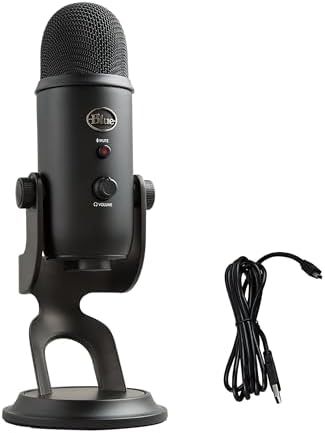
- Custom three-capsule array for broadcast-quality sound
- Blue VO!CE software with enhanced effects
- Four pickup patterns: cardioid, omni, bidirectional, stereo
- Onboard controls for volume, pattern, mute and gain

- A04 Gen2 has dual XLR and USB connections
- 192kHz/24bit sampling rate, 30Hz-16kHz response
- MAONO Link software adjusts gain and noise reduction
- Cardioid polar pattern with pop filter and foam

- 24-Bit audio with up to 48kHz sampling
- Mixer-style controls with audio pass-through
- Three pick-up patterns including Whisper mode
- Gesture activated quick-mute with RGB lighting
- USB plug-and-play connection without additional drivers
- Wide frequency response handles high SPLs easily
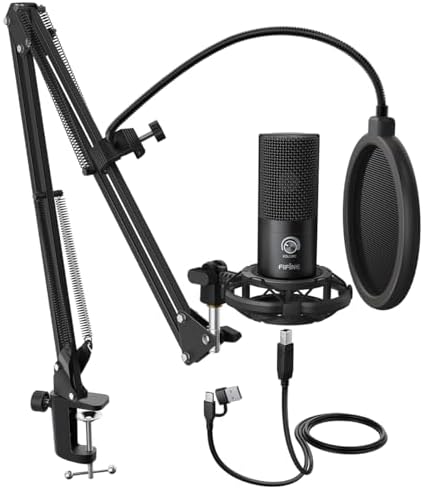
- Boom arm with 180° rotation and 135° extension
- C-clamp and desktop mount with 30" reach

- 50Hz-16KHz frequency response, directional cardioid dynamic
- XLR connection requires separate cable not included
- USB plug-and-play with tap-to-mute control
- RGB ring with 3 modes and 10 light colors

- K66 uses condenser capsule with cardioid pattern
- Noise reduction mode enabled by holding mute button
- Plug-and-play with USB-C and Lightning cables
- Zero-latency monitoring via 3.5mm headphone jack

- TC-777 cardioid pattern suppresses background noise
- Non-slip stand with one-click mute and volume
- Compatible with Windows, MAC, PS4 and 5
- USB 2.0 plug and play with adjustable angles
1. RØDE NT1 Signature Series Studio Condenser Microphone
Best for: singers needing a complete, quiet vocal chain
Rode built this large-diaphragm condenser around a single idea: nothing between you and the take. The listing calls it “whisper-quiet,” placing it among the lowest self-noise microphones ever made. That matters when you’re tracking vocals in a room that isn’t perfectly treated, because less electronic hiss means cleaner recordings before you touch any software.
What makes it the top pick here is the box. You get the NT1 Signature in black, an SM6 shock mount with a built-in pop filter, an XLR cable and a dust cover. Most condensers ship bare, forcing you to hunt down those pieces separately. Here, the only thing missing is your audio interface. The tight cardioid pattern focuses on the voice and rejects the room, which suits untreated spaces well.
Anyone who already owns a full rack of high-end accessories won’t need the bundled shock mount or cable. Comparing the specs and features, the NT1 Signature lists a tight cardioid pattern, whereas the Logitech Blue Yeti gives you four patterns to switch between.
Pros
- Shock mount, pop filter, XLR cable and dust cover included
- Large-diaphragm condenser voicing trusted in studios for two decades
- Tight cardioid pattern rejects room noise
- Among the lowest self-noise designs available
Cons
- The box lists the microphone, shock mount, pop filter, cable and dust cover, but not an audio interface, so that remains a separate purchase to start recording.
2. Audio-Technica AT2020 Cardioid Condenser Studio XLR Microphone
Best for: project studios building a traditional XLR setup
This side-address condenser has been a staple in home studios for years, and the listing explains why: a custom-engineered low-mass diaphragm delivers extended frequency response and superior transient response. It handles high sound pressure levels across a wide dynamic range, meaning it won’t distort easily if you move from spoken word to loud singing.
It’s strictly an XLR microphone with an integral three-pin output. There’s no USB fallback here, so you’ll need an interface with phantom power to run it. The cardioid polar pattern reduces pickup from the sides and rear, improving isolation of your main source. It’s listed as ideal for project and home studio applications, which fits buyers who want a reliable standard without extra software.
Singers who need a shock mount right away should look elsewhere, since the listing doesn’t include one. The AT2020 requires an external interface, while the Rode RØDE NT1 Signature bundles the XLR cable and shock mount you’d otherwise have to source yourself.
Pros
- Custom low-mass diaphragm for detailed transient response
- High SPL handling across a wide dynamic range
- Cardioid pattern isolates the desired sound source
- Integral 3-pin XLRM output connector
Cons
- The listing specifies an integral 3-pin XLRM output and nothing else in the box, so an interface, cable and mount are all separate purchases.
3. Antelope Audio Edge Go Large Diaphragm Condenser USB C Microphone
Best for: producers wanting classic mic tones via software
Antelope Audio took a different path here. Instead of selling one fixed sound, the Edge Go packs eighteen real-time mic emulations modeled in a European anechoic chamber. You’re getting the character of iconic studio mics through a gold-coated dual-membrane capsule, without buying the vintage hardware.
It connects over USB-C and draws power straight from your computer. No phantom power, preamps or mixers are needed. Twenty built-in effects — including preamp models, equalizers and compressors — run with imperceptible latency. The frequency response spans 20Hz to 20kHz with a dynamic range up to -116 dB. The box includes a table stand, elastic holder, pop filter, carry case and USB cable.
Engineers who prefer capturing a raw signal and mixing entirely in their DAW might find the onboard processing unnecessary. Its frequency response spans 20Hz to 20kHz, whereas the ZealSound K66 states a narrower 40Hz–18kHz span.
Pros
- Eighteen real-time mic emulations modeled in an anechoic chamber
- Twenty built-in effects including EQ and compression
- USB-C bus-powered with no external gear required
- Gold-coated dual-membrane capsule with versatile polar patterns
- Table stand, elastic holder, pop filter, carry case and cable included
Cons
- The frequency response spans the full range of human hearing, so instruments producing fundamental tones below that floor fall outside what this capsule captures.
4. Logitech Creators Blue Yeti USB Microphone
Best for: podcasters recording multiple guests around one desk
The Blue Yeti uses a custom three-capsule array to offer four pickup patterns: cardioid, omni, bidirectional and stereo. That flexibility lets you record solo vocals, roundtable interviews or stereo instruments without swapping hardware.
Blue VO!CE software adds broadcast vocal effects, advanced modulation and HD audio samples. Onboard controls give you direct access to headphone volume, pattern selection, instant mute and mic gain. The adjustable desktop stand pivots to optimize placement, and no-latency monitoring lets you track your voice in real time. It plugs straight into Mac or PC setups.
Solo singers working in a noisy room don’t need four patterns; a dedicated cardioid mic will reject more background sound. The Yeti offers four pickup patterns, standing against the single tight cardioid pattern listed for the Rode RØDE NT1 Signature.
Pros
- Custom three-capsule array produces broadcast-quality sound
- Four pickup patterns: cardioid, omni, bidirectional and stereo
- Blue VO!CE software for effects and modulation
- Onboard controls for gain, mute, volume and pattern selection
- Plug-and-play setup on Mac or PC
Cons
- The listing names four pickup patterns controlled by onboard dials, so switching mid-session means reaching for the hardware rather than clicking a screen.
5. MAONO A04 Gen2 XLR/USB Condenser Microphone Kit
Best for: creators moving between USB laptops and XLR interfaces
Dual connectivity is the headline here. The A04 Gen2 runs over USB for plug-and-play sessions on PCs, phones or tablets, and switches to XLR when you route it through an interface or mixer. Note that XLR mode on Windows, iOS or mobile devices requires phantom power, and it isn’t compatible with Xbox.
A 16mm electret condenser transducer drives the sound, supporting a 192kHz/24bit sampling rate with a 30Hz-16kHz frequency response. MAONO Link software unlocks gain adjustment, noise reduction toggles, scene EQ presets, a compressor and a limiter, though those tools only work in USB mode. The bundle is generous: scissor arm stand, shock mount, pop filter, windscreen foam, boom arm base and USB cable. Just remember the XLR cable isn’t included.
Buyers who only ever use XLR will carry the weight of USB circuitry they never turn on. Its stated 192kHz/24bit sampling rate doubles the 48kHz ceiling listed for the ROCCAT Torch.
Pros
- Dual USB and XLR outputs for flexible routing
- 192kHz/24bit sampling rate via professional sound chipset
- MAONO Link software provides EQ, compressor and limiter (USB mode)
- Includes scissor arm stand, shock mount, pop filter and windscreen
- 16mm electret condenser capsule with strong bass response
Cons
- The box lists a USB cable but explicitly notes the XLR cable isn’t included, so using the XLR output requires a second purchase.
6. ROCCAT Torch USB Microphone
Best for: streamers who want physical mixer knobs on the mic
ROCCAT designed the Torch around mixer-style controls built directly into the body. You can cycle pickup patterns, adjust volume and tweak gain on the fly without opening software. An audio pass-through function makes fine-tuning easier while you work.
It records at 24-bit depth with up to 48kHz sampling. Three pickup patterns are available: Cardioid, Stereo and an exclusive Whisper mode for quiet environments. Contactless quick-mute uses gesture activation, and RGB lighting zones change color based on your selected pattern or act as a visual gain indicator. The mic separates from its base to mount on a boom arm while keeping those physical controls accessible.
Podcasters who prefer a completely dark room might find the three reactive RGB zones distracting. The Torch lists three pickup patterns, which is one fewer than the four offered by the Logitech Blue Yeti.
Pros
- Mixer-style controls for pattern, volume and gain on the body
- 24-bit audio with up to 48kHz sampling
- Three patterns including an exclusive Whisper mode
- Contactless gesture-activated quick-mute
- Detachable from base for boom arm mounting
Cons
- The listing states 24-bit audio with up to 48kHz sampling, so projects requiring higher resolution like 192kHz can’t be captured natively here.
7. FIFINE T669 Studio Condenser USB Microphone
Best for: beginners wanting an arm stand included out of the box
FIFINE packages the T669 as a complete station. You get a heavy-duty scissor arm stand made of all-steel construction, a studio-grade shock mount, a double pop filter and an 8.2ft USB-B to USB-A/C cable. The arm rotates 180° vertically and extends 135° forward and backward, with a 30″ reach that keeps the mic close without blocking your face.
The cardioid condenser capsule handles high SPLs and offers a wide frequency response. It connects over USB for plug-and-play recording on PCs and laptops, with no drivers needed. Just note it’s incompatible with Xbox. The double pop filter provides two layers of dissipation to remove air rushes and popping sounds during vocal takes.
Anyone who already owns a premium boom arm won’t need the bundled steel stand taking up closet space. The T669 ships with an 8.2ft USB cable, matching the exact length stated for the TONOR Podcast Microphone’s 1.9m power cord when converted.
Pros
- All-steel scissor arm stand with 30″ reach included
- Double pop filter for two layers of air dissipation
- Studio-grade shock mount minimizes vibration
- Wide frequency response handles high SPLs
- 8.2ft USB-B to USB-A/C cable included
Cons
- The listing states incompatibility with Xbox, so console players on that system can’t use this mic for voice chat or streaming.
8. FIFINE AmpliGame AM8 USB/XLR Dynamic Microphone
Best for: gamers switching between USB streaming and XLR recording
The AM8 is a dynamic microphone, which means it naturally rejects off-axis noise better than many condensers. Its frequency response covers 50Hz-16KHz, delivering balanced audio without exaggerating your voice. The suggested recording range is tight: keep the end-addressing top facing the source, about 2 to 6 inches away.
Over USB, you get tap-to-mute with an LED reminder, a controllable RGB ring with memory for your color settings, a headphone jack for zero-latency monitoring and a smooth gain knob. Switch to XLR for higher fidelity through an interface, but know that the RGB lights, function keys and tap-to-mute go inactive in that mode. Built-in 3/8’’ and 5/8’’ metal threads fit most stands without adapters.
Singers who stay far from the mic will struggle, since the listing advises a strict 2 to 6 inch distance. As a dynamic capsule, it lists a 50Hz-16KHz response, whereas the ZealSound K66 starts lower at 40Hz.
Pros
- Dynamic cardioid capsule rejects unwanted off-axis noise
- Tap-to-mute button operates independently from software
- Controllable RGB ring with memory function (USB mode)
- Headphone jack and gain knob for real-time control
- Built-in 3/8’’ and 5/8’’ threads fit standard stands
Cons
- The listing specifies a suggested recording range of 2 to 6 inches, so anyone needing to sit further back must raise their gain significantly.
9. ZealSound Podcast Microphone
Best for: creators recording across phones, tablets and computers
Compatibility is the K66’s strongest trait. It ships with both USB-C and Lightning adapters, letting you plug straight into iPhones, iPads and modern Android devices alongside standard PCs and Macs. No drivers or apps are required — it’s true plug-and-play across platforms.
Inside, a high-performance condenser capsule delivers a 40Hz–18kHz frequency response at a 46kHz sampling rate, with –45dB ±3dB sensitivity. An intelligent noise reduction mode tackles keyboard clicks, fan hum and background chatter when activated via the mute button. Physical knobs handle mic volume, monitoring volume and echo adjustment without software. The top-addressed body rotates 360 degrees on a weighted metal base.
Its 40Hz–18kHz frequency response reaches lower than the 50Hz floor listed for the FIFINE AmpliGame AM8.
Pros
- USB-C and Lightning adapters included for mobile devices
- Intelligent noise reduction mode filters fan and keyboard noise
- Dedicated knobs for mic gain, monitoring volume and echo
- Zero-latency monitoring via 3.5mm headphone jack
- 360-degree rotatable top-addressed design on a metal base
Cons
- The frequency response is listed as 40Hz–18kHz, so capturing the highest harmonics above 18kHz isn’t supported by this capsule.
10. TONOR Podcast Microphone
Best for: callers needing a simple, stable desktop mic
The TC-777 strips things back to essentials. It uses a USB 2.0 connection for plug-and-play operation on Windows, Mac, PS4 and PS5, recognized quickly by Zoom, Skype and Discord. There’s no assembly process required beyond unfolding the tripod.
A cardioid pickup pattern captures crisp voice from the front while suppressing background noise. One-click mute and volume control sit right on the body for easy operation. The included mini shock mount and pop filter prevent vibrations and plosives from ruining a take. The non-slip stand occupies a small desktop area, making it fit crowded desks.
Streamers who need a boom arm will have to buy one separately, as this relies on the included foldable tripod. The package lists a 1.9m power cord, which is shorter compared to the 8.2ft cable bundled with the FIFINE T669.
Pros
- Cardioid pattern suppresses unwanted background noise
- One-click mute and volume control on the body
- Foldable mic tripod, mini shock mount and pop filter included
- USB 2.0 plug-and-play with no drivers required
- Compatible with Windows, Mac, PS4 and PS5
Cons
- The box lists a foldable mic tripod rather than a clamp or arm, so positioning it away from the desk surface requires separate hardware.
Also Worth Considering
The Dejasound Isolation Shield Pop Filter is a music condenser mic package that includes an isolation shield and pop filter for home studio use. The Rode RØDE NT1 Signature beats it for serious vocal tracking because the Rode box lists a dedicated SM6 shock mount alongside its pop filter and cable, offering a tighter mechanical setup. Creators who specifically need a surrounding isolation shield for a very noisy room might still consider the Dejasound bundle.
The MAONO A04 USB Microphone is a 192kHz/24Bit condenser mic kit designed for PC podcasting. The MAONO A04 Gen2 replaces it on our main list because the Gen2 adds dual XLR/USB connectivity where the original A04 listing only mentions USB. Anyone whose setup will never leave a single computer might still find the original A04 sufficient.
The Brvomussy Podcast Equipment Bundle is a recording studio package featuring a podcast microphone, voice changer and live sound card audio interface. The Antelope Edge Go lists twenty built-in real-time effects including specific preamp models and equalizers processed with imperceptible latency, whereas the Brvomussy bundle provides four sound variations and ten sound effects. Streamers who want a standalone physical voice changer box might still prefer the Brvomussy package.
How to Choose the Right Studio Recording Microphone
Connection type and what you already own
Decide how the mic reaches your computer first. XLR models like the Audio-Technica AT2020 demand an audio interface with phantom power. USB options such as the Logitech Blue Yeti plug directly in. Hybrids like the MAONO A04 Gen2 do both, but check the listing: XLR mode there requires external phantom power on mobile devices.
Accessories included versus what you still need
Read the box contents carefully. The Rode RØDE NT1 Signature ships with a shock mount, pop filter and XLR cable. The FIFINE T669 adds a steel arm stand. Others, like the Audio-Technica AT2020, list only the microphone itself, meaning mounts and cables become immediate extra steps before you record anything.
Pickup patterns for your room and sources
Cardioid patterns focus on the front and reject the room, which suits untreated spaces. The Rode RØDE NT1 Signature uses a tight cardioid design. If you record groups around one desk, multiple patterns matter. The Logitech Blue Yeti lists four options — cardioid, omni, bidirectional and stereo — replacing several single-pattern mics.
Capsule type and frequency response limits
Condenser capsules capture detail across wide ranges, spanning the entire spectrum of human hearing on the Antelope Edge Go. The FIFINE AmpliGame AM8 is a dynamic microphone with a listed frequency response of 50Hz-16KHz. Match the stated response to your source. Vocals rarely need sub-bass extension, but acoustic instruments might. Understanding condenser microphone polar patterns helps clarify why certain shapes suit specific rooms.
Frequently Asked Questions
Do I need phantom power for these microphones?
Only for XLR-connected condenser models. The Audio-Technica AT2020 requires an interface supplying phantom power to operate. USB microphones like the Logitech Blue Yeti draw power directly from your computer’s port. The MAONO A04 Gen2 works over USB without it, but explicitly states phantom power is necessary when using its XLR output on mobile devices.
Can I use these microphones with gaming consoles?
Check the listing for your specific console. The FIFINE T669 and TONOR Podcast Microphone both state compatibility with PS4 and PS5, but explicitly note they’re incompatible with Xbox. The FIFINE AmpliGame AM8 suggests connecting to the USB-A port on the back of a PS5 for proper operation. Always verify console support before buying.
What is microphone modeling and do I need it?
Modeling uses software to emulate the sound of classic hardware. The Antelope Edge Go lists eighteen real-time mic emulations crafted in an anechoic chamber, plus twenty built-in effects. You don’t need it if you prefer shaping tone manually in your recording software. It suits producers wanting instant access to vintage tones without owning the physical units.
Does a wider frequency response always mean better sound?
Not automatically. The Antelope Edge Go covers the full human hearing range from the deepest audible bass to the highest treble. The FIFINE AmpliGame AM8 states 50Hz-16KHz, which is narrower but typical for a dynamic mic focused on vocal clarity. Wider specs capture more extremes, but a mic tuned for vocals might intentionally roll off deep bass to reduce rumble.
Why do some mics lose features when switching to XLR?

Onboard electronics power those extras. The FIFINE AmpliGame AM8 states clearly that its RGB lighting, tap-to-mute button and function keys are inactive when using the XLR connection. Those features rely on USB power and data. Over XLR, the mic acts purely as an analog audio source, sending raw signal to your interface.
How close should I sit to the microphone?
Follow the manufacturer’s stated range. The FIFINE AmpliGame AM8 advises keeping the top of the end-addressing capsule 2 to 6 inches from the audio source. The MAONO A04 Gen2 also lists a best range of 2 to 6 inches. Sitting further away than recommended forces you to increase gain, which pulls in more room noise.
Conclusion
The Rode RØDE NT1 Signature remains the strongest starting point for most buyers because its box holds everything except the interface. If you just need something to plug into a laptop today, the Logitech Blue Yeti handles that with less fuss. Pick the connection type that matches your current gear, then hit record.
As an Amazon Associate, Instrument Insight earns from qualifying purchases at no additional cost to you.