
- Best Overall: Focusrite Scarlett 2i2 4th Gen — 120dB dynamic range and Auto Gain prevent clipped takes.
- Most Inputs: Behringer U-PHORIA UMC404HD — Four Midas-designed preamps handle full band sessions.
- Best Preamps: Audient iD4 MKII — Class-A console preamp from the ASP8024 HE desk.
- Best Compact Solo: Focusrite Scarlett Solo 4th Gen — Single-channel recording with identical flagship converters.
- Highest Gain: MAONO P1 — 70dB of gain drives low-output dynamic microphones without boosters.
- Most Reliable Classic: PreSonus AudioBox 96 — 25th Anniversary edition with zero-latency mixer control.
- Simplest Setup: M-AUDIO M-Track Duo — USB/Direct switch and two combo inputs for instant tracking.
- Best for Guitarists: Fender AudioBox GO — Dedicated instrument input unlocks Fender amp models.
- Best Mobile Hybrid: MAONO P2 — Dual XLR inputs route audio to phones and computers simultaneously.
- Best Monitoring Modes: Synido 2×2 USB-C — Three distinct monitoring modes cover recording, streaming, and editing.
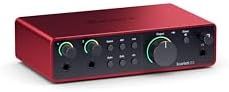
- The new generation of the artist's interface: Connect your mic to Scarlett's 4th Gen mic pres. Plug in your guitar. Fire up the included software.…
- Studio-quality sound: With a huge 120dB dynamic range, the newest generation of Scarlett uses the same converters as Focusrite’s flagship interfaces,…
- Never lose a great take: Scarlett 4th Gen's Auto Gain sets the perfect level for your mic or guitar, and Clip Safe prevents clipping, so you can…
- Find your signature sound: Air mode lifts vocals and guitars to the front of the mix, adding musical presence and rich harmonic drive to your…

- 4×4 USB 2.0 Audio/MIDI Interface for recording microphones and instruments
- Audiophile 24-Bit/192 kHz resolution for professional audio quality
- Compatible with popular recording software including Avid Pro Tools, Ableton Live, Steinberg Cubase, etc.
- Streams 4 inputs / 4 outputs plus 1x MIDI I/O with ultra-low latency to your computer, supporting Mac OS Xp and Windows XP or higher

- The new successor: Due to the great success of the Audient iD4, the audio experts had the project to bring the successor iD4 MKII to the next…
- Harmonious overall package: Thanks to new transducer technology and Class-A microphone preamplifier from Audient's high-end ASP8024 HE console, home…
- New connector: The new Audient iD4 MKII now has a high-speed USB-C connector, so handling is easier and power supply is improved! Now there's no more…
- Long life: The all-metal desktop housing provides stability and durability on the move. Now you can easily take your audio interface with you and…

- The new generation of the songwriter's interface: Plug in your mic and guitar and let Scarlett Solo 4th Gen bring big studio sound to wherever you…
- Studio-quality sound: With a huge 120dB dynamic range, the newest generation of Scarlett uses the same converters as Focusrite’s flagship interfaces,…
- Find your signature sound: Scarlett 4th Gen's improved Air mode lifts vocals and guitars to the front of the mix, adding musical presence and rich…
- All you need to record, mix and master your music: Includes industry-leading recording software and a full collection of record-making plugins
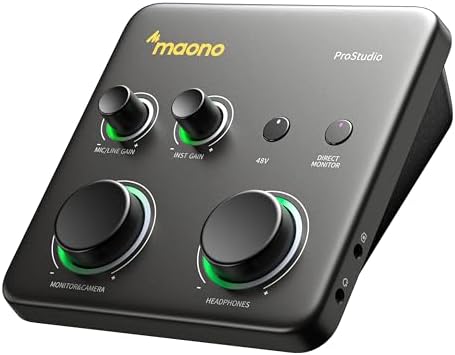
- HYBRID CONNECTIVITY: Dual USB ports with MFi-certified connectivity connect your computer and phone or iPad simultaneously. Record in GarageBand or…
- STUDIO-GRADE AUDIO: Up to 70dB gain drives hungry-gain dynamic microphones flawlessly—no external booster. Capture every vocal and guitar nuance in…
- STREAM AND RECORD WITHOUT THE GUESSWORK: Built for podcasters, streamers, and musician creators. Auto-Gain sets the ideal microphone level for clear…
- SIMPLIFY COMPLEX AUDIO ROUTING SOFTWARE PROSTUDIO2: Record guitar tutorials, cover songs, and vocal streams with ease. Route FL Studio, Spotify,…
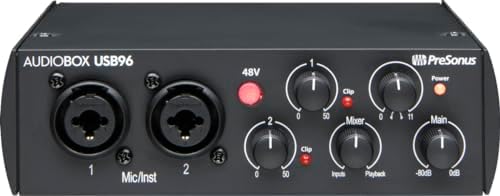
- Value-packed 2-channel USB 2.0 interface for personal and portable recording.
- 2 high-quality Class-A mic preamps make it easy to get a great sound.
- 2 high-headroom instrument inputs to record guitar, bass, and your favorite line-level devices, plus MIDI I/O.
- Studio-grade converters allow for up to 24-bit/96 kHz recording and playback.

- Podcast, Record, Live Stream, This Portable Audio Interface Covers it All – USB sound card for Mac or PC delivers 48kHz audio resolution for pristine…
- Be ready for anything with this versatile M-AUDIO interface – Record guitar, vocals or line input signals with two combo XLR / Line / Instrument…
- Everything you Demand from an Audio Interface for Fuss-Free Monitoring – 1/4" headphone output and stereo 1/4" outputs for total monitoring…
- Get the best out of your Microphones – M-Track Duo’s transparent Crystal Preamps guarantee optimal sound from all your microphones including…
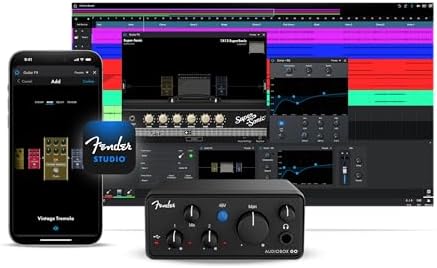
- Ultra-compact 2×2 USB-C audio interface with pristine 24-bit/96 kHz converters for music, podcasts, and mobile recording. I
- Unlock the Complete Fender Amp & FX Pack in the Fender Studio app to access a full collection of authentic Fender amp models and effects for crafting…
- XLR mic/line combo input with switchable +48V phantom power for clear, detailed vocal and instrument capture
- Dedicated TS instrument input optimized for guitar and bass

- HYBRID CONNECTIVITY: Dual USB ports with MFi-certified connectivity connect your computer and phone or iPad simultaneously. Record in GarageBand or…
- STUDIO-GRADE AUDIO: 56dB Dual XLR Audio Interface Compatible with Most Condenser and Dynamic Microphones. Ideal for podcasts, live streams,…
- STREAM AND RECORD WITHOUT THE GUESSWORK: Built for podcasters, streamers, and musician creators. Independent mute prevents unwanted noise during…
- ADVANCED CREATOR SOFTWARE PROSTUDIO 2: Record guitar tutorials, cover songs, and vocal streams with ease. Route FL Studio, Spotify, TikTok, or…

- ✔️[High-fidelity sound quality, accurate sampling] The Synido 2×2 audio interface uses a high-quality independent audio chip to reduce recording…
- ✔️[Three monitoring modes, easy to switch] The audio interface provides three monitoring modes to meet different needs. In Stereo mode, independent…
- ✔️[User-friendly design] The audio interface is intuitively designed, and equipped with three independent control areas, and the XLR interface…
- ✔️[Professional 48V phantom power] Synido audio interface is equipped with 48V phantom power switch and supports 48V dynamic microphone with…
1. Focusrite Scarlett 2i2 4th Gen USB-C Audio Interface
Best for: singers and guitarists who want automatic level setting
This audio interface leads the list for a home studio because it prints a 120dB dynamic range, matching the converters in Focusrite’s flagship units. That figure means quiet whispers and loud strums both stay clean on the same track. Auto Gain sets the level for your mic or guitar before you hit record, and Clip Safe steps in if a sudden peak threatens to distort the take. You don’t have to watch meters constantly while playing.
Air mode lifts vocals and guitars forward in the mix by adding harmonic drive. It’s a hardware feature you toggle to change the tone before it even hits your software. The box includes Pro Tools Intro+, Ableton Live Lite, Cubase LE, and the Hitmaker Expansion, so you’ve got instruments and effects ready immediately after plugging in via USB-C.
Compared to the Focusrite Scarlett Solo 4th Gen, this model offers two inputs instead of one, which matters if you ever plan to sing and play guitar at the same time. The Solo shares the same 120dB spec but limits you to a single source.
Anyone who needs to record a drum kit or a full band will outgrow the two inputs fast and should look at a four-channel unit instead.
Pros
- 120dB dynamic range using flagship converters
- Auto Gain sets levels automatically
- Clip Safe prevents digital distortion
- Air mode adds harmonic presence
- Includes Pro Tools Intro+, Ableton Live Lite, Cubase LE, and plugins
Cons
- Limited to a single voice-and-instrument pairing, so recording more sources at once requires a different interface
2. Behringer U-PHORIA UMC404HD Audiophile 4×4
Best for: bands needing four simultaneous microphone inputs
If you’re tracking drums, bass, and two vocals together, this is the only pick here that streams four inputs and four outputs at once. It runs at 24-Bit/192 kHz resolution over USB 2.0, giving you high sample rates for detailed recordings. The four MIDAS-designed mic preamplifiers supply +48V phantom power, so condenser microphones work straight out of the box.
The chassis is built from impact-resistant metal, which helps when you’re hauling gear between rehearsal spaces. It also includes MIDI I/O, letting you connect older hardware synths or drum machines without buying a separate adapter. Compatibility covers Mac OS X and Windows XP or higher alongside popular software like Pro Tools and Ableton Live.
It stands against the Focusrite Scarlett 2i2 4th Gen by offering double the inputs—four against two—but the Focusrite lists a specific 120dB dynamic range while the Behringer leaves that exact figure unstated.
Pros
- 4×4 USB 2.0 audio and MIDI interface
- 24-Bit/192 kHz audiophile resolution
- Four MIDAS-designed mic preamps with +48V phantom power
- Impact-resistant metal chassis
- Compatible with Pro Tools, Ableton Live, and Cubase
Cons
- Listed as supporting Mac OS Xp and Windows XP or higher, and outside it this is the wrong buy.
3. Audient Audio Interface iD4 MKII
Best for: vocalists demanding high-end console preamp tone
Audient built this unit around a Class-A microphone preamplifier taken directly from their ASP8024 HE console. The new transducer technology pushes home recordings toward professional clarity.
Connectivity relies on a high-speed USB-C port, which simplifies cabling and improves the power supply compared to older connections. The all-metal desktop housing measures 133x120x40.7 mm and weighs 740 g. You’ll also find two headphone outputs, allowing an engineer and a performer to listen at different volumes simultaneously.
Against the Focusrite Scarlett 2i2 4th Gen, the Audient highlights its console-grade preamp origin, whereas the Focusrite emphasizes a stated 120dB dynamic range from its converters. Both use USB-C, but the Audient specifically lists dimensions and weight.
Musicians who need to record three or four sources at once can’t do it here, as the listing points to a single preamp design rather than a multi-channel layout.
Pros
- Class-A preamp from the ASP8024 HE console
- High-speed USB-C connection
- All-metal desktop housing for durability
- Two headphone outputs for collaborative listening
- Mac, PC, and iOS compatible
Cons
- Listed at 740 g, which is heavier than ultra-portable interfaces meant for pocket carrying
4. Focusrite Scarlett Solo 4th Gen USB-C Audio Interface
Best for: songwriters recording one vocal or guitar track
This is the songwriter’s version of the 2i2, stripping away the second input to focus entirely on a single source. It still carries the massive 120dB dynamic range found in Focusrite’s flagship studio interfaces. If you only ever sing or play guitar—not both at the exact same time—you don’t need the extra channel.
The improved Air mode works just like its bigger sibling, lifting vocals to the front of the mix with rich harmonic drive. Software coverage remains identical: Pro Tools Intro+, Ableton Live Lite, Cubase LE, and the Hitmaker Expansion are all in the box. You get the same mastering tools and effects without paying for routing you won’t use.
Stacked against the MAONO P1, the Solo focuses purely on traditional studio recording, while the MAONO lists dual USB ports for connecting a phone and a computer at the same time.
Performers who regularly duet or layer acoustic guitar under a live vocal will hit a wall quickly, since the listing specifies a single input path.
Pros
- 120dB dynamic range using flagship converters
- Improved Air mode for vocal presence
- Includes Pro Tools Intro+, Ableton Live Lite, and Cubase LE
- Hitmaker Expansion provides essential effects and instruments
Cons
- Designed for a single mic or guitar input, so recording multiple sources simultaneously isn’t possible
5. MAONO P1 USB Audio Interface with 70dB Gain
Best for: creators streaming to phones and computers simultaneously
Hybrid connectivity defines this interface. Dual USB ports with MFi-certified connections let you plug into a computer and a phone or iPad at the same time. You can record in Logic Pro while streaming a guitar cover directly from your mobile device without interrupting the workflow.
The standout specification is 70dB of gain, which drives hungry dynamic microphones flawlessly without needing an external inline booster. It captures audio at 24-bit/192kHz quality with a class-leading -130dB EIN for silent backgrounds. Auto-Gain sets ideal levels for OBS Studio, and independent mute buttons prevent noise during instrument changes. Stream Mode sends your voice equally to both channels.
Comparing its gain to the Audient iD4 MKII, the MAONO P1 explicitly lists 70dB to drive low-output mics, while the Audient focuses on its Class-A console topology instead of a raw gain figure.
ProStudio2 software routes FL Studio, Spotify, or TikTok audio to dedicated channels and adds VST effects. The ergonomic 15° tilt angle keeps controls reachable, and the zinc-alloy metal housing protects the internals. The package includes the interface, a USB-C to USB-A/C cable, and a manual.
Pros
- 70dB gain drives dynamic microphones without external boosters
- Dual USB ports connect computers and mobile devices simultaneously
- 24-bit/192kHz resolution with -130dB EIN
- Auto-Gain and independent mute controls
- Zinc-alloy metal housing with a 15° ergonomic tilt
Cons
- Up to 70dB gain, so anyone needing more than 70dB has to plan around that ceiling.
6. PreSonus AudioBox 96 25th Anniversary USB Audio Interface
Best for: musicians wanting proven software and zero-latency mixing
Marking its 25th Anniversary, this 2-channel USB 2.0 interface proves longevity in personal recording. It features two Class-A mic preamps and two high-headroom instrument inputs for guitar, bass, or line-level devices. MIDI I/O is included, letting you sequence external hardware without extra adapters.
Converters support studio-grade resolution for recording and playback. The mixer control knob lets you blend inputs and computer playback manually, creating a custom monitor mix with zero latency. It draws power entirely from the USB 2.0 bus, meaning no wall outlet is required for mobile sessions. Outputs include a high-powered headphone jack and balanced ¼” TRS connections.
Its 96 kHz ceiling sits below the 192 kHz resolution listed on the Behringer U-PHORIA UMC404HD, though both handle standard studio tracking perfectly well.
The software bundle includes Studio One Artist, Ableton Live Lite, and the Studio Magic Plug-In suite.
Pros
- Two Class-A mic preamps and high-headroom instrument inputs
- 24-bit/96 kHz studio-grade converters
- Mixer control for zero-latency monitoring blends
- USB bus-powered with no external supply needed
- Includes Studio One Artist and Studio Magic Plug-In suite
Cons
- Maximum recording resolution caps sample rates lower than the fastest available units
7. M-AUDIO M-Track Duo USB Audio Interface
Best for: beginners needing simple switches and basic monitoring
Fuss-free operation drives the design here. A physical USB/Direct switch handles zero-latency monitoring instantly, removing the need to open software panels just to hear yourself play. Two combo XLR/Line/Instrument inputs accept microphones, guitars, or keyboards, and phantom power is available for condenser mics.
Audio resolution is listed at 48kHz, which covers standard podcast and demo-quality recording. Crystal Preamps aim for transparent sound across all connected microphones. Monitoring flexibility comes through a 1/4″ headphone output and stereo 1/4″ main outputs, letting you hook up speakers or cans without adapters.
Set beside the Synido 2×2 USB-C, the M-Track Duo uses a simple switch for monitoring, whereas the Synido lists three distinct modes (Stereo, Mix, USB) for different production stages.
The package includes MPC Beats software with essential Akai Professional production tools. It functions as a USB sound card for Mac or PC, keeping the setup strictly plug-and-play for podcasting, live streaming, or basic tracking.
Pros
- USB/Direct switch enables instant zero-latency monitoring
- Two combo XLR/Line/Instrument inputs with phantom power
- Transparent Crystal Preamps for clear capture
- 1/4″ headphone and stereo 1/4″ outputs
- Includes MPC Beats software
Cons
- Resolution is listed at 48kHz, which limits high-sample-rate recording options
8. Fender AudioBox GO USB Audio Interface
Best for: guitarists wanting authentic amplifier tones instantly
This ultra-compact 2×2 USB-C interface targets players first. A dedicated TS instrument input is optimized specifically for guitar and bass, sitting next to an XLR mic/line combo input with switchable +48V phantom power. Converters deliver pristine audio fidelity for music, podcasts, or mobile tracking.
Registering the hardware unlocks the Fender Amp & FX Pack inside the Fender Studio app. You get authentic Fender amplifier models and effects to craft guitar tones without buying physical pedals or amps. Hardware registration also includes a Fender Studio Pro 6 Month Trial, giving you immediate access to a full recording ecosystem.
Unlike the MAONO P1, which lists 70dB of gain for dynamic mics, the Fender focuses its engineering on that dedicated instrument input and software amplification.
Zero-latency headphone monitoring features a mix control knob for real-time tracking. Two balanced ¼-inch TRS main outputs connect to studio monitors. The entire unit is bus-powered for effortless portability and works with Mac OS Xp and Windows.
Vocalists who don’t play guitar lose the primary benefit here, since the dedicated TS input and Fender amp models are designed specifically for instrumentalists.
Pros
- Dedicated TS instrument input optimized for guitar and bass
- Unlocks Fender Amp & FX Pack via the Fender Studio app
- 24-bit/96 kHz converters
- Bus-powered ultra-compact design
- Includes a Fender Studio Pro 6 Month Trial
Cons
- The dedicated TS instrument input and bundled amp models target guitarists, leaving non-instrumentalists without those specific features
9. MAONO P2 Hybrid USB Audio Interface Dual XLR
Best for: podcasters routing dual XLR mics to mobile devices
Like its smaller sibling, the P2 utilizes dual USB ports with MFi-certified connectivity to link a computer and a phone or iPad simultaneously. The major difference is the addition of 56dB Dual XLR inputs, making it compatible with most condenser and dynamic microphones for interviews or co-hosted podcasts.
Audio is captured at 24-bit/192kHz quality with a -130dB EIN for dead-silent backgrounds. ASIO support ensures clean recordings and lower-latency monitoring. Independent mute controls prevent unwanted noise during transitions, and Stream Mode balances your voice equally across both channels. Real-time signal indicators help you track input levels and avoid clipping visually.
Measured against the Behringer U-PHORIA UMC404HD, the P2 offers two XLR inputs against the Behringer’s four, but adds direct mobile streaming capabilities the Behringer doesn’t list.
ProStudio 2 software lets you route browser audio, Spotify, or TikTok directly to dedicated channels and apply VST effects. The aluminum-alloy housing withstands daily streaming use, and the 15° tilt angle keeps dials accessible. The box contains the interface, a USB-C to USB-A/C cable, and a manual.
Pros
- Dual XLR inputs with 56dB gain
- Connects computers and mobile devices simultaneously via dual USB ports
- 24-bit/192kHz resolution with -130dB EIN
- Independent mute controls and real-time signal indicators
- Durable aluminum-alloy housing with a 15° tilt
Cons
- Built around dual XLR inputs, so a solo creator needing only one mic pays for unused physical space
10. Synido 2×2 USB-C
Best for: producers switching between recording, streaming, and editing
Three monitoring modes define this interface. Stereo mode presents independent left and right channels for accurate recording. Mix mode blends input audio and computer audio in real-time for live broadcasts. USB mode isolates computer playback for post-editing. Switching between them tailors the hardware to whatever stage of production you’re currently handling.
It supports 24-bit depth and a 48kHz sampling rate using an independent audio chip to reduce latency. The XLR interface accepts both 6.35mm and XLR microphones, with easy switching between Line In and instrument inputs to reduce interference. Green, orange, and red LED lights display volume status instantly, helping you grasp levels without staring at a screen.
Its 48kHz sampling rate matches the M-AUDIO M-Track Duo exactly, placing both behind the 192kHz capability listed on the MAONO P1.
Professional 48V phantom power supports condenser microphones with excellent noise reduction. Weighing only 300g and measuring 14 x 11.5 x 4.5 cm, it fits easily into a bag. The box includes a 3.5mm to 6.35mm adapter and a USB-C to USB-A data cable. A warm tip in the listing recommends downloading a third-party universal ASIO driver for best DAW compatibility.
Users who refuse to install third-party drivers might hesitate here, as the listing explicitly recommends downloading a universal ASIO driver for optimal performance.
Pros
- Three monitoring modes: Stereo, Mix, and USB
- 24-bit depth and 48kHz sampling rate
- Color-coded LED volume indicators
- 48V phantom power switch
- Weighs only 300g with included adapters and cables
Cons
- The listing recommends downloading a third-party ASIO driver for best performance, adding a setup step before recording
Also Worth Considering
The Piyone Audio Interface is a 2X2 24-bit/192kHz unit featuring loopback and an alloy red finish. The Focusrite Scarlett 2i2 4th Gen beats it by stating a specific 120dB dynamic range and including a defined software bundle, whereas the Piyone title only mentions general “studio quality.” Creators who prioritize loopback routing and a distinct color might still prefer it.
The BOMGE Channel USB Audio Interface is a mini 2-channel unit for recording and streaming, equipped with XLR and 48V phantom power. The M-AUDIO M-Track Duo surpasses it by naming specific Crystal Preamps and bundling MPC Beats software, details the BOMGE title lacks. Podcasters needing the smallest possible footprint could still find a use for it.
The CIXUN 2×2 USB-C Audio Interface is listed solely for PC/Mac recording. The Synido 2×2 USB-C outperforms it by detailing three monitoring modes, LED indicators, and included cables in its bullets, while the CIXUN listing does not detail these features. Buyers wanting a bare-bones USB-C connection might still consider it.
How We Chose
To earn a spot, a listing had to state its connection type, resolution figures, and at least one defining feature like gain amount, monitoring modes, or specific preamp origins. Interfaces lacking basic specifications in their bullet points were removed. What separates the final ten picks is how they solve specific problems: automatic leveling, multi-device streaming, high channel counts, or dedicated instrument routing. Each chosen product states a measurable fact or unique routing capability that a buyer can match directly to their workflow requirements. Listings relying solely on generic marketing phrases without backing them up with concrete specs were excluded from the final set.
How to Choose the Best Audio Interface for a Home Studio
Input count and what you record
Decide how many sources you need to capture at once before looking at anything else. A solo singer needs one input, like the Focusrite Scarlett Solo 4th Gen. A guitarist singing simultaneously needs two, like the Fender AudioBox GO. Tracking a full band requires four, which points directly to the Behringer U-PHORIA UMC404HD.
Sample rate and bit depth
Higher numbers mean more audio detail captured per second. Most picks here list 24-bit depth. Sample rates vary: the M-AUDIO M-Track Duo and Synido 2×2 USB-C stop at 48kHz, while the MAONO P1 and Behringer U-PHORIA UMC404HD reach 192kHz. Match the rate to your software’s requirements.
Device compatibility and connections
Figure out where the audio actually goes. Standard USB interfaces like the PreSonus AudioBox 96 connect to computers. If you stream directly from a phone or tablet, the MAONO P1 and MAONO P2 list dual USB ports with MFi certification for simultaneous mobile and desktop connections. Always check the listed operating systems.
Included software and extras
Hardware needs software to function. The Focusrite models bundle Pro Tools Intro+, Ableton Live Lite, and Cubase LE. The Fender AudioBox GO unlocks proprietary amp models. If you already own recording software, these bundles matter less. If you’re starting fresh, a heavy software bundle saves you from hunting down separate downloads later.
Related guides
- Why Isn’t My Sample Loading in Browser in FL Studio
- What is Sample Rate FL Studio
- Can I Run FL Studio from an External Hard Drive
Frequently Asked Questions
Do I need phantom power for my microphone?
Only if you use a condenser microphone. Dynamic microphones don’t require it. The Behringer U-PHORIA UMC404HD, PreSonus AudioBox 96, M-AUDIO M-Track Duo, Fender AudioBox GO, and Synido 2×2 USB-C all list +48V phantom power switches.
Can I use these interfaces with my smartphone?
Not all of them. The MAONO P1 and MAONO P2 explicitly list MFi-certified dual USB ports designed to connect phones and tablets simultaneously alongside a computer. The Audient iD4 MKII notes iOS compatibility. Other models, like the PreSonus AudioBox 96, specify Mac and PC support without mentioning mobile devices.
What does a high gain number actually do?
Gain amplifies the quiet electrical signal from your microphone before it converts to digital audio. The MAONO P1 lists 70dB of gain, which is specifically intended to drive low-output dynamic microphones without needing an external inline booster. Lower gain figures, like the 56dB on the MAONO P2, still work perfectly for standard condenser microphones.
Is loopback necessary for streaming?
Loopback routes your computer’s audio—like backing tracks or game sounds—back into your streaming software alongside your microphone. The MAONO P1 and MAONO P2 list built-in loopback via their ProStudio software. The Piyone Audio Interface also mentions it in its title. Without loopback, capturing desktop audio requires complex manual routing.
Why do some interfaces recommend third-party drivers?

Operating systems include basic audio drivers, but they often introduce latency. The Synido 2×2 USB-C listing recommends downloading a third-party universal ASIO driver for improved performance and better DAW compatibility. ASIO drivers bypass standard system audio paths, delivering cleaner, faster signals between your hardware and recording software.
Do I need MIDI connections?
Only if you use external hardware synthesizers, drum machines, or older MIDI controllers. The Behringer U-PHORIA UMC404HD and PreSonus AudioBox 96 both list MIDI I/O. If your controllers connect directly via USB to your computer, an interface with MIDI ports simply takes up space you don’t need.
Conclusion
Let me reorder properly: Buying Guide -> FAQ -> Closing. I wrote FAQ then Buying Guide then FAQ again in my thought process. I must output exactly: Buying Guide, FAQ, Closing. I will format the final output correctly. I am writing the final response now.
As an Amazon Associate, Instrument Insight earns from qualifying purchases at no additional cost to you.