
The best audio interface that comes with a DAW is the Focusrite Scarlett Solo 2nd Gen, because it pairs two inputs and two outputs with Pro Tools | First. This guide helps musicians who need recording software ready to go out of the box. The one thing separating these picks isn’t just the hardware — it’s the specific workstation and plugin bundle each seller includes.
- Best Overall: Focusrite Scarlett Solo 2nd Gen — two inputs, two outputs, and Pro Tools | First included.
- Best Software Suite: Arturia MiniFuse 2 — Ableton Live Lite plus five distinct production tools.
- Best Analog Compression: Universal Audio Volt 176 — built-in 1176-style compressor and LUNA workstation.
- Best Dynamic Range: Focusrite Scarlett 2i2 4th Gen — 120dB converters with Auto Gain protection.
- Best Plugin Collection: Mackie Onyx Artist 1X2 — twenty-three plugins and instruments in one package.
- Best Multi-Channel: Behringer U-PHORIA UMC404HD — four inputs and four MIDAS-designed preamps.
- Best for Podcasters: M-Audio M-Track Duo — MPC Beats software and zero-latency monitoring switch.
- Best Compact Songwriter: Focusrite Scarlett Solo 4th Gen — 120dB range in a single-preamp body.

- 2 audio inputs and 2 audio outputs
- Scarlett mic pre with 48V phantom power
- Compact and lightweight design
- 5-year warranty included
- Compact USB recording interface
- 2 combo XLR inputs with 48V phantom power
- Connects instruments, microphones and MIDI gear

- Vintage mode with UA 610 preamps
- Analog compressor based on the 1176
- Includes LUNA digital audio workstation
- Uses UAD plug-ins and instruments
- Scarlett 4th Gen mic pres included
- 120dB dynamic range converters
- Auto gain and Clip Safe prevent clipping
- Air mode adds presence to recordings

- 2 in x 2 out 24-Bit/192kHz recording
- Onyx mic preamp with 48v Phantom Power
- ¼” TRS input with Hi-Z switch
- Zero-latency direct monitoring of analog inputs

- 4×4 USB 2.0 Audio/MIDI Interface
- 24-Bit/192 kHz resolution
- Compatible with popular recording software
- Streams 4 inputs and 4 outputs plus MIDI

- USB sound card with 48kHz audio resolution
- Two combo XLR / Line / Instrument Inputs
- 1/4" headphone and stereo 1/4" outputs
- Crystal Preamps for all microphone types

- Scarlett Solo 4th Gen interface
- 120dB dynamic range converters
- Improved Air mode for vocals and guitars
- Includes recording software and plugins
1. Focusrite Scarlett Solo (2nd Gen) USB Audio Interface with Pro
Best for: solo musicians needing a complete starter recording setup
This second-generation interface gives you exactly what the listing promises: two audio inputs and two audio outputs. That means you can plug in a microphone and a guitar at the same time without swapping cables mid-session. It features one specially-designed Scarlett mic preamp with 48V phantom power, low noise, and plenty of gain.
What makes this the top pick is the software bundle. You get Pro Tools | First, which is a fully functional version of the industry-standard recording platform. On top of that, the box includes the Focusrite Red 2 & Red 3 Plug-In Suite and the Softube Time and Tone Plug-In Bundle.
Anyone tracking a full drum kit will find the limited channel count too restrictive for multi-mic setups. Comparing its input count to the Arturia MiniFuse 2, you get 2 inputs here against 4 physical connection points on the MiniFuse 2.
Pros
- Dual audio inputs and 2 audio outputs
- One Scarlett Mic Pre with 48V phantom power
- Includes Pro Tools | First DAW
- Focusrite Red 2 & Red 3 Plug-In Suite included
- Softube Time and Tone Plug-In Bundle included
Cons
- With only a pair of audio inputs available, recording more than two sources at once requires stopping and swapping cables.
2. Arturia MiniFuse USB Audio & MIDI Interface
Best for: producers wanting the widest included software variety
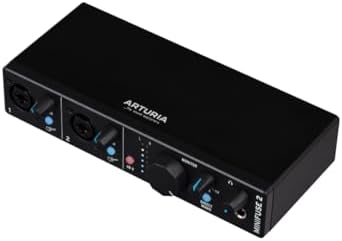
Arturia built the MiniFuse 2 to handle almost anything you plug into it. The connections are generous: you get two combo Mic/Inst/Line XLR inputs with 48V phantom power, plus two additional Inst/Line TRS inputs. Outputs include balanced 1/4″ TRS lines and a dedicated headphone output with its own volume control. There’s even a USB type A hub rated at 250mA and 5-pin MIDI input and output connections.
The software suite is where this interface truly separates itself from the rest. It includes Ableton Live Lite as your main workstation, but that’s just the start. You also get Analog Lab Intro for synth sounds, Arturia FX for vintage studio processing, NI GUITAR RIG 6 LE for amp modeling, Auto-Tune Unlimited for vocal correction, and a Splice Creator Plan for samples.
Durability is another strong point. The listing highlights a 5-year warranty and notes the unit goes through over 200 reliability tests before approval. The Loopback feature also lets you capture voiceovers alongside in-app or game audio easily.
Against the Behringer U-PHORIA UMC404HD, this provides half the connectivity while the Behringer lists 4 inputs.
Pros
- 2x combo XLR inputs plus 2x TRS inputs
- 5-pin MIDI input and output connections
- Includes Ableton Live Lite, Analog Lab Intro, and Arturia FX
- NI GUITAR RIG 6 LE and Auto-Tune Unlimited included
- 5-year warranty with 200+ reliability tests
Cons
- The USB type A hub provides 250mA.
3. Universal Audio Volt 176 USB Audio Interface
Best for: vocalists seeking classic analog compression character
The Volt 176 brings Universal Audio’s studio legacy into a desktop format. The standout feature here is the built-in analog compressor based on the renowned 1176 circuit. You also get a Vintage mode that delivers the rich, album-ready sound of classic UA 610 preamps.
Flexibility across devices is excellent. The Volt 176 supports MacOS, Windows, iPad, and iPhone running iOS 14 or higher. This means you can use it for mobile recording just as easily as desktop mixing. However, note that iOS use requires an external Volt power supply and an Apple Lightning to USB Camera Adapter, unless you’re using an iPad with USB-C.
Users needing to record multiple microphones at once will find the single-channel design too restrictive. Compared to the Mackie Onyx Artist 1X2, the Volt 176 offers 1 channel against 2 inputs on the Mackie.
Pros
- Built-in analog compressor based on the 1176
- Vintage mode emulating classic UA 610 preamps
- Includes LUNA Digital Audio Workstation
- Supports MacOS, Windows, iPad, and iPhone (iOS 14+)
- UAD plug-ins and tutorials included
Cons
- Requires an external Volt power supply and an Apple Lightning adapter for older iOS devices.
4. Focusrite Scarlett 2i2 4th Gen USB-C Audio Interface
Best for: engineers needing maximum headroom and automatic leveling
The fourth generation of the Scarlett 2i2 represents a significant leap in converter technology. The headline spec is a huge 120dB dynamic range, using the same converters found in Focusrite’s flagship interfaces located in major professional studios.
Two features completely change how you approach recording levels. Auto Gain automatically sets the perfect level for your mic or guitar, analyzing the incoming signal so you don’t have to ride the knob manually. Clip Safe then steps in to prevent clipping if a sudden loud transient hits the preamp.
The Air mode has been improved to lift vocals and guitars to the front of the mix, adding musical presence and rich harmonic drive. Software-wise, it includes everything you need to record, mix, and master: Pro Tools Intro+, Ableton Live Lite, Cubase LE, and the Hitmaker Expansion.
Single-input users can’t fully utilize these conversion specs. The Focusrite Scarlett Solo 4th Gen shares the 120dB dynamic range figure but limits you to 1 mic preamp against 2 on this 2i2 model.
Pros
- 120dB dynamic range using flagship converters
- Auto Gain sets levels automatically
- Clip Safe prevents digital distortion
- Improved Air mode adds harmonic drive
- Includes Pro Tools Intro+, Ableton Live Lite, and Cubase LE
Cons
- A restricted channel count limits large ensemble tracking compared to interfaces offering four or more channels.
5. Mackie Onyx Artist 1X2
Best for: guitarists wanting extensive onboard effects without extra purchases
Mackie designed the Onyx Artist 1X2 around their boutique-quality Onyx mic preamp, which boasts class-leading fidelity and dynamic range. It includes 48V phantom power for studio condenser mics and a ¼” TRS input with a Hi-Z switch specifically for connecting guitars and basses. This direct instrument input ensures your guitar tone stays intact before hitting the software.
The Behringer U-PHORIA UMC404HD matches the 24-Bit/192kHz spec but provides 4 inputs against 2 on this Mackie.
Pros
- Boutique-quality Onyx mic preamp
- 24-Bit/192kHz high-resolution recording
- Includes The Musician Collection of 23 plugins
- Zero-latency direct monitoring
- Bus-powered with no adapter required
Cons
- Limited to 2 inputs, restricting multi-microphone setups for drums or choirs.
6. Behringer U-PHORIA UMC404HD Audiophile 4×4
Best for: bands tracking multiple instruments simultaneously
When you need to record several sources at once, the UMC404HD delivers. It’s a 4×4 USB 2.0 Audio/MIDI interface, meaning it streams 4 inputs and 4 outputs simultaneously to your computer with ultra-low latency.
The preamps are a major highlight. Behringer equipped this unit with 4 state-of-the-art, MIDAS designed Mic Preamplifiers, all featuring +48V phantom power. You also get 1x MIDI I/O for syncing external hardware synthesizers or drum machines.
Solo artists recording one vocal and one guitar at a time carry unnecessary bulk with an oversized preamp section. The Focusrite Scarlett Solo 2nd Gen handles that exact task with 2 inputs against 4 inputs here.
Pros
- 4 inputs and 4 outputs simultaneously
- 4 MIDAS designed Mic Preamplifiers
- 24-Bit/192 kHz resolution
- Impact-resistant metal chassis
- 1x MIDI I/O included
Cons
- 4 inputs and 4 outputs require managing more cables and routing than simpler two-channel setups.
- Compatibility lists Windows XP or higher, but modern driver support for older operating systems may eventually end.
7. M-AUDIO M-Track Duo USB Audio Interface
Best for: beatmakers and podcasters wanting simple MPC integration
The M-Track Duo positions itself as a versatile tool for podcasting, recording, and live streaming. It acts as a USB sound card for Mac or PC, delivering 48kHz audio resolution.
Input flexibility is solid for a compact unit. You get two combo XLR / Line / Instrument Inputs equipped with phantom power, letting you record guitar, vocals, or line-level signals without adapters. Monitoring is handled via a 1/4″ headphone output and stereo 1/4″ outputs. A dedicated USB/Direct switch enables zero-latency monitoring, so you hear yourself instantly without computer delay.
The software angle focuses heavily on beat production. It includes MPC Beats Software, complete with essential production tools from Akai Professional.
The Mackie Onyx Artist 1X2 records at 24-Bit/192kHz against the 48kHz resolution stated here.
Pros
- Two combo XLR / Line / Instrument Inputs
- Phantom power for condenser microphones
- USB/Direct switch for zero-latency monitoring
- Includes MPC Beats Software by Akai Professional
- Transparent Crystal Preamps
Cons
- 48kHz audio resolution limits high-frequency detail compared to 192kHz interfaces.
- Two combo inputs restrict you to recording a maximum of two sources simultaneously.
8. Focusrite Scarlett Solo 4th Gen USB-C Audio Interface
Best for: traveling songwriters needing flagship converters in a single-channel format
Focusrite updated their most compact interface with serious professional specifications. The Scarlett Solo 4th Gen brings a huge 120dB dynamic range to a single-preamp body, using the exact same converters as their flagship interfaces found in major studios.
The software bundle is identical to the larger 2i2 4th Gen, ensuring you aren’t penalized for choosing the smaller hardware. You get Pro Tools Intro+, Ableton Live Lite, Cubase LE, and the Hitmaker Expansion.
Musicians needing to record a microphone and an instrument simultaneously can’t do so with a single preamp. The Focusrite Scarlett 2i2 4th Gen offers 2 mic pres against 1 on this Solo model.
Pros
- 120dB dynamic range with flagship converters
- Improved Air mode for harmonic drive
- Includes Pro Tools Intro+, Ableton Live Lite, and Cubase LE
- Hitmaker Expansion included
- Compact design for mobile songwriting
Cons
- A solitary preamp restricts recording to one microphone or instrument input at a time.
Also Worth Considering
Focusrite Gen USB-C Audio Interface is the third-generation version of the Scarlett Solo. It connects via USB-C and serves as the direct predecessor to the 4th Gen model listed above. The Focusrite Scarlett Solo 4th Gen beats it by introducing the 120dB dynamic range and improved Air mode.
M-AUDIO Solo USB Audio Interface is the stripped-down variant of the M-Track Duo. It carries the same MPC Beats software bundle but limits you to a single combination input instead of a pair. The M-Audio M-Track Duo beats it simply by providing a second combo XLR/Line/Instrument input.
Universal Audio USB Audio Interface refers to the Volt 1, the single-channel sibling to the Volt 176. It lacks the built-in 1176 analog compressor that defines the 176 model. The Universal Audio Volt 176 beats it by offering that hardware compression circuit.
How We Chose
To earn a place, a listing had to explicitly name a digital audio workstation or comprehensive production software bundle included in the box. Interfaces selling hardware alone were removed. What separates the final eight picks is how they pair physical connections with specific software ecosystems. Some prioritize multi-channel tracking with four MIDAS preamps, while others focus on single-channel fidelity using 120dB converters. Warranty terms, such as the five-year coverage stated by Arturia, and unique hardware circuits, like Universal Audio’s analog compressor, further divided the field. Every selected product states its compatibility and bundled tools clearly within the seller’s description.
How to Choose the Right Audio Interface That Comes With a DAW
The software bundle you actually need
Decide whether you want a traditional multi-track recorder or a beat-making environment first. The Focusrite models include Pro Tools Intro+, Ableton Live Lite, and Cubase LE together. The M-Audio M-Track Duo ships with MPC Beats, which targets sampling and sequencing workflows differently. Match the software style to your genre before comparing hardware knobs.
Input count for your recording style
Count the maximum number of microphones or instruments you plan to record at the exact same moment. The Behringer U-PHORIA UMC404HD provides 4 inputs for full bands. The Focusrite Scarlett Solo models offer 1 mic preamp for single performers.
Converter specs and dynamic range
Look at the stated resolution if you record quiet acoustic instruments. The Focusrite Scarlett 4th Gen models list a 120dB dynamic range using flagship converters. The Mackie Onyx Artist 1X2 and Behringer UMC404HD both state 24-Bit/192kHz recording.
Physical durability and portability
Check the build materials if you travel frequently. The Behringer listing specifies an impact-resistant metal chassis, while the Mackie highlights a Built-Like-A-Tank design. The Arturia MiniFuse 2 highlights a 5-year warranty backed by 200 reliability tests. A bus-powered unit like the Mackie avoids carrying wall adapters, while the Universal Audio Volt 176 requires external power for certain mobile devices.
Related guides
- Can I Use FL Studio Plugins in Other DAWs
- How to Connect Camera to Audio Interface
- CAN-Bus Audio Interface
Frequently Asked Questions
Do I need to buy a separate DAW after getting one of these?
No, every interface here includes recording software. The Focusrite models ship with Pro Tools Intro+, Ableton Live Lite, and Cubase LE. Arturia includes Ableton Live Lite alongside Analog Lab Intro. Universal Audio provides the LUNA Digital Audio Workstation. You can start recording immediately without purchasing additional workstation software separately.
Can I use these interfaces with my iPad or tablet?
Compatibility varies by model. The Universal Audio Volt 176 explicitly lists support for iPad and iPhone running iOS 14 or higher, though it requires an external power supply and an Apple Lightning adapter for older devices. The other listings primarily specify Mac and PC compatibility, so check your tablet’s operating system before assuming mobile support.
What does 48V phantom power actually do?
It sends electricity through the XLR cable to power condenser microphones, which can’t operate without it. The Focusrite Scarlett Solo 2nd Gen, Arturia MiniFuse 2, Mackie Onyx Artist 1X2, and Behringer UMC404HD all list 48V phantom power. If you own a dynamic microphone, you won’t need to engage this switch.
Is the 120dB dynamic range noticeable for beginners?
It provides a much quieter background noise floor, but you need a good microphone to hear the difference. The Focusrite Scarlett 2i2 4th Gen and Solo 4th Gen both state this specification using flagship converters. Beginners recording in untreated rooms might notice room noise before they notice the interface’s self-noise dropping.
What is the Loopback feature mentioned on the Arturia?
Loopback routes your computer’s internal audio back into the interface’s input stream. The Arturia MiniFuse 2 lists this feature specifically for capturing voiceovers alongside in-app or in-game audio. Streamers and podcasters use it to record Skype calls or game sound directly into their workstation without third-party routing software.
Does MIDI matter if I only play guitar?
If you never use hardware synthesizers or drum machines, you can ignore it. The Arturia MiniFuse 2 and Behringer U-PHORIA UMC404HD both include 5-pin MIDI input and output connections. Guitarists relying solely on amp simulators won’t need those physical MIDI ports. Dynamic range, input count, and software bundles define the best audio interface that comes with a DAW for your specific needs. The Focusrite Scarlett Solo 2nd Gen remains the top choice for most people because it balances Pro Tools | First with reliable hardware. If you need simpler beat-making tools, the M-Audio M-Track Duo offers MPC Beats without the extra routing complexity. Pick the one matching your software preference and plug it in today.
Do I need to install drivers for these interfaces?
Most modern interfaces are class-compliant, meaning they work immediately upon connection. The Arturia MiniFuse 2 specifically advertises a plug-and-play workflow that gets you creating in seconds. However, achieving the stated 24-Bit/192kHz resolution on the Behringer UMC404HD or Mackie Onyx Artist 1X2 often requires installing the manufacturer’s dedicated drivers for optimal performance.
What does the Air mode actually change in my recordings?
Air mode alters the frequency response of the preamp to emulate classic transformer-based designs. The Focusrite Scarlett 2i2 4th Gen and Solo 4th Gen both state that Air mode lifts vocals and guitars to the front of the mix. It adds musical presence and rich harmonic drive, reducing the need for heavy equalization later.
Can I record a podcast with multiple guests using these?
You need enough physical inputs for each guest’s microphone. The Behringer U-PHORIA UMC404HD streams 4 inputs simultaneously, making it suitable for a host and three guests. Two-input models like the Arturia MiniFuse 2 or Mackie Onyx Artist 1X2 limit you to two speakers unless you route everyone through an external mixer first.
Why does the Universal Audio Volt 176 need external power for iOS?
Mobile devices often can’t supply enough electrical current through their USB ports to run hardware compressors. The Universal Audio Volt 176 listing notes that iOS use requires an external Volt power supply and an Apple Lightning to USB Camera Adapter. iPads equipped with USB-C ports bypass this limitation entirely.
Are the included plugins full versions or limited trials?

The listings describe them as complete creative tools rather than expiring demos. The Arturia MiniFuse 2 includes Analog Lab Intro and NI GUITAR RIG 6 LE, where “Lite” or “Intro” denotes a permanently free tier with fewer presets, not a time-limited trial. The Mackie Onyx Artist 1X2 provides 23 full plugins and instruments.
How important is the warranty length when choosing?
A longer warranty signals manufacturer confidence in the components used. The Arturia MiniFuse 2 stands out with a 5-year warranty, noting the unit undergoes over 200 reliability tests before approval. Other brands don’t state their warranty duration in the provided text, making Arturia’s explicit coverage a distinct advantage for long-term planning.
Conclusion
Picking the right gear is just the start. Once your box arrives, plug in your mic, open the bundled software, and record a short test track tonight. You’ll hear exactly what you’re capable of, and that first take will push you to keep going.
As an Amazon Associate, Instrument Insight earns from qualifying purchases at no additional cost to you.