
The Focusrite Scarlett 2i2 4th Gen is the best audio interface for mac because it provides a complete recording suite with professional-grade converters and automatic gain features. This guide helps musicians and podcasters choose the right hardware based on their specific needs. While all models here handle digital audio signals, the main difference lies in the input count, gain capabilities, and included software bundles.
- Best Overall: Focusrite Scarlett 2i2 4th Gen — offers high-end converters and automated level-setting tools.
- Best Display: MOTU M2 — features a clear, helpful visual monitor for signal levels.
- Best Preamp Quality: Audient iD4 MKII — uses high-end console preamps for superior sonic clarity.
- Highest Gain: MAONO P1 — provides significant gain for demanding microphones without extra boosters.
- Most Inputs: Behringer UMC404HD — includes four separate inputs for tracking multiple sources.
- Most Portable: PreSonus AudioBox 96 — compact design powered entirely through a single USB connection.
- Simplest Setup: M-Audio M-Track Solo — streamlined interface perfect for quick, hassle-free recording sessions.
- Best for Vintage Sound: Universal Audio Volt 2 — includes a dedicated mode to emulate classic analog circuits.
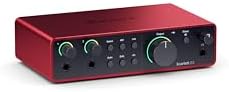
- 4th Gen mic pres for mic and guitar
- 120dB dynamic range with flagship converters
- Auto Gain sets level, Clip Safe prevents clipping
- Air mode adds presence to vocals and guitars

- 6+GB of free content included
- USB-C interface with 2 preamps
- Hardware monitoring built in
- 24-bit/192kHz resolution

- Class-A preamp from ASP8024 HE console
- High-speed USB-C connector for power supply
- All-metal desktop housing for stability
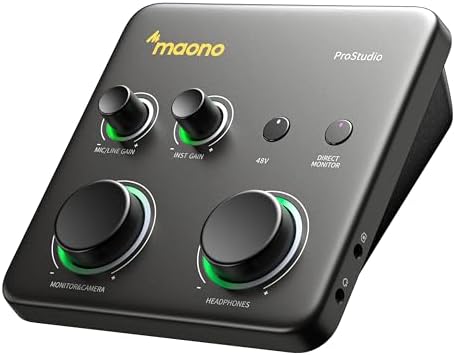
- Dual USB ports connect computer and phone simultaneously
- Up to 70dB gain, 24-bit/192kHz, -130dB EIN
- Auto-Gain sets ideal microphone level automatically
- Route app audio directly to dedicated channels

- 4×4 USB 2.0 audio/MIDI interface
- 24-Bit/192 kHz resolution for recording
- Compatible with Pro Tools, Ableton Live, Cubase
- Streams 4 inputs / 4 outputs plus 1x MIDI I/O
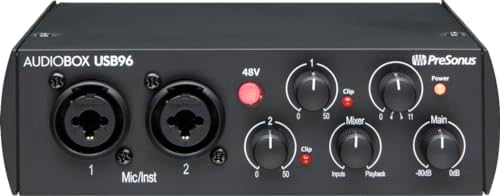
- 2-channel USB 2.0 interface for recording
- 2 Class-A mic preamps included
- 2 instrument inputs plus MIDI I/O
- 24-bit/96 kHz recording and playback
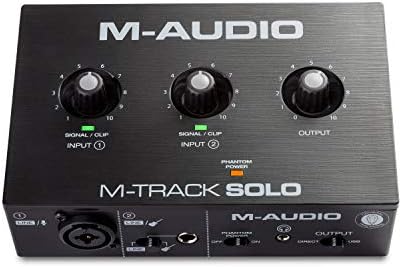
- USB sound card delivers 48kHz audio resolution
- Combo XLR / Line input with phantom power
- 1/8" headphone output and stereo RCA outputs
- Crystal Preamp supports condenser mics

- Vintage mode uses UA 610 preamps
- Up to 24-bit / 192 kHz quality converters
- Includes LUNA Digital Audio Workstation
- Includes UAD plug-ins and instruments
1. Focusrite Scarlett 2i2 4th Gen USB-C Audio Interface
Best for: Songwriters needing a complete, professional recording solution.
This interface is the most refined choice here, focusing on making the recording process as seamless as possible. The inclusion of Auto Gain and Clip Safe technology means you spend less time adjusting levels and more time playing. It uses the same converters as the company’s flagship studio gear, providing a high dynamic range that captures subtle details in your performance.
The interface is built to be a central hub, coming with a deep collection of software and plugins to help you mix and master your tracks. Whether you’re tracking a single vocal or a guitar, the Air mode adds a distinct harmonic character that helps your recordings sit well in a final mix. It’s a well-rounded package for anyone serious about home production.
Anyone who needs to record more than two sources at once should look elsewhere, as this unit is limited to a 2-in/2-out configuration, unlike the 4-input Behringer UMC404HD.
Pros
- Includes professional recording software and plugins.
- Auto Gain sets levels automatically for fast setup.
- Clip Safe prevents digital distortion during loud takes.
- Air mode enhances vocal and guitar presence.
Cons
- Limited to two inputs, which rules out tracking a full drum kit or multi-person podcast simultaneously.
2. MOTU M2 USB-C Audio Interface
Best for: Producers who want constant visual feedback on their audio levels.
The standout feature here is the full-color LCD screen that displays clear, high-resolution meters for all inputs and outputs. This makes it incredibly easy to see exactly how your signal is hitting the interface, even from across the room. It handles audio at high resolutions, ensuring your recordings retain plenty of detail for professional editing.
The device is straightforward to use, with dedicated switches for hardware monitoring that let you hear your inputs without any delay. It’s a clean, modern interface that prioritizes accurate monitoring above all else. The build quality feels solid, and the USB-C connection ensures it works well with modern computer setups.
Pros
- Hardware monitoring for zero-latency performance.
- Supports high-resolution 24-bit/192kHz audio.
- Includes hardware monitoring for zero-latency performance.
- Mac/PC/iOS compatible.
Cons
- The focus on visual hardware makes it less feature-rich in bundled software compared to other picks.
3. Audient Audio Interface iD4 MKII
Best for: Musicians who demand top-tier preamp performance for their microphones.
This interface is built around a Class-A preamp derived from the brand’s high-end studio consoles. Because of this, it provides a level of sonic transparency that’s hard to beat in this category. The metal housing is rugged and designed to survive being moved between home studios and rehearsal spaces.
The layout is clean, and the addition of a second headphone output is a thoughtful touch for collaborating with another person. It also features a monitor mix and panning function, giving you more control over your direct signal while recording. It’s a workhorse that puts sound quality at the very top of its list.
Anyone who requires MIDI connectivity will find this unit lacking, as it doesn’t include the MIDI ports found on the PreSonus AudioBox 96.
Pros
- Class-A console microphone preamplifier for high-end sound.
- Rugged all-metal desktop housing.
- Dual headphone outputs for easy collaboration.
- High-speed USB-C connectivity for improved power.
Cons
- Lacks MIDI ports, which prevents it from connecting directly to hardware synthesizers or controllers.
4. MAONO P1 USB Audio Interface with 70dB Gain
Best for: Streamers and creators who use gain-hungry dynamic microphones.
This unit is a powerhouse for anyone who struggles with quiet microphones. With 70dB of gain, it can drive demanding dynamic mics without requiring an external booster. The hybrid connectivity allows you to record to your computer and a mobile device at the same time, which is perfect for streamers who want to capture high-quality audio for different platforms simultaneously.
The software integration is designed to simplify complex routing, letting you send different audio sources to specific channels. It also features a specific stream mode that balances your voice across channels, making it a dream for those who broadcast live. The 15-degree tilt makes the physical knobs very easy to reach during a session.
Creators who primarily record in a quiet, treated studio may find the 70dB of gain unnecessary, especially when compared to the simpler, more traditional design of the Focusrite Scarlett 2i2 4th Gen.
Pros
- High 70dB gain range for quiet microphones.
- Dual USB ports for recording to computer and phone.
- Built-in loopback for easy streaming and routing.
- Independent mute buttons for headphone and monitor channels.
Cons
- The advanced routing features and hybrid connectivity add a layer of complexity that may overwhelm beginners.
5. Behringer U-PHORIA UMC404HD Audiophile 4×4
Best for: Podcasters or bands that need to record multiple sources at once.
If you have a multi-person podcast or want to mic up several instruments, this is the most capable option here. It offers four inputs and four outputs, allowing for complex recording setups that other two-channel interfaces simply can’t handle. The Midas-designed preamps provide a solid, reliable sound that has become a staple in many home setups.
The chassis is built to be tough, with an impact-resistant metal design that earns its “built-like-a-tank” description. It also includes MIDI input and output, allowing you to integrate hardware keyboards or drum machines directly into your recording workflow. It’s a high-capacity tool for those who have outgrown basic recording gear.
Anyone with a very small desk space should consider the size of this unit, as its expanded layout makes it significantly larger than the compact M-Audio M-Track Solo.
Pros
- Four independent inputs for multi-source recording.
- Includes MIDI I/O for external hardware integration.
- Midas-designed preamps for consistent audio quality.
- Robust, impact-resistant metal chassis.
Cons
- The larger footprint occupies more desk space than smaller, more basic alternatives.
6. PreSonus AudioBox 96 25th Anniversary USB Audio Interface
Best for: Producers who need a portable, bus-powered interface for mobile recording.
This is a classic choice for anyone who needs to record on the go. Because it’s powered entirely by the USB connection, you don’t need to carry extra power adapters or worry about finding an outlet. It’s a straightforward interface that gives you exactly what you need to get a clean signal into your computer.
The included software suite is quite generous, featuring a full digital audio workstation and a collection of plugins to help you mix your tracks. The compact, bus-powered design makes it a reliable companion for field recordings or hotel-room song sessions. It balances simplicity with enough quality to satisfy most personal recording needs.
This model is limited to 96kHz recording, which is lower than the 192kHz resolution offered by the MOTU M2.
Pros
- Bus-powered through USB for maximum portability.
- Includes a wide range of recording software.
- Zero-latency monitoring with a dedicated mixer control.
Cons
- The 96kHz maximum sample rate is lower than the 192kHz standard found on many other modern picks.
7. M-AUDIO M-Track Solo USB Audio Interface
Best for: Beginners who want a simple, no-fuss start to home recording.
This interface is the definition of streamlined. It has one combo input and one line input, covering the basics for a solo performer who wants to plug in a mic and a guitar. The transparent Crystal preamps are designed to keep the signal clean, ensuring your recordings sound natural without extra coloration.
The setup is incredibly fast, with a simple USB connection and a straightforward control layout. It includes essential production software, giving you everything you need to start making music right out of the box. It’s perfect for someone who wants to record without digging through deep menus or complex settings.
Users who plan to upgrade their setup later will likely find the lack of extra inputs limiting compared to the Behringer UMC404HD.
Pros
- Transparent Crystal preamps for clean signal capture.
- Simple, intuitive layout for quick setup.
- Includes essential production software for beginners.
- Zero-latency monitoring via a direct switch.
Cons
- The single combo input limits the type of multi-mic setups you can perform.
8. Universal Audio Volt 2 USB Audio Interface
Best for: Producers who want the signature sound of classic analog hardware.
The standout feature of this interface is the Vintage mode, which uses internal circuitry to emulate the rich, warm sound of a classic 610 tube preamp. It gives your vocals and instruments a polished, album-ready quality with just the press of a button. The converters are top-tier, ensuring that every detail of your performance is captured with extreme clarity.
The interface is compatible with a wide range of devices, including iPads and iPhones, making it a flexible choice for mobile recording. It also comes with access to professional-grade software that helps you learn and improve your mixing skills. It’s a sophisticated piece of gear that brings high-end studio character to a compact, desktop-friendly format.
Anyone who needs to record multiple microphones or instruments simultaneously should look at the Behringer UMC404HD, as this unit is strictly limited to a basic stereo setup.
Pros
- Vintage mode emulates classic tube preamp sound.
- High-quality 24-bit/192kHz converters.
- Supports mobile recording on iPad and iPhone.
- Includes professional-grade software and tutorials.
Cons
- Requires an external power supply for some mobile setups, unlike the bus-powered PreSonus AudioBox 96.
Also Worth Considering
The MAONO Dual XLR PC Phone is a specialized interface that offers dual XLR inputs, making it a strong contender for those needing to record two microphones at once. It’s slightly more niche than the Focusrite Scarlett 2i2 4th Gen, which remains the best overall pick for most users due to its broader software support.
The CIXUN 2×2 USB-C Audio Interface is a basic, no-frills option for those who just need a simple connection to their computer. It lacks the advanced preamp technology found in the Audient iD4 MKII, but it remains a functional choice for very simple recording tasks.
The Piyone Audio Interface offers a standard 2×2 configuration with loopback functionality. It serves as a decent alternative for those who don’t need the specific vintage emulation features found on the Universal Audio Volt 2.
How We Chose
The selection prioritized interfaces that clearly stated their connectivity options and technical specifications. Products were evaluated based on the specific needs of different users, such as portability, multi-source recording, or ease of use. Only interfaces that provided sufficient detail regarding their hardware capabilities were shortlisted. Models that lacked clearly defined features or consistent branding were excluded to ensure the guide remained focused on reliable, well-documented options.
How to Choose the Right Audio Interface
Inputs and what they handle
Decide how many things you need to record at once. A basic stereo model like the Focusrite Scarlett 2i2 4th Gen is perfect for a solo singer-songwriter. If you’re recording a drum kit or a multi-person podcast, you need a 4-input interface like the Behringer UMC404HD. Check if you need XLR inputs for microphones or 1/4-inch jacks for instruments.
Preamp quality and sound
The preamp is the heart of your recording. High-end components, like those in the Audient iD4 MKII, offer more clarity and less background noise. Some models, such as the Universal Audio Volt 2, offer special modes to add character to your sound. If you’re using quiet dynamic microphones, look for interfaces with high gain, like the MAONO P1.
Software and compatibility
Most interfaces include a bundle of software to get you started. Check if the included DAW and plugins match your production style. Ensure the interface is compatible with your specific computer or mobile device. Many modern interfaces, such as the PreSonus AudioBox 96, use USB-C for fast data transfer and reliable power delivery.
Monitoring and hardware features
Consider how you’ll listen to your performance. Direct monitoring is essential to avoid delay, or latency, while you record. Look for interfaces with dedicated volume controls for headphones and speakers. If you’re a streamer, a loopback function like the one on the MAONO P1 is helpful for routing desktop audio to your audience.
Frequently Asked Questions
Is an external power supply always required?
Not always. Many interfaces, such as the PreSonus AudioBox 96, are bus-powered, meaning they draw all the electricity they need directly from your computer through the USB cable. However, some units like the Universal Audio Volt 2 might require an external power supply when connected to mobile devices or tablets.
What is the difference between a combo input and a standard input?
A combo input allows you to plug in either an XLR cable for a microphone or a 1/4-inch cable for an instrument into the same jack. This saves space on the front panel. Interfaces like the M-Audio M-Track Solo use these to remain compact while still offering versatile connection options for different types of gear.
Can I record on my phone or tablet?
Yes, many modern interfaces are designed for mobile use. The MAONO P1 and Universal Audio Volt 2 explicitly support recording to phones and tablets. Always check the specific requirements, as some setups may need an Apple Lightning to USB Camera Adapter or an external Volt power supply to function correctly.
Do I need a specific interface for a dynamic microphone?

Dynamic microphones often require more gain than condenser microphones to reach a usable volume. If you use a quiet dynamic mic, choose an interface with high gain capabilities, such as the MAONO P1, which offers 70dB of gain. This avoids the need for an extra, separate signal booster to get a clean recording.
What does “Zero-latency monitoring” mean?
Zero-latency monitoring lets you hear your voice or instrument immediately through your headphones while you record, without any delay caused by the computer’s processing. Most interfaces on this list, including the MOTU M2 and M-Audio M-Track Solo, include a physical switch or knob to enable this, which is crucial for staying in time.
Conclusion
The Focusrite Scarlett 2i2 4th Gen is the best all-around choice for most users due to its professional-grade converters and helpful automated tools. If you need something simpler for quick, mobile recording, the PreSonus AudioBox 96 is a reliable alternative. Check your device’s connection ports and start your first recording session today.
As an Amazon Associate, Cleanestor earns from qualifying purchases at no additional cost to you.