
The best usb audio interface here is the Focusrite Scarlett 2i2 4th Gen, because it lists a 120dB dynamic range and includes Auto Gain alongside Clip Safe to protect every take. This guide helps musicians, podcasters, and streamers pick the right box to connect microphones and instruments to a computer.
- Most complete recording setup: Focusrite Scarlett 2i2 4th Gen — highest listed dynamic range plus automatic gain protection and bundled DAWs.
- Most inputs: Behringer UMC404HD — four mic preamps and MIDI routing in a metal chassis.
- Best inline adapter: Shure MVX2U Gen 2 — connects an XLR microphone directly to USB-C with onboard processing.
- Best for DJs: ESI GIGAPORT eX — eight RCA outputs and dual headphone jacks for cueing tracks.
- Best mobile connectivity: MAONO P2 Hybrid — dual USB ports link a computer and phone simultaneously.
- Simplest to use: PreSonus AudioBox 96 — basic mixer knob and bus power over standard USB.
- Best entry-level: M-Audio M-Track Duo — two combo inputs and a direct monitoring switch.
- Best compact studio: MAONO PS22 Lite — fits in a palm and includes loopback routing software.
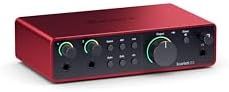
- 4th Gen mic preamps
- 120dB dynamic range converters
- Auto Gain and Clip Safe features
- Air mode for vocals and guitars

- 4×4 USB 2.0 Audio/MIDI interface
- 24-Bit/192 kHz resolution
- Compatible with major recording software
- 4 inputs, 4 outputs, 1x MIDI I/O

- XLR-to-USB-C interface
- Onboard Shure Digital Audio Processing
- Auto Level Mode with DSP
- Up to +60 dB gain and 48V phantom power

- USB Type-C connectivity
- Supports 24-bit/192kHz and 7.1 surround sound
- Compatible with DJ applications and DAWs
- 8 RCA outputs and dual headphone jacks

- Dual USB ports with MFi-certified connectivity
- 56dB dual XLR interface with 24-bit/192kHz
- Independent mute controls for headphones and monitors
- Includes ProStudio 2 software with VST effects
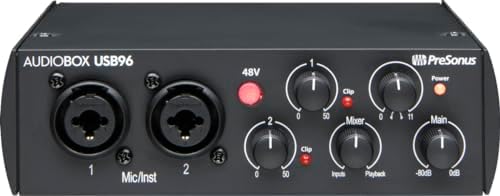
- 2-channel USB 2.0 interface
- 2 Class-A mic preamps
- 2 instrument inputs and MIDI I/O
- 24-bit/96 kHz recording and playback

- 48kHz audio resolution
- Two combo XLR/Line/Instrument inputs with phantom power
- 1/4" headphone and stereo outputs
- Crystal Preamps for condenser microphones
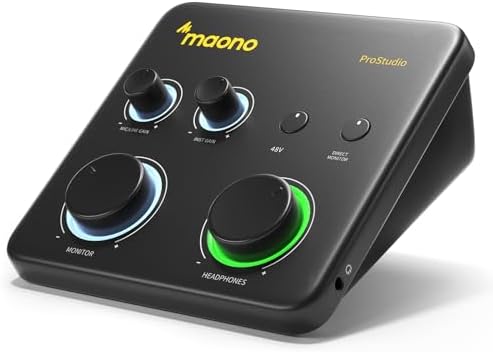
- 24-bit/192kHz resolution with 106dB dynamic range
- 56 dB preamp with 48V phantom power
- Dedicated instrument input with adjustable impedance
- Includes ProStudio Routing Software
1. Focusrite Scarlett 2i2 4th Gen USB-C Audio Interface
Best for: Musicians who want automatic level control.
This fourth-generation unit focuses heavily on preventing ruined takes. It lists Auto Gain, which sets the input level automatically when you plug in a mic or guitar. Clip Safe sits alongside it to stop digital distortion before it happens. You don’t have to stare at meters while playing; the interface handles the ceiling for you. That’s a massive shift for anyone used to riding a gain knob manually during a live performance or a fast-moving recording session.
Air mode adds harmonic drive to vocals and guitars, lifting them forward in the mix without needing an external pedal or plugin. The converters share architecture with Focusrite’s flagship units, pushing a 120dB dynamic range. Comparing specs across this list, the Focusrite Scarlett 2i2 4th Gen lists a 120dB dynamic range, while the MAONO PS22 Lite lists 106dB.
The included software bundle covers nearly everything a new studio requires. You get Pro Tools Intro+, Ableton Live Lite, Cubase LE, and the Hitmaker Expansion for effects and mastering tools. It’s a full production suite ready to install the moment you connect the hardware.
Anyone tracking more than two sources at once will find the two inputs insufficient, as the listing specifies only a pair of connections for mics and instruments.
Pros
- 120dB dynamic range using flagship-grade converters
- Auto Gain sets levels automatically for mics and guitars
- Clip Safe prevents digital clipping during loud passages
- Air mode adds presence and harmonic drive to recordings
- Includes Pro Tools Intro+, Ableton Live Lite, Cubase LE, and Hitmaker Expansion
Cons
- Limited to two inputs, so recording a full drum kit or multiple vocalists simultaneously requires another device.
2. Behringer U-PHORIA UMC404HD Audiophile 4×4
Best for: Bands needing four simultaneous microphone inputs.
Four Midas-designed mic preamps make this the roomiest option here for multi-track recording. If you’re tracking a small band, having four XLR inputs means everyone plugs in at once. The 24-bit/192 kHz resolution matches several other picks. Having four inputs eliminates cable swapping between takes so you can actually play music together in the same room.
The chassis is described as impact-resistant metal, built to survive being tossed into a gig bag. It streams four inputs and four outputs simultaneously, plus a dedicated MIDI I/O port. That MIDI connection lets you route hardware synthesizers or drum machines straight into your DAW without buying a separate interface just for sync data. It runs over USB 2.0 and supports both Mac OS X and Windows XP or higher.
Comparing physical builds, the metal frame here contrasts with the aluminum-alloy housing listed on the MAONO P2 Hybrid, though both aim for durability on the road. The four preamps also mean phantom power is available across all channels for condenser microphones.
A setup requiring only a minimal number of inputs means carrying extra weight and managing unused channels every time you record.
Pros
- Four Midas-designed mic preamps with +48V phantom power
- 24-bit/192 kHz audiophile resolution
- Streams 4 inputs and 4 outputs plus 1x MIDI I/O
- Impact-resistant metal chassis
Cons
- Listed as a 4×4 interface, which means buyers needing only a single microphone are paying for three unused preamps and a larger footprint on their desk.
3. Shure MVX2U Gen 2 XLR-to-USB-C Audio Interface
Best for: Podcasters connecting one XLR mic to laptops.
Instead of sitting flat on a desk, this adapter plugs directly into the end of an XLR cable. It converts any dynamic or condenser microphone into a USB-C device instantly. You can run it into a desktop, tablet, or smartphone without a bulky breakout box taking up space. It’s the simplest way to upgrade a standard microphone for professional streaming or voiceover work wherever you happen to be sitting.
Onboard digital processing does the heavy lifting. Auto Level Mode adjusts gain in real time, while a Real-Time Denoiser and Digital Popper Stopper clean up the signal at zero latency. You can choose Dark, Natural, or Bright tone profiles right from the hardware. It delivers up to +60 dB of clean gain and supplies 48V phantom power, meaning even hungry broadcast mics wake up fully.
The MOTIV app ecosystem manages settings across devices. You can tweak EQ, compression, and limiting through MOTIV Mix, Audio, or Video apps on your phone or computer. Against the Focusrite Scarlett 2i2 4th Gen’s traditional input pair, this Shure adapter offers exactly one XLR connection, trading channel count for total portability.
Recording a duo interview or adding a guitar track alongside a vocal isn’t possible here, since the listing shows only a single XLR connection point.
Pros
- Inline XLR-to-USB-C design for direct connection
- Auto Level Mode adjusts gain in real time via DSP
- Real-Time Denoiser and Digital Popper Stopper included
- Provides up to +60 dB clean gain and 48V phantom power
- Compatible with MOTIV apps for EQ, compression, and limiting
Cons
- Built around a single XLR connection, so recording a pair of people at once requires buying a second unit entirely.
4. ESI GIGAPORT eX DJ Audio Interface
Best for: DJs routing multiple tracks to external mixers.
Eight RCA outputs define this unit’s entire purpose. It’s engineered for DJs who need to send separate audio channels to different decks or zones on a mixer. Dual headphone jacks let two people cue tracks simultaneously without splitting signals through a passive adapter. If your workflow relies on routing stems rather than just stereo playback, this layout saves you from constantly replugging cables mid-set.
Power comes straight through the USB Type-C connection, keeping the setup free of wall adapters. It supports 7.1 surround sound and operates at high-resolution studio quality. Compatibility spans mainstream DJ applications and top-tier DAWs, making it flexible enough for both live mixing and studio editing. A comprehensive 2-year warranty is backed by support teams based in the US and Germany.
Where the PreSonus AudioBox 96 lists balanced ¼” TRS outputs for studio monitors, this ESI model relies entirely on RCA connections tailored for DJ gear. That distinction matters depending on what amplifier or mixer sits next to your laptop.
Speakers requiring balanced TRS or XLR inputs won’t connect directly, as the output specification lists only RCA jacks.
Pros
- 8 RCA outputs for multichannel DJ routing
- Dual headphone jacks for simultaneous cueing
- USB Type-C powered with no external supply needed
- Supports 7.1 channel audio at 24-bit/192kHz
- Includes a 2-year warranty with US and German support
Cons
- Outputs are strictly RCA, so anyone with studio monitors expecting balanced TRS or XLR connections will need adapters to hook them up.
5. MAONO P2 Hybrid USB Audio Interface Dual XLR
Best for: Creators recording on computers and phones simultaneously.
Two USB ports sit on the back panel, letting you connect a computer and a mobile device at the exact same time. You can record a guitar part in Logic Pro while streaming the audio directly to an iPad. MFi-certified connectivity ensures stable operation with Apple products, while Android and cameras are also supported. It removes the constant cable-swapping that usually interrupts creators moving between desktop editing and mobile uploads.
Audio specs include ultra-high-definition resolution and a class-leading -130dB EIN for silent recordings. Two XLR inputs provide 56dB of gain, handling most condenser and dynamic microphones easily. Independent mute buttons prevent accidental noise when switching guitars, and Stream Mode sends your voice equally to both channels. ASIO support keeps monitoring latency low during solo sessions.
The ProStudio 2 software routes specific apps—like Spotify or TikTok—to dedicated channels. You can add VST effects and capture loopback audio without digging through system settings. Comparing mobile readiness, this dual-port setup goes further than the M-Audio M-Track Duo, which lists only standard USB connectivity for Mac or PC. An ergonomic 15° tilt angle and aluminum-alloy housing keep it steady on crowded desks.
A setup that never leaves a desktop loses the main advantage of the dual-port design, leaving half the hardware idle.
Pros
- Dual USB ports connect a computer and phone/iPad simultaneously
- 56dB gain across a pair of XLR inputs at high-resolution quality
- -130dB EIN for ultra-low noise recording
- Independent mute controls for headphones, monitors, and inputs
- ProStudio 2 software with app routing and loopback
Cons
- Ships with a USB-C to USB-A/C cable but requires two active devices to utilize the hybrid feature, leaving single-device users with an unused port.
6. PreSonus AudioBox 96 25th Anniversary USB Audio Interface
Best for: Beginners wanting simple analog controls.
This 25th Anniversary edition strips away complex menus in favor of straightforward knobs. A single mixer control blends your live input with computer playback, delivering zero-latency monitoring without opening a software window. Two Class-A mic preamps handle vocals and instruments cleanly.
Converters operate at professional-grade bit depth and sample rate. While that sample rate ceiling is lower than the 192 kHz listed on several other interfaces here, it remains standard for podcasts, voiceovers, and basic music demos. Power arrives entirely over USB 2.0, meaning no wall outlet is required. A high-powered headphone output and balanced ¼” TRS outputs cover standard monitoring needs.
The software bundle includes Studio One Artist, Ableton Live Lite, and the Studio Magic Plug-In suite. MIDI I/O is also present for connecting keyboards or controllers. Compared to the Focusrite Scarlett 2i2 4th Gen’s automated Clip Safe feature, this PreSonus unit relies entirely on your own ears and hands to prevent clipping.
Projects demanding 192 kHz sample rates will hit a hard limit here, as the converters cap out at 96 kHz.
Pros
- Mixer control knob for zero-latency blending of input and playback
- Two Class-A mic preamps with high-headroom instrument inputs
- USB bus-powered via USB 2.0 with no external supply
- Includes Studio One Artist, Ableton Live Lite, and Studio Magic suite
- Built-in MIDI I/O for hardware controllers
Cons
- Maximum recording resolution matches standard studio fidelity, placing a ceiling below the higher sample rates supported by other picks on this page.
7. M-AUDIO M-Track Duo USB Audio Interface
Best for: First-time buyers needing basic two-channel recording.
Two combo inputs accept XLR, line, or instrument cables, covering almost anything you’d plug into a starter studio. Crystal Preamps deliver transparent sound, and phantom power is available for condenser microphones. It resolves audio at 48kHz, which is perfectly adequate for spoken word, casual streaming, and basic songwriting demos. You won’t find high-resolution sample rates here, but you’ll find immediate functionality for everyday tasks.
Monitoring is handled through a 1/4″ headphone output and stereo 1/4″ main outputs. A physical USB/Direct switch toggles between hearing your computer’s playback and the raw input signal with zero latency. It’s a tactile solution that avoids software menus entirely. The included MPC Beats software brings Akai Professional’s production tools straight into your workflow, giving beatmakers a familiar environment to start creating.
Against the MAONO PS22 Lite’s listed high-resolution capability, this M-Audio interface caps out at 48kHz resolution. That difference matters if you plan to archive high-fidelity music, but it barely registers for a weekly podcast or a quick voice memo. Portability is a given, as the entire unit draws power from the USB connection.
Musicians recording acoustic instruments for professional release will notice the 48kHz ceiling limits high-frequency detail.
Pros
- Two combo XLR/Line/Instrument inputs with phantom power
- Crystal Preamps for transparent microphone capture
- USB/Direct switch enables zero-latency monitoring
- Includes MPC Beats software with Akai production tools
- 1/4″ headphone and stereo outputs
Cons
- Audio resolution tops out at 48kHz, setting a firm limit for anyone looking to record high-definition acoustic music.
8. MAONO PS22 Lite USB Audio Interface
Best for: Streamers needing loopback in a tiny footprint.
Designed to fit in the palm of your hand, this interface packs studio-grade resolution and a 106dB dynamic range into a remarkably small shell. It features a dedicated instrument input with adjustable impedance for guitars, alongside an XLR input offering 56 dB of preamp gain and 48V phantom power. A dynamic light ring shows input status at a glance, so you don’t have to open your software to check if your signal is hitting the converter.
ProStudio Routing Software unlocks virtual channels and loopback functions for live streaming. You can route game audio, microphone input, and backing tracks separately. Intuitive modes switch quickly between recording, broadcasting, and instrument setups. ASIO drivers ensure low-latency output, and compatibility spans Mac, Windows, iPads, and major DAWs like Pro Tools, Ableton Live, and Cubase.
Comparing physical footprints, the PS22 Lite’s palm-sized claim contrasts sharply with the Behringer UMC404HD’s large metal chassis built for four inputs. Both serve completely different spaces. The side-mounted headphone jack reduces cable clutter on your desk, and the package includes a USB-A/USB-C to USB-C cable to get started immediately.
Users needing to record two microphones at once must look elsewhere, since the listing specifies only one XLR and one instrument input.
Pros
- High-fidelity recording with 106dB dynamic range
- Dedicated instrument input with adjustable impedance
- ProStudio Routing Software with loopback and virtual channels
- Dynamic light ring indicates sound input status visually
- Palm-sized, lightweight design with side headphone jack
Cons
- The box contains one XLR input and one instrument input, so recording two vocalists simultaneously is impossible without adding a mixer first.
Also Worth Considering
Focusrite Gen USB-C Audio Interface is the Solo variant of the 4th Gen line. It offers fewer inputs than the Focusrite Scarlett 2i2 4th Gen, which provides two independent channels for simultaneous recording. Buyers who only ever sing or play guitar alone might prefer the simpler Solo layout, saving desk space when a second input stays empty anyway.
Piyone Audio Interface is a 2×2 unit featuring 24-bit/192kHz resolution, an alloy red chassis, and loopback functionality. It competes directly with the MAONO P2 Hybrid on paper, but lacks the dual-port simultaneous mobile and computer connection that defines the MAONO’s workflow. It remains a solid choice for desktop-only streamers who want color-matched hardware.
Tiimge USB Audio Interface is another 2×2 option listing 48V phantom power and 24-bit/192kHz sound. The PreSonus AudioBox 96 beats it on software inclusion, bundling Studio One Artist and a full plugin suite. Still, the Tiimge could appeal to someone who already owns their preferred DAW and simply needs a capable conversion box.
How We Chose
To earn a spot, a product had to state its resolution, connection type, and preamp count clearly in the seller’s copy. Listings lacking basic specifications or offering only a title without feature details were removed. What separates the final picks is how they solve specific problems: automatic gain control, multi-device routing, or sheer channel count. Interfaces designed purely for DJs were kept distinct from standard studio boxes. Every selected item targets a different workflow, ensuring the final list covers beginners, touring musicians, podcasters, and electronic performers without overlapping on identical feature sets.
How to Choose the Right USB Audio Interface
Number of Inputs Required
Count the sources you’ll record at the exact same time. A solo podcaster needs one XLR port, found on the Shure MVX2U Gen 2. A duo requires two, like the Focusrite Scarlett 2i2 4th Gen provides. Bands tracking drums and vocals together should look at the four inputs listed on the Behringer UMC404HD. Buying more inputs than you use just adds cable clutter.
Sample Rate and Resolution
Higher numbers capture more audio detail. Most picks here list 24-bit/192kHz, including the MAONO PS22 Lite and ESI GIGAPORT eX. The PreSonus AudioBox 96 stops at 96 kHz, while the M-Audio M-Track Duo caps at 48kHz. For spoken word, 48kHz works fine. For archiving acoustic music, 192kHz gives you significantly more data to mix later.
Where You Will Record
Desk-bound studios can use larger metal units. Mobile creators need bus power and compact shapes. The MAONO P2 Hybrid lists dual USB ports for phones and computers, making it ideal for travel. The Shure MVX2U Gen 2 plugs inline with a cable, removing the box entirely. Always match the physical size to the bag or desk you actually use.
Included Software Bundle
Hardware gets sound into the computer, but software shapes it. The Focusrite Scarlett 2i2 4th Gen ships with Pro Tools Intro+, Ableton Live Lite, and Cubase LE. The PreSonus AudioBox 96 includes Studio One Artist. If you already own a DAW, these bundles matter less. If you’re starting fresh, a rich software list means you won’t need to hunt for recording programs later.
Frequently Asked Questions
Do I need phantom power for my microphone?
Only if you use a condenser microphone. Dynamic mics don’t require it. The Shure MVX2U Gen 2 lists 48V phantom power specifically for condenser support, as do the Behringer UMC404HD and MAONO P2 Hybrid.
Can I connect these interfaces to a tablet?
Some are built for it, while others aren’t. The MAONO P2 Hybrid explicitly lists MFi-certified connectivity for iPads and iPhones alongside Android support. The MAONO PS22 Lite mentions iPad compatibility too. However, units like the Behringer UMC404HD specify Mac OS X and Windows, with no tablet support mentioned. Always verify the operating systems listed before assuming mobile compatibility.
What does loopback actually do?
Loopback routes your computer’s internal audio back into your streaming or recording software. Instead of holding a microphone up to a speaker, the audio travels digitally. The MAONO PS22 Lite includes ProStudio Routing Software specifically for loopback, and the Piyone Audio Interface lists it in its title. It’s essential for streamers who play game audio or backing tracks while talking.
Is 48kHz resolution enough for a podcast?
Yes, spoken word rarely benefits from higher sample rates. The M-Audio M-Track Duo records at 48kHz, which matches the standard delivery format for most podcast hosting platforms. You’ll save hard drive space and processing power compared to 192kHz files. Reserve the higher resolutions listed on models like the ESI GIGAPORT eX for music production where cymbal decay and room tone matter.
How does auto gain protect my recordings?
Auto gain watches your input signal and lowers the volume automatically if you get too loud. The Focusrite Scarlett 2i2 4th Gen uses Auto Gain paired with Clip Safe to prevent digital distortion, which is useful for dynamic speakers or singers who move closer to and further from the mic unexpectedly.
Do these interfaces work without a wall outlet?

Most draw power directly from the computer’s USB port. The PreSonus AudioBox 96 explicitly states it’s USB bus-powered via USB 2.0 with no additional supply needed. The ESI GIGAPORT eX is similarly USB Type-C powered. This makes them highly portable, though connecting them to unpowered USB hubs might cause dropouts during long sessions.
Can I use hardware synthesizers with these boxes?
You need MIDI ports to sync external keyboards or drum machines. The Behringer UMC404HD lists 1x MIDI I/O alongside its audio channels. The PreSonus AudioBox 96 also includes MIDI I/O. Models focused purely on audio conversion, like the Shure MVX2U Gen 2, lack MIDI entirely, meaning you’d need a separate USB MIDI cable for hardware synths.
Conclusion
Picking the right box is just the start. Plug in your favorite mic, open your recording software, and lay down a quick test track today. You’ll hear the difference immediately, and you won’t want to go back to your computer’s built-in sound.
As an Amazon Associate, Instrument Insight earns from qualifying purchases at no additional cost to you.