
The real difference between these studio monitors comes down to the driver size and the specific connectivity options you need for your workspace. Whether you’re setting up a professional desk or a small bedroom studio, matching the speaker’s physical size to your available space is the most effective way to ensure an accurate, balanced sound.
- Best Overall: JBL 305P MkII — Patented waveguide technology provides a wide and precise sweet spot.
- Deepest Bass Extension: PreSonus Eris Studio 8 — Stated 35 Hz response offers the lowest frequency reach here.
- Largest Driver: KRK Classic 7 — The 7-inch woofer leads the range for physical driver size.
- Most Trusted Compact: Yamaha HS4 — Renowned design in a compact footprint with versatile input options.
- Best Midrange Clarity: KRK Kreate 3 — Glass fiber composite woofer design emphasizes clear midrange reproduction.
- Best Wireless Connectivity: Edifier MR3 — Bluetooth multi-point and app-based EQ offer modern wireless control.
- Simplest Desktop Setup: PreSonus Eris 3.5 — Intuitive front-panel controls make this the easiest for daily use.
- Best Tone Control: Mackie CR3.5 — Dedicated tone knob allows for quick voicing adjustments on-desk.
- Best Wired Latency: M-Audio BX3 — Engineered for a zero-latency signal path for live work.

- Includes two 305P MkII 2-way monitors
- Dual 41-Watt Class-D amplifiers
- 5-inch woofer with Slip Stream port
- Boundary EQ and HF Trim controls

- 1.25-inch silk-dome high-frequency transducer
- 120˚(H) x 60˚(V) EBM waveguide
- 8-inch woven-composite low-frequency drivers

- 73 watt 7-inch active monitor
- Custom bi-amped class A/B amplifiers
- Heavy-duty enclosure
- Front-firing port for flexible placement
- Sold as a pair
- 4.5-inch woofer and 1-inch tweeter
- 60 Hz – 22 kHz frequency response
- 26 W and above output power

- Textile dome tweeter
- Woven glass fiber composite woofer
- 3.5-inch woofer and 1-inch tweeter
- Bluetooth wireless audio input
- 52Hz to 40kHz frequency response
- TRS, RCA, AUX, and Bluetooth inputs
- 18W*2 RMS output with 3.5-inch drivers
- EDIFIER ConneX app EQ control
- Sold as a stereo pair
- 50 watts of built-in amplification
- 3.5-inch woofers and 1-inch tweeters
- High and low acoustic tuning controls

- Sold as a pair
- Tone knob for voicing adjustments
- Location switch for bass correction

- Wired connection for zero-latency monitoring
- Bi-amplified desktop power
- 3.5-inch Kevlar woofers
- Natural silk dome tweeters
1. (2) JBL 305P MkII 5″ 2-Way Active Powered Studio Reference
Best for: Producers who need a wide, forgiving sweet spot.
This model stands out because of its focus on consistent imaging. The patented Image Control Waveguide helps you hear a stable soundstage even if you aren’t sitting perfectly centered between the speakers, which is a common challenge in smaller home studios. With dual 41-watt amplifiers, it provides enough power for most near-field monitoring tasks, and the boundary EQ switches on the back help you tame unwanted bass buildup if the speakers are placed close to a wall.
Comparing its 5-inch woofer to the 8-inch driver on the PreSonus Eris Studio 8, the JBL is a much more compact solution for desks where space is limited. The enclosure uses a sturdy MDF design that feels substantial, and the inclusion of both XLR and TRS inputs ensures you can connect to almost any professional audio interface without needing extra adapters.
Anyone who needs to reach sub-bass frequencies below the 5-inch woofer’s capability will find this model limiting for deep cinematic sound design.
Pros
- Patented Image Control Waveguide for accurate imaging
- Dual 41-watt Class-D amplifiers
- Boundary EQ and HF Trim for room tuning
- XLR and TRS input versatility
Cons
- 5-inch woofer size is smaller than the 8-inch PreSonus Eris Studio 8
- No RCA inputs for consumer audio devices
2. PreSonus Eris Studio 8 8-inch 2-Way Active Studio Monitors
Best for: Serious mixers requiring extended low-frequency response.
With a 35 Hz to 20 kHz frequency response, this monitor provides extended low-frequency reach. It reaches down to 35 Hz, which is the deepest bass extension on this list, allowing you to hear low-end details that smaller speakers simply can’t reproduce. The 8-inch woven-composite woofer works with a front-firing port to keep the sound tight and accurate, even when you’re pushing the volume to its 105 dB peak limit.
The EBM waveguide is designed to create a wide sweet spot, helping you maintain a clear stereo image throughout your studio. With its 32 mm listed size, the front-firing port design makes it easier to position near walls compared to models with rear ports. It includes a variety of inputs, such as XLR, TRS, and RCA, so you can easily switch between your interface and other gear without swapping cables behind the unit.
The large size of this monitor is a significant footprint for anyone with a small workspace or a shallow desk.
Pros
- 35 Hz low-end frequency response
- 140W Class AB biamplification
- Wide 120-degree horizontal dispersion
- Balanced and unbalanced input options
Cons
- The large driver requires significant desk or stand space.
- Heavier construction than the 3.5-inch Mackie CR3.5
3. KRK Classic 7 Powered Two-Way Professional Studio Monitor
Best for: Users who prefer a larger driver for natural headroom.
The KRK Classic 7 is built for those who want a substantial 7-inch woofer without the complexity of external amplifiers. Because the internal amps are custom-matched to the drivers, you get high headroom and low distortion, which is helpful when you need to monitor at louder volumes for extended periods. The front-firing port is a major advantage here, as it allows you to place the speakers closer to walls without the bass reflections that often occur with rear-ported designs.
Adjusting the sound to your specific room is straightforward thanks to the dedicated low and high-frequency level controls on the back. It feels like a professional, heavy-duty monitor that’s designed to stay in place. Compared to the 3.5-inch M-Audio BX3, this speaker offers a much larger physical presence and a more powerful, room-filling sound profile that’s better suited to larger production suites.
Anyone working in a very tight desk setup might find the 7-inch woofer and the heavy-duty enclosure too bulky for their limited surface area.
Pros
- 7-inch woofer provides ample headroom
- Front-firing port design for easier placement
- Custom bi-amped Class A/B amplifiers
- Dedicated room correction frequency controls
Cons
- Larger footprint than the 3.5-inch PreSonus Eris 3.5
- Lacks the wireless Bluetooth connectivity found on the Edifier MR3
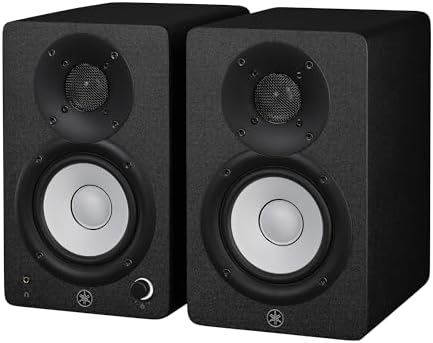
4. Yamaha HS4 Powered Studio Monitor in Black
Best for: Professionals who want a trusted, compact reference.
Yamaha’s reputation in the studio world is built on accuracy, and the HS4 brings that signature sound to a smaller form factor. The 4.5-inch woofer and 1-inch dome tweeter are paired to provide a clear, flat response that helps you make informed mixing decisions. It includes room control and high trim switches, which are essential for adjusting the output to suit the acoustics of a bedroom or a small home office.
The input selection is particularly flexible, featuring combo XLR/TRS inputs alongside RCA and stereo mini connections. This makes it easy to integrate into a setup that uses both professional interfaces and consumer devices like tablets or phones. When you place these next to the compact KRK Kreate 3, the Yamaha offers a slightly larger woofer that helps with midrange authority while maintaining a very manageable size for most standard desks.
Users who require a dedicated wireless connection will need to add an external adapter because this model relies entirely on wired inputs.
Pros
- 4.5-inch woofer for balanced midrange
- Versatile combo, RCA, and mini inputs
- Room control and high trim switches
- Compact size fits most studio desks
Cons
- No built-in Bluetooth for wireless streaming
- Frequency response starts at 60 Hz, unlike the 35 Hz PreSonus Eris Studio 8
5. KRK Kreate 3 Powered Studio Monitors Pair
Best for: Creators who value midrange clarity and wireless convenience.
The KRK Kreate 3 uses a 3.5-inch glass aramid woofer that’s specifically designed to deliver a clear, honest midrange. This is a great choice if you’re doing a lot of vocal editing or guitar tracking, as the material is lightweight and responsive. The addition of a Bluetooth input is a highlight, as it allows you to stream reference tracks or quick ideas from your phone without having to plug in any cables.
The textile dome tweeter ensures that the highs remain crisp without becoming fatiguing during long sessions. While it’s similar in size to other entry-level desktop monitors, the glass aramid woofer provides a different sonic texture that some producers prefer for its tight, punchy response. It’s a modern, flexible tool that adapts well to a desk where you might be mixing one moment and listening to music the next.
Anyone who needs to connect multiple professional balanced sources will find the input options less comprehensive than those on the Yamaha HS4.
Pros
- Glass aramid woofer for clear midrange
- Bluetooth input for wireless streaming
- Textile dome tweeter for precise highs
- Lightweight and compact design
Cons
- Fewer balanced input options than the Yamaha HS4
- The smaller woofer lacks the deep bass of the larger PreSonus Eris Studio 8.
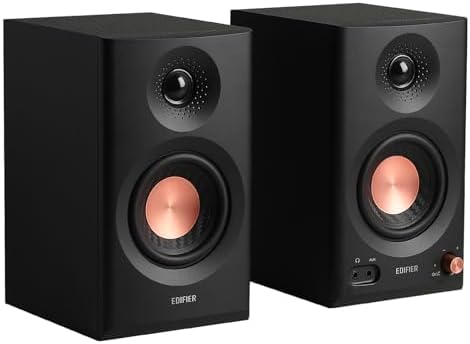
6. Edifier MR3 Powered Studio Monitor
Best for: Modern creators who need wireless flexibility and app control.
The Edifier MR3 is packed with features that make it a very versatile hub for a modern studio. It’s Hi-Res Audio certified and offers a wide frequency response, which is great for both detailed monitoring and daily listening. The standout feature is the EDIFIER ConneX app, which lets you fine-tune the EQ and switch between different sound modes, such as Music or Monitor, directly from your phone.
Connectivity is a major strength here, as you get balanced TRS, RCA, and AUX inputs, along with Bluetooth multi-point support. This allows you to keep several devices connected at once, which is a huge convenience if you’re switching between a computer, a phone, and a guitar amp. When compared to the M-Audio BX3, the MR3 offers a more modern, digital-first approach to sound management and wireless integration.
Producers who prefer a purely analog signal path may find the reliance on an app for advanced EQ adjustments to be an unnecessary extra step.
Pros
- Hi-Res Audio certification
- Bluetooth multi-point connection
- Dedicated app for personalized EQ control
- Multiple balanced and unbalanced inputs
Cons
- Relies on an app for some advanced tuning
- The driver is smaller than the 7-inch KRK Classic 7.
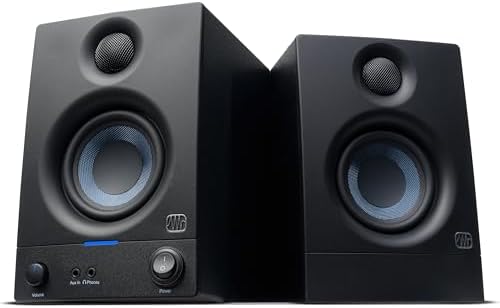
7. PreSonus Eris 3.5 Powered Studio Monitors
Best for: Beginners who want a simple, all-in-one desktop solution.
This model is designed for those who want to get up and running as quickly as possible. It’s sold as a complete stereo pair and includes all the basic connections you need for a computer, mixer, or game console. The front-panel aux input and the dedicated headphone jack are incredibly convenient for quick changes, letting you plug in a phone or headphones without reaching behind the desk.
The woven-composite woofer and silk-dome tweeter provide a balanced sound that’s much clearer than standard computer speakers. You can also use the high- and low-frequency tuning controls to adjust the sound to your specific desk environment. Compared to the JBL 305P MkII, this is a much smaller and more approachable system for a bedroom studio or a casual editing desk.
Anyone looking for professional-grade, deep-sub monitoring will find the compact woofer physically limited compared to the larger PreSonus Eris Studio 8.
Pros
- Front-panel headphone and aux access
- Built-in acoustic tuning controls
- Compact woven-composite woofer.
- All cables included for easy setup
Cons
- The woofer is significantly smaller than the PreSonus Eris Studio 8.
- No Bluetooth functionality unlike the Edifier MR3
8. Mackie CR3.5 Studio Monitors (Pair)
Best for: Desktop users who want quick, tactile sound adjustment.
The Mackie CR3.5 focuses on making your workflow as easy as possible. The inclusion of a dedicated tone knob on the front panel is a great feature, as it lets you change the voicing of the speaker to suit your preference or the type of audio you’re working on without needing to open any software menus. It also includes a location switch, which helps you correct the bass response depending on whether the speakers are sitting against a wall or in a more open space.
It comes with isolation pads and all the necessary cables, so you don’t have to worry about buying extra parts to get started. When you compare its 3.5-inch woofer to the 5-inch woofer on the JBL 305P MkII, the Mackie is clearly designed for a smaller, more intimate workspace where ease of use and physical control are the top priorities.
Producers who need absolute, uncolored accuracy for critical mastering might find the tone knob feature less useful than the professional tuning switches on the Yamaha HS4.
Pros
- Tactile front-panel tone knob
- Location switch for wall-proximity correction
- Included isolation pads and cables
- Compact size for small studios
Cons
- 3.5-inch woofer is smaller than the 5-inch JBL 305P MkII
- Lacks the balanced XLR inputs found on the Yamaha HS4
9. M-AUDIO BX3 3.5″ Wired Studio Monitors Pair
Best for: Live streamers and podcasters needing a zero-latency signal.
The M-Audio BX3 is built specifically for users who can’t afford any delay in their audio. By focusing on a clean, wired connection, these monitors provide a signal that’s perfect for live streaming or recording, where timing is everything. The Kevlar woofers are known for their punchy response, and the silk-dome tweeters keep the high end clear, which is ideal for voice-heavy content like podcasts.
The MDF cabinet is designed to be acoustically inert, which helps reduce the unwanted vibrations that often plague smaller, plastic-based multimedia speakers. You get a good selection of rear inputs, including 1/4-inch and RCA, which makes it easy to hook up instruments or DJ gear. When you place it side-by-side with the PreSonus Eris 3.5, the BX3 offers a distinct Kevlar driver construction that gives it a unique, punchy character.
If you need wireless Bluetooth connectivity for your workflow, you’ll have to look at a model like the Edifier MR3 instead.
Pros
- Zero-latency wired connection
- Kevlar woofer for punchy bass
- Acoustically-inert MDF construction
- Convenient front-panel headphone access
Cons
- Lacks the wireless Bluetooth convenience of the Edifier MR3
- 3.5-inch driver is smaller than the 7-inch KRK Classic 7
Also Worth Considering
The PreSonus 2-Way Active Studio Monitor is a larger format speaker that offers the EBM waveguide for wider dispersion. It’s a great alternative if the PreSonus Eris Studio 8 is too large for your space, as it provides a middle ground in terms of driver size.
The PreSonus 2-Way Active Studio Monitors are a 5.25-inch variant that bridges the gap between the smaller desktop models and the larger studio units. They’re ideal for producers who want more power than the 3.5-inch speakers can provide but have limited desk space.
The Edifier Power Studio Monitor Speakers are a 4-inch model that serves as a balanced option for those who want a bit more punch than the 3.5-inch speakers provide. They’re a good choice for someone who finds the 4.5-inch Yamaha HS4 appealing but wants a different aesthetic.
How We Chose
Each selection features a clear, balanced sound profile. Models with dedicated room-tuning controls or specific waveguide technology were prioritized for their ability to adapt to different acoustic environments. Speakers that lacked basic connectivity options like TRS or XLR were excluded unless they offered a specific, high-demand feature like wireless Bluetooth integration.
How to Choose the Right Studio Monitors
Size and where it has to fit
The physical size of the monitor is the most important factor for your desk. Smaller woofers, like the units in the PreSonus Eris 3.5 or M-Audio BX3, are perfect for tight spaces. Larger drivers, like the woofer in the PreSonus Eris Studio 8, require more room but provide deeper bass response.
Inputs and connectivity
Consider what gear you need to connect. If you use a professional interface, you’ll want speakers with balanced TRS or XLR inputs, which the JBL 305P MkII and Yamaha HS4 both offer. For those who need to connect phones or tablets wirelessly, the Edifier MR3 provides Bluetooth, while the PreSonus Eris 3.5 offers easy front-panel aux access.
Room tuning and controls
Every room affects sound differently. Look for monitors with built-in tuning switches, such as the boundary EQ on the JBL 305P MkII or the tone knob on the Mackie CR3.5. These features allow you to adjust the frequency response to match your room’s acoustics, helping you achieve a flatter, more accurate mix.
Frequently Asked Questions
Do I need an external amplifier for these monitors?
No, all of the monitors listed here are “active” or “powered,” meaning they have built-in amplifiers matched to their drivers. You can plug them directly into your audio interface or computer output, and they will work immediately. You don’t need to buy any extra gear to power them.
Can I use these for general music listening?
Yes, you can use any of these studio monitors for casual listening, gaming, or watching movies. DELETE Models like the Edifier MR3 even include specific modes to help you switch between monitoring work and daily music enjoyment.
What is the advantage of balanced inputs?
Balanced inputs, such as the XLR and TRS connections found on the JBL 305P MkII and Yamaha HS4, help reduce electrical interference and noise. If your studio has a lot of cables running close together, using balanced cables ensures a cleaner, more professional signal path from your interface to your speakers.
How do I position my studio monitors for the best sound?

Ideally, you should place your monitors at ear level, angled inward toward your head to form an equilateral triangle. If your speakers have rear-firing ports, try to keep them a few inches away from the wall. If you must place them close to a wall, use the built-in room-tuning switches on models like the Mackie CR3.5 to adjust the bass response.
Is it worth getting a larger driver size?
A larger driver, like the 7-inch woofer in the KRK Classic 7 or the driver in the PreSonus Eris Studio 8, can produce lower frequencies with more authority than smaller desktop units. If you’re mixing music with heavy bass, a larger driver provides the output needed for low frequencies. For vocal-heavy or acoustic music, a smaller driver is often sufficient.
Conclusion
The JBL 305P MkII is a versatile choice for producers due to its wide sweet spot. If you need something simpler for a basic desk setup, the PreSonus Eris 3.5 offers great value in a compact, easy-to-use package. Pick the size that fits your desk, connect your sources, and start your next project.
As an Amazon Associate, Instrument Insight earns from qualifying purchases at no additional cost to you.