
The Yamaha HS5 is the best studio monitor for mixing because it provides a reliable, flat frequency response that lets you hear your tracks exactly as they are. This guide helps producers who need to make mix decisions that translate well to other speakers. The main thing that separates these options is their size and frequency response.
- Best Overall: Yamaha HS5 — Offers the most neutral, flat sound for precise mixing decisions.
- Best Large Driver: PreSonus Eris Studio 8 — Delivers the deepest low-end reproduction with an 8-inch woofer.
- Most Compact: IK Multimedia iLoud Micro — Fits into the smallest spaces while maintaining a linear response.
- Best Mid-Range: PreSonus Eris E5 — Features a balanced 5.25-inch woofer and included production software.
- Best Small Yamaha: Yamaha HS3 — Provides the classic brand sound in a smaller, 3.5-inch footprint.
- Best Entry-Level: PreSonus Eris 3.5 — A simple, effective choice for beginners needing clear, balanced sound.
- Best Waveguide Design: PreSonus Eris Studio 4 — Uses a custom waveguide to create a wider stereo image.
- Best Ultra-Compact Wired: M-Audio BX3 — A reliable, latency-free choice with durable MDF cabinet construction.
- Best Desktop Upgrade: M-Audio BX4 — Larger 4.5-inch drivers provide more volume for desktop production tasks.
- Best Bluetooth Option: Ortizan C7 — Adds wireless connectivity for quick listening without sacrificing balanced inputs.

- 2-way bass-reflex bi-amplified nearfield studio monitor
- 5" cone woofer and 1" dome tweeter
- 54Hz-30kHz frequency response
- 45W LF plus 25W HF bi-amp 70W system

- 1.25-inch (31.75 mm) silk-dome high-frequency transducer
- Custom-tuned 120˚(H) x 60˚(V) EBM waveguide
- 8-inch woven-composite low-frequency drivers

- Active studio reference monitoring system with internal DSP
- Class D power amplifiers push 50W RMS total
- Low-end response down to 55Hz (-3dB)
- Portable and lightweight design
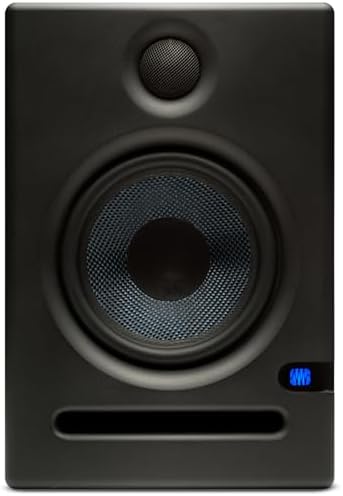
- Includes Studio One Prime and Studio Magic plug-in suite
- Over $1000 USD worth of music production software
- 5.25-inch woven composite woofer
- 1-inch ultra-low-mass silk-dome tweeter
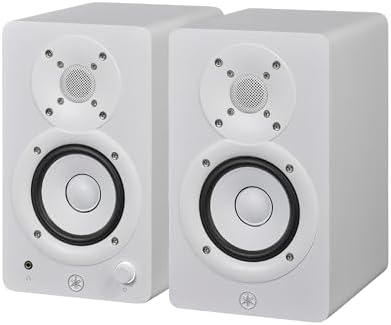
- Packaging: Pair
- 2-way bass-refiex powered speaker
- 3.5" cone woofer and 0.75" dome tweeter
- 70 Hz – 22 kHz frequency response (-10 dB)
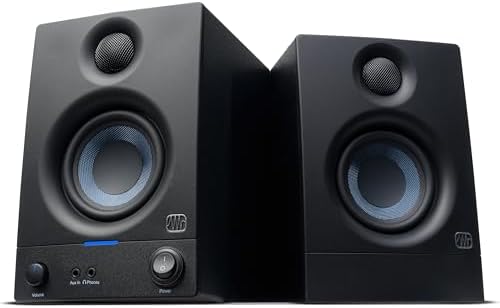
- Sold as a complete stereo pair
- 50 watts of built-in amplification
- 3.5” woven-composite woofers and 1” silk-dome tweeters
- Frequency range 80 Hz–20 kHz

- 1-inch (25 mm) silk-dome high-frequency transducer
- Custom-tuned 120˚(H) x 60˚(V) EBM waveguide
- 4.5-inch woven-composite low-frequency drivers

- Wired connection engineered for zero-latency audio monitoring
- Bi-amplified power for desktop use
- 3.5-inch Kevlar Woofers
- Natural Silk Dome Tweeters

- Wired connection engineered for zero-latency audio monitoring
- Bi-amplified power for desktop use
- 4.5-inch Kevlar Woofers
- Natural Silk Dome Tweeters

- RCA input and BT 5.3 technology for pairing
- Built-in 24-bit DAC captures digital audio via USB
- 3.5 INCH CARBON FIBER SPEAKER and 0.75inch SILK DOME TWEETER
- Electronic 2- crossover with flat curve tuning
1. Yamaha HS5 Powered Studio Monitor
Best for: Producers needing a neutral reference for critical mixing work.
The HS5 is a standard for a reason. Its 5-inch cone woofer and 1-inch dome tweeter produce a sound that’s famously honest, which helps you hear exactly what is happening in your mix without added coloration. The bi-amp system ensures that the highs and lows are powered separately, keeping the output clean even when you’re pushing the volume during a long session.
You can easily adjust the sound to fit your room using the built-in Room Control and High TRIM switches. These controls are vital if your speakers are placed close to a wall or in a corner, as they help you tame bass buildup or adjust treble brightness. Comparing its 54Hz low-end reach to the 35Hz on the PreSonus Eris Studio 8, it’s clear that the HS5 focuses more on mid-range detail than deep sub-frequencies.
Pros
- Neutral, flat frequency response for honest mixing
- Dedicated Room Control and High TRIM switches
- Balanced XLR and TRS inputs
- Bi-amplified design for cleaner output
Cons
- Limited low-end reach compared to larger monitors
2. PreSonus Eris Studio 8 8-inch 2-Way Active Studio Monitors
Best for: Anyone who needs to hear deep sub-bass frequencies clearly.
When your music relies on heavy bass or sub-frequencies, the Eris Studio 8 is the right tool. Its 8-inch woven-composite woofer moves a lot of air, providing a smooth and extended low end that smaller monitors simply can’t reach. The EBM waveguide design helps spread sound evenly, which creates a wide sweet spot so you don’t have to sit perfectly still to hear a balanced stereo image.
This monitor is built for power, using 140 watts of Class AB bi-amplification. It’s much larger than the Yamaha HS3, which uses a 3.5-inch woofer against the 8-inch driver here, making the Eris Studio 8 the better pick for larger rooms where you need to fill the space. The front-firing port also makes it easier to place near a wall without causing muddy bass reflections.
Pros
- 8-inch woofer for extended bass reproduction
- Wide 120-degree horizontal dispersion via EBM waveguide
- High 105 dB peak SPL output
- Versatile inputs including RCA, XLR, and TRS
Cons
- Large footprint requires significant desk or stand space
3. IK Multimedia iLoud Micro Monitor 50 watt Portable Wireless Bluetooth
Best for: Creators working in tight spaces or traveling frequently.
If you have a tiny desk or need to pack your studio in a bag, the iLoud Micro is the most practical choice. With its listed 8-inch measurement, it uses internal digital signal processing to keep the frequency response linear. This technology helps the 3-inch woofer sound much larger than it looks, providing a controlled low end that reaches down to 55Hz.
These monitors are very flexible, offering both Bluetooth for casual listening and physical inputs for your gear. They’re far more portable than the PreSonus Eris E5, which lacks the compact, lightweight design of this pair. The ability to switch between free-field and desktop EQ settings means you can get a balanced sound even if your speakers are sitting directly on your workspace.
Pros
- Extremely compact and portable design
- Internal DSP for accurate, linear frequency response
- Bluetooth wireless connectivity included
- EQ settings for different desk placements
Cons
- Smaller 3-inch woofer limits overall volume capacity
4. PreSonus Eris E5 2-Way 5.25″ Near Field Studio Monitor
Best for: Users who want a balanced mid-range and additional software.
The Eris E5 is a solid, all-around performer that hits a middle ground between size and power. Its 5.25-inch woofer provides a punchy sound that works well for most home studio tasks, while the 1-inch silk-dome tweeter keeps the highs from sounding harsh. The Eris E5 includes Studio One Prime and Studio Magic plug-in suite.
Acoustic tuning controls allow you to contour the sound to your room, which is helpful if you don’t have professional sound treatment. Compared to the M-Audio BX3, which has a 3.5-inch woofer against the 5.25-inch driver here, the Eris E5 offers more headroom for mixing at higher volumes.
Pros
- 5.25-inch woofer for solid low-end performance
- Acoustic tuning for room-specific adjustments
- Includes useful music production software suite
- Front-firing port for easier placement
Cons
- Larger physical size than entry-level compact monitors
5. Yamaha HS3 Powered Studio Monitor in White
Best for: Fans of the Yamaha sound who have limited desk space.
The HS3 brings the signature, neutral character of the larger HS series into a much smaller desktop footprint. It’s designed for those who need an accurate reference but can’t fit the 5-inch or 8-inch models into their workspace. Even in such a compact enclosure, it includes the same Room Control and High TRIM response switches found on the bigger models.
This pair is a great option for secondary mixing or smaller setups where space is the primary limit. It has a narrower frequency range than the PreSonus Eris Studio 4, which reaches down to 55Hz compared to the 70Hz limit on this model. The HS3 delivers a 70 Hz – 22 kHz frequency response from an ultra-compact cabinet.
Pros
- Ultra-compact desktop footprint
- Classic Yamaha neutral sound profile
- Includes Room Control and High TRIM switches
- Sold as a matched stereo pair
Cons
- Limited low-frequency extension due to small woofer size
6. PreSonus Eris 3.5 Powered Studio Monitors
Best for: Beginners looking for an easy, all-in-one desktop monitor.
The Eris 3.5 is designed for clarity and ease of use. It’s a complete stereo pair that connects to almost anything, from a computer to a game console, thanks to its variety of inputs. Its small woofer paired with a 1-inch silk-dome tweeter provides clear, balanced highs and deeper bass.
Everything is simple to manage, with volume and tuning controls right where you need them. While it’s similar in size to the Ortizan C7, the Eris 3.5 focuses on a straightforward, wired studio experience rather than wireless features. It’s a solid choice for anyone who wants to upgrade from standard computer speakers without needing extra gear.
Pros
- Very simple setup for beginners
- Versatile inputs including front-panel aux
- Includes front-facing headphone output for privacy
- Compact size fits on any desk
Cons
- Not intended for professional-grade sub-bass work
7. PreSonus Eris Studio 4 4.5-inch 2-Way Active Studio Monitor
Best for: Producers who value a wide, precise stereo image.
The Eris Studio 4 stands out because of its custom EBM waveguide, which helps focus the sound toward your ears. This design creates a consistent 120-degree horizontal spread, making it easier to pinpoint where instruments sit in your mix. The 4.5-inch woofer provides a good balance of bass and mid-range clarity for most home studio setups.
The monitor features resonance-suppressing internal bracing. Compared to the IK Multimedia iLoud Micro, which uses a 3-inch woofer against the 4.5-inch driver here, the Eris Studio 4 offers a more substantial physical presence and deeper frequency reach.
Pros
- EBM waveguide for wide stereo imaging
- Sturdy, resonance-suppressed cabinet design
- 4.5-inch woofer for balanced low-end
- Balanced XLR and TRS inputs
Cons
- Larger than ultra-compact alternatives
8. M-AUDIO BX3 3.5″ Wired Studio Monitors Pair
Best for: Streamers and podcasters needing a latency-free wired connection.
The BX3 is a reliable, no-nonsense monitor for those who spend a lot of time at a computer. Its MDF cabinet is built to stop unwanted vibrations, which helps the sound stay tight and clear. The 3.5-inch Kevlar woofer is designed to handle punchy sounds, making it a great choice for beat-making or editing voice tracks.
Access is easy with the front-panel aux input, allowing you to plug in headphones quickly for late-night work. When you compare its 3.5-inch Kevlar driver to the 4.5-inch driver on the M-Audio BX4, the BX3 is clearly the more space-saving option for crowded desktops. It provides a pure, uninterrupted signal that’s perfect for live streaming and general production.
Pros
- Latency-free wired performance
- Durable MDF construction prevents vibration
- Convenient front-panel headphone access
- Kevlar woofer for punchy bass response
Cons
- Small driver size limits deep bass output
9. M-AUDIO BX4 4.5″ Wired Studio Monitors Pair
Best for: Desktop users who want slightly more power and bass.
The BX4 is the larger sibling to the BX3, offering a 4.5-inch Kevlar woofer that delivers more volume and deeper bass. It maintains the same focus on latency-free performance, making it a strong candidate for anyone who produces music or video content at their desk. The MDF cabinet helps keep the sound clean and focused even at higher output levels.
Like the BX3, this model includes front-panel access for headphones, which is useful for quick switching during a busy workday. While the Yamaha HS5 offers a flatter, more professional mixing reference, the BX4 is a better fit for a desktop setup where you want a bit more “punch” for entertainment and casual production. It’s a versatile upgrade for standard computer speakers.
Pros
- 4.5-inch Kevlar woofer provides extra bass
- Acoustically inert MDF cabinet
- Front-panel aux and headphone inputs
- Latency-free signal path
Cons
- Less neutral than dedicated professional studio monitors
10. Ortizan C7 Powered Studio Monitors Pair with Bluetooth 5.3
Best for: Users who need wireless flexibility alongside professional inputs.
The Ortizan C7 is unique because it combines Bluetooth 5.3 with balanced 6.35mm TRS inputs. This means you can keep your phone connected wirelessly while also plugging in a mixing console or an electric piano. The 3.5-inch carbon fiber woofer provides a clean, modern sound that’s quite detailed for its size.
It’s a great choice for a small, multi-purpose space where you need to switch between different audio sources. Compared to the PreSonus Eris 3.5, which relies only on wired connections, the Ortizan C7 offers more versatility for modern users. The inclusion of a 24-bit DAC also helps keep digital audio signals clear when connected via USB.
Pros
- Bluetooth 5.3 wireless connectivity
- Balanced TRS inputs for professional gear
- Carbon fiber woofer for crisp detail
- Multiple input options including RCA and AUX
Cons
- Wireless connection can introduce slight latency
Also Worth Considering
The YAMAHA HS5I is a specific variant of the HS5 that includes mounting points and screws for wall or ceiling installation. It’s built for the same professional mixing tasks as the standard HS5, but it’s the better choice for studios that lack desk space and require fixed placement.
How to Choose the Right Studio Monitor
Frequency response and accuracy
Look for a monitor that states a flat or linear response. A flat response means the speaker doesn’t boost or cut specific frequencies, which is essential for mixing. The Yamaha HS5 and IK Multimedia iLoud Micro are designed with this neutrality in mind.
Size and where it has to fit
Measure your desk before choosing. Larger monitors like the PreSonus Eris Studio 8 provide more bass but require more room. If your desk is small, models like the Yamaha HS3 or M-Audio BX3 offer a better balance of power and footprint without sacrificing the clarity needed for mixing.
Connectivity needs
Decide which devices you need to connect. If you use a professional audio interface, look for balanced XLR or TRS inputs, found on the PreSonus Eris Studio 4 and Yamaha HS5. If you need Bluetooth, the Ortizan C7 is the right choice for quick wireless playback.
Frequently Asked Questions
Do I need an audio interface to use these?
While you can connect many of these monitors using RCA or 1/8-inch aux cables, using a professional audio interface with balanced TRS or XLR cables is recommended to avoid noise. Balanced connections help prevent signal interference in professional setups.
Can I place these monitors directly on my desk?
Yes, but you may experience vibrations or muddy bass. Using isolation pads or stands helps decouple the monitors from your desk surface. Many models, like the IK Multimedia iLoud Micro, include settings to compensate for desktop placement, which can help improve the clarity of your mix.
Is the Bluetooth connection on the Ortizan C7 good for mixing?
Bluetooth is excellent for quick playback or reference listening, but it isn’t ideal for critical mixing. For precise, real-time monitoring, you should use the balanced TRS inputs on the Ortizan C7 to ensure your audio signal remains stable and free of the latency inherent in wireless streaming.
Why do some monitors have front-firing ports?

Front-firing ports, like those on the PreSonus Eris E5 and Studio 4, allow you to place the speakers closer to a wall without causing excessive bass buildup. This is a significant advantage in smaller studios where you have limited options for speaker positioning.
What is the advantage of bi-amplification?
Bi-amplification means the woofer and tweeter have their own dedicated amplifiers. This allows the system to manage power more efficiently and reduces distortion, resulting in a cleaner sound across the full frequency range. Most professional monitors here, including the Yamaha HS5, use this design.
Conclusion
The Yamaha HS5 remains the best choice for most producers because it offers the most neutral and reliable sound for mixing. If you have very limited space, the IK Multimedia iLoud Micro is a simpler alternative that still provides impressive accuracy. Start by clearing your desk space and choosing the monitor size that fits your room best.
As an Amazon Associate, Instrument Insight earns from qualifying purchases at no additional cost to you.