
The best audio interface for vocals is the Focusrite Scarlett 2i2, thanks to its Auto Gain feature that sets levels automatically so you never clip a take. This guide helps singers and podcasters pick the right box to connect a microphone to a computer. The one thing separating these picks is how they handle gain, routing, and software out of the box.
A good recording setup starts with clean preamps and simple controls. Every model here converts analog sound into digital files your software can read, but the included tools and input counts differ widely. That’s what this comparison settles.
- Best Overall: Focusrite Scarlett 2i2 — Auto Gain prevents clipping while Air mode lifts vocal presence.
- Best for Solo Artists: Focusrite Scarlett Solo — Same 120dB dynamic range in a simpler single-input layout.
- Most Versatile Inputs: Behringer U-PHORIA UMC404HD — Four Midas-designed preamps handle full band sessions.
- Best Build Quality: Arturia MiniFuse 2 — Backed by a 5-year warranty after 200 reliability tests.
- Best for Mobile Streaming: MAONO P2 Hybrid — Dual USB ports connect a computer and phone simultaneously.
- Best Ultra-Compact: Fender AudioBox GO — Bus-powered 2×2 design fits easily inside a gig bag.
- Simplest to Use: YONDRIX USB Audio Interface — No drivers needed; just plug it in and start recording.
- Best Portable Design: M-AUDIO M-Track Duo — Lightweight build with a USB/Direct switch for zero-latency monitoring.
- Best Low Latency: Kmise USB Audio Interface — ASIO driver support delivers fast monitoring on Windows machines.
- Best for Home Studios: Tiimge USB Audio Interface — Independent TRS and TS outputs route audio to separate speakers.
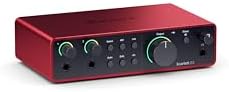
- Connect mic and guitar to Scarlett 4th Gen pres
- 120dB dynamic range using Focusrite flagship converters
- Auto Gain sets levels, Clip Safe prevents clipping
- Air mode adds presence and harmonic drive

- Scarlett Solo 4th Gen for mic and guitar
- 120dB dynamic range using Focusrite flagship converters
- Improved Air mode lifts vocals and guitars
- Includes recording software and plugin collection

- 4×4 USB 2.0 Audio/MIDI Interface
- Audiophile 24-Bit/192 kHz resolution
- Compatible with Avid Pro Tools, Ableton Live, Steinberg Cubase
- Streams 4 inputs / 4 outputs plus 1x MIDI I/O
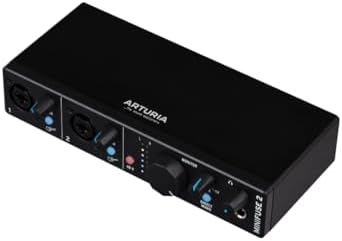
- 5-year warranty, over 200 reliability tests
- Compact USB interface with plug-and-play workflow
- Loopback captures voiceovers alongside app audio
- 2 Inputs with 48V phantom power and MIDI sync

- Dual USB ports with MFi-certified connectivity
- 56dB Dual XLR, 24-bit/192kHz, -130dB EIN
- Independent mute and headphone controls
- ProStudio 2 routes FL Studio, Spotify, TikTok audio
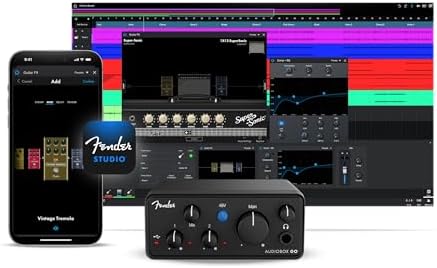
- Ultra-compact 2×2 USB-C interface, 24-bit/96 kHz
- Fender Amp & FX Pack via Fender Studio app
- XLR mic/line combo input with +48V phantom power
- Dedicated TS instrument input for guitar and bass

- No driver required, works with Windows and Mac
- Dual XLR/Line inputs with 60dB preamp gain
- 48V phantom power with indicator light
- Low-latency audio for streaming and recording

- USB sound card delivers 48kHz audio resolution
- Two combo XLR / Line / Instrument Inputs
- 1/4" headphone output, USB/Direct zero latency switch
- M-Track Duo Crystal Preamps for all microphones
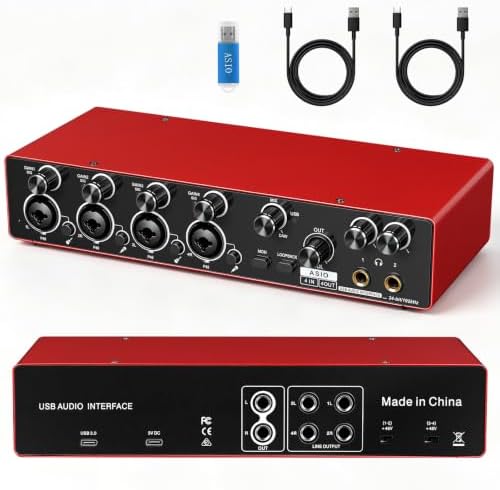
- 24-bit/192kHz recording resolution
- ASIO driver support for low latency recording
- 4-channel interface for multiple audio sources
- Kmise Guitar Audio Interface with 48V phantom power

- 24Bit/192kHz high-resolution audio recording
- 48V phantom power for condenser microphones
- Works with Windows and Mac OS without drivers
- Records vocals, guitars, livestreams, and podcasts
1. Focusrite Scarlett 2i2 4th Gen USB-C Audio Interface
Best for: Singers needing automatic level control during takes
This fourth-generation unit brings a massive 120dB dynamic range to home setups, using the same converters found in Focusrite’s flagship studio gear. For vocalists, the headline feature is Auto Gain. It listens to your mic or guitar and sets the perfect level before you sing, while Clip Safe steps in if a sudden loud note threatens to distort the recording. You don’t have to stare at meters while trying to deliver an emotional performance.
Air mode adds another layer of polish. It pushes vocals forward in the mix by introducing harmonic drive and musical presence. Instead of sounding flat or buried, your voice cuts through naturally without extra plugins doing the heavy lifting. The package also includes Pro Tools Intro+, Ableton Live Lite, Cubase LE, and the Hitmaker Expansion suite, giving you everything required to record, mix, and master immediately.
Comparing the specs and features, the Scarlett 2i2 offers two inputs against the single input listed on the Focusrite Scarlett Solo, making it the better fit for anyone tracking a voice and guitar together.
Pros
- 120dB dynamic range using flagship converters
- Auto Gain sets levels automatically for mics and guitars
- Clip Safe prevents distortion during loud passages
- Air mode adds harmonic presence to vocals
- Includes Pro Tools Intro+, Ableton Live Lite, Cubase LE, and Hitmaker Expansion
Cons
- Limited to two inputs, so recording a full drum kit or multiple singers at once requires stopping to swap cables
2. Focusrite Scarlett Solo 4th Gen USB-C Audio Interface
Best for: Singer-songwriters recording one track at a time
Built for songwriters, this interface shares the exact same 120dB dynamic range and flagship converters as its bigger sibling. The improved Air mode lifts vocals to the front of the mix with rich harmonic drive. If your workflow involves laying down one vocal track, then overdubbing a guitar later, having fewer inputs isn’t a limitation—it’s less clutter on your desk.
You still get the complete Hitmaker Expansion bundle, plus Pro Tools Intro+, Ableton Live Lite, and Cubase LE. That means the software side doesn’t shrink just because the hardware did. You’re getting the same mastering tools and effects collection to finish your tracks. The focus here is purely on simplicity: plug in your mic, fire up the included software, and start recording without routing decisions slowing you down.
It carries the same 120dB dynamic range figure printed on the Focusrite Scarlett 2i2, proving the audio quality hasn’t been downgraded for the smaller footprint.
Pros
- 120dB dynamic range matching flagship studio interfaces
- Improved Air mode adds presence to vocals and guitars
- Includes Pro Tools Intro+, Ableton Live Lite, and Cubase LE
- Comes with the full Hitmaker Expansion plugin suite
Cons
- The box lists a single mic input, so capturing two sources at once means buying a second interface or a mixer
3. Behringer U-PHORIA UMC404HD Audiophile 4×4
Best for: Bands tracking four sources at once
When a session demands more channels, this 4×4 interface answers the call. It streams four inputs and four outputs simultaneously over USB 2.0, supported by four MIDAS-designed mic preamplifiers. That means you can mic a vocalist, a guitarist, a bassist, and a keyboard player all at the same time without bouncing signals through a separate mixer first.
The resolution hits 24-bit/192kHz, which matches the highest spec seen across this entire list. It also includes 1x MIDI I/O, letting you sync external drum machines or hardware synths directly. Built with an impact-resistant metal chassis, it feels ready for stages and studios alike. Compatibility covers popular software like Avid Pro Tools, Ableton Live, and Steinberg Cubase, running on Mac OS X and Windows XP or higher.
Its four inputs double what the Focusrite Scarlett 2i2 offers, opening up arrangements that simply aren’t possible on smaller units.
Operating systems older than Windows XP or Mac OS X fall outside the stated compatibility, ruling out vintage computers entirely.
Pros
- 4 inputs and 4 outputs stream simultaneously
- Four MIDAS-designed mic preamps with +48V phantom power
- 24-bit/192kHz audiophile resolution
- Includes 1x MIDI I/O for hardware synths
- Impact-resistant metal chassis
Cons
- Stated compatibility begins at Windows XP and Mac OS X, leaving anyone on an unsupported legacy operating system unable to connect
4. Arturia MiniFuse USB Audio & MIDI Interface
Best for: Creators prioritizing long-term hardware reliability
Durability defines this pick. Arturia backs it with a 5-year warranty, noting that each unit goes through over 200 reliability tests before approval. The components are selected for longevity, meaning you won’t be shopping for a replacement anytime soon. It’s a compact USB recording interface built to travel from home studios to outdoor sessions without falling apart.
Feature-wise, it packs two combo Mic/Inst/Line XLR inputs with 48V phantom power, alongside two additional Inst/Line TRS inputs. You also get 5-pin MIDI input and output connections, a USB type A hub rated at 250mA, and a dedicated headphone output with volume control. A Loopback feature lets you capture voiceovers alongside in-app or game audio effortlessly—perfect for streamers mixing vocals with desktop sound.
The included software is vast: Ableton Live Lite, Analog Lab Intro, Arturia FX, NI GUITAR RIG 6 LE, Auto-Tune Unlimited, and a Splice Creator Plan.
The USB type A hub supplies 250mA, which is a ceiling anyone trying to power a high-draw external hard drive directly from the interface has to plan around.
Pros
- 5-year warranty backed by 200 reliability tests
- Loopback feature captures desktop and mic audio together
- Two combo XLR inputs plus two TRS inputs
- 5-pin MIDI I/O and a USB type A hub included
- Bundled with Auto-Tune Unlimited, Ableton Live Lite, and NI GUITAR RIG 6 LE
Cons
- The USB hub provides 250mA, so bus-powered accessories drawing more current will need their own external power supply
5. MAONO P2 Hybrid USB Audio Interface Dual XLR
Best for: Streamers routing audio to phones and computers
Hybrid connectivity sets this interface apart. It features dual USB ports with MFi-certified connectivity, allowing you to hook up a computer and a phone or iPad at the exact same time. You can record a vocal cover in Logic Pro while streaming it directly from your mobile device to TikTok or Instagram without interrupting your workflow. It instantly connects to Mac, PC, iPhone, Android, and cameras.
Audio specs are serious: 24-bit/192kHz quality, 56dB of gain on its dual XLR inputs, and a class-leading -130dB EIN for dead-silent recordings. An ergonomic 15° tilt angle keeps the controls facing you comfortably on a desk. Independent mute buttons prevent unwanted noise when swapping guitars, and Stream Mode sends your voice equally to both channels for balanced listening.
The ProStudio 2 software routes FL Studio, Spotify, or browser audio directly to dedicated channels. Its dual USB ports stand against the single connection point listed on the YONDRIX USB Audio Interface, offering far more routing flexibility.
Users relying solely on basic stereo recording might find the independent headphone, monitor, and stream controls overly complex for a simple vocal demo.
6. Fender AudioBox GO USB Audio Interface
Best for: Guitarists needing amp models on the go
Ultra-compact and bus-powered, this portable interface slips into any bag for effortless travel. It uses 24-bit/96 kHz converters to capture pristine audio, featuring a dedicated TS instrument input optimized specifically for guitar and bass alongside an XLR mic/line combo input with switchable +48V phantom power. You get two balanced ¼-inch TRS main outputs for studio monitors and zero-latency headphone monitoring with mix control.
The real draw for musicians is the Fender Studio app. Registering the hardware unlocks a complete Fender Amp & FX Pack, giving you authentic amplifier models and effects to craft inspiring tones directly on your computer. Hardware registration also includes a Fender Studio Pro 6 Month Trial. It operates via simple plug-and-play on virtually all macOS and Windows systems.
Listing 24-bit/96 kHz resolution, it falls short of the higher sampling rate printed on the Behringer U-PHORIA UMC404HD.
Pros
- Ultra-compact, bus-powered design for total portability
- Dedicated TS input optimized for guitar and bass
- Unlocks Fender Amp & FX Pack via the Fender Studio app
- Zero-latency headphone monitoring with mix control
- Includes a Fender Studio Pro 6 Month Trial
Cons
- Converters top out at 96 kHz, so workflows demanding 192 kHz resolution can’t be completed on this unit
7. YONDRIX USB Audio Interface
Best for: Beginners wanting instant plug-and-play recording
No drivers are required here. You simply connect it to your computer’s USB port and start recording immediately on both Windows and Mac systems. It handles high-resolution audio across its dual-channel layout. Dual XLR/Line combo inputs offer 60dB of preamp gain and HI-Z switching, accommodating condenser microphones and high-impedance instruments with equal ease.
Monitoring is straightforward. Balanced TRS outputs feed your speakers, while a dedicated headphone output features separate level control. A phantom light clearly indicates when 48V power is active, removing the guesswork for podcasters setting up sensitive mics. It pairs seamlessly with Pro Tools, Ableton Live, and Cubase, handling vocals, guitars, and live-streaming games without latency issues.
The package includes two different USB cables (A to C, and B 2.0 to A) alongside the manual. Its 60dB preamp gain matches the figure listed on the MAONO P2 Hybrid’s 56dB spec closely, though the YONDRIX edges it out slightly on paper.
The included cables end in USB-A and USB-B connectors, so owners of modern laptops with only USB-C ports must buy an adapter separately.
Pros
- True plug-and-play with no driver installation required
- 24-bit/192kHz resolution with 60dB preamp gain
- HI-Z switching accommodates high-impedance instruments
- Phantom light visually confirms 48V power status
- Includes both USB A to C and USB B 2.0 to A cables
Cons
- The box lists USB-A and USB-B cables but no USB-C to USB-C cable, meaning newer laptops lacking standard USB-A ports require a separate adapter
8. M-AUDIO M-Track Duo USB Audio Interface
Best for: Podcasters needing simple zero-latency monitoring
Portability meets versatility in this lightweight USB sound card designed for mobile recording. It delivers 48kHz audio resolution for Mac or PC, featuring two combo XLR / Line / Instrument inputs equipped with phantom power. Whether you’re plugging in a dynamic mic for a podcast or a condenser for vocals, the transparent Crystal Preamps guarantee optimal sound capture without coloring your tone.
Monitoring is handled via a physical USB/Direct switch. Flip it to eliminate latency entirely, letting you hear yourself in real time through the 1/4″ headphone output or the stereo 1/4″ main outputs. It strips away complex software routing menus in favor of tactile control. The package includes MPC Beats Software, packing essential production tools from Akai Professional to get beatmakers started immediately.
Its stated 48kHz resolution falls significantly short of the 192kHz figure listed on the Tiimge USB Audio Interface.
Pros
- Physical USB/Direct switch enables instant zero-latency monitoring
- Transparent Crystal Preamps optimize microphone sound
- Two combo XLR/Line/Instrument inputs with phantom power
- Stereo 1/4″ outputs and a 1/4″ headphone jack
- Includes MPC Beats Software with Akai Professional tools
Cons
- Audio resolution tops out at 48kHz, so capturing high-resolution 192kHz files is impossible on this unit
9. Kmise USB Audio Interface
Best for: Windows producers relying on ASIO drivers
Speed matters when tracking vocals, and this multi-channel interface highlights ASIO driver support specifically for ultra-low latency recording on Windows. It achieves 24-bit/192kHz resolution, ensuring the subtlest nuances of your voice are captured faithfully. High-quality converters and preamps work together to filter noise and enhance spatial awareness, reproducing the original sound source accurately.
Four channels let you connect microphones, guitars, and keyboards simultaneously. A dedicated 48V phantom power switch powers professional condenser microphones with a single press, delivering broadcast-quality clarity for singers and voice actors. Setup is simple: it supports Windows ASIO driver mode for low latency and offers plug-and-play use with Mac OS.
Offering four channels, it doubles the two inputs found on the Focusrite Scarlett 2i2, providing more room for expanding a home studio.
Mac users miss out on the primary selling point, as the listing specifies ASIO driver support exclusively for Windows systems.
Pros
- ASIO driver support ensures ultra-low latency on Windows
- 4-channel layout records multiple sources simultaneously
- 24-bit/192kHz recording resolution
- One-touch 48V phantom power switch for condenser mics
- Plug-and-play compatibility with Mac OS
Cons
- ASIO driver support is listed only for Windows, so Mac users can’t utilize this specific low-latency architecture
10. Tiimge USB Audio Interface
Best for: Home studios routing audio to separate monitors
Designed for home setups, this compact interface captures high-resolution audio without complicated equipment. It features two combo XLR/1/4″ inputs that handle microphones, guitars, and external devices smoothly. Reliable 48V phantom power ensures condenser microphones receive the juice they need for clear vocal recording, streaming, and podcasting.
What separates it physically is the output section. It lists independent TRS and TS outputs, allowing you to route audio to different destinations—perhaps studio monitors on the TRS jacks and a guitar amplifier on the TS ones. Easy plug-and-play connection works across Windows and Mac OS without additional drivers, supporting major software like Pro Tools, Ableton Live, and Cubase.
Matching the 24-bit/192kHz resolution of the Kmise USB Audio Interface, it holds its own on pure conversion quality.
Also Worth Considering
Piyone Audio Interface is a 2X2 24-bit/192kHz unit featuring an alloy red chassis, loopback, and one-cable setup for PC/Mac/iOS. The Arturia MiniFuse 2 beats it on durability claims, listing a 5-year warranty and 200 reliability tests where the Piyone title mentions none. Creators wanting a distinct color might still prefer it.
MAONO PS22 PC Guitar Vocals is described as a Lite USB audio interface tailored for PC guitar and vocal streaming. Users with basic PC-only streaming needs may find the simpler title appealing.
CIXUN 2×2 USB-C Audio Interface is a 2×2 recorder connecting via USB-C for PC and Mac. The Focusrite Scarlett 2i2 beats it by naming specific generation upgrades, Auto Gain, and Clip Safe directly in its title details. Anyone strictly needing a generic USB-C connection without extra software bundles might still consider it.
How We Chose
The final ten represent distinct use cases, ranging from single-mic songwriter setups to four-channel band interfaces. Separation relies entirely on what the seller’s copy explicitly promises: automatic gain staging, mobile hybrid routing, ASIO driver support, or extended warranties. Every detail mentioned in these product descriptions originates directly from those product descriptions.
How to Choose the Right Audio Interface
Input Count and Session Size
Decide how many things you’ll record at once. A solo singer needs one XLR input, like the Focusrite Scarlett Solo. A podcaster interviewing a guest needs two, found on the Focusrite Scarlett 2i2. Bands tracking live require four, which the Behringer U-PHORIA UMC404HD and Kmise USB Audio Interface provide.
Resolution and Sample Rate Specs
Higher numbers capture more audio detail. Most picks here list 24-bit/192kHz resolution, including the Tiimge USB Audio Interface and YONDRIX USB Audio Interface. If you see 24-bit/96 kHz on the Fender AudioBox GO or 48kHz on the M-AUDIO M-Track Duo, know those limit your maximum file fidelity.
Included Software and Effects
Hardware gets you recording; software gets you producing. The Focusrite models include Pro Tools Intro+ and Ableton Live Lite. The Arturia MiniFuse 2 bundles Auto-Tune Unlimited and NI GUITAR RIG 6 LE. Check what’s listed in the box before buying extra plugins separately.
Connectivity and Device Compatibility
Match the ports to your computer. Standard USB-A works for most desktops. The MAONO P2 Hybrid lists dual USB ports with MFi certification for iPhones. The YONDRIX USB Audio Interface includes both USB A-to-C and B-to-A cables. Verify your machine’s ports align with the listed cables.
Understanding digital audio resolution standards helps clarify why sample rates matter when selecting gear.
Frequently Asked Questions
Do I need phantom power for my microphone?
Yes, if you’re using a condenser microphone. Dynamic mics don’t require it. Almost every interface here, including the Tiimge USB Audio Interface and M-AUDIO M-Track Duo, lists a 48V phantom power switch specifically to energize condenser capsules. Without flipping that switch, a condenser mic will produce no signal.
Can I use these interfaces with my smartphone?
Only if the listing explicitly states mobile compatibility. The MAONO P2 Hybrid highlights MFi-certified connectivity for iPhones and iPads, plus Android support. The Piyone Audio Interface title also mentions iOS. Other models, like the Behringer U-PHORIA UMC404HD, specify Mac and Windows computers only.
What does ASIO driver support actually do?
ASIO bypasses standard operating system audio layers to reduce delay between singing into a mic and hearing it in your headphones. The Kmise USB Audio Interface lists ASIO support specifically for Windows users. Mac systems use Core Audio natively, which is why that same listing mentions plug-and-play for Mac OS instead.
Is loopback necessary for streaming vocals?
Loopback routes your computer’s internal audio back into your streaming software alongside your microphone. The Arturia MiniFuse 2 lists a Loopback feature for capturing in-game audio with voiceovers. The MAONO P2 Hybrid uses ProStudio 2 software to achieve similar routing. Pure music recording without streaming doesn’t require it.
Will Air mode replace my EQ plugins?

Not entirely, but it reduces the need for them. The Focusrite Scarlett 2i2 and Focusrite Scarlett Solo describe Air mode as adding musical presence and harmonic drive to lift vocals forward. It’s an analog circuit shaping the tone before it hits your software, giving you a polished starting point rather than a raw, flat signal.
Why do sample rates differ between models?
Manufacturers target different workflows. The M-AUDIO M-Track Duo lists 48kHz, standard for video podcasts. The Fender AudioBox GO states 96 kHz. Models like the Behringer U-PHORIA UMC404HD push 192kHz for audiophile mastering. Higher rates capture more ultrasonic data, resulting in larger files and increased processing loads on your computer.
Conclusion
The Focusrite Scarlett 2i2 remains the strongest choice for most vocalists because Auto Gain and Clip Safe protect every take. If you only ever record one mic alone, the Focusrite Scarlett Solo handles that job with identical converter quality. Pick the one matching your input needs, plug in your mic, and start singing.
As an Amazon Associate, Cleanestor earns from qualifying purchases at no additional cost to you.